I have not recommended any particular way of saving, backing up, or saving data.
All I was trying to do is explain my method of Cloning. I fully understand that Cloning does not suite everybody.
Many don't use it.
I use it and like it, but I don't over complicate it. I just follow the basic instruction that Macrium gives and I think the video I posted is a good example.
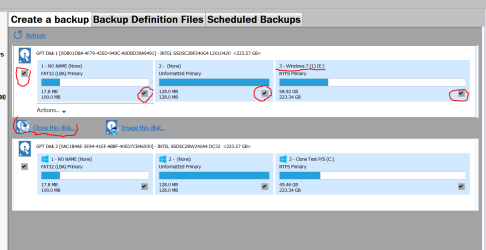
I do it exactly like my picture in my post #9.
If need be I will do a wipe of the drive the clone will be installed.
1. I select the drive/disk I want to Clone
2. Under that drive/disk as it states (Clone this disk)
3. It will give a option where one wants the Clone to be installed. I select the ssd where I want the Clone to be installed and just follow on screen instruction.
4. When the Clone has completed I boot into the Clone to make sure things work as they should.
I have found a few things that one can deal with after the clone is complete.
If for what ever reason one doesn't like the Clone all one has to do is wipe the disk clean and try what ever one wants to do.
I keep my Clones as Hotswaps. I can boot into them at anytime using (F8).
I keep my Clones updated just like any other Windows 7 system.
I wouldn't and don't use Clone for data, game, music ect. on other drives/disk.
That is, in my opinion is where back ups to External drives is for.
If you notice in my pictures my Clone is very small because I keep little on the operating system drive/disk.
My thought are also simple like me.
If one has a operating system stop working all that needs to be done is boot into the Clone.
From the Clone anything can be done just the original installation of Windows 7.
You should be able to access the same drives and backup as the original installation of Windows 7 could do.
The Clones are used only on the computer that they were made from so their is no problems with bios, drivers, activation ect. A Clone is a Clone.
NOTE:
I haven't had any problems with my systems so their is a lot of my thoughts with no documented proof.
I have made images for a long time but never had to use one. I would have to watch a video to remember how to do it.
I also have Clones but never really
had to use one. Knock on wood.
I'm not promoting, suggesting or pushing Cloning to anybody that does not want to try it.
I do it and like it.
I don't over complicate it. I don't know every thing their is to know about Macrium Reflect. Rather a small part that I have found useful to me.
If one is interested in knowing more about about Macrium Reflect their is truck loads of information available. Here is one source.
Macrium Reflect v6 User Guide - KnowledgeBase - Macrium Reflect Knowledgebase



 My earlier post broke out the two imaging choices.