System image, clone, and restore points

If you do a search for macrium image restore points you can find a lot of hits about this.
Here is one thread i found on the Macrium forum about this:
Windows RESTORE POINTS... are they imaged?
Well Dave,
I do not see any definitive solutions in this thread. Unless you do please point it out. They simply seem to debate on why or why not they can be restored.

Thanks
 

My Computer

Computer type
PC/Desktop
OS
Windows 7 Home Prem 32 bit
Just for your information.
You are using Windows 7 Enterprise.
I know nothing about Enterprise.
Most Enterprise operating system are controlled by a I.T. Department of one kind or another.
Enterprise cost way to much money for me the get and tinker with.

What I did is in the first post in this thread.
I have no idea whether it will work in Windows Enterprise or not.
I.T. Departments use many methods to backup systems. I doubt they use a Clone of any kind; but then again I have also never worked in a I.T. Department.

What I did. Windows 7/64 Pro.

1. Made a Clone using Macrium Reflect.
2. Booted into Clone
3. Using System Protection, turned on system protection for the Clone.
4. Rebooted into Clone.
5. Completed Microsoft Fixit

Note:
Protection is turned on both the original and Clone drives.
Of course my original Windows 7 had Restore Point. They were Cloned over to the other ssd but would not work until I did as I have stated.


https://support.microsoft.com/en-us/kb/982736

6. Rebooted into Clone.
7. Verified my restore point disc percent was at least 5%. It varies at times.
8. Created a NEW Restore Point

Things work as I want them two.
I will stop now so I can boot into my Clone and see if I can find any more information.

Will be back.
------------------------
Okay I'm back (6:55) booted into my Clone.

Here is what I end up with

BlaBla CCleaner Today.PNG

Save for vss Today.PNG
 
Last edited:

My Computer

Computer type
PC/Desktop
Computer Manufacturer/Model Number
Home made Desktop
OS
Windows 10 Pro. 64/ version 1709 Windows 7 Pro/64
CPU
Intel i7-6800K @ 4.3
Motherboard
ASUS X-99 Deluxe II
Memory
Corsair Platinum 16 gig @2400
Graphics Card(s)
EVGA GTX 1070 OC
Monitor(s) Displays
Asus 27" LED LCD/VE278Q
Screen Resolution
1920-1080 or 1280-720 HDMI
Hard Drives
INTEL SSD 730-240 Gb Sata 3.0/
PSU
EVGA Platium 1200W
Case
Phanteks Luxe Tempered Glass 8 fans/ one radiator
Cooling
XSPC/ Water Cooled CPU
Keyboard
Das 4 Professional
Mouse
Logitech M705/MX Anywhere 2-S
Internet Speed
100 mbits
Antivirus
Microsoft Security Essentials/ Malwarebytes Premium 3.0/ SAS
Browser
I.E. 11 default/Firefox/ ISP Time Warner Cable/Spectrum
Other Info
LG BluRay Burner/
Sound system-KLipsch-THX/
Icy Dock ssd Hot Swap bays.
If you do a search for macrium image restore points you can find a lot of hits about this.
Here is one thread i found on the Macrium forum about this:
Windows RESTORE POINTS... are they imaged?
Well Dave,
I do not see any definitive solutions in this thread. Unless you do please point it out. They simply seem to debate on why or why not they can be restored.

Thanks

I don't know if there is a solution, i was just pointing out you are not the only person having this issue.
I have Macrium free, I use imaging, I don't use cloning, and I don't use restore points, so for me this is not an issue.

Here's another Macrium thread where they acknowledge there is an issue, it's from Macrium V5, i don't know if anything changed in V6.
Macrium Support Forum - Include Windows Restore points in Image
 

My Computer

Computer type
PC/Desktop
Computer Manufacturer/Model Number
home built
OS
Multi-Boot W7_Pro_x64 W8.1_Pro_x64 W10_Pro_x64 +Linux_VMs +Chromium_VM
CPU
AMD Athlon II x4 620
Motherboard
Gigabyte GA-MA785G-UD3H
Memory
6GB GSkill DDR2 800
Graphics Card(s)
AMD 4670 GPU + AMD 4200 IGP
Sound Card
on board Realtek ALC889A
Monitor(s) Displays
RCA 40" LCD TV, Insignia 32" LCD TV, HP 15" LCD monitor
Screen Resolution
1680 x 1050
Hard Drives
OCZ Vertex 3 120GB,
Samsung F3 1TB (3),
Several others - WD, Seagate, Hitachi, ...
PSU
Corsair 500 W
Case
Rosewill mid tower
Cooling
CM 90mm rifle
Keyboard
Gyration wireless, Logitech wireless, Dell USB wired
Mouse
Gyration wireless, Logitech wireless, V7 USB wired
Internet Speed
Spectrum - 100Mbps D / 10Mbps U
Antivirus
Avast, MBAM3, EMET, WinPatrol
Browser
Pale Moon, Firefox, IE
Other Info
2 multi-boot PC's
Mainly HTPC/Office/Gen purpose (no gaming).
Trendnet USB KVM.
LG DVD burner/Blue Ray Player.
Tray system for removable SATA backup drives.

Not currently OCd, under-volted.
I use Hybrid sleep, rarely re-boot or shutdown.

Hauppauge HD-PVR, Avermedia PCIe TV Tuner, Hauppauge PCI TV Tuner.
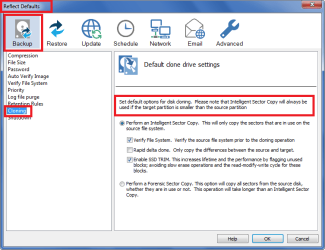
"...It DOES apply to cloning as well. Check the ADVANCED options which by default does INTELLIGENT sector copy..." betaupsilon
Thanks for the correction! I did not know that I have to check into Cloning's Advanced menu to see other choices.
 

My Computer

Computer type
PC/Desktop
Computer Manufacturer/Model Number
Antec desktop; Acer Aspire laptops
OS
Windows 7 Professional 64-bit
CPU
Desktop i5; Acers i5 & i7
Memory
desktop 16GB; 1 Acer 8GB & 1 Acer 16GB
Hard Drives
1TB split into 2 equal partitions [OS and data] usable by RJS
Internet Speed
AT&T DSL
Browser
FF, GChrome, msIE
Other Info
Windows 7 Firewall, Emsisoft AM/AV, MSE [scan-only], SpywareBlaster, Ruiware/BillP combine
You can change the defaults to personal preferences in the Menu bar / Other Tasks / Edit Defaults.

MacriumDefaults.png
 

My Computer

Computer type
PC/Desktop
Computer Manufacturer/Model Number
home built
OS
Multi-Boot W7_Pro_x64 W8.1_Pro_x64 W10_Pro_x64 +Linux_VMs +Chromium_VM
CPU
AMD Athlon II x4 620
Motherboard
Gigabyte GA-MA785G-UD3H
Memory
6GB GSkill DDR2 800
Graphics Card(s)
AMD 4670 GPU + AMD 4200 IGP
Sound Card
on board Realtek ALC889A
Monitor(s) Displays
RCA 40" LCD TV, Insignia 32" LCD TV, HP 15" LCD monitor
Screen Resolution
1680 x 1050
Hard Drives
OCZ Vertex 3 120GB,
Samsung F3 1TB (3),
Several others - WD, Seagate, Hitachi, ...
PSU
Corsair 500 W
Case
Rosewill mid tower
Cooling
CM 90mm rifle
Keyboard
Gyration wireless, Logitech wireless, Dell USB wired
Mouse
Gyration wireless, Logitech wireless, V7 USB wired
Internet Speed
Spectrum - 100Mbps D / 10Mbps U
Antivirus
Avast, MBAM3, EMET, WinPatrol
Browser
Pale Moon, Firefox, IE
Other Info
2 multi-boot PC's
Mainly HTPC/Office/Gen purpose (no gaming).
Trendnet USB KVM.
LG DVD burner/Blue Ray Player.
Tray system for removable SATA backup drives.

Not currently OCd, under-volted.
I use Hybrid sleep, rarely re-boot or shutdown.

Hauppauge HD-PVR, Avermedia PCIe TV Tuner, Hauppauge PCI TV Tuner.
That is exactly how mine is and was set.
I presume that is Default because that is the way I left and used Cloning.
 

My Computer

Computer type
PC/Desktop
Computer Manufacturer/Model Number
Home made Desktop
OS
Windows 10 Pro. 64/ version 1709 Windows 7 Pro/64
CPU
Intel i7-6800K @ 4.3
Motherboard
ASUS X-99 Deluxe II
Memory
Corsair Platinum 16 gig @2400
Graphics Card(s)
EVGA GTX 1070 OC
Monitor(s) Displays
Asus 27" LED LCD/VE278Q
Screen Resolution
1920-1080 or 1280-720 HDMI
Hard Drives
INTEL SSD 730-240 Gb Sata 3.0/
PSU
EVGA Platium 1200W
Case
Phanteks Luxe Tempered Glass 8 fans/ one radiator
Cooling
XSPC/ Water Cooled CPU
Keyboard
Das 4 Professional
Mouse
Logitech M705/MX Anywhere 2-S
Internet Speed
100 mbits
Antivirus
Microsoft Security Essentials/ Malwarebytes Premium 3.0/ SAS
Browser
I.E. 11 default/Firefox/ ISP Time Warner Cable/Spectrum
Other Info
LG BluRay Burner/
Sound system-KLipsch-THX/
Icy Dock ssd Hot Swap bays.
Yea, these are the installed defaults, i don't use cloning, so i would not change them.
For imaging, defaults can be changed in the Compression option.

I've always used the default settings, i never used/tested the Forenzic Sector copy option.
I keep several backup images, so the image size is something important to me.
 
Last edited:

My Computer

Computer type
PC/Desktop
Computer Manufacturer/Model Number
home built
OS
Multi-Boot W7_Pro_x64 W8.1_Pro_x64 W10_Pro_x64 +Linux_VMs +Chromium_VM
CPU
AMD Athlon II x4 620
Motherboard
Gigabyte GA-MA785G-UD3H
Memory
6GB GSkill DDR2 800
Graphics Card(s)
AMD 4670 GPU + AMD 4200 IGP
Sound Card
on board Realtek ALC889A
Monitor(s) Displays
RCA 40" LCD TV, Insignia 32" LCD TV, HP 15" LCD monitor
Screen Resolution
1680 x 1050
Hard Drives
OCZ Vertex 3 120GB,
Samsung F3 1TB (3),
Several others - WD, Seagate, Hitachi, ...
PSU
Corsair 500 W
Case
Rosewill mid tower
Cooling
CM 90mm rifle
Keyboard
Gyration wireless, Logitech wireless, Dell USB wired
Mouse
Gyration wireless, Logitech wireless, V7 USB wired
Internet Speed
Spectrum - 100Mbps D / 10Mbps U
Antivirus
Avast, MBAM3, EMET, WinPatrol
Browser
Pale Moon, Firefox, IE
Other Info
2 multi-boot PC's
Mainly HTPC/Office/Gen purpose (no gaming).
Trendnet USB KVM.
LG DVD burner/Blue Ray Player.
Tray system for removable SATA backup drives.

Not currently OCd, under-volted.
I use Hybrid sleep, rarely re-boot or shutdown.

Hauppauge HD-PVR, Avermedia PCIe TV Tuner, Hauppauge PCI TV Tuner.
What I did. Windows 7/64 Pro.

1. Made a Clone using Macrium Reflect.
2. Booted into Clone
3. Using System Protection, turned on system protection for the Clone.
4. Rebooted into Clone.
5. Completed Microsoft Fixit

Note:
Protection is turned on both the original and Clone drives.
Of course my original Windows 7 had Restore Point. They were Cloned over to the other ssd but would not work until I did as I have stated.


https://support.microsoft.com/en-us/kb/982736

6. Rebooted into Clone.
7. Verified my restore point disc percent was at least 5%. It varies at times.
8. Created a NEW Restore Point
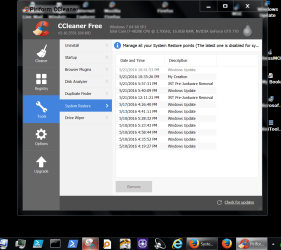
Things work as I want them two.
I will stop now so I can boot into my Clone and see if I can find any more information.

? on making the clone: Did you run MACRIUM from WIN PE or WIN PRO?
 

My Computer

Computer type
PC/Desktop
OS
Windows 7 Home Prem 32 bit
Hi,
I was under the impression people use system imaging as a replacement for windows horrible system restore points
Possibly that is just why I use Reflect system imaging ;)
System protection off Reflect On.
 

My Computer

Computer type
PC/Desktop
Computer Manufacturer/Model Number
Custom assembled by me :}
OS
Win-7-Pro64bit 7-H-Prem-64bit
CPU
i7-5930K 2nd i9-9940x both water blocked VRM's too
Motherboard
ASUS SABERTOOTH X99 2nd ASUS x299 Apex
Memory
Trident-z 3200C14 2nd Trident-z 3600C16
Graphics Card(s)
EVGA 1080ti ftw3 2nd Titan Xp both water blocked
Sound Card
Built-in Realtek
Monitor(s) Displays
1-AOC G2460PG 24"G-Sync 144Hz/ 2nd 1-ASUS VG248QE 24" 144Hz
Screen Resolution
1920 x 1080 144Hz
Hard Drives
2-Samsung M.2 Evo & Evo Plus
2-Samsung 850 EVO 500GB SSD's/ 3-2.5 W.D. Black 1tb-&3-1tb/3-3.5 WD Black 1tb hdd's
PSU
EVGA SuperNOVA 1000-P2 2nd 1200-P2
Case
2-Corsair Obsidian Series 450D Black ATX Mid Tower
Cooling
Custom water loops
Keyboard
Logitech G710+/ 2nd Logitech G910
Mouse
2-RedDragon M901 Perdition 16400 dpi Gaming mouse = wired
Internet Speed
Comcast Ping 19ms 89.31mbps download speed 6.12mbps upload
Antivirus
Malwarebytes Pro/ Superantispyware Pro
Browser
FireFox & Pale moon
Other Info
2nd ASUS X299 Apex/Intel i9-9940x with Custom water loop/7H-Prem-x64/Corsair 450D case/Ram Trident-z 3600C16 4x8gb / Samsung970Evo plus 500gb SSD/Dual ssd EZ swap evo/PSU EVGA SuperNova 1200w-P2 80+Platinum/GPU Titan Xp /8-ML-140 on push-pull on 2-280GTX rads
...Both the sector by sector choice and the intelligent copy choice only pertain to imaging, not to cloning...

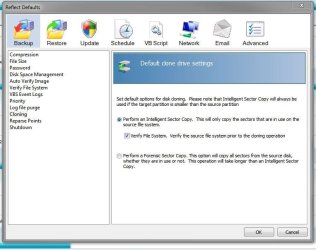
Actually, at least in the Pro version, one does have a choice between Forensic Sector Cloning and Intelligent Sector Cloning.

MR.JPG
 

My Computer

Computer type
PC/Desktop
Computer Manufacturer/Model Number
Custom Build
OS
Win 7 Ultimate 64 bit
CPU
Intel i7-3930K
Motherboard
ASUS P9X79 WS
Memory
Kingston HyperX Genesis 32GB Kit (8x4GB Modules) 1600MHz DDR
Graphics Card(s)
MSI R7850 Twin Frozr 2GD5/OC Radeon HD 7850 2GB 256-bit GDDR
Sound Card
Asus Xonar Essence STX
Monitor(s) Displays
3x Asus VG248QE 24", Vizio 32" TV
Screen Resolution
1920 x 1080, ?
Hard Drives
Samsung 128GB 840 Pro SSD (1),
Samsung 4TB 850 EVO SSDs (4)
Samsung 4TB 850 EVO SSDs (16) external backup drives used in 2.5" hot swap bays in the computer.
PSU
Corsair HX750w
Case
Antec Two Hundred v2 (modified)
Cooling
Cooler Master GeminII S524 120mm (fan replaced with a 140mm)
Keyboard
Logitech G510s
Mouse
Logitech M525 (two in use)
Internet Speed
=< 32Mbps down, 8Mbps up
Antivirus
AVAST!, MBAM, SAS, Spybot S&D (all but MBAM free) Glary Util
Browser
IE11
Other Info
LSI 9211-8i HBA card (8 SATA III ports), 2.5" & 3.5" Hot Swap Bays, HooToo HT-CR001 PCI-E to USB 3.0 Internal Hub + 6 Slot Card Reader, and LG Model CH12LS28 BD-ROM Optical Drive. Also, ScanSnap S1500 ADF duplexing scanner, Canon 9000F flat bed scanner, Corsair SP2500 2.1 speakers, Samsung CLP 415nw laser color printer, Cyberpower PP2200SW UPS
I just cloned a HDD to an SSD with Macrium, same as Jack did, I have no idea what any of that sector by sector or intelligent sector stuff is, it just worked by clicking clone this drive.

Intelligent Sector is the default.

Intelligent sector cloning or imaging simply means only the sectors with any data in them are cloned or imaged. Empty sectors are ignored.

Forensic Sector cloning or imaging means all sectors whether empty or not, are cloned or imaged.
 

My Computer

Computer type
PC/Desktop
Computer Manufacturer/Model Number
Custom Build
OS
Win 7 Ultimate 64 bit
CPU
Intel i7-3930K
Motherboard
ASUS P9X79 WS
Memory
Kingston HyperX Genesis 32GB Kit (8x4GB Modules) 1600MHz DDR
Graphics Card(s)
MSI R7850 Twin Frozr 2GD5/OC Radeon HD 7850 2GB 256-bit GDDR
Sound Card
Asus Xonar Essence STX
Monitor(s) Displays
3x Asus VG248QE 24", Vizio 32" TV
Screen Resolution
1920 x 1080, ?
Hard Drives
Samsung 128GB 840 Pro SSD (1),
Samsung 4TB 850 EVO SSDs (4)
Samsung 4TB 850 EVO SSDs (16) external backup drives used in 2.5" hot swap bays in the computer.
PSU
Corsair HX750w
Case
Antec Two Hundred v2 (modified)
Cooling
Cooler Master GeminII S524 120mm (fan replaced with a 140mm)
Keyboard
Logitech G510s
Mouse
Logitech M525 (two in use)
Internet Speed
=< 32Mbps down, 8Mbps up
Antivirus
AVAST!, MBAM, SAS, Spybot S&D (all but MBAM free) Glary Util
Browser
IE11
Other Info
LSI 9211-8i HBA card (8 SATA III ports), 2.5" & 3.5" Hot Swap Bays, HooToo HT-CR001 PCI-E to USB 3.0 Internal Hub + 6 Slot Card Reader, and LG Model CH12LS28 BD-ROM Optical Drive. Also, ScanSnap S1500 ADF duplexing scanner, Canon 9000F flat bed scanner, Corsair SP2500 2.1 speakers, Samsung CLP 415nw laser color printer, Cyberpower PP2200SW UPS
I'm pretty sure intelligent sector copy also skips copying the hiberfil.sys and pagefile.sys files too.
These aren't needed in the copy and will be automatically created when you boot up the clone anyway.

This keeps the size of the copies down considerably.
 

My Computer

Computer type
PC/Desktop
Computer Manufacturer/Model Number
Custom Build
OS
Win 7 Ultimate, Win 8.1 Pro, Linux Mint 19 Cinnamon (All 64-Bit)
CPU
Intel i5 4690K
Motherboard
Gigabyte Z97X-UD3H
Memory
Corsair Vengeance LP 32GB DDR3
Graphics Card(s)
MSI GTX 1060 GAMING X 6GB
Sound Card
Onboard
Hard Drives
Samsung 850 EVO 250GB SSD (x2)
Samsung 860 EVO 1TB SSD (x2)
Crucial MX300 525GB SSD
WD Blue 2TB 5400rpm Intellipark Disabled (x2)
PSU
Corsair HX750i
Case
Phanteks Enthoo Pro
Cooling
CM Hyper 212 EVO on CPU, Noctua Redux NF-P14S 1500rpm (x6)
Keyboard
Corsair K70 RGB LUX
Mouse
Corsair Sabre RGB
Antivirus
Avast Free, MalwareBytes, SAS & CryptoPrevent
Browser
Chrome
Other Info
StarTech PEXESAT322I 2 Port PCI-E SATA Card
ASUS PCE-AC56 Dual-band AC1300 Wireless Card
Akasa FC.Six Manual Fan Controller
And a Partridge in a Pear Tree!
OK,
The FIXIT tool did not change anything even after rebooting. I pulled the RIP CORD & manually enabled SYS PROTECTION. I still cannot see the RESTORE PTS, but the Disk Usage did not drop to ZERO. So those points must still exist.

Any suggestions?

WizTree can show what files and space are used in the System Volume Information folder.
They have a Portable Zip available, no install needed.
Antibody Software - WizTree finds the files and folders using the most disk space on your hard drive
 

My Computer

Computer type
PC/Desktop
Computer Manufacturer/Model Number
home built
OS
Multi-Boot W7_Pro_x64 W8.1_Pro_x64 W10_Pro_x64 +Linux_VMs +Chromium_VM
CPU
AMD Athlon II x4 620
Motherboard
Gigabyte GA-MA785G-UD3H
Memory
6GB GSkill DDR2 800
Graphics Card(s)
AMD 4670 GPU + AMD 4200 IGP
Sound Card
on board Realtek ALC889A
Monitor(s) Displays
RCA 40" LCD TV, Insignia 32" LCD TV, HP 15" LCD monitor
Screen Resolution
1680 x 1050
Hard Drives
OCZ Vertex 3 120GB,
Samsung F3 1TB (3),
Several others - WD, Seagate, Hitachi, ...
PSU
Corsair 500 W
Case
Rosewill mid tower
Cooling
CM 90mm rifle
Keyboard
Gyration wireless, Logitech wireless, Dell USB wired
Mouse
Gyration wireless, Logitech wireless, V7 USB wired
Internet Speed
Spectrum - 100Mbps D / 10Mbps U
Antivirus
Avast, MBAM3, EMET, WinPatrol
Browser
Pale Moon, Firefox, IE
Other Info
2 multi-boot PC's
Mainly HTPC/Office/Gen purpose (no gaming).
Trendnet USB KVM.
LG DVD burner/Blue Ray Player.
Tray system for removable SATA backup drives.

Not currently OCd, under-volted.
I use Hybrid sleep, rarely re-boot or shutdown.

Hauppauge HD-PVR, Avermedia PCIe TV Tuner, Hauppauge PCI TV Tuner.
Just for your information.
You are using Windows 7 Enterprise.
I know nothing about Enterprise.
Most Enterprise operating system are controlled by a I.T. Department of one kind or another.
Enterprise cost way to much money for me the get and tinker with.

What I did is in the first post in this thread.
I have no idea whether it will work in Windows Enterprise or not.
I.T. Departments use many methods to backup systems. I doubt they use a Clone of any kind; but then again I have also never worked in a I.T. Department.

What I did. Windows 7/64 Pro.

1. Made a Clone using Macrium Reflect.
2. Booted into Clone
3. Using System Protection, turned on system protection for the Clone.
4. Rebooted into Clone.
5. Completed Microsoft Fixit

Note:
Protection is turned on both the original and Clone drives.
Of course my original Windows 7 had Restore Point. They were Cloned over to the other ssd but would not work until I did as I have stated.


https://support.microsoft.com/en-us/kb/982736

6. Rebooted into Clone.
7. Verified my restore point disc percent was at least 5%. It varies at times.
8. Created a NEW Restore Point

Layback,
I still have had no success. Did you run MACRIUM from the WIN PE environment or were you booted normally? Also, did you leave your source drive connected when you booted into your clone? I think if you disconnect the source drive your RESTORE PTS might disappear. If they do then your RESTORE PTS probably did not transfer as you thought.

If you could, let me know.

THANX
 

My Computer

Computer type
PC/Desktop
OS
Windows 7 Home Prem 32 bit
From post #34.
user_online.gif


Layback,

I still have had no success. Did you run MACRIUM from the WIN PE environment or were you booted normally? Also, did you leave your source drive connected when you booted into your clone? I think if you disconnect the source drive your RESTORE PTS might disappear. If they do then your RESTORE PTS probably did not transfer as you thought.

If you could, let me know.

Their is no need for a WIN PE when using a Clone.

If the restore point were on the original drive then they are on the Clone. A Clone is a Clone.

Disconnecting the source drive after the Clone is complete does nothing to the Clone. How could it.
I can boot and use the original Windows 7 normally and boot into the Clone normally and use both in a normal fashion.
Of course only one at a time.

You are making the Clone process way to complicated.
Some how you might be getting the Clone process and the Image process mixed or confused.

Watch the video in my post #9 again.
 

My Computer

Computer type
PC/Desktop
Computer Manufacturer/Model Number
Home made Desktop
OS
Windows 10 Pro. 64/ version 1709 Windows 7 Pro/64
CPU
Intel i7-6800K @ 4.3
Motherboard
ASUS X-99 Deluxe II
Memory
Corsair Platinum 16 gig @2400
Graphics Card(s)
EVGA GTX 1070 OC
Monitor(s) Displays
Asus 27" LED LCD/VE278Q
Screen Resolution
1920-1080 or 1280-720 HDMI
Hard Drives
INTEL SSD 730-240 Gb Sata 3.0/
PSU
EVGA Platium 1200W
Case
Phanteks Luxe Tempered Glass 8 fans/ one radiator
Cooling
XSPC/ Water Cooled CPU
Keyboard
Das 4 Professional
Mouse
Logitech M705/MX Anywhere 2-S
Internet Speed
100 mbits
Antivirus
Microsoft Security Essentials/ Malwarebytes Premium 3.0/ SAS
Browser
I.E. 11 default/Firefox/ ISP Time Warner Cable/Spectrum
Other Info
LG BluRay Burner/
Sound system-KLipsch-THX/
Icy Dock ssd Hot Swap bays.
If the restore point were on the original drive then they are on the Clone. A Clone is a Clone.

You are making the Clone process way to complicated.
Some how you might be getting the Clone process and the Image process mixed or confused.

Watch the video in my post #9 again.
Layback,
I think I found my problem. Below is from MJF regarding DISK SIGNATURES & RESTORE PTS in item #3. My DISK SIGNATURE is not the same on my clone. Did you manage to maintain identical signatures? If so how?

"This quote could be relevant to the discussion:
Source: "Acronis True Image WD Edition", 2000-2010, pp.48

When MBR recovery is chosen, the "Recover disk signature" box will appear in the bottom left corner at the next step. Recovering disk signature may be desirable due to the following reasons:
1. Acronis True Image WD Edition creates scheduled tasks using the signature of the source hard disk. If you recover the same disk signature, you don't need to re-create or edit the tasks created previously.
2. Some installed applications use disk signature for licensing and other purposes.
3. If you use Windows Restore Points, they will be lost when the disk signature is not recovered.
4. In addition, recovering disk signature allows to recover VSS snapshots used by Windows Vista and Windows 7's "Previous Versions" feature.
If the box is unselected, Acronis True Image WD Edition generates a new disk signature for the recovered drive. This may be needed when you use an image backup not for disaster recovery but for cloning your Windows Vista hard drive to another one. Trying to boot Windows after cloning with both drives connected will result in a problem. During Windows booting, its loader checks the disk signatures of all the connected drives, and if it finds two identical disk signatures, the loader changes the signature of the second disk, which would be the clone disk. Once this happens, the clone disk would not be able to boot up independently of the original disk, because the MountedDevices fields in the clone's registry reference the disk signature of the original disk, which will not be available if the original disk is disconnected."

The section of the same reference:
14.3.6 Cloning with Manual Partitions
may also be of interest
 

My Computer

Computer type
PC/Desktop
OS
Windows 7 Home Prem 32 bit
You can't have identical disk signatures on 2 connected MBR drives. Windows 7 at one stage would put the second drive with an identical disk signature offline. Then at some stage (I guess an old update) Windows automatically changed the disk signature of the second drive to avoid a disk signature clash. What I believe Macrium does in the intelligent sector copy cloning is to also change the disk signature in the BCD so your clone will boot.

If you transfer your OS to a new drive using system imaging it will retain the original disk signature on the new drive. The original and new reimaged drive should not be both physically connected at the same time. But again I don't think you will keep your restore points. I don't rely on restore points so it isn't an issue for me.
 
Last edited:

My Computer

Computer type
PC/Desktop
Computer Manufacturer/Model Number
Own build
OS
Windows 7x64 Home Premium SP1
CPU
Intel i7 2600k
Motherboard
ASUS P8Z68 Deluxe
Memory
G.Skill Ripjaws (DDR3-1600) 2x4GB
Graphics Card(s)
Nvidia GeForce GTS 450; Intel HD Graphics 3000(GT2+)
Monitor(s) Displays
Dell Ultrasharp IPS panel U2311H, Samsung SyncMaster P2350
Screen Resolution
1920x1080
Hard Drives
Samsung 850 Pro SSD 256GB, Samsung SSD 840 120GB, Seagates 1TB Barracuda ST31000528AS x2
PSU
Seasonic M12II 520W
Case
Lian Li Lancool PC-K60
Cooling
Case: 1x120mm, 3x140mm CPU: Hyper 212+
Keyboard
Logitech MK520 (wireless)
Mouse
Logitech MK520
Internet Speed
6-7 Mbps
Antivirus
Norton Security Premium, Malwarebytes on 2 (MSE on 3rd PC)
Browser
FireFox
Other Info
Audio: Logitech Z523 2.1
I don't use restore points because i don't trust them, i've read too many threads/posts where they don't work reliably, and they are not a "full" backup.
As an alternative i now use Macrium DIFFERENTIAL images, if/when i want a quick backup before making some change i'm not sure of.
You might consider using differentials rather than relying on restore points.

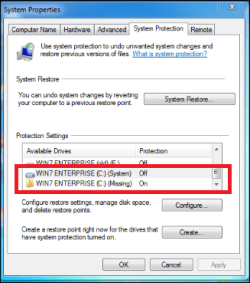
Also, I see an issue/error in your screen print in Post #18 where there is a listing for a Missing (duplicate) drive/partition.
You should figure out why you have that entry and fix it.

RestorePointIssue.PNG

I have multi-boot PC's, and i don't assign a drive letter to the other (non-booted) OS drives/partitions.
 

My Computer

Computer type
PC/Desktop
Computer Manufacturer/Model Number
home built
OS
Multi-Boot W7_Pro_x64 W8.1_Pro_x64 W10_Pro_x64 +Linux_VMs +Chromium_VM
CPU
AMD Athlon II x4 620
Motherboard
Gigabyte GA-MA785G-UD3H
Memory
6GB GSkill DDR2 800
Graphics Card(s)
AMD 4670 GPU + AMD 4200 IGP
Sound Card
on board Realtek ALC889A
Monitor(s) Displays
RCA 40" LCD TV, Insignia 32" LCD TV, HP 15" LCD monitor
Screen Resolution
1680 x 1050
Hard Drives
OCZ Vertex 3 120GB,
Samsung F3 1TB (3),
Several others - WD, Seagate, Hitachi, ...
PSU
Corsair 500 W
Case
Rosewill mid tower
Cooling
CM 90mm rifle
Keyboard
Gyration wireless, Logitech wireless, Dell USB wired
Mouse
Gyration wireless, Logitech wireless, V7 USB wired
Internet Speed
Spectrum - 100Mbps D / 10Mbps U
Antivirus
Avast, MBAM3, EMET, WinPatrol
Browser
Pale Moon, Firefox, IE
Other Info
2 multi-boot PC's
Mainly HTPC/Office/Gen purpose (no gaming).
Trendnet USB KVM.
LG DVD burner/Blue Ray Player.
Tray system for removable SATA backup drives.

Not currently OCd, under-volted.
I use Hybrid sleep, rarely re-boot or shutdown.

Hauppauge HD-PVR, Avermedia PCIe TV Tuner, Hauppauge PCI TV Tuner.
I don't use restore points because i don't trust them, i've read too many threads/posts where they don't work reliably, and they are not a "full" backup.
As an alternative i now use Macrium DIFFERENTIAL images, if/when i want a quick backup before making some change i'm not sure of.
You might consider using differentials rather than relying on restore points.

Also, I see an issue/error in your screen print in Post #18 where there is a listing for a Missing (duplicate) drive/partition.
You should figure out why you have that entry and fix it.

View attachment 387155

I have multi-boot PC's, and i don't assign a drive letter to the other (non-booted) OS drives/partitions.
The MISSING drive is the SOURCE drive. I disconnect it when I boot into the clone to be sure there is no DISK clashing or confusion..
 

My Computer

Computer type
PC/Desktop
OS
Windows 7 Home Prem 32 bit
You can't have identical disk signatures on 2 connected MBR drives. Windows 7 at one stage would put the second drive with an identical disk signature offline. Then at some stage (I guess an old update) Windows automatically changed the disk signature of the second drive to avoid a disk signature clash. What I believe Macrium does in the intelligent sector copy cloning is to also change the disk signature in the BCD so your clone will boot.

If you transfer your OS to a new drive using system imaging it will retain the original disk signature on the new drive. The original and new reimaged drive should not be both physically connected at the same time. But again I don't think you will keep your restore points. I don't rely on restore points so it isn't an issue for me.
I understand the disdain for RESTORE PTS, but there is some merit to their utility. You are correct that the RESTORE PTS will not be preserved in imaging. I have tried that on numerous experiments. Layback somehow got his to work by cloning & I cannot. It would appear the DISK SIGNATURE is my hang up based on the info I read from your posts in the past. So Layback circumvented this how? Did he reassign the DISK SIGNATURE? He does not indicate that he did.

From his statements he supposedly can swap 1 drive out for the other & that is what I want to do as well. That I can do, but the RESTORE PTS are either not accessible or do not exist.
 
Last edited:

My Computer

Computer type
PC/Desktop
OS
Windows 7 Home Prem 32 bit
Back
Top