System Image has overwritten older version, any way to restore?

barrysheen

New member
Local time
9:05 AM
Messages
5
Hi all

I recently rebuilt my Windows 7 64bit laptop, but before doing so I created a system image on an external drive, so if I encountered any problems I could restore it to it's previous state.

The rebuild went fine but after a week or so I realised that I had not copied some of my photos I wanted to transfer.

I thought if I created another system image I could restore to the older version, grab the photos, then restore back using the most current image and all would be well.

I began creating the new system image and was warned that it 'may' overwrite older versions if there was insufficient space on the drive. Well as there would have been about 300gb free even after adding this system image I didn't think it would be a problem. I imagine you can guess what happens next.....it's overwritten my original system image.

So what I am desperate to now know is.....is there any way to recover the original system image from the drive?

Thanks in advance.

Barry
 

My Computer My Computer

At a glance

Windows 7 x64
OS
Windows 7 x64
Hello Barry and welcome to Seven Forums. My usual disclaimer: I'm not an expert in anything. :)

I believe that once a system image is overwritten you can't recover the original data. Microsoft says that once a system image is made, "...you can't choose individual items to restore, and all of your current programs, system settings, and files are replaced with the contents of the system image."

What is a system image?

I believe that trying to recover the old system image would be trying to selectively pick and choose individual items. I could be wrong on this and if so others will probably jump in to correct me.

Could you still use this new system image as your "master"? It should be called WindowsImageBackup on the external hard drive. You could rename it to something like WIBMaster011612 so it won't get overwritten again. The next time you create a new system image it will then be called WindowsImageBackup and your external drive will show two files ... WIBMaster and WindowsImageBackup. If you ever need to restore to the "Master" just name it back to WindowsImageBackup and select it from your choices.
 

My Computer My Computer

At a glance

Win 7 Pro 64-bitIntel i5 2.4 Ghz8GB DDR3Intel HD 3000
Computer type
Laptop
Computer Manufacturer/Model Number
Sony Vaio VPCEB47GM Laptop
OS
Win 7 Pro 64-bit
CPU
Intel i5 2.4 Ghz
Memory
8GB DDR3
Graphics Card(s)
Intel HD 3000
Sound Card
IDT High Definition
Monitor(s) Displays
15.6 WGXA Anti-Glare LED
Screen Resolution
1280x800
Hard Drives
640Gb 7200rpm
Antivirus
MSE
Browser
Opera (primary) with IE9 backup
Thanks marsmimar.

I did think it was unlikely, but as completely deleted items can sometimes be restored I wondered if there would be an option in this instance.
 

My Computer My Computer

At a glance

Windows 7 x64
OS
Windows 7 x64
If you used the Back up they should be there. The Backup of your files is accessible.
You can restore them without a reimage.

Option One of this tutorial. Which opens your back up drive.> http://www.sevenforums.com/tutorials/648-restore-backup-user-system-files.html

Then read thru Step 7.
You want to go to Step 9 and pick your back up by DATE.
Not the new one you made but the older one you made before the rebuild.
Keep reading the tutorial steps and restore your files you want or all of them.
 

My Computer My Computer

At a glance

Windows7 Pro 64bit SP-1; Windows XP Pro 32bitIntel Core i7-870 Lynnfield 2.93GHz LGA 1156 ...8GB@1400MHz Crucial Ballistix DDR3-1600 4x2GBASUS ENGTX460 DirectCU/2DI/1GD5 1GB 256-bit G...
Computer Manufacturer/Model Number
Hopalong/ Godzilla
OS
Windows7 Pro 64bit SP-1; Windows XP Pro 32bit
CPU
Intel Core i7-870 Lynnfield 2.93GHz LGA 1156 95W Quad-Core
Motherboard
ASUS P7P55D-E PRO
Memory
8GB@1400MHz Crucial Ballistix DDR3-1600 4x2GB
Graphics Card(s)
ASUS ENGTX460 DirectCU/2DI/1GD5 1GB 256-bit GDDR5
Sound Card
VIA Onboard
Monitor(s) Displays
Asus VS248H-P 24"; Samsung SyncMaster 941BW 19"ws
Screen Resolution
1920x1080; 1440x900
Hard Drives
Samsung 830 120GB SSD
Intel 320 120GB SSD
Western Digital Caviar Black WD7501AALS 750GB 7200 RPM SATA 3.0Gb/s
Western Digital Caviar Black WD6401AALS 640GB 7200 RPM SATA 3.0Gb/s
PSU
COOLER MASTER Silent Pro RS850-AMBAJ3-US 850W Modular
Case
COOLER MASTER HAF 932 RC-932-KKN5-GP Black
Cooling
Scythe "Mugen-2 Rev.B" (2 ScytheKaze-Jyuni PWM fans)
Keyboard
Logitech K-320
Mouse
Kensington
Antivirus
Avast Inernet Suite
Browser
IE 9 ; Chrome
Hi Hopalong X

But now that my original system image (which had the photos I'm missing) has been overwritten by the new version, I'm trying to find a way to recover that deleted system image. Does that make sense?
 

My Computer My Computer

At a glance

Windows 7 x64
OS
Windows 7 x64
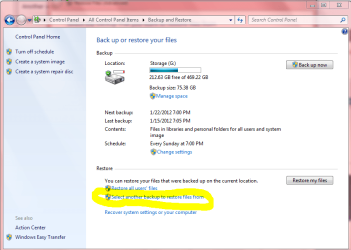
Another way.
Hook up the back up HD.
Open the window on the left.
Then your back up HD should be shown at top where mine shows "G" your drive designation will possibly be different.

Click where I marked yellow "Select another backup to restore".
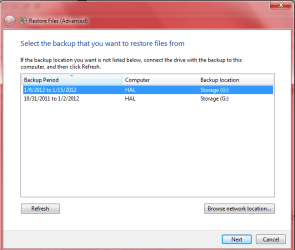
The window on the right will open. edit.

See how they are dated?
Hopefully you will show the new one you just made and the old one you need by date made.
If the one you need is listed highlight and click NEXT in the bottom right corner and follow prompts.
This should restore the old photos etc. to the new install but not Windows.
itself.

This is all I got. The only suggestion that will work if the Back Up is listed.
I have had it work well for others to recover pictures and music files before if the Back up is listed.

Good Luck
Mike
 

Attachments

  • BackUp1.PNG
    BackUp1.PNG
    39.4 KB · Views: 38
  • BackUp2.PNG
    BackUp2.PNG
    20 KB · Views: 21
Last edited:

My Computer My Computer

At a glance

Windows7 Pro 64bit SP-1; Windows XP Pro 32bitIntel Core i7-870 Lynnfield 2.93GHz LGA 1156 ...8GB@1400MHz Crucial Ballistix DDR3-1600 4x2GBASUS ENGTX460 DirectCU/2DI/1GD5 1GB 256-bit G...
Computer Manufacturer/Model Number
Hopalong/ Godzilla
OS
Windows7 Pro 64bit SP-1; Windows XP Pro 32bit
CPU
Intel Core i7-870 Lynnfield 2.93GHz LGA 1156 95W Quad-Core
Motherboard
ASUS P7P55D-E PRO
Memory
8GB@1400MHz Crucial Ballistix DDR3-1600 4x2GB
Graphics Card(s)
ASUS ENGTX460 DirectCU/2DI/1GD5 1GB 256-bit GDDR5
Sound Card
VIA Onboard
Monitor(s) Displays
Asus VS248H-P 24"; Samsung SyncMaster 941BW 19"ws
Screen Resolution
1920x1080; 1440x900
Hard Drives
Samsung 830 120GB SSD
Intel 320 120GB SSD
Western Digital Caviar Black WD7501AALS 750GB 7200 RPM SATA 3.0Gb/s
Western Digital Caviar Black WD6401AALS 640GB 7200 RPM SATA 3.0Gb/s
PSU
COOLER MASTER Silent Pro RS850-AMBAJ3-US 850W Modular
Case
COOLER MASTER HAF 932 RC-932-KKN5-GP Black
Cooling
Scythe "Mugen-2 Rev.B" (2 ScytheKaze-Jyuni PWM fans)
Keyboard
Logitech K-320
Mouse
Kensington
Antivirus
Avast Inernet Suite
Browser
IE 9 ; Chrome
Thanks. So what you're saying is, the actual files I created (images, documents etc) and the operating system/programs are backed up separately?

When I go on to my external hard drive and 'WindowsImageBackup' there is just one main file which has yesterdays date as part of it's name. None of the others are large enough to contain a backup.

Any ideas?
 

My Computer My Computer

At a glance

Windows 7 x64
OS
Windows 7 x64
It can be accessed seperately at least. They could be in one folder. I never looked inside the files on my backup HD.

What does yours show in the window on the right above after you follow my above steps?

How many dates are listed?
 

My Computer My Computer

At a glance

Windows7 Pro 64bit SP-1; Windows XP Pro 32bitIntel Core i7-870 Lynnfield 2.93GHz LGA 1156 ...8GB@1400MHz Crucial Ballistix DDR3-1600 4x2GBASUS ENGTX460 DirectCU/2DI/1GD5 1GB 256-bit G...
Computer Manufacturer/Model Number
Hopalong/ Godzilla
OS
Windows7 Pro 64bit SP-1; Windows XP Pro 32bit
CPU
Intel Core i7-870 Lynnfield 2.93GHz LGA 1156 95W Quad-Core
Motherboard
ASUS P7P55D-E PRO
Memory
8GB@1400MHz Crucial Ballistix DDR3-1600 4x2GB
Graphics Card(s)
ASUS ENGTX460 DirectCU/2DI/1GD5 1GB 256-bit GDDR5
Sound Card
VIA Onboard
Monitor(s) Displays
Asus VS248H-P 24"; Samsung SyncMaster 941BW 19"ws
Screen Resolution
1920x1080; 1440x900
Hard Drives
Samsung 830 120GB SSD
Intel 320 120GB SSD
Western Digital Caviar Black WD7501AALS 750GB 7200 RPM SATA 3.0Gb/s
Western Digital Caviar Black WD6401AALS 640GB 7200 RPM SATA 3.0Gb/s
PSU
COOLER MASTER Silent Pro RS850-AMBAJ3-US 850W Modular
Case
COOLER MASTER HAF 932 RC-932-KKN5-GP Black
Cooling
Scythe "Mugen-2 Rev.B" (2 ScytheKaze-Jyuni PWM fans)
Keyboard
Logitech K-320
Mouse
Kensington
Antivirus
Avast Inernet Suite
Browser
IE 9 ; Chrome
Thanks Hopalong X

I will try tonight and feedback here. Eitherway, many thanks for your detailed responses.

Barry
 

My Computer My Computer

At a glance

Windows 7 x64
OS
Windows 7 x64
Okay hope it helps it is all I know to try.

Mike
 

My Computer My Computer

At a glance

Windows7 Pro 64bit SP-1; Windows XP Pro 32bitIntel Core i7-870 Lynnfield 2.93GHz LGA 1156 ...8GB@1400MHz Crucial Ballistix DDR3-1600 4x2GBASUS ENGTX460 DirectCU/2DI/1GD5 1GB 256-bit G...
Computer Manufacturer/Model Number
Hopalong/ Godzilla
OS
Windows7 Pro 64bit SP-1; Windows XP Pro 32bit
CPU
Intel Core i7-870 Lynnfield 2.93GHz LGA 1156 95W Quad-Core
Motherboard
ASUS P7P55D-E PRO
Memory
8GB@1400MHz Crucial Ballistix DDR3-1600 4x2GB
Graphics Card(s)
ASUS ENGTX460 DirectCU/2DI/1GD5 1GB 256-bit GDDR5
Sound Card
VIA Onboard
Monitor(s) Displays
Asus VS248H-P 24"; Samsung SyncMaster 941BW 19"ws
Screen Resolution
1920x1080; 1440x900
Hard Drives
Samsung 830 120GB SSD
Intel 320 120GB SSD
Western Digital Caviar Black WD7501AALS 750GB 7200 RPM SATA 3.0Gb/s
Western Digital Caviar Black WD6401AALS 640GB 7200 RPM SATA 3.0Gb/s
PSU
COOLER MASTER Silent Pro RS850-AMBAJ3-US 850W Modular
Case
COOLER MASTER HAF 932 RC-932-KKN5-GP Black
Cooling
Scythe "Mugen-2 Rev.B" (2 ScytheKaze-Jyuni PWM fans)
Keyboard
Logitech K-320
Mouse
Kensington
Antivirus
Avast Inernet Suite
Browser
IE 9 ; Chrome
Back
Top