cannot find way to restore from VHD image on external hard drive

Nellyho

New member
Local time
11:41 PM
Messages
1
Hello, Thanks in advance for any guidance you can offer. I will do my best to describe what I find to be a confusing scenario. Our Windows 7 laptop became infected with a virus last August. It prevented me from booting the computer. We back up to a 930 gb "My Book" external hard drive. It appears we use WD Smartdrive as a back up facilitator. (Not sure what the program does, but without any effort on our part we have a lot of data, including VHD images, backed up on the external hard drive.) I finally had to re format and reload Windows thinking it would be easy to restore from the back up hard drive. When I reloaded windows I must have named the computer "homeofficelaptop". The previous name must have been "officelaptop". After reloading windows I tried to restore using the backup hard drive, it was not as user friendly as I thought it would be. I ended up just copying and pasting files from the external to the c: drive. Now I want to do it right and restore from a VHD image on the backup drive. Windows is not seeing the backup image I need to use. It only sees an image that was created since I restored. The backup drive has a "WindowsImagebackup" folder containing subfolders "homeofficelaptop" and "officelaptop". The VHD file I want to restore is in "officelaptop". Windows only recognizes "homeofficelaptop". I've tried changing the name of the computer back to "officelaptop" but it is not helping. Windows restore function does not let me search and pick which VHD to restore from. How can I make it do that or what else can I do to restore from the older, pre-virus, pre-recovery image? There is lots more I could say and attempts I've made but maybe this is enough. Thanks for whatever advice you can offer.
 

My Computer My Computer

At a glance

windows 7 home premium 64 bit
Computer type
PC/Desktop
Computer Manufacturer/Model Number
hp
OS
windows 7 home premium 64 bit
Hard Drives
Samsung 304245 mb
wd mybook 110 usb device
Antivirus
norton was mse
Browser
ie

My Computer My Computer

At a glance

64-bit Windows 11 Pro for WorkstationsIntel i7-8700K OC'd to 5 GHz64 GB (4x16GB) G.SKILL TridentZ RGB DDR4 3600...ASUS ROG-STRIX-GTX1080TI-O11G-GAMING
Computer type
PC/Desktop
Computer Manufacturer/Model Number
Self built custom
OS
64-bit Windows 11 Pro for Workstations
CPU
Intel i7-8700K OC'd to 5 GHz
Motherboard
ASUS ROG Maximus XI Formula Z390
Memory
64 GB (4x16GB) G.SKILL TridentZ RGB DDR4 3600 MHz
Graphics Card(s)
ASUS ROG-STRIX-GTX1080TI-O11G-GAMING
Sound Card
Integrated
Monitor(s) Displays
2 x Samsung Odyssey G7 27"
Screen Resolution
2560x1440
Hard Drives
1TB Samsung 990 PRO M.2,
4TB Samsung 990 PRO PRO M.2,
TerraMaster F8 SSD Plus NAS
PSU
Seasonic Prime Titanium 850W
Case
Thermaltake Core P3
Cooling
Corsair Hydro H115i
Keyboard
Logitech wireless K800
Mouse
Logitech MX Master 4
Internet Speed
2 Gb/s Download and 100 Mb/s Upload
Antivirus
Malwarebyte Anti-Malware Premium
Browser
Google Chrome
Other Info
Logitech Z625 speaker system,
Logitech BRIO 4K Pro webcam,
HP Color LaserJet Pro MFP M477fdn,
APC SMART-UPS RT 1000 XL - SURT1000XLI,
Galaxy S23 Plus phone
Just a thought:

All my external HDDs are from WD and although I do not use WD SmartWare as my backup solution at the moment, I have played with it quite a lot. As I remember, I have never had any issues in recognizing WDs own backup images with WDs own software.

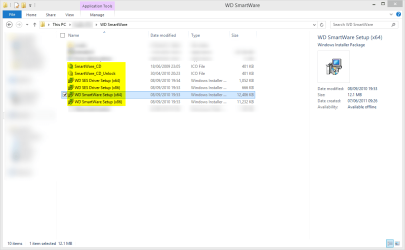
Check if your WD drive has the WD SmartWare setup files, they should be found in WD SmartWare folder. If yes, run the correct setup file on your laptop when the WD drive is connected, WD SmartWare Setup (x86).exe if you have a 32 bit system and WD SmartWare Setup (x64).exe for a 64 system. If you are not able to find WD SmartWare setup files, you can download the latest version.

When done, open WD SmartWare program and click Retrieve tab, it should now find its own disk images which can then be restored.

Kari

WD SmartWare.png
 

My Computer My Computer

At a glance

Windows 10 Pro x64 EN-GB1.6 GHz Intel Core i7-720QM Processor6 GBATI Mobility Radeon HD 5850 Graphics
Computer type
Laptop
Computer Manufacturer/Model Number
HP ENVY 17-1150eg
OS
Windows 10 Pro x64 EN-GB
CPU
1.6 GHz Intel Core i7-720QM Processor
Memory
6 GB
Graphics Card(s)
ATI Mobility Radeon HD 5850 Graphics
Sound Card
Beats sound system with integrated subwoofer
Monitor(s) Displays
17" laptop display, 22" LED and 32" Full HD TV through HDMI
Screen Resolution
1600*900 (1), 1920*1080 (2&3)
Hard Drives
Internal: 2 x 500 GB SATA Hard Disk Drive 7200 rpm
External: 2TB for backups, 3TB USB3 network drive for media
Cooling
As Envy runs a bit warm, I have it on a Cooler Master pad
Keyboard
Logitech diNovo Media Desktop Laser (bluetooth)
Mouse
Logitech Performance Mouse MX
Internet Speed
50/10 Mbps VDSL
Antivirus
Windows Defender 4.3.9431.0
Browser
Maxthon 3.5.2., IE11
Back
Top