Solved System image larger than new drive?

I will do so, but it will be tomorrow or this weekend. I will definitely be back to you. Gotta go to work. Talk to you later.
 

My Computer My Computer

At a glance

Microsoft Windows 7 Home Premium 64-bit 7601 ...Intel(R) Core(TM) i7 CPU 860 @ 2.80GHz8.00 GBNVIDIA GeForce GTX 670
Computer type
PC/Desktop
Computer Manufacturer/Model Number
Custom
OS
Microsoft Windows 7 Home Premium 64-bit 7601 Multiprocessor Free Service Pack 1
CPU
Intel(R) Core(TM) i7 CPU 860 @ 2.80GHz
Motherboard
ASRock P55 Pro
Memory
8.00 GB
Graphics Card(s)
NVIDIA GeForce GTX 670
Sound Card
(1) High Definition Audio Device (2) Logitech G930 Headset
Screen Resolution
1920 x 1080 x 32 bits (4294967296 colors) @ 60 Hz
Hard Drives
(1) Hitachi HDS5C3020ALA632 ATA Device (2) Samsung SSD 850 EVO 500GB ATA Device (3) EPSON Stylus Storage USB Device (4) (5) Generic- MS/MS-Pro USB Device (6) Generic- SD/MMC USB Device (7) Generic- SM/xD-Picture USB Device
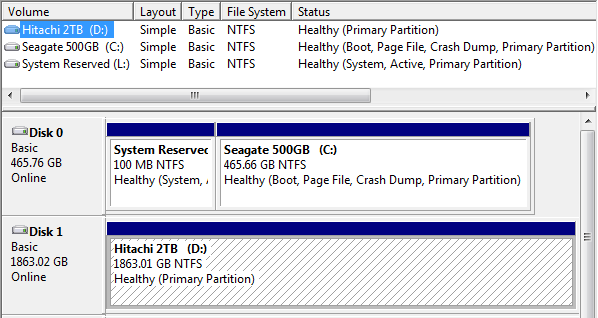
You previously asked me to reboot to my old HDD and post a shot of disk management. It is below. I have installed Macrium free, but stopped there as I recognized something that could be a problem. My old HDD was run with the bios SATA mode on IDE. I had read when switching to SSD I should make sure to be on AHCI, so I switched it prior to first booting to the new SSD and installing the OS. Can that be a problem?


nlfDkoB.png
 

My Computer My Computer

At a glance

Microsoft Windows 7 Home Premium 64-bit 7601 ...Intel(R) Core(TM) i7 CPU 860 @ 2.80GHz8.00 GBNVIDIA GeForce GTX 670
Computer type
PC/Desktop
Computer Manufacturer/Model Number
Custom
OS
Microsoft Windows 7 Home Premium 64-bit 7601 Multiprocessor Free Service Pack 1
CPU
Intel(R) Core(TM) i7 CPU 860 @ 2.80GHz
Motherboard
ASRock P55 Pro
Memory
8.00 GB
Graphics Card(s)
NVIDIA GeForce GTX 670
Sound Card
(1) High Definition Audio Device (2) Logitech G930 Headset
Screen Resolution
1920 x 1080 x 32 bits (4294967296 colors) @ 60 Hz
Hard Drives
(1) Hitachi HDS5C3020ALA632 ATA Device (2) Samsung SSD 850 EVO 500GB ATA Device (3) EPSON Stylus Storage USB Device (4) (5) Generic- MS/MS-Pro USB Device (6) Generic- SD/MMC USB Device (7) Generic- SM/xD-Picture USB Device
"system reserved" has boot manager and boot menu only! And bitlocker, but I don't think you will ever use bitlocker disk encryption. It doesn't work on win7 home premium anyway. Why not simply get rid of system reserved!!!?

Please attach the SSD as well to the system and delete the windows and "system reserved" partition from SSD. I want to see all in screenshot

Do http://www.sevenforums.com/tutorials/61869-ahci-enable-windows-7-vista.html as well
 
Last edited:

My Computer My Computer

At a glance

Microsoft Windows 7 Home Premium 64-bits 7601...Intel(R) Core(TM) i3 CPU M 370 @ 2.40GHz4,00 GBATI Mobility Radeon HD 5400 Series
Computer type
Laptop
Computer Manufacturer/Model Number
ACER ASPIRE 5742G
OS
Microsoft Windows 7 Home Premium 64-bits 7601 Multiprocessor Free Service Pack 1
CPU
Intel(R) Core(TM) i3 CPU M 370 @ 2.40GHz
Motherboard
Acer Aspire 5742G
Memory
4,00 GB
Graphics Card(s)
ATI Mobility Radeon HD 5400 Series
Sound Card
(1) AMD High Definition Audio Device (2) Realtek High Defi
Screen Resolution
1366 x 768 x 32 bits (4294967296 colors) @ 60 Hz
Hard Drives
WDC WD5000BEVT-22ZAT0
"system reserved" has boot manager and boot menu only! And bitlocker, but I don't think you will ever use bitlocker disk encryption. It doesn't work on win7 home premium anyway. Why not simply get rid of system reserved!!!?

Move the boot stuff to 465GB partition. http://www.sevenforums.com/tutorials/209885-bootmgr-move-c-easybcd.html after that delete partition "system reserved" and create the disk screenshot again. Screenshot with ALL fields visible please!

Your instructions were to "Move the boot stuff to 465GB partition". I performed the actions with easybcd as instructed. Did that action move the boot stuff or do I need to do something else? I did not yet attempt to delete the "system reserved" partition until I hear from you.

A dumb question, but is deleting the partition the same as "delete volume"? "Delete Volume" is the only selection I see when I click on the system reserved partition.

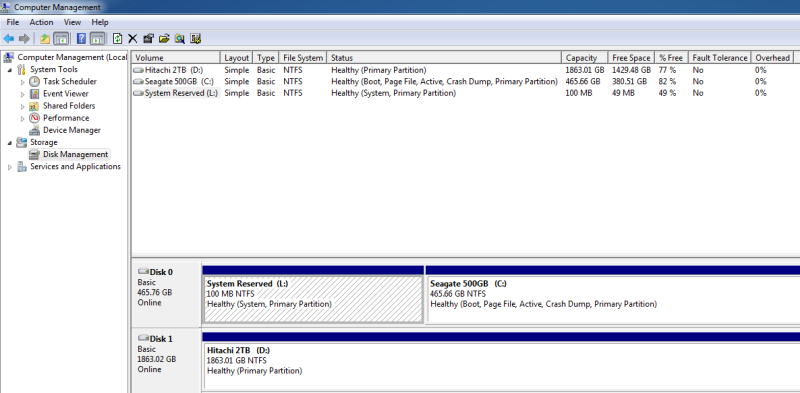
Here is the screen shot immediately following the easybcd action:
Kci3SHk.png
 

My Computer My Computer

At a glance

Microsoft Windows 7 Home Premium 64-bit 7601 ...Intel(R) Core(TM) i7 CPU 860 @ 2.80GHz8.00 GBNVIDIA GeForce GTX 670
Computer type
PC/Desktop
Computer Manufacturer/Model Number
Custom
OS
Microsoft Windows 7 Home Premium 64-bit 7601 Multiprocessor Free Service Pack 1
CPU
Intel(R) Core(TM) i7 CPU 860 @ 2.80GHz
Motherboard
ASRock P55 Pro
Memory
8.00 GB
Graphics Card(s)
NVIDIA GeForce GTX 670
Sound Card
(1) High Definition Audio Device (2) Logitech G930 Headset
Screen Resolution
1920 x 1080 x 32 bits (4294967296 colors) @ 60 Hz
Hard Drives
(1) Hitachi HDS5C3020ALA632 ATA Device (2) Samsung SSD 850 EVO 500GB ATA Device (3) EPSON Stylus Storage USB Device (4) (5) Generic- MS/MS-Pro USB Device (6) Generic- SD/MMC USB Device (7) Generic- SM/xD-Picture USB Device
The move wasn't necessary... could have fixed it by other procedure. Yes do "delete volume". and boot. Did you do the enable AHCI procedure already? If not.. do it.

C volume: 465 GB total, free space 380GB. So 85GB used. Fits easily on SSD.

Attach SSD as well to system and post disk management screenshot.

You have a win7 install DVD or system repair disc? We need it later
 

My Computer My Computer

At a glance

Microsoft Windows 7 Home Premium 64-bits 7601...Intel(R) Core(TM) i3 CPU M 370 @ 2.40GHz4,00 GBATI Mobility Radeon HD 5400 Series
Computer type
Laptop
Computer Manufacturer/Model Number
ACER ASPIRE 5742G
OS
Microsoft Windows 7 Home Premium 64-bits 7601 Multiprocessor Free Service Pack 1
CPU
Intel(R) Core(TM) i3 CPU M 370 @ 2.40GHz
Motherboard
Acer Aspire 5742G
Memory
4,00 GB
Graphics Card(s)
ATI Mobility Radeon HD 5400 Series
Sound Card
(1) AMD High Definition Audio Device (2) Realtek High Defi
Screen Resolution
1366 x 768 x 32 bits (4294967296 colors) @ 60 Hz
Hard Drives
WDC WD5000BEVT-22ZAT0
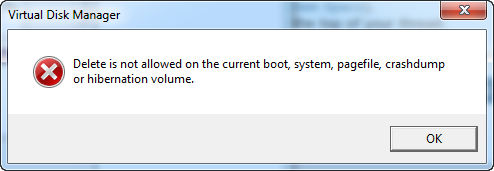
I am doing the change procedure from IDE to AHCI now. Disk Manager will not allow me to delete that volume for some reason.

O6GOq5d.png


Yes I do have the original Win7 installation DVD.

I will have to go to work now. Will touch base tomorrow. Thanks again for your help.
 

My Computer My Computer

At a glance

Microsoft Windows 7 Home Premium 64-bit 7601 ...Intel(R) Core(TM) i7 CPU 860 @ 2.80GHz8.00 GBNVIDIA GeForce GTX 670
Computer type
PC/Desktop
Computer Manufacturer/Model Number
Custom
OS
Microsoft Windows 7 Home Premium 64-bit 7601 Multiprocessor Free Service Pack 1
CPU
Intel(R) Core(TM) i7 CPU 860 @ 2.80GHz
Motherboard
ASRock P55 Pro
Memory
8.00 GB
Graphics Card(s)
NVIDIA GeForce GTX 670
Sound Card
(1) High Definition Audio Device (2) Logitech G930 Headset
Screen Resolution
1920 x 1080 x 32 bits (4294967296 colors) @ 60 Hz
Hard Drives
(1) Hitachi HDS5C3020ALA632 ATA Device (2) Samsung SSD 850 EVO 500GB ATA Device (3) EPSON Stylus Storage USB Device (4) (5) Generic- MS/MS-Pro USB Device (6) Generic- SD/MMC USB Device (7) Generic- SM/xD-Picture USB Device
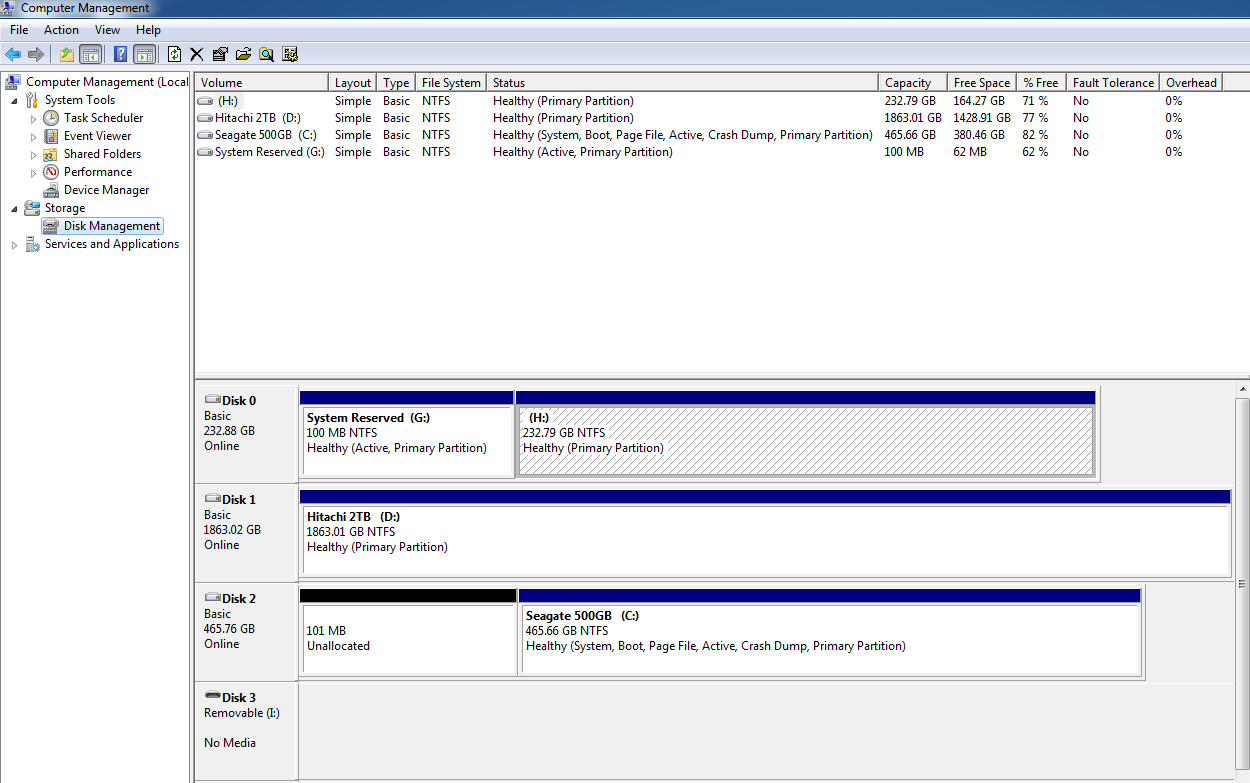
I managed to do all that before leaving for work. AHCI enabled, volume deleted, SSD connected and booted. Here is disk manager now.
5jXKJYt.png
 

My Computer My Computer

At a glance

Microsoft Windows 7 Home Premium 64-bit 7601 ...Intel(R) Core(TM) i7 CPU 860 @ 2.80GHz8.00 GBNVIDIA GeForce GTX 670
Computer type
PC/Desktop
Computer Manufacturer/Model Number
Custom
OS
Microsoft Windows 7 Home Premium 64-bit 7601 Multiprocessor Free Service Pack 1
CPU
Intel(R) Core(TM) i7 CPU 860 @ 2.80GHz
Motherboard
ASRock P55 Pro
Memory
8.00 GB
Graphics Card(s)
NVIDIA GeForce GTX 670
Sound Card
(1) High Definition Audio Device (2) Logitech G930 Headset
Screen Resolution
1920 x 1080 x 32 bits (4294967296 colors) @ 60 Hz
Hard Drives
(1) Hitachi HDS5C3020ALA632 ATA Device (2) Samsung SSD 850 EVO 500GB ATA Device (3) EPSON Stylus Storage USB Device (4) (5) Generic- MS/MS-Pro USB Device (6) Generic- SD/MMC USB Device (7) Generic- SM/xD-Picture USB Device
  1. Delete volume H and G. So delete all volumes from SSD.
  2. Start Macrium Reflect FREE and clone C to SSD. v5: How to clone a disk (Clone Disk, v5) at 'Cloned Partition Properties' be sure it's primary, active and aligned Vista/7/SSD [1MB]. C already was that so I think it is default on clone. Make it Maximum Size. Original size is default, but becuase that won't fit it is truncated to all unallocated space anyway.
  3. Now you have an exact clone. Bootmenu is confused with 2 same disks and SSD registry C points to old C. Delete Q:\boot\bcd (replace Q with actual drive letter of SSD). Do it in http://www.sevenforums.com/tutorials/783-elevated-command-prompt.html . Bootmenu on SSD is gone now.
  4. Label the SSD volume "SSD win7" or something you like. (instead of "Seagate 500GB"). Can be done in disk management
  5. Detach old HDD and boot from win7 install DVD. Do a startup repair 3 times! http://www.sevenforums.com/tutorials/681-startup-repair.html . Boot menu is back now. System boots and cannot find C (still pointing to old HDD which is gone). win7 fixes that (it makes itself C )
  6. Enable system protection for the new C http://www.sevenforums.com/tutorials/335-system-protection-change-disk-space-usage.html and adjust the space to your needs.
  7. http://www.sevenforums.com/tutorials/11733-disk-defragmenter-open-use.html ->"configure schedule" be sure C (SSD) will not be defragged!
Post results
What are you planning to do with old HDD?
 

My Computer My Computer

At a glance

Microsoft Windows 7 Home Premium 64-bits 7601...Intel(R) Core(TM) i3 CPU M 370 @ 2.40GHz4,00 GBATI Mobility Radeon HD 5400 Series
Computer type
Laptop
Computer Manufacturer/Model Number
ACER ASPIRE 5742G
OS
Microsoft Windows 7 Home Premium 64-bits 7601 Multiprocessor Free Service Pack 1
CPU
Intel(R) Core(TM) i3 CPU M 370 @ 2.40GHz
Motherboard
Acer Aspire 5742G
Memory
4,00 GB
Graphics Card(s)
ATI Mobility Radeon HD 5400 Series
Sound Card
(1) AMD High Definition Audio Device (2) Realtek High Defi
Screen Resolution
1366 x 768 x 32 bits (4294967296 colors) @ 60 Hz
Hard Drives
WDC WD5000BEVT-22ZAT0
Hello Kaktussoft

I wanted to get back to you. Over the weekend I attempted to do all the steps you gave me. I got stumped at the cloning. I kept getting an error, so I fell back and did a clean install. Below is what I have now.

I have renamed the drive as indicated, enabled system protection, and made sure there was no defragmenting schedule for the SSD. Everything is working fine now. Should I use Macrium to create an image?

Your question on the old drive- No use at this time. I guess it will be a spare.


3kBWVle.png
 

My Computer My Computer

At a glance

Microsoft Windows 7 Home Premium 64-bit 7601 ...Intel(R) Core(TM) i7 CPU 860 @ 2.80GHz8.00 GBNVIDIA GeForce GTX 670
Computer type
PC/Desktop
Computer Manufacturer/Model Number
Custom
OS
Microsoft Windows 7 Home Premium 64-bit 7601 Multiprocessor Free Service Pack 1
CPU
Intel(R) Core(TM) i7 CPU 860 @ 2.80GHz
Motherboard
ASRock P55 Pro
Memory
8.00 GB
Graphics Card(s)
NVIDIA GeForce GTX 670
Sound Card
(1) High Definition Audio Device (2) Logitech G930 Headset
Screen Resolution
1920 x 1080 x 32 bits (4294967296 colors) @ 60 Hz
Hard Drives
(1) Hitachi HDS5C3020ALA632 ATA Device (2) Samsung SSD 850 EVO 500GB ATA Device (3) EPSON Stylus Storage USB Device (4) (5) Generic- MS/MS-Pro USB Device (6) Generic- SD/MMC USB Device (7) Generic- SM/xD-Picture USB Device

My Computer My Computer

At a glance

Microsoft Windows 7 Home Premium 64-bits 7601...Intel(R) Core(TM) i3 CPU M 370 @ 2.40GHz4,00 GBATI Mobility Radeon HD 5400 Series
Computer type
Laptop
Computer Manufacturer/Model Number
ACER ASPIRE 5742G
OS
Microsoft Windows 7 Home Premium 64-bits 7601 Multiprocessor Free Service Pack 1
CPU
Intel(R) Core(TM) i3 CPU M 370 @ 2.40GHz
Motherboard
Acer Aspire 5742G
Memory
4,00 GB
Graphics Card(s)
ATI Mobility Radeon HD 5400 Series
Sound Card
(1) AMD High Definition Audio Device (2) Realtek High Defi
Screen Resolution
1366 x 768 x 32 bits (4294967296 colors) @ 60 Hz
Hard Drives
WDC WD5000BEVT-22ZAT0
Sorry. I cannot remember the error. Some kind of read error I think. After 2-3 times I gave up and just proceeded with the full installation of the OS. All is working well. I will proceed with the image now that everything is installed.
 

My Computer My Computer

At a glance

Microsoft Windows 7 Home Premium 64-bit 7601 ...Intel(R) Core(TM) i7 CPU 860 @ 2.80GHz8.00 GBNVIDIA GeForce GTX 670
Computer type
PC/Desktop
Computer Manufacturer/Model Number
Custom
OS
Microsoft Windows 7 Home Premium 64-bit 7601 Multiprocessor Free Service Pack 1
CPU
Intel(R) Core(TM) i7 CPU 860 @ 2.80GHz
Motherboard
ASRock P55 Pro
Memory
8.00 GB
Graphics Card(s)
NVIDIA GeForce GTX 670
Sound Card
(1) High Definition Audio Device (2) Logitech G930 Headset
Screen Resolution
1920 x 1080 x 32 bits (4294967296 colors) @ 60 Hz
Hard Drives
(1) Hitachi HDS5C3020ALA632 ATA Device (2) Samsung SSD 850 EVO 500GB ATA Device (3) EPSON Stylus Storage USB Device (4) (5) Generic- MS/MS-Pro USB Device (6) Generic- SD/MMC USB Device (7) Generic- SM/xD-Picture USB Device
Back
Top