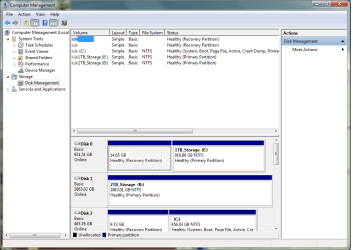
I currently operate a PC with 3 separate HDD. I have my windows 7 and all of my programs installed on a 500 GB HDD. I have all of my files saved to a 2 TB HDD and a 1 TB HDD. I want to do a system image of the 500 GB HDD that has the OS and programs installed on it, however, when I go through to create a system image there is a check box to "Include a system image of drives (C , 1 TB_Storage (E" I only want to image C (The 500 GB HDD) I don't want to image E (The 1 TB HDD). Any suggestions?
Thank you,
Ryan
, 1 TB_Storage (E" I only want to image C (The 500 GB HDD) I don't want to image E (The 1 TB HDD). Any suggestions?Thank you,
Ryan
My Computer
At a glance
64 bitIntel Core 2 Quad Q8300 @ 2.5 GHz8 GBNVIDIA GeForce 9800 GT
- Computer Manufacturer/Model Number
- Gateway
- OS
- 64 bit
- CPU
- Intel Core 2 Quad Q8300 @ 2.5 GHz
- Motherboard
- Intel
- Memory
- 8 GB
- Graphics Card(s)
- NVIDIA GeForce 9800 GT
- Sound Card
- Realtek High Definition Audio
- Monitor(s) Displays
- Acer AL2216W
- Hard Drives
- 500 GB
1 TB
2 TB