System Image - Recover a Broken Windows 7 System Image

How to Restore your System with a Broken Windows 7 System Image


   Information
There were many reports where people did rely on Windows 7 images. But, when their system became inoperable and they wanted to recover with their Windows7 image, it did not work. The reasons are not always very clear and it really does not matter. The fact that one cannot recover the system is a dramatic event.

This tutorial will explain a procedure how one may still be able to use this broken image for recovery if the following conditions are given:


  • The Windows 7 image is on an external drive or the drive can be externalized
  • You have another working system (Win7, Vista, or XP) to which you can attach the external drive
  • The VHD of the Windows7 image does still exist. The approach is to reimage the Windows7 VHD and restore from that image.
We will use free Macrium for that operation. You will find a tutorial on how to operate free Macrium on this tutorial page.

For the recovery you need to burn the WinPE DVD which is explained in the Macrium tutorial. The recovery steps using the WinPE DVD are explained in this tutorial by Kado, which you find at this YouTube site. Note that this tutorial has text but no narrative.

In addition, we will use the Windows Disk Management. If you type Disk Management into the Start/Search box and hit Enter, it should show up.


Step 1 - Check the Windows7 VHD

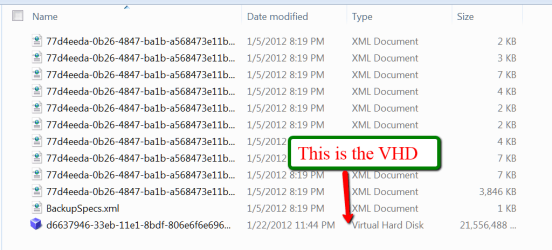
Attach the external disk on which the Windows7 image resides. The Windows7 image is in the root of that drive and the folder is called WindowsImageBackup. Open that folder (you may be asked for authorization) and the subsequent folders until you see a page like this:
2012-01-23_1634.png

If you can see the VHD, as in the picture, then you are most likely in good shape.


Step 2 - Attach the Windows 7 VHD

Go to Disk Management. In the top left next to the File button click on the Action button and then click on Attach VHD. Then navigate to the Windows7 VHD as in Step 1, double click on the VHD, and click on OK.

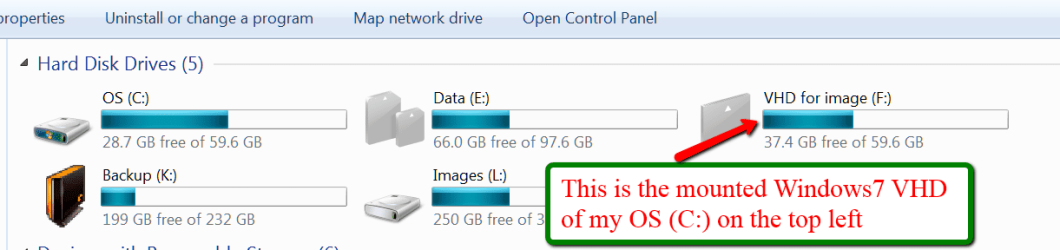
Now the VHD is attached (also called Mounted). If you roll down in Disk Management, you should see it as one of your volumes. You can also see it in Computer where it should show like this:
2012-01-23_1812.png

Make sure you write down the drive letter (which is 'F' in my example) because you will need that letter later.


Step 3 - Image the attached VHD

As a first step here, create a new folder on the same external disk where the Windows 7 image is. Call this folder Macrium Image. If you have a second external drive attached to that system, you can create the Macrium Image folder there. That will make the imaging step a bit faster.

Imaging an attached VHD is no different than imaging any other volume (partition or drive). Start Macrium and follow the steps explained in the Macrium imaging tutorial that is linked above. Just make sure you select the right volume (the letter you wrote down in Step 2) and that you select the Macrium Image folder you just created.

Then click Finish and OK and the image will be taken. That can take 30 minutes or more depending on the size of the data in your VHD.


Step 4 - Recover your system with the Macrium image

Attach the external disk to the system from where the Windows7 Image originally came. Boot that system from the DVD reader with the Macrium WinPE DVD. Follow the steps explained in Kados YouTube video which is linked above.

All you really need to do is to navigate to the Macrium image and drag it into the C: partition. The restoration of your system should be done in 30 minutes. After you close the WinPE window (after it told you that it was done), your system should reboot to the time when the Windows7 Image was taken.


Final Words

I am pretty sure that this procedure can also be applied to VHDs of other imaging programs that do not cooperate during the recovery step. But up to now, I have only seen people having those problems with Windoes7 imaging - on this and other forums.


Last edited:
That's very clever Wolfgang. I would never have thought of that.
 

My Computer My Computer

Computer type
Laptop
Computer Manufacturer/Model Number
Hewlett-Packard/G62-107SA Notebook
OS
Microsoft Windows 7 Home Premium 64-bit Service Pack 1
CPU
Intel(R) Core(TM) i3 CPU M 330 @ 2.13GHz
Motherboard
Hewlett-Packard 1425
Memory
8 GB DDR3
Graphics Card(s)
Intel(R) HD Graphics
Sound Card
Realtek High Definition Audio
Monitor(s) Displays
Builtin
Screen Resolution
1366 x 768 x 32 bits (4294967296 colors) @ 60 Hz
Hard Drives
250 GB SATA Hard Disk Drive 7200 rpm
2TB Seagate GoFlex USB 2 Drive
1TB Iomega Prestige USB 2 Drive
1.5TB Iomega Prestige USB 2 Drive (Samsung)
2TB WD MyBook Live NAS.
Mouse
Logitech Anywhere MX
Internet Speed
152 Mbs download 10 Mbs upload
Antivirus
Norton 360
Browser
Chrome
Very nice, Wolfgang. Many thanks to you and Keith.
 

My Computer My Computer

Computer type
Laptop
Computer Manufacturer/Model Number
Sony Vaio VPCEB47GM Laptop
OS
Win 7 Pro 64-bit
CPU
Intel i5 2.4 Ghz
Memory
8GB DDR3
Graphics Card(s)
Intel HD 3000
Sound Card
IDT High Definition
Monitor(s) Displays
15.6 WGXA Anti-Glare LED
Screen Resolution
1280x800
Hard Drives
640Gb 7200rpm
Antivirus
MSE
Browser
Opera (primary) with IE9 backup
What an inventive idea, Wofgang. Thanks.

Kari

EDIT:

I'm sorry but no rep ;)

WHS_rep.PNG
 

My Computer My Computer

Computer type
Laptop
Computer Manufacturer/Model Number
HP ENVY 17-1150eg
OS
Windows 10 Pro x64 EN-GB
CPU
1.6 GHz Intel Core i7-720QM Processor
Memory
6 GB
Graphics Card(s)
ATI Mobility Radeon HD 5850 Graphics
Sound Card
Beats sound system with integrated subwoofer
Monitor(s) Displays
17" laptop display, 22" LED and 32" Full HD TV through HDMI
Screen Resolution
1600*900 (1), 1920*1080 (2&3)
Hard Drives
Internal: 2 x 500 GB SATA Hard Disk Drive 7200 rpm
External: 2TB for backups, 3TB USB3 network drive for media
Cooling
As Envy runs a bit warm, I have it on a Cooler Master pad
Keyboard
Logitech diNovo Media Desktop Laser (bluetooth)
Mouse
Logitech Performance Mouse MX
Internet Speed
50/10 Mbps VDSL
Antivirus
Windows Defender 4.3.9431.0
Browser
Maxthon 3.5.2., IE11
This is my new innovative way of thinking - LOL. I am glad you guys like it.

And Kari, it is the thought that counts. I do not make tuts for reps, but because I like to make tuts for you guys to have an easy reference.
 

My Computer My Computer

Computer Manufacturer/Model Number
HP, Dell, Gateway, Toshiba - 4 laptops and 2 desktops
OS
Vista, Windows7, Mint Mate, Zorin, Windows 8
CPU
from 1.6GHz Duo to i7
Monitor(s) Displays
2x HP w2207
Hard Drives
5x HDD, 7x SSD, 12x Externals
Keyboard
with trackball - no mices
Mouse
Trackball mice
Internet Speed
DSL 6000
No, this tut really deserves rep. It's just that I couldn't, have to spread.
 

My Computer My Computer

Computer type
Laptop
Computer Manufacturer/Model Number
HP ENVY 17-1150eg
OS
Windows 10 Pro x64 EN-GB
CPU
1.6 GHz Intel Core i7-720QM Processor
Memory
6 GB
Graphics Card(s)
ATI Mobility Radeon HD 5850 Graphics
Sound Card
Beats sound system with integrated subwoofer
Monitor(s) Displays
17" laptop display, 22" LED and 32" Full HD TV through HDMI
Screen Resolution
1600*900 (1), 1920*1080 (2&3)
Hard Drives
Internal: 2 x 500 GB SATA Hard Disk Drive 7200 rpm
External: 2TB for backups, 3TB USB3 network drive for media
Cooling
As Envy runs a bit warm, I have it on a Cooler Master pad
Keyboard
Logitech diNovo Media Desktop Laser (bluetooth)
Mouse
Logitech Performance Mouse MX
Internet Speed
50/10 Mbps VDSL
Antivirus
Windows Defender 4.3.9431.0
Browser
Maxthon 3.5.2., IE11
Yes it does. I got the same when I tried to rep it.
 

My Computer My Computer

Computer type
Laptop
Computer Manufacturer/Model Number
Hewlett-Packard/G62-107SA Notebook
OS
Microsoft Windows 7 Home Premium 64-bit Service Pack 1
CPU
Intel(R) Core(TM) i3 CPU M 330 @ 2.13GHz
Motherboard
Hewlett-Packard 1425
Memory
8 GB DDR3
Graphics Card(s)
Intel(R) HD Graphics
Sound Card
Realtek High Definition Audio
Monitor(s) Displays
Builtin
Screen Resolution
1366 x 768 x 32 bits (4294967296 colors) @ 60 Hz
Hard Drives
250 GB SATA Hard Disk Drive 7200 rpm
2TB Seagate GoFlex USB 2 Drive
1TB Iomega Prestige USB 2 Drive
1.5TB Iomega Prestige USB 2 Drive (Samsung)
2TB WD MyBook Live NAS.
Mouse
Logitech Anywhere MX
Internet Speed
152 Mbs download 10 Mbs upload
Antivirus
Norton 360
Browser
Chrome
You guys are too good with me. It feels good to have friends like you guys.
 

My Computer My Computer

Computer Manufacturer/Model Number
HP, Dell, Gateway, Toshiba - 4 laptops and 2 desktops
OS
Vista, Windows7, Mint Mate, Zorin, Windows 8
CPU
from 1.6GHz Duo to i7
Monitor(s) Displays
2x HP w2207
Hard Drives
5x HDD, 7x SSD, 12x Externals
Keyboard
with trackball - no mices
Mouse
Trackball mice
Internet Speed
DSL 6000
Then consider my rep as also coming from Keith and Kari. :)
 

My Computer My Computer

Computer type
Laptop
Computer Manufacturer/Model Number
Sony Vaio VPCEB47GM Laptop
OS
Win 7 Pro 64-bit
CPU
Intel i5 2.4 Ghz
Memory
8GB DDR3
Graphics Card(s)
Intel HD 3000
Sound Card
IDT High Definition
Monitor(s) Displays
15.6 WGXA Anti-Glare LED
Screen Resolution
1280x800
Hard Drives
640Gb 7200rpm
Antivirus
MSE
Browser
Opera (primary) with IE9 backup

My Computer My Computer

Computer Manufacturer/Model Number
HP, Dell, Gateway, Toshiba - 4 laptops and 2 desktops
OS
Vista, Windows7, Mint Mate, Zorin, Windows 8
CPU
from 1.6GHz Duo to i7
Monitor(s) Displays
2x HP w2207
Hard Drives
5x HDD, 7x SSD, 12x Externals
Keyboard
with trackball - no mices
Mouse
Trackball mice
Internet Speed
DSL 6000
I can report a real live success applying this recovery method. I worked with this young man for appr. one week and we successfully recovered his system with a broken Windows7 image. The young man was very careful and thorough and cooperated really well.

What helped also is that everybody else stayed out of the loop once we got going. I think 'additional helpers' might have just confused the issue. Thanks everybody for holding your breath.
 
Last edited:

My Computer My Computer

Computer Manufacturer/Model Number
HP, Dell, Gateway, Toshiba - 4 laptops and 2 desktops
OS
Vista, Windows7, Mint Mate, Zorin, Windows 8
CPU
from 1.6GHz Duo to i7
Monitor(s) Displays
2x HP w2207
Hard Drives
5x HDD, 7x SSD, 12x Externals
Keyboard
with trackball - no mices
Mouse
Trackball mice
Internet Speed
DSL 6000
Good to know Wolfgang. It was certainly a learning experience for both of you.
 

My Computer My Computer

Computer type
Laptop
Computer Manufacturer/Model Number
Hewlett-Packard/G62-107SA Notebook
OS
Microsoft Windows 7 Home Premium 64-bit Service Pack 1
CPU
Intel(R) Core(TM) i3 CPU M 330 @ 2.13GHz
Motherboard
Hewlett-Packard 1425
Memory
8 GB DDR3
Graphics Card(s)
Intel(R) HD Graphics
Sound Card
Realtek High Definition Audio
Monitor(s) Displays
Builtin
Screen Resolution
1366 x 768 x 32 bits (4294967296 colors) @ 60 Hz
Hard Drives
250 GB SATA Hard Disk Drive 7200 rpm
2TB Seagate GoFlex USB 2 Drive
1TB Iomega Prestige USB 2 Drive
1.5TB Iomega Prestige USB 2 Drive (Samsung)
2TB WD MyBook Live NAS.
Mouse
Logitech Anywhere MX
Internet Speed
152 Mbs download 10 Mbs upload
Antivirus
Norton 360
Browser
Chrome
Right Gary. I had only tried the scheme with test partitions. But this was a real live experience.
 

My Computer My Computer

Computer Manufacturer/Model Number
HP, Dell, Gateway, Toshiba - 4 laptops and 2 desktops
OS
Vista, Windows7, Mint Mate, Zorin, Windows 8
CPU
from 1.6GHz Duo to i7
Monitor(s) Displays
2x HP w2207
Hard Drives
5x HDD, 7x SSD, 12x Externals
Keyboard
with trackball - no mices
Mouse
Trackball mice
Internet Speed
DSL 6000
Gary? :roflmao:
 

My Computer My Computer

Computer type
Laptop
Computer Manufacturer/Model Number
Hewlett-Packard/G62-107SA Notebook
OS
Microsoft Windows 7 Home Premium 64-bit Service Pack 1
CPU
Intel(R) Core(TM) i3 CPU M 330 @ 2.13GHz
Motherboard
Hewlett-Packard 1425
Memory
8 GB DDR3
Graphics Card(s)
Intel(R) HD Graphics
Sound Card
Realtek High Definition Audio
Monitor(s) Displays
Builtin
Screen Resolution
1366 x 768 x 32 bits (4294967296 colors) @ 60 Hz
Hard Drives
250 GB SATA Hard Disk Drive 7200 rpm
2TB Seagate GoFlex USB 2 Drive
1TB Iomega Prestige USB 2 Drive
1.5TB Iomega Prestige USB 2 Drive (Samsung)
2TB WD MyBook Live NAS.
Mouse
Logitech Anywhere MX
Internet Speed
152 Mbs download 10 Mbs upload
Antivirus
Norton 360
Browser
Chrome
Sorry Keith. This early in the morning my RAM is not yet up to speed.
 

My Computer My Computer

Computer Manufacturer/Model Number
HP, Dell, Gateway, Toshiba - 4 laptops and 2 desktops
OS
Vista, Windows7, Mint Mate, Zorin, Windows 8
CPU
from 1.6GHz Duo to i7
Monitor(s) Displays
2x HP w2207
Hard Drives
5x HDD, 7x SSD, 12x Externals
Keyboard
with trackball - no mices
Mouse
Trackball mice
Internet Speed
DSL 6000
Dear whs,

I have a problem regarding your guide.
You see, the PC of my SO was acting up for quite some time and recently we received an error message, that there was a physical problem with the hard drive. We did an image of the hard drive in question (she has 2 in her PC) with the WIN 7 tool, took out the damaged hard drive and only left the 2nd hard drive in, which was unused so far anyway.
Then reinstalled windows and tried to restore the image - which however was not found by Windows.
So I came across this thread and followed your instructions.
All went rather smoothly, including step 4.
Then I took out the repair DVD, changed the boot priority to the SATA again, but the PC does not boot and displayes the following
"Reboot and Select proper boot device
or insert Boot Media in selected Boot device and press a key"

Do you have any idea where I might have gone wrong?
I would very much appreciate a reply,

best regards
Dispi
 

My Computer My Computer

Computer type
PC/Desktop
Computer Manufacturer/Model Number
custom buil
OS
Windows 7 64
Hmm, looks like you lost the bootmgr. Check on the original Winodws image whether there is a second VHD for the famous 100MB system partition. If that is the case, you'll have to bring that over using the method described in the tutorial.
 

My Computer My Computer

Computer Manufacturer/Model Number
HP, Dell, Gateway, Toshiba - 4 laptops and 2 desktops
OS
Vista, Windows7, Mint Mate, Zorin, Windows 8
CPU
from 1.6GHz Duo to i7
Monitor(s) Displays
2x HP w2207
Hard Drives
5x HDD, 7x SSD, 12x Externals
Keyboard
with trackball - no mices
Mouse
Trackball mice
Internet Speed
DSL 6000
Thank you for your reply!

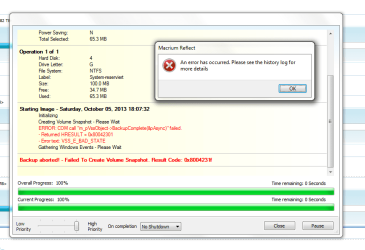
There is indeed a second VHD. I just tried taking an image of this other VHD but was prompted with an error.
I attached the error.

Am I supposed to make two recovery images? Or somehow combine the "actual" and the "system reserved" before making an image?

So sorry, but I am not a crack at this...
 

Attachments

  • Unbenannt.png
    Unbenannt.png
    31.3 KB · Views: 224

My Computer My Computer

Computer type
PC/Desktop
Computer Manufacturer/Model Number
custom buil
OS
Windows 7 64
I have found a solution to the error message and could make an image of the system reserved file using "chkdsk" (even though no error was found).

However, it is still not clear to me what I should do with these two virtuals - do I somehow combine them?
 

My Computer My Computer

Computer type
PC/Desktop
Computer Manufacturer/Model Number
custom buil
OS
Windows 7 64
Well - sometimes try and error is the way to go.
Macrium Reflect is just a great program - the repair DVD provides an option to recreate the bootmanager.

We just did that and it works like a charm!

VIELEN DANK!
Grüße aus HH
 

My Computer My Computer

Computer type
PC/Desktop
Computer Manufacturer/Model Number
custom buil
OS
Windows 7 64
Back
Top