System Image restore using WIN7 and DVD media

brownbeardad

New member
Local time
8:52 AM
Messages
28
Location
Louisville, KY
I am planning to perform a system image restore using the system image contained on four DVD's. I have read Brink's excellent article "How to Do a System Image Recovery in Windows 7". After researching WIN7 Forums for this afternoon and into the evening, I have a question regarding the backup data files option when accessing system image recovery thru the control panel. This assumes that the win7 OS is functional. After many attempts using Mini Tool, Paragon and other software, I have not been able to repair the HDD so the OS will not boot. My only access to perform a system image restore is thru the repair console or repair disk. Does this mean I cannot use the backup option?

My goal is determine if any files lost from the HDD failure are contained in this system image without wiping the files I am attempting to recover. Is there another way to view or recover the files from a system image on DVD? I understand that since the vhd files are on four DVD's they cannot be viewed using WIN7 disk management. Any help will be appreciated.
 

My Computer My Computer

At a glance

Microsoft Windows 7 Home Premium 64-bit 7601 ...Intel(R) Core(TM) i7-2630QM CPU @ 2.00GHz16.00 GB(1) NVIDIA GeForce GT 540M (2) Intel(R) HD Gr...
Computer type
Laptop
Computer Manufacturer/Model Number
Toshiba Satellite P755-S5269
OS
Microsoft Windows 7 Home Premium 64-bit 7601 Multiprocessor Free Service Pack 1
CPU
Intel(R) Core(TM) i7-2630QM CPU @ 2.00GHz
Motherboard
TOSHIBA PEQAA
Memory
16.00 GB
Graphics Card(s)
(1) NVIDIA GeForce GT 540M (2) Intel(R) HD Graphics Fami
Sound Card
(1) Realtek High Definition Audio (2) Intel(R) Display Aud
Monitor(s) Displays
HD TruBrite® LED Backlit display
Screen Resolution
0 x 0 x 0 bits (0 colors) @ 0 Hz
Hard Drives
(1) TOSHIBA MK7575GSX (2) JMCR SD SCSI Disk Device
Mouse
Logitech M505
Internet Speed
18 GB/sec
Antivirus
Bitdefender 2018
Browser
Mozilla Firefox
Other Info
DVD-SuperMulti drive (+/-R double layer), Li-Ion (96Wh, 12-Cell), Graphics Memory 1GB GDDR3,
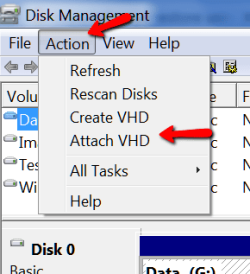
VHDs can be viewed with Disk Management provided you have a running system. In Disk Management under the Action button you can attach the VHD and then open it in Computer.
 

Attachments

  • 2016-01-12_1827.png
    2016-01-12_1827.png
    9.2 KB · Views: 14

My Computer My Computer

At a glance

Vista, Windows7, Mint Mate, Zorin, Windows 8from 1.6GHz Duo to i7
Computer Manufacturer/Model Number
HP, Dell, Gateway, Toshiba - 4 laptops and 2 desktops
OS
Vista, Windows7, Mint Mate, Zorin, Windows 8
CPU
from 1.6GHz Duo to i7
Monitor(s) Displays
2x HP w2207
Hard Drives
5x HDD, 7x SSD, 12x Externals
Keyboard
with trackball - no mices
Mouse
Trackball mice
Internet Speed
DSL 6000
It seems you don't have a running os.

You can d/l this and burn as an image to cd/dvd or extract to flash drive.
 
Last edited:

My Computers My Computers

  • At a glance

    7 X64i5 84002x8gb 3200mhz
    Computer type
    PC/Desktop
    OS
    7 X64
    CPU
    i5 8400
    Motherboard
    gigabyte b365m ds3h
    Memory
    2x8gb 3200mhz
    Hard Drives
    various
    PSU
    pure power 11 400w cm
    Case
    Coolermaster
    Cooling
    cryorig m9i
  • At a glance

    7x64g54008gb ddr4 2400
    Computer type
    PC/Desktop
    OS
    7x64
    CPU
    g5400
    Motherboard
    ga b365m ds3h
    Memory
    8gb ddr4 2400
    PSU
    xfx pro 450w
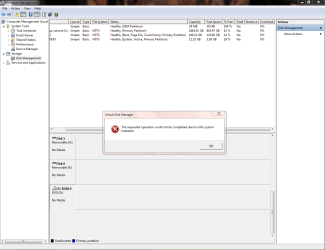
I have tried to attached the vhd files for all four DVD's on my desktop. The DVD set is from a System Image made from my laptop. I get the same error message as shown in the screen print below. If I attach the System Image made on my Desktop and stored to its second HDD using Disk Management, I can view this vhd file. I know of two differences between the System Image that I can view and the DVD set; the DVD's are multiple media and the desktop is not AF. Is the sector size difference causing the DVD's to produce this error message?
 

Attachments

  • error message a.PNG
    error message a.PNG
    34.8 KB · Views: 4

My Computer My Computer

At a glance

Microsoft Windows 7 Home Premium 64-bit 7601 ...Intel(R) Core(TM) i7-2630QM CPU @ 2.00GHz16.00 GB(1) NVIDIA GeForce GT 540M (2) Intel(R) HD Gr...
Computer type
Laptop
Computer Manufacturer/Model Number
Toshiba Satellite P755-S5269
OS
Microsoft Windows 7 Home Premium 64-bit 7601 Multiprocessor Free Service Pack 1
CPU
Intel(R) Core(TM) i7-2630QM CPU @ 2.00GHz
Motherboard
TOSHIBA PEQAA
Memory
16.00 GB
Graphics Card(s)
(1) NVIDIA GeForce GT 540M (2) Intel(R) HD Graphics Fami
Sound Card
(1) Realtek High Definition Audio (2) Intel(R) Display Aud
Monitor(s) Displays
HD TruBrite® LED Backlit display
Screen Resolution
0 x 0 x 0 bits (0 colors) @ 0 Hz
Hard Drives
(1) TOSHIBA MK7575GSX (2) JMCR SD SCSI Disk Device
Mouse
Logitech M505
Internet Speed
18 GB/sec
Antivirus
Bitdefender 2018
Browser
Mozilla Firefox
Other Info
DVD-SuperMulti drive (+/-R double layer), Li-Ion (96Wh, 12-Cell), Graphics Memory 1GB GDDR3,
Back
Top