Solved System interupts causing high CPU usage, possibly from ataport.sys

ktm583

New member
Local time
4:58 AM
Messages
20
I been working on this for a month now and have had no luck looking in other posts. System interrupts uses one core of my computer 100%. I ran windows performance analyzer and it seems to be caused by ataport.sys . The problem happens periodically and will last for a couple of hours then go away. I have ran an AVG full scan and Malwarebytes full scan. I've tried to update all my drivers. I'm not sure what else to do.

I will attach some links to trace files if anyone would be willing to look at them.

This is a trace file with system interrupts using low to no processor.


https://onedrive.live.com/redir?resid=59359A7BEC936972!6165&authkey=!AEYzozwVA-uWqII&ithint=file%2c.zip


This is a trace file when system interrupts is using a high percentage of the processor.


https://onedrive.live.com/redir?resid=59359A7BEC936972!6231&authkey=!APKjDL-HQmvXTxU&ithint=file%2c.zip


This is the trace file when system interrupts is using a high percentage of the processer after uninstalling Garmin Express.


https://onedrive.live.com/redir?resid=59359A7BEC936972!6264&authkey=!AC457vuCo8tBXr4&ithint=file%2c.zip

Thanks in advance
 
Last edited:

My Computer

Computer type
PC/Desktop
Computer Manufacturer/Model Number
Dell
OS
Windows 7 Home Premium 64bit
This may be a driver problem Run this latency checker, it may give you a clue. Red bars mean that there is a problem.
 

My Computer

Computer Manufacturer/Model Number
HP, Dell, Gateway, Toshiba - 4 laptops and 2 desktops
OS
Vista, Windows7, Mint Mate, Zorin, Windows 8
CPU
from 1.6GHz Duo to i7
Monitor(s) Displays
2x HP w2207
Hard Drives
5x HDD, 7x SSD, 12x Externals
Keyboard
with trackball - no mices
Mouse
Trackball mice
Internet Speed
DSL 6000
I have tried this procedure with latencyMon and I was unable to isolate which driver was causing the large amount of system interrupts. There is a large amount DPC. I was hoping that the trace files I attached would help someone figure out what maybe causing the problem. Would you be able to ,or maybe know someone who you could refer to this thread?

Thanks.
 

My Computer

Computer type
PC/Desktop
Computer Manufacturer/Model Number
Dell
OS
Windows 7 Home Premium 64bit
TThe latency checker I linked usually tells you on the bottom where the culprit is. Was there no such message.
 

My Computer

Computer Manufacturer/Model Number
HP, Dell, Gateway, Toshiba - 4 laptops and 2 desktops
OS
Vista, Windows7, Mint Mate, Zorin, Windows 8
CPU
from 1.6GHz Duo to i7
Monitor(s) Displays
2x HP w2207
Hard Drives
5x HDD, 7x SSD, 12x Externals
Keyboard
with trackball - no mices
Mouse
Trackball mice
Internet Speed
DSL 6000
I did not know that that one would tell me the culprit. I will try it the next time system interrupts is using a high percentage of my processor, it does it intermittently for several hours at a time.

Thanks.
 

My Computer

Computer type
PC/Desktop
Computer Manufacturer/Model Number
Dell
OS
Windows 7 Home Premium 64bit
I don't see anything but a blank screen. Could you please Attach the files/images to your message. The small paperclip in the message header is used to attach files.
 

My Computer

Computer type
PC/Desktop
Computer Manufacturer/Model Number
Built 2/11/2011
OS
Windows 7 Pro-x64
CPU
i7-2600 3.4GHz - 3.8GHz Turbo
Motherboard
Intel DH67BL-B3
Memory
8Gb - 2x4GB, Muskin 991770 PC3-1333
Graphics Card(s)
Integrated Intel HD 2000
Sound Card
Integrated Intel 10.1 HD, RealTek ALC892
Monitor(s) Displays
Asus LCD VH222H, Haier HL24XSL2a
Screen Resolution
1920x1080, 1920x1080
Hard Drives
Crucial SSD C300-128Gb,
Western Digital WD5002AALX - 500Gb,
Western Digital WD7501AALS - 750Gb
PSU
Seasonic 650W 80+ Gold Modular
Case
Rosewill Defender
Cooling
Stock CPU, Four 120mm case fans, PCH fan added
Keyboard
Logitech EX100 Y-RBH94 Wireless
Mouse
Logitech EX100 M-RCE95 Wireless
Internet Speed
3.0/1.5 Mbs
Antivirus
Microsoft Security Essentials
Browser
Microsoft Internet Explorer 11
Other Info
Antec Veris Premier-Multimedia IR Station,
Cyber Accoustics-3602 Speakers,
AFT XM-5U Card Reader,
Hauppauge TV-HVR-2250,
Sony LX300 USB Turntable
I can not attach the files as they are 8MB a piece, too large to attach to a post. I was able to download them from onedrive, on a public computer, using the links I provided, and without signing into my account. Maybe you could try again, if it does not work thanks for at least trying to help.
 

My Computer

Computer type
PC/Desktop
Computer Manufacturer/Model Number
Dell
OS
Windows 7 Home Premium 64bit
No thanks. I'll unsubscribe.
 

My Computer

Computer type
PC/Desktop
Computer Manufacturer/Model Number
Built 2/11/2011
OS
Windows 7 Pro-x64
CPU
i7-2600 3.4GHz - 3.8GHz Turbo
Motherboard
Intel DH67BL-B3
Memory
8Gb - 2x4GB, Muskin 991770 PC3-1333
Graphics Card(s)
Integrated Intel HD 2000
Sound Card
Integrated Intel 10.1 HD, RealTek ALC892
Monitor(s) Displays
Asus LCD VH222H, Haier HL24XSL2a
Screen Resolution
1920x1080, 1920x1080
Hard Drives
Crucial SSD C300-128Gb,
Western Digital WD5002AALX - 500Gb,
Western Digital WD7501AALS - 750Gb
PSU
Seasonic 650W 80+ Gold Modular
Case
Rosewill Defender
Cooling
Stock CPU, Four 120mm case fans, PCH fan added
Keyboard
Logitech EX100 Y-RBH94 Wireless
Mouse
Logitech EX100 M-RCE95 Wireless
Internet Speed
3.0/1.5 Mbs
Antivirus
Microsoft Security Essentials
Browser
Microsoft Internet Explorer 11
Other Info
Antec Veris Premier-Multimedia IR Station,
Cyber Accoustics-3602 Speakers,
AFT XM-5U Card Reader,
Hauppauge TV-HVR-2250,
Sony LX300 USB Turntable

My Computer

Computer Manufacturer/Model Number
HP, Dell, Gateway, Toshiba - 4 laptops and 2 desktops
OS
Vista, Windows7, Mint Mate, Zorin, Windows 8
CPU
from 1.6GHz Duo to i7
Monitor(s) Displays
2x HP w2207
Hard Drives
5x HDD, 7x SSD, 12x Externals
Keyboard
with trackball - no mices
Mouse
Trackball mice
Internet Speed
DSL 6000
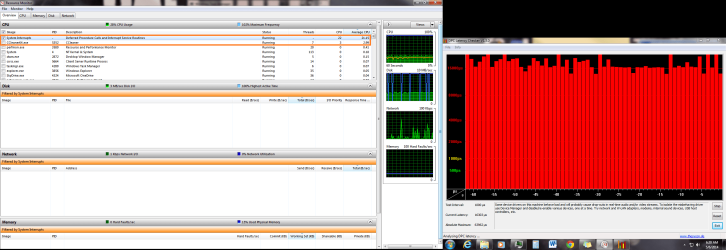
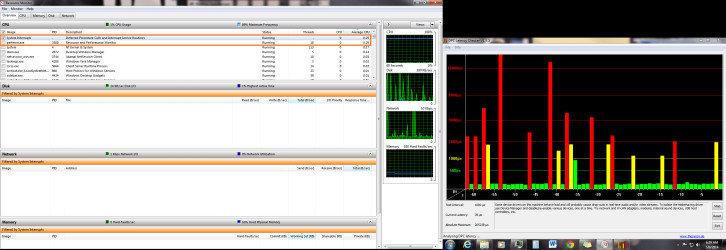
Ok, so I ran the latency checker you suggested and here is what I got. When I First started running it CCleaner was also running, the DPC was through the roof, and the system interrupts percent processor usuage was high. After CCleaner stopped running, the DPC dropped and so did the system interrupts processor usage. Here are screen shots of both cases.

I seems like programs that have a lot of disc usage ( AVG, MSE, CCleaner) are causing the high amount of interrupts. What would cause that?
 

Attachments

  • DPC latency Checker cc running.png
    DPC latency Checker cc running.png
    86.1 KB · Views: 1
  • DPC latency Checker cc not running.png
    DPC latency Checker cc not running.png
    82.2 KB · Views: 1

My Computer

Computer type
PC/Desktop
Computer Manufacturer/Model Number
Dell
OS
Windows 7 Home Premium 64bit
Hmm, unfortunately in your case the latency checker was not very clear as to the causes. I am afraid you will have to follow the advice and eliminate one after the other driver by disabling it in the device manager. But it definitely seems to point to a driver problem.
 

My Computer

Computer Manufacturer/Model Number
HP, Dell, Gateway, Toshiba - 4 laptops and 2 desktops
OS
Vista, Windows7, Mint Mate, Zorin, Windows 8
CPU
from 1.6GHz Duo to i7
Monitor(s) Displays
2x HP w2207
Hard Drives
5x HDD, 7x SSD, 12x Externals
Keyboard
with trackball - no mices
Mouse
Trackball mice
Internet Speed
DSL 6000
I have tried that, however, I could not isolate the cause. Here is what I noticed about the problem ( system interrupts using a high percentage of my processor):

1st) If I restart my computer I will not have any problems with system interrupts using a large percentage of my processor for 6-12 hours. After that it starts causing problems.

2nd) It only occurs when I open a program or there is a program actively running, if the program is idle there are no problems. Example when I run CCleanner, CC well use about 4 percent of my total processor and system interrupt wills use 100% of one core. When CC is done cleaning its processor usage drops below 1% and so does the processor usage of system interrupts.

It leads me to believe there is a driver or hardware problem with my hard drive, motherboard, memory, processor or something like that; these are all things that I cannot disable from device manager. Would that theory make sense?

I have ran a Chkdsk, memory diagnostics, updated my hard drive firmware. I can't update my BIOS because it is fully updated already.
 

My Computer

Computer type
PC/Desktop
Computer Manufacturer/Model Number
Dell
OS
Windows 7 Home Premium 64bit

It has been 36 hours since the problem has occurred so I think it is fixed.

First off my problem (high CPU usage from System interrupts) occurred only when there was a high amount of disc usage, such as when copying files, opening a program or running a program that accesses the disk a lot when running, like a virus scan.

Here is what I did, though I am not sure exactly which fixed the problem.

I downloaded and ran Auslogics Registry cleaner, Auslogics Disk defragmenter, and Auslogics Registry Defragmenter. When running the Disk defragmenter, I selected the option to move system files to the front of the disc and ran the defrag and optimizer, as opposed to solely the defrag.

Then I ran Chkdsk using the following Administrator command prompt command: Chkdsk /f /r :C

After words, I downloaded Seatools from Seagate, and ran the Fix All long option on my hard drive.
 

My Computer

Computer type
PC/Desktop
Computer Manufacturer/Model Number
Dell
OS
Windows 7 Home Premium 64bit
Back
Top