Solved system memory question

iknowjohnny

New member
Power User
VIP
Local time
10:49 AM
Messages
237
I have 4 memory slots on my gigabyte P55A-UD3 board with 4 Gskill 2 GB memory strips. Can i replace 2 of them with 4 GB or do all 4 have to be the same size? And if i can, how do i know which slots? Are they 1-2-3-4 left to right and u would replace either 1 and 2 or 3 and 4, or are the sets alternating so you would replace 1 and 3 or 2 and 4? Also, what specs do i have to follow in the pic below of my ram? Just DDR3 and 1600? Also, does brand matter? Thanks.


QOY0FuR.jpg
 

My Computer

OS
windows 7 professional
iknowjohnny

YES! you can install a 2gb and 4gb RAM chip together. As long as the frequency is the same there isn't going to be any issues. However, if you add 2gb 1066 and 4gb 1600 the system will read the 2gb and 4gb has 1066

The GigaByte GA-P55A-UD3 uses the Intel LGA 1156/Socket H CPU socket. It uses the DDR3 memory type, with maximum speeds of up to 1600 MHz, and 4 DDR3 slots allowing for a maximum total of 16 GB RAM.

Usually RAM is replaced in matched pairs
Crucial has a tool that will scan your system and recommend the correct ram.
You don't have to use Crucial, just note the compatible ram
Crucial Advisor tool
 

My Computer

Computer type
PC/Desktop
Computer Manufacturer/Model Number
HP Desktop & Compaq Laptop
OS
Win 10 x64, Linux Lite, Win 7 x64, BlackArch, & Kali
Hard Drives
Samsung 850 Pro 256Gb,
Hitachi HDD 1Tb,
Crucial MX SSD 250Gb
Segate 3Tb USB 3.0 Ext. Backup HDD
Internet Speed
150Mbps dn, 20Mbps up
Antivirus
Avast Free, Malwarebytes Anti-Exploit & Anti-Ransomware
Browser
Firefox, Chrome, Opera, & VPN
I have 4 memory slots on my gigabyte P55A-UD3 board with 4 Gskill 2 GB memory strips. Can i replace 2 of them with 4 GB or do all 4 have to be the same size? And if i can, how do i know which slots?
Your mobo takes dual-channel memory. That means the memory must be installed in pairs. The two DIMMs in each pair must match, but the two pairs need not match each other.

In dual-channel mobos the pairs are usually differentiated by contrasting colors of the DIMM sockets or of the retaining clips on the ends of the slots. From pictures, it looks like the your mobo uses blue and white DIMM sockets. The two blue sockets will be one pair, and the white sockets will be the other pair.

Yes, the specs you want are DDR3 (synonymous with PC3) and speed 1600 (same as 12800, referenced another way).

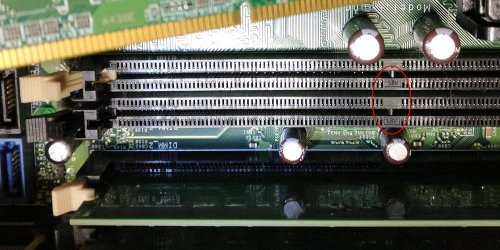
I, too, am a fan of Crucial memory. However, in this case the Crucial website indicates the GA-P55A-UD3 takes low-voltage memory (1.35V), whereas the GA-P55A-UD3 spec sheet seems to specify 1.5V memory. The spec sheet seems to be consistent with the memory in your photo, so I'd stick with 1.5V. (Hint: take a close look at your DIMM slots to see if they might indicate the voltage rating on them.)
 

Attachments

  • dimm-socket-voltage.jpg
    dimm-socket-voltage.jpg
    140.7 KB · Views: 0

My Computer

Computer type
PC/Desktop
Computer Manufacturer/Model Number
Dell Optiplex 7050
OS
Windows 7/8.1/10 multiboot
CPU
Intel Core i7-7700
Motherboard
Dell, Intel Q270 chipset
Memory
48GB (2x16GB Crucial DDR4-3200 + 2x8GB Hynix DDR4-2400)
Graphics Card(s)
Intel HD630 + AMD Radeon R7 450 PCIe
Monitor(s) Displays
Asus VC279 (27")
Screen Resolution
1920x1080
Hard Drives
Toshiba M.2 NVMe (256GB),
Samsung 960 Evo (500GB),
WD Red Plus 80EFBX (8TB)

My Computer

Computer type
PC/Desktop
Computer Manufacturer/Model Number
HP Desktop & Compaq Laptop
OS
Win 10 x64, Linux Lite, Win 7 x64, BlackArch, & Kali
Hard Drives
Samsung 850 Pro 256Gb,
Hitachi HDD 1Tb,
Crucial MX SSD 250Gb
Segate 3Tb USB 3.0 Ext. Backup HDD
Internet Speed
150Mbps dn, 20Mbps up
Antivirus
Avast Free, Malwarebytes Anti-Exploit & Anti-Ransomware
Browser
Firefox, Chrome, Opera, & VPN
Thanks all, good stuff and helps a lot. Thank you.
 

My Computer

OS
windows 7 professional
If your computer currently has a 2 GB DDR3-1600, 1.5V, CL=9, Unbuffered, Non-ECC module (according to your image) in all 4 DIMM slots, why don't you replace all of them with identical 4 GB modules?

Besides not having to worry about which 2 GB modules and 4 GB modules goes in which DIMM slots, your computer will have 16 GB of RAM instead of 12 GB.
 

My Computer

Computer type
PC/Desktop
Computer Manufacturer/Model Number
Dell OptiPlex 9020
OS
Windows 7 Professional SP1 64-bit
CPU
Intel Core i7-4790 3.60 GHz
Memory
32 GB DDR3-1600 MHz
Graphics Card(s)
Integrated Intel HD Graphics 4600
Monitor(s) Displays
Viewsonic 32" LCD
Hard Drives
Kingston SATA 3 240 GB SSD
Internet Speed
Spectrum Internet 1000 Mbps
I can barely afford to eat these days.
 

My Computer

OS
windows 7 professional
iknowjohnny

I had to take out a loan to pay attention! LOL
 

My Computer

Computer type
PC/Desktop
Computer Manufacturer/Model Number
HP Desktop & Compaq Laptop
OS
Win 10 x64, Linux Lite, Win 7 x64, BlackArch, & Kali
Hard Drives
Samsung 850 Pro 256Gb,
Hitachi HDD 1Tb,
Crucial MX SSD 250Gb
Segate 3Tb USB 3.0 Ext. Backup HDD
Internet Speed
150Mbps dn, 20Mbps up
Antivirus
Avast Free, Malwarebytes Anti-Exploit & Anti-Ransomware
Browser
Firefox, Chrome, Opera, & VPN
Back
Top