Solved System Not Seeing My External Drives ?

FredM8

New member
Member
Local time
7:12 AM
Messages
89
Location
London - UK
I am having problems with windows not seeing my external drives. This is a problem that seems to come and go for no reason that I can work out. Sometimes the drive will not show in MyComputer, but will show in the disc manager. If I play around with the drive letters then it will show in MyComputer again. If I shut down and restart the problem is back once more. But like I say, this problem seems to come and go.
 

My Computer My Computer

Computer type
PC/Desktop
Computer Manufacturer/Model Number
Home Build
OS
Windows 7 Pro 64 Bit
CPU
i7 4790K
Motherboard
ASUS Z97 WS
Memory
32 GB DDR3 2400 mhz
Graphics Card(s)
EVGA GeForce GTX 960 SuperSC ACX 2.0+ 4 GB, GDDR5
Monitor(s) Displays
iiyama ProLite E2607WSD 26in wide, ProLite E1906s 19in 5.4
Screen Resolution
Main 1920 X 1200, Other 1280 X 1024
Hard Drives
Main : 256 GB Samsung 850 PRO SSD | Other HDD's are normal SATA III- Seagate Barracuda
PSU
EVGA G2 850 W
Case
Microtower uATX
Cooling
Noctua NH-U9S Dual Fan + 2 X 120 mm NF-12 Fans
Keyboard
Windows
Mouse
Windows
Internet Speed
Dreadful, but getting better when 4g Dongles arrive
Antivirus
Windows Security Essentials
Browser
Chrome, Firefox, IE11, AVANT
Other Info
Speakers: M-AUDIO AV40 | WebCam: Logitech C920 |
External storage via eSATA X 2 | One port dedicated to file storage, and the other one dedicated to "Acronis Clone" as backup
Try this:

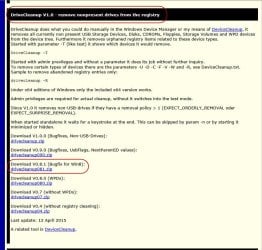
Download v 0.8.1 of the drivecleanup.zip from Drive Tools for Windows.

Unzip it to a folder, say drivecleanup.

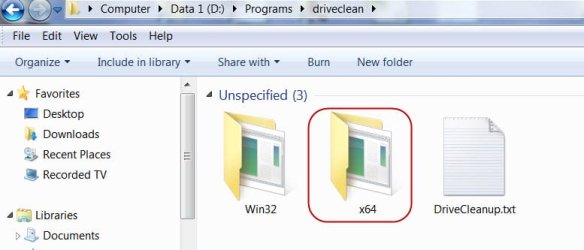
You will have two folders Win32 and x64 each containing DriveCleanup.exe for 32 bit and 64 bit respectively.

Remove all USB storage devices from your system (except your Keyboard and mouse) and reboot.

Right click on the DriveCleanup.exe and run as administrator. (Use the *.exe file appropriate for your bit version of Windows.).

After the clean up act, reboot and check whether your drives are recognised now.

( When you plug in your USB storage devices after this cleanup, these will be installed afresh. What you have done is to remove all non-present devices and drive letters associated with them and start with a clean slate. Hopefully that should resolve the problem.)
 

My Computer My Computer

OS
Windows 7 Home Premium 32 bit
Thanks for the info, but i was unable to find DriveCleanup.exe but I did find DeviceCleanup and ran that.
The problem remains in MyComputer but the drives are all visible in Computer Management. I suppose that perhaps I should have pointed out that my external storage is via eSATA. Two X normal ports and I X port multiplier for my dual dock/cloner. In Computer Management I sometimes have to assign a drive letter to the drive so that it can be found. Something has happened to stop this happening automatically.
 

My Computer My Computer

Computer type
PC/Desktop
Computer Manufacturer/Model Number
Home Build
OS
Windows 7 Pro 64 Bit
CPU
i7 4790K
Motherboard
ASUS Z97 WS
Memory
32 GB DDR3 2400 mhz
Graphics Card(s)
EVGA GeForce GTX 960 SuperSC ACX 2.0+ 4 GB, GDDR5
Monitor(s) Displays
iiyama ProLite E2607WSD 26in wide, ProLite E1906s 19in 5.4
Screen Resolution
Main 1920 X 1200, Other 1280 X 1024
Hard Drives
Main : 256 GB Samsung 850 PRO SSD | Other HDD's are normal SATA III- Seagate Barracuda
PSU
EVGA G2 850 W
Case
Microtower uATX
Cooling
Noctua NH-U9S Dual Fan + 2 X 120 mm NF-12 Fans
Keyboard
Windows
Mouse
Windows
Internet Speed
Dreadful, but getting better when 4g Dongles arrive
Antivirus
Windows Security Essentials
Browser
Chrome, Firefox, IE11, AVANT
Other Info
Speakers: M-AUDIO AV40 | WebCam: Logitech C920 |
External storage via eSATA X 2 | One port dedicated to file storage, and the other one dedicated to "Acronis Clone" as backup

My Computer My Computer

Computer type
PC/Desktop
Computer Manufacturer/Model Number
Custom Build
OS
Windows 7 Ultimate x64 SP1
CPU
AMD Phenom 2 1090T
Motherboard
Gigabyte GA-890FXA-UD5
Memory
2x8GB Kingston HyperX Fury Black 1600Mhz Unganged
Graphics Card(s)
MSI GTX 970 Gaming 4G
Sound Card
Realtek On-Board HD 7.1 Audio / Logitech G35
Monitor(s) Displays
3xAcer GD245HQ
Screen Resolution
1920x1080
Hard Drives
Samsung 850 Pro 512GB SSD - OS /
WD Caviar Black SATA 3 - 1 TBx2 - Dynamic RAID 0 /
WD Caviar Green SATA 2 - 640GBx2 - Dynamic RAID 0 /
WD Caviar Green SATA 2 - 640GB - Internal Backup /
Seagate Barracude SATA 3 - 3TB - External Backup/ Sync
PSU
HighPower 1000W
Case
Cooler Master HAF 932
Cooling
Noctua NH-D14
Keyboard
Logitech G19
Mouse
Logitech G500
Internet Speed
100/4 Mbit Cable (100GB quota)
Antivirus
ZoneAlarm Extreme Security / MBAM Pro / MBAE Free / SAS Free
Browser
IE 11 - Firefox - Chrome
Other Info
Logitech F710/ G27/ G940/ Z5500 // TrackIR 5 // Nvidia 3D Surround Vision
......but i was unable to find DriveCleanup.exe but I did find DeviceCleanup .

Device cleanup??????? I don't find any by that name . You will find Drive Cleanup somewhere in the middle as you scroll down that page.

18-06-2015 07-33-30.jpg

Since your system is 64 bit as I see it in your posts, you will use the DriveCleanup.exe inside the x64 folder.

18-06-2015 08-02-03.jpg

Safely remove all USB devices (except mouse/keyboard) from your system.

Right click on the 64bit DriveCleanup.exe and run as administrator.

You will see a DOS Window showing all the non-present devices removed. Post a screenshot to confirm that you have done everything right.

Press any key to close the Window when finished and reboot your PC.

Now connect one external drive. Does it show that Windows is installing the necessary drivers and then ready to use?

Now tell us whether you see the drive with a drive letter.
 

My Computer My Computer

OS
Windows 7 Home Premium 32 bit
Continuing, If all your drives are seen in Windows Disk Management and if you need to assign a drive letter everytime to access the drive then try this:

Start > All Programs > Accessories > Right click on Command Prompt and Run as administrator.
Then
diskpart [ENTER]
Against the DISKPART prompt
automount [ENTER]
Does it say "automatic mounting of new volumes disabled" ? Then
automount enable [ENTER]
"automatic mounting of new volumes enabled"

Close Command Window.

Problem resolved?
 

My Computer My Computer

OS
Windows 7 Home Premium 32 bit
Many thanks Jumanji, and you too GokAy.

This has solved the problem !

Start > All Programs > Accessories > Right click on Command Prompt and Run as administrator.
Then
diskpart [ENTER]
Against the DISKPART prompt
automount [ENTER]
Does it say "automatic mounting of new volumes disabled" ? Then
automount enable [ENTER]
"automatic mounting of new volumes enabled"
 
Last edited:

My Computer My Computer

Computer type
PC/Desktop
Computer Manufacturer/Model Number
Home Build
OS
Windows 7 Pro 64 Bit
CPU
i7 4790K
Motherboard
ASUS Z97 WS
Memory
32 GB DDR3 2400 mhz
Graphics Card(s)
EVGA GeForce GTX 960 SuperSC ACX 2.0+ 4 GB, GDDR5
Monitor(s) Displays
iiyama ProLite E2607WSD 26in wide, ProLite E1906s 19in 5.4
Screen Resolution
Main 1920 X 1200, Other 1280 X 1024
Hard Drives
Main : 256 GB Samsung 850 PRO SSD | Other HDD's are normal SATA III- Seagate Barracuda
PSU
EVGA G2 850 W
Case
Microtower uATX
Cooling
Noctua NH-U9S Dual Fan + 2 X 120 mm NF-12 Fans
Keyboard
Windows
Mouse
Windows
Internet Speed
Dreadful, but getting better when 4g Dongles arrive
Antivirus
Windows Security Essentials
Browser
Chrome, Firefox, IE11, AVANT
Other Info
Speakers: M-AUDIO AV40 | WebCam: Logitech C920 |
External storage via eSATA X 2 | One port dedicated to file storage, and the other one dedicated to "Acronis Clone" as backup
I haven't done anything :) Kudos to Jumanji :cool:
 

My Computer My Computer

Computer type
PC/Desktop
Computer Manufacturer/Model Number
Custom Build
OS
Windows 7 Ultimate x64 SP1
CPU
AMD Phenom 2 1090T
Motherboard
Gigabyte GA-890FXA-UD5
Memory
2x8GB Kingston HyperX Fury Black 1600Mhz Unganged
Graphics Card(s)
MSI GTX 970 Gaming 4G
Sound Card
Realtek On-Board HD 7.1 Audio / Logitech G35
Monitor(s) Displays
3xAcer GD245HQ
Screen Resolution
1920x1080
Hard Drives
Samsung 850 Pro 512GB SSD - OS /
WD Caviar Black SATA 3 - 1 TBx2 - Dynamic RAID 0 /
WD Caviar Green SATA 2 - 640GBx2 - Dynamic RAID 0 /
WD Caviar Green SATA 2 - 640GB - Internal Backup /
Seagate Barracude SATA 3 - 3TB - External Backup/ Sync
PSU
HighPower 1000W
Case
Cooler Master HAF 932
Cooling
Noctua NH-D14
Keyboard
Logitech G19
Mouse
Logitech G500
Internet Speed
100/4 Mbit Cable (100GB quota)
Antivirus
ZoneAlarm Extreme Security / MBAM Pro / MBAE Free / SAS Free
Browser
IE 11 - Firefox - Chrome
Other Info
Logitech F710/ G27/ G940/ Z5500 // TrackIR 5 // Nvidia 3D Surround Vision
Glad your problem is resolved.

GokAy is always superactive kicking in with useful suggestions all around. He is already a Seven Guru with only time standing in the way to that badge. Sooner than later I am gonna retire from SevenForums (I am just counting days) leaving it to GokAy. He is going to be an able successor. :)
 

My Computer My Computer

OS
Windows 7 Home Premium 32 bit
Back
Top