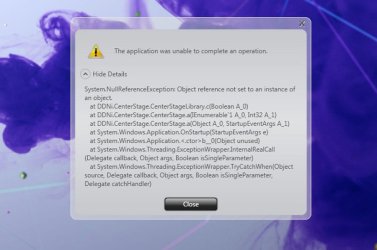
In the taskbar is there a logo, or a name of the application that this error is occuring? What about in task manager?
SOrry but I know very little, have you tried checking your Event Log ? rb: > type in "Event Viewer" > click on custom view, then Administration EVents.
Also if you can please download CCleaner, and go to Tools> Startup> Save to text file.
We can go over some entries that are not needed and entries of programs that you have already deleted yet are still there.
Another option which i suggest is system restore
My Computer
Computer type
PC/Desktop
Computer Manufacturer/Model Number
Gateway / Slight Modifications
OS
Windows 8 64 bit PRO
CPU
AMD Phenom X4 9100e
Motherboard
Gateway RS780
Memory
2GB X2 DDR2
Graphics Card(s)
Sapphire HD 6850
Sound Card
Integrated
Monitor(s) Displays
Gateway 19" + Dell 19"
Screen Resolution
1440X900 sometimes 2880 by 900
Hard Drives
WD 80GB
WD 640GB
WD 1,000GB
PSU
Antec BP 550watts
Case
Antec 300
Cooling
Stock Cooling
Keyboard
Saitek Eclipse II
Mouse
Gigabyte GM-M6800
Internet Speed
D: 30Mbps U:4Mbps
Antivirus
Avast version 8
Browser
Internet Explorer ver 10 64 bit
Other Info
This is my work computer.
I have another laptop running Windows 7 64 bit.
Another PC running Windows 8 64 bit pro.
Total of 3
Clease do a system restore to an earlier point, after that is complete use Norton uninstaller tool, hopefully it will remove it properly. If it does Internet explorer should work properly afterwards.




 rb: > type in "Event Viewer" > click on custom view, then Administration EVents.

