System Protection and recovering previous restore points

Win7obfuscation

New member
Local time
1:32 PM
Messages
16
Hi all. Could someone help me with the following
sysprotect1.PNG

I am trying to go back to an earlier setting.
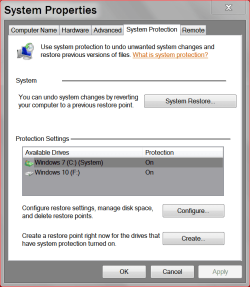
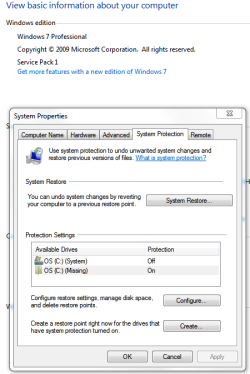
I looked at a number of threads and got my way to the system/system Protection/system property panel as seen above.

Now I see 2 available drives. This machine came with Win 7 Pro already installed to a 1TB WD blue drive. I shortly migrated to an SSD 840 EVO 1TB using their migration software. I suspect that the 2 available drives listed are the existing drive (henseforth designated as SSD) and the "original" drive (henseforth designated as WD HD).
sysprotect2.PNG

The first red circled drive I note does not have protection enabled! Whereas the one below it has! Why are there 2 when I only have 1 hard disc, the SSD. Is this related to migration? What is the second listed drive? It's protection is ON! However it has "missing" instead of system. Am I to assume that the OS is missing and I am now using the "new" drive ... the SSD and that is where the OS now resides? And why is protedction OFF?
As usual thanks in advance. So far Many have been a lot of help
 

My Computer My Computer

At a glance

Win 7 Pro with Service Pack 1i7-377016 GBAMD Radeon 7700
Computer type
PC/Desktop
Computer Manufacturer/Model Number
Hp Pro 6300
OS
Win 7 Pro with Service Pack 1
CPU
i7-3770
Memory
16 GB
Graphics Card(s)
AMD Radeon 7700
Hard Drives
Samsung 840 EVO 1TB
Antivirus
AVG
Browser
chrome
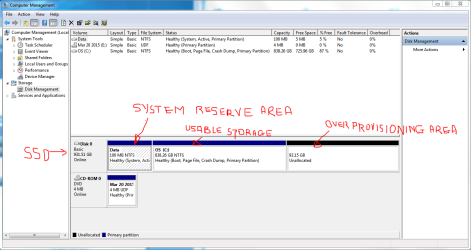
here is the disk management panel
sysprotect3.PNG
 

My Computer My Computer

At a glance

Win 7 Pro with Service Pack 1i7-377016 GBAMD Radeon 7700
Computer type
PC/Desktop
Computer Manufacturer/Model Number
Hp Pro 6300
OS
Win 7 Pro with Service Pack 1
CPU
i7-3770
Memory
16 GB
Graphics Card(s)
AMD Radeon 7700
Hard Drives
Samsung 840 EVO 1TB
Antivirus
AVG
Browser
chrome
You are clearly using the SSD since it is the only one connected.

I'd assume this can all be traced back to migration with Samsung Magician or whatever you used.

Did you ever attempt to enlarge the too-small "data" partition? I'm not sure how it being so crowded might affect System Restore, if at all.

I don't use a so-called "System Reserved" partition and am not sure if it should be visible, along with C, in the System Restore configuration window. All I see in mine is a single entry for each of my 3 hard drives: C, D, and E.

The only thing clearly wrong with the Disk Management picture is that the System Reserved partition is named "data".

I assume you can't simply rename it to System Reserved and even if you did you still have the confusion in System Restore?

Have you attempted to turn off System Restore on all drives, delete all possible restore points, shut down, restart, and re-evaluate?

Have you run sfc /scannow from a command prompt to check the integrity of system files?

I suspect it's fixable if you had a repair disc, which I guess you don't?

You needn't have used Samsung Magician for migration. You could have used an ordinary imaging tool.

Is your "old" HDD still around in working order, with a working C installation, just as it was the day before you bought the SSD?
 

My Computer My Computer

At a glance

Windows 7 Home Premium SP1, 64-bitIntel Skylake i5-6600K, not overclocked8 GB HyperX DDR4-2666 (2 x 4 GB)none; graphics are integrated on CPU
Computer type
PC/Desktop
Computer Manufacturer/Model Number
Ignatz Special; 4 speed manual gearbox; factory air conditioning; one of one
OS
Windows 7 Home Premium SP1, 64-bit
CPU
Intel Skylake i5-6600K, not overclocked
Motherboard
AsRock Z170M Extreme 4, micro ATX
Memory
8 GB HyperX DDR4-2666 (2 x 4 GB)
Graphics Card(s)
none; graphics are integrated on CPU
Sound Card
onboard: Realtek ALC1150; external: USB Behringer UF0-202
Monitor(s) Displays
Dell S2340M 23 inch IPS
Screen Resolution
1600 x 900
Hard Drives
System: Crucial MX100 series SSD, 128 GB;
Data: Samsung Spinpoint 103SJ, 1 TB;
Backup: WD Caviar Green WD30EZRX-00D8PB0, 3 TB
PSU
Rosewill SilentNight 500 watt fanless, semi-modular
Case
Antec Solo II
Cooling
Noctua NH-U12S; Noctua F12 intake, Noctua S12A exhaust
Keyboard
Microsoft 200 6JH-00001 USB
Mouse
Dell or Microsoft optical wired; USB
Antivirus
Microsoft Security Essentials and Malwarebytes Premium
Browser
Pale Moon
Other Info
All fans PWM; speeds at idle: CPU circa 500 rpm; intake circa 600 rpm; exhaust circa 600 rpm; CPU temps 27 idle and 47 C load in a warm room (27 C/81 F) when running Intel Extreme Tuning Utility stress test.
I use a System Reserve and and a separate C drive.
When I go to protection all it indicates is Windows 7 C systems (ON) and my restore points work quite well.
The reason mine indicates Windows 7 is because I gave that drive that name. The Windows 10 doesn't show systems I believe is because its still in the testing stages.

I would recommend turning on your OS C systems.

The missing OS C is probably the old hard drive that is no longer there.
Windows 7 knows it was there at one time and now indicates it no longer see it.

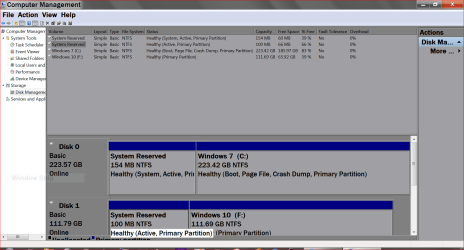
System Properties Restore points..PNG

This also might be helpful.

New Disk Management.PNG
 

My Computer My Computer

At a glance

Windows 10 Pro. 64/ version 1709 Windows 7 Pr...Intel i7-6800K @ 4.3Corsair Platinum 16 gig @2400EVGA GTX 1070 OC
Computer type
PC/Desktop
Computer Manufacturer/Model Number
Home made Desktop
OS
Windows 10 Pro. 64/ version 1709 Windows 7 Pro/64
CPU
Intel i7-6800K @ 4.3
Motherboard
ASUS X-99 Deluxe II
Memory
Corsair Platinum 16 gig @2400
Graphics Card(s)
EVGA GTX 1070 OC
Monitor(s) Displays
Asus 27" LED LCD/VE278Q
Screen Resolution
1920-1080 or 1280-720 HDMI
Hard Drives
INTEL SSD 730-240 Gb Sata 3.0/
PSU
EVGA Platium 1200W
Case
Phanteks Luxe Tempered Glass 8 fans/ one radiator
Cooling
XSPC/ Water Cooled CPU
Keyboard
Das 4 Professional
Mouse
Logitech M705/MX Anywhere 2-S
Internet Speed
100 mbits
Antivirus
Microsoft Security Essentials/ Malwarebytes Premium 3.0/ SAS
Browser
I.E. 11 default/Firefox/ ISP Time Warner Cable/Spectrum
Other Info
LG BluRay Burner/
Sound system-KLipsch-THX/
Icy Dock ssd Hot Swap bays.
Thanks ignatzatonic and Layback Bear.
ignatzatonic.

I suspect that the pickle I am in now is from the migration.

I was going to do this but first I wanted a way to reboot the machine if I got stuck then I tried to make a recovery disc.. then I would not let me make it.

I did not install the OS .. if I did I would not have opted for the System Reserve area. And from what I read this MAY be the reason why I can't do a backup. seems that in newer versions of windows (8) this area is larger.

The DATA designation is a mystery. I am going to the Samsung forums to sort this out. suspect it was their migration tool.

REPAIR disc. THAT is the goal at present before I invoke enlarging the system reserve area... from what I read.. if I go down that road... I need a way to ro boot the machine.

Yes the old HD is still around and I could put it back in.. but haven't done this.


Layback Bear said
The missing OS C is probably the old hard drive that is no longer there.
Windows 7 knows it was there at one time and now indicates it no longer see it.

I agree... I will turn it back on. will see if that makes any difference
 

My Computer My Computer

At a glance

Win 7 Pro with Service Pack 1i7-377016 GBAMD Radeon 7700
Computer type
PC/Desktop
Computer Manufacturer/Model Number
Hp Pro 6300
OS
Win 7 Pro with Service Pack 1
CPU
i7-3770
Memory
16 GB
Graphics Card(s)
AMD Radeon 7700
Hard Drives
Samsung 840 EVO 1TB
Antivirus
AVG
Browser
chrome
Yes the old HD is still around and I could put it back in.. but haven't done this.

Assuming you get no satisfaction from Samsung forums, my first thought would be to put the old HD back in and either clone or image it to the SSD with a sane tool, avoiding Samsung Magician like the plague.

After first wiping the SSD clean.

I'm assuming the partition scheme on that old HDD is sound and standard with no issues.

Have you rejected the idea of copying the necessary boot files from your "data" partition to C with EasyBCD?
 

My Computer My Computer

At a glance

Windows 7 Home Premium SP1, 64-bitIntel Skylake i5-6600K, not overclocked8 GB HyperX DDR4-2666 (2 x 4 GB)none; graphics are integrated on CPU
Computer type
PC/Desktop
Computer Manufacturer/Model Number
Ignatz Special; 4 speed manual gearbox; factory air conditioning; one of one
OS
Windows 7 Home Premium SP1, 64-bit
CPU
Intel Skylake i5-6600K, not overclocked
Motherboard
AsRock Z170M Extreme 4, micro ATX
Memory
8 GB HyperX DDR4-2666 (2 x 4 GB)
Graphics Card(s)
none; graphics are integrated on CPU
Sound Card
onboard: Realtek ALC1150; external: USB Behringer UF0-202
Monitor(s) Displays
Dell S2340M 23 inch IPS
Screen Resolution
1600 x 900
Hard Drives
System: Crucial MX100 series SSD, 128 GB;
Data: Samsung Spinpoint 103SJ, 1 TB;
Backup: WD Caviar Green WD30EZRX-00D8PB0, 3 TB
PSU
Rosewill SilentNight 500 watt fanless, semi-modular
Case
Antec Solo II
Cooling
Noctua NH-U12S; Noctua F12 intake, Noctua S12A exhaust
Keyboard
Microsoft 200 6JH-00001 USB
Mouse
Dell or Microsoft optical wired; USB
Antivirus
Microsoft Security Essentials and Malwarebytes Premium
Browser
Pale Moon
Other Info
All fans PWM; speeds at idle: CPU circa 500 rpm; intake circa 600 rpm; exhaust circa 600 rpm; CPU temps 27 idle and 47 C load in a warm room (27 C/81 F) when running Intel Extreme Tuning Utility stress test.
Have you rejected the idea of copying the necessary boot files from your "data" partition to C with EasyBCD?

I'm a little paranoid. I need a bootable win7 disc. Still working on this.
 

My Computer My Computer

At a glance

Win 7 Pro with Service Pack 1i7-377016 GBAMD Radeon 7700
Computer type
PC/Desktop
Computer Manufacturer/Model Number
Hp Pro 6300
OS
Win 7 Pro with Service Pack 1
CPU
i7-3770
Memory
16 GB
Graphics Card(s)
AMD Radeon 7700
Hard Drives
Samsung 840 EVO 1TB
Antivirus
AVG
Browser
chrome

My Computer My Computer

At a glance

Vista, Windows7, Mint Mate, Zorin, Windows 8from 1.6GHz Duo to i7
Computer Manufacturer/Model Number
HP, Dell, Gateway, Toshiba - 4 laptops and 2 desktops
OS
Vista, Windows7, Mint Mate, Zorin, Windows 8
CPU
from 1.6GHz Duo to i7
Monitor(s) Displays
2x HP w2207
Hard Drives
5x HDD, 7x SSD, 12x Externals
Keyboard
with trackball - no mices
Mouse
Trackball mice
Internet Speed
DSL 6000
Back
Top