All previous Restore Points are gone?

Nio

New member
Local time
4:54 AM
Messages
27
Location
ATM, on Earth.
Hi,
Long story short, a few days ago, I was trying to install Microsoft Visual Studio 2019. When the installing bar was full, the installer closes itself without any notice or anything and turns out VS 2019 was not installed AT ALL. Then I rebooted and try to install it again but end up with the same result. I gave up that night after all that long wait.

After starting my laptop yesterday, I noticed that my favourite 'Snipping Tool' and a few other useful accessories are gone too. Upon using system restore, all the previous restore points before my attempt to install VS 2019 are gone as well.
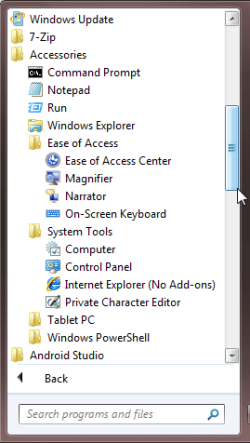
explorer_cIsfoFYEKM.png
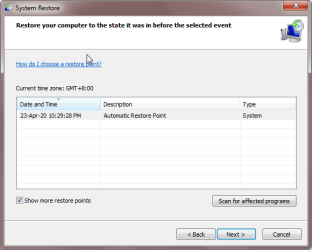
rstrui_eA5QAiXFTS.png
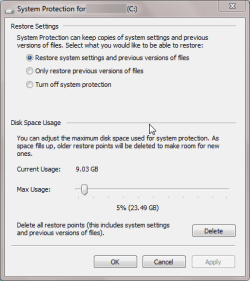
SystemPropertiesProtection_XT5A8t7NxF.png

Now I can't restore back my laptop to the point before I tried to install VS 2019. Please assist me to get my restore point back. :cry:


PS - Forgive my bad English.


My Computer

Computer type
Laptop
Computer Manufacturer/Model Number
Lenovo V470c
OS
Windows 7 Professional x64
CPU
Intel(R) Core(TM) i5-2430M CPU @ 2.40GHz
Graphics Card(s)
NVIDIA GeForce
Internet Speed
Good enough to play FPS games.
Other Info
Last update Windows Update made was from 2013.
Hello, in the System Restore window, click on "Scan for affected programs", and if your accessories are listed in the results, then you will be good to go in choosing that restore point (23-Apr-20).

It could be, your computer has not been allocated enough disk space, to store older restore points.
 

My Computer

Computer type
PC/Desktop
OS
Windows 7 x64, Vista x64, 8.1 smartphone
CPU
Intel E8400 65W 64-bit
Motherboard
Gigabyte EP45-UD3LR
Memory
DDR2 2 x 2GB, 1GB x 2
Graphics Card(s)
XFX Radeon HD5750
Sound Card
AMD High Definition Audio; Realtek High Definition Audio
Monitor(s) Displays
iiyama prolite X2377HDS
Screen Resolution
1920 x 1080
Hard Drives
500GB 7200 rpm Seagate ST3500413AS 16MB, 500GB 5400 rpm Toshiba MQ02ABF050H 32MB, 200GB 7200 rpm Seagate ST3200820AS 8MB, 2TB 7200 rpm Western Digital WD20EZRX 64MB
PSU
Enermax Liberty Modular
Case
Antec P193 Midi Tower
Keyboard
Mionix ZIBAL 60
Mouse
Razer USB 2.0 Diamondback Mouse or Huion Graphics Tablet
Browser
Internet Explorer, Lunascape, Firefox, Opera, Avast Safezone
Hello, in the System Restore window, click on "Scan for affected programs", and if your accessories are listed in the results, then you will be good to go in choosing that restore point (23-Apr-20).

It could be, your computer has not been allocated enough disk space, to store older restore points.

Thanks for replying. However, the accessories were not listed for that restore point.

The last time I check (which was last week) System Restore, the previous restore points were there until the restore point that you mentioned show up which only use 9.43GB.
So I'm sure that the allocated usage that was set previously (23.49GB) was enough(?) for several restore points. :confused:
 
Last edited:

My Computer

Computer type
Laptop
Computer Manufacturer/Model Number
Lenovo V470c
OS
Windows 7 Professional x64
CPU
Intel(R) Core(TM) i5-2430M CPU @ 2.40GHz
Graphics Card(s)
NVIDIA GeForce
Internet Speed
Good enough to play FPS games.
Other Info
Last update Windows Update made was from 2013.
Do you use a Disk Cleanup Utility? Such a utility could delete restore points, in order to free up disk space.

I have 40GB of System Protection (Restore Points), because disk space is cheap, restore points are expensive.
 

My Computer

Computer type
PC/Desktop
OS
Windows 7 x64, Vista x64, 8.1 smartphone
CPU
Intel E8400 65W 64-bit
Motherboard
Gigabyte EP45-UD3LR
Memory
DDR2 2 x 2GB, 1GB x 2
Graphics Card(s)
XFX Radeon HD5750
Sound Card
AMD High Definition Audio; Realtek High Definition Audio
Monitor(s) Displays
iiyama prolite X2377HDS
Screen Resolution
1920 x 1080
Hard Drives
500GB 7200 rpm Seagate ST3500413AS 16MB, 500GB 5400 rpm Toshiba MQ02ABF050H 32MB, 200GB 7200 rpm Seagate ST3200820AS 8MB, 2TB 7200 rpm Western Digital WD20EZRX 64MB
PSU
Enermax Liberty Modular
Case
Antec P193 Midi Tower
Keyboard
Mionix ZIBAL 60
Mouse
Razer USB 2.0 Diamondback Mouse or Huion Graphics Tablet
Browser
Internet Explorer, Lunascape, Firefox, Opera, Avast Safezone
Back
Top