Solved System protection tab missing from Control Panel System and Security

trubmij

New member
Local time
8:49 PM
Messages
2
I am running Windows 7 Professional (64 bit).

I have noted that the System protection tab is missing from my Control Panel's System and Security.

I have done some research and find that Registry Key “HKEY_LOCAL_MACHINE\SOFTWARE\Policies\Microsoft\Windows NT\SystemRestore”
is not there.

Further research has revealed that the System Registry key on Windows 7 is often a target of Malware and some Anti-Malware applications which can flag this key as suspect and put it into quarantine. I use MalwareBytes, Free version and have looked in my quarantine records and cannot find any reference to this key.

I use Bullguard Premium Protection for my Antivirus and Firewall and there are no quarantined items in that either,

I have run an “sfc /scannow” and it has not found any errors and running the command "C:\Windows\System32\SystemPropertiesProtection.exe" will allow me to manually run allowing me to create a restore point or restore from a previous restore point but I would like to get the key back into the registry to allow the System Protection tab to run from my Control Panel

Is there a simple way of manually restoring the missing key(s) to get back to "normal" please.

I have done research on this too and find confusing and/or conflicting information.

Thanks and kind regards
trubmij
 

My Computer

Computer type
Laptop
Computer Manufacturer/Model Number
Acer
OS
Windows 7 Professional 64 bit
Antivirus
Bullguard
Browser
Google Chrome
Hi


System protection,(Recovery points), as far as i'm aware has never been shown directly on the Panel.


for Settings Use
accessed via Control panel >> System >>

Restore Use
accessed via Control panel >> Recovery >>

ps most here use Macrium free for back-up


Roy
 

My Computer

Computer type
PC/Desktop
Computer Manufacturer/Model Number
medionl/Aspire 6930G/acer x55a
OS
W7 home premium 32bit/W7HP 64bit/w10 tp insider ring
CPU
E5300 dual core
Motherboard
medion MS7366
Memory
3gb
Graphics Card(s)
Nvidia Geforce 7100 Nforce 630i
Monitor(s) Displays
avixc
Internet Speed
n (isp resticted to 72)
Antivirus
mse/pands
Browser
palemoon
Other Info
Belkin Fd7050 n USB using Railink RT2870 drivers, more upto date
I have done some research and find that Registry Key “HKEY_LOCAL_MACHINE\SOFTWARE\Policies\Microsoft\Windows NT\SystemRestore”
is not there.

I don't have that key, system restore works fine for me.


Type rundll32.exe shell32.dll,Control_RunDLL sysdm.cpl,,4 into run box

Or rt click desktop, select new shortcut and paste in rundll32.exe shell32.dll,Control_RunDLL sysdm.cpl,,4

To make it look pretty, use system32\rstrui.exe as icon
 

My Computers

System One System Two

  • Computer type
    PC/Desktop
    OS
    7 X64
    CPU
    i5 8400
    Motherboard
    gigabyte b365m ds3h
    Memory
    2x8gb 3200mhz
    Hard Drives
    various
    PSU
    pure power 11 400w cm
    Case
    Coolermaster
    Cooling
    cryorig m9i
  • Computer type
    PC/Desktop
    OS
    7x64
    CPU
    g5400
    Motherboard
    ga b365m ds3h
    Memory
    8gb ddr4 2400
    PSU
    xfx pro 450w
Touchwood and SIW2 thanks to you both for your replies and workarounds.

I am convinced that the System protection tab is missing from my Control Panel's System and Security and it used to be there. Maybe it is something that is in Windows 7 "Professional" anyway, its not there now. I note the workarounds and I have also found that selecting Start> Rt click on "Computer"> click on Properties will also give me a System Protection tab that will allow me to Create a restore point or Restore from a previous one.

I also note that recently the automatic creation of restore points that used to happen every 14 days or so does not now happen. Maybe that is linked to the initial problem I raised.

Regards

trubmij
 

My Computer

Computer type
Laptop
Computer Manufacturer/Model Number
Acer
OS
Windows 7 Professional 64 bit
Antivirus
Bullguard
Browser
Google Chrome
Hi,
I am convinced that the System protection tab is missing from my Control Panel's System and Security and it used to be there.

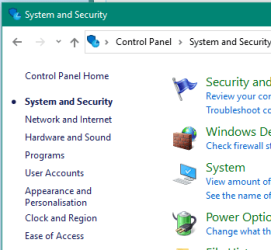
This is Control Panel > System and security:

Device Manager - System and security.PNG

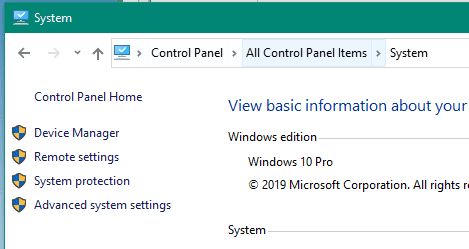
You need to be in Control Panel > All Control Panel Items > System to see the System Protection link. See here:

Control Panel - system.PNG

In Windows Explorer, right-mouse click on Computer and select Properties, then select the System protection link.
 
Last edited:

My Computer

Computer type
PC/Desktop
OS
Windows 7 x64, Vista x64, 8.1 smartphone
CPU
Intel E8400 65W 64-bit
Motherboard
Gigabyte EP45-UD3LR
Memory
DDR2 2 x 2GB, 1GB x 2
Graphics Card(s)
XFX Radeon HD5750
Sound Card
AMD High Definition Audio; Realtek High Definition Audio
Monitor(s) Displays
iiyama prolite X2377HDS
Screen Resolution
1920 x 1080
Hard Drives
500GB 7200 rpm Seagate ST3500413AS 16MB, 500GB 5400 rpm Toshiba MQ02ABF050H 32MB, 200GB 7200 rpm Seagate ST3200820AS 8MB, 2TB 7200 rpm Western Digital WD20EZRX 64MB
PSU
Enermax Liberty Modular
Case
Antec P193 Midi Tower
Keyboard
Mionix ZIBAL 60
Mouse
Razer USB 2.0 Diamondback Mouse or Huion Graphics Tablet
Browser
Internet Explorer, Lunascape, Firefox, Opera, Avast Safezone
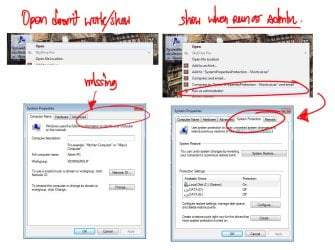
i see what you mean
THIS.jpg
happen to me when install/uninstall or repair Vc++
sometime it happen because some program i update/install are automatic replace them with vc++ x86 not vc++ x64 and my PC cant find .dll file for
after program install this option always gone and i lose option to open all other program as Admin

in my case it mean i cant use Wacom(pen-tablet) driver anymore if i lose ability to open em as admin because OpenGL need permission as admin just like system-protection option
but OpenGL feature cant be open as admin through Wacom or Adobe

---------------------edit------------------
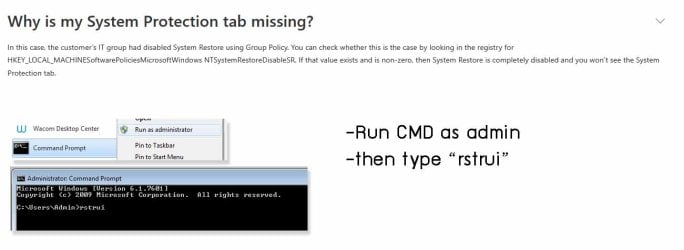
i found solution on other site
this2.jpg

***Full explained
Fixed You Must Enable System Protection on This Drive Win10/8/7!
 
Last edited:

My Computers

System One System Two

  • OS
    W7 x64
  • Computer type
    PC/Desktop
Back
Top