
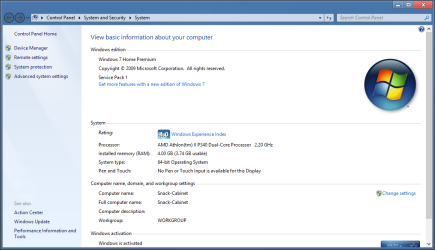
Control Panel\System and Security\System BIOS Version\Model?

SnackCabinet

Banned
Local time
3:24 PM
Messages
139
Location
Indiana
Since I have a clean installation of Windows 7, it no longer shows me my Acer specs in Control Panel\System and Security\System, can I get it back some how? Something to do with my drivers not being signed? Or something?
 

Attachments

  • 1-8-2013 10-22-42 PM.png
    1-8-2013 10-22-42 PM.png
    41.2 KB · Views: 27

My Computer

Computer Manufacturer/Model Number
Acer / PEW76(B)
OS
Microsoft Windows 7 Home Premium 64-bit SP1
CPU
AMD K10 (45nm Technology)
Motherboard
Acer JE51_DN (Socket S1G4)
Memory
4.00 GB Dual-Channel DDR3 @ 536MHz (7-7-7-20)
Graphics Card(s)
ATI Mobility Radeon HD 4200 Series (Acer Incorporated [ALI])
Sound Card
AMD High Definition Audio Device
Monitor(s) Displays
Generic PnP Monitor on ATI Mobility Radeon HD 4200 Series
Screen Resolution
Dual Monitor: 1366x768 / 1440 x 900
Hard Drives
298GB TOSHIBA MK3275GSX SATA Disk Device (SATA)
PSU
6-Cell Li-ion Battery
A clean install wipes out any manufacturer installed software that contains your computer information. (The same thing happened when I did a clean install on my Sony Vaio.) Unless you still have a hidden recovery partition on the hard drive (or recovery disks) that can return your Acer to original factory specs, I'm not aware of anything that can get that data to show up on the System dialog box. However, there are free 3rd party utilities like Speccy that can provide all the Acer data and then some, like real time monitoring of temperatures, hardware serial numbers, etc.

Speccy - System Information - Free Download
 

My Computer

Computer type
Laptop
Computer Manufacturer/Model Number
Sony Vaio VPCEB47GM Laptop
OS
Win 7 Pro 64-bit
CPU
Intel i5 2.4 Ghz
Memory
8GB DDR3
Graphics Card(s)
Intel HD 3000
Sound Card
IDT High Definition
Monitor(s) Displays
15.6 WGXA Anti-Glare LED
Screen Resolution
1280x800
Hard Drives
640Gb 7200rpm
Antivirus
MSE
Browser
Opera (primary) with IE9 backup

My Computer

Computer type
Laptop
Computer Manufacturer/Model Number
Sager NP9170
OS
Win 7 Pro x64 / Win 10 Pro
CPU
Intel(R) Core(TM) i7-3630QM CPU @ 2.40GHz
Motherboard
CLEVO P170EM
Memory
12 GB
Graphics Card(s)
(1) Intel(R) HD Graphics 4000 (2) NVIDIA GeForce GTX 675M
Sound Card
(1) Realtek High Definition Audio (2) Intel(R) Display Aud
Monitor(s) Displays
17.3
Screen Resolution
1920x1080
Hard Drives
(1) Samsung 860 EVO 500GB(OS) (1) Samsung 860 EVO 500GB(Data)
Keyboard
Backlite
Antivirus
MSE, Malwarebytes Pro
Browser
Firefox
Other Info
DESKTOP: Custom-built.
OS: Win 10 Pro x64.
CASE: Rosewill R5.
CPU: Intel I5 4670K CPU @ 3.40GHz.
CPU COOLER: Cool Master Hyper 212 EVO.
MOTHERBOARD: Asus Z87-A.
MEMORY: Kingston HyperX 2x4 GB.
GPU: Nvidia Geforce 650 TI.
PSU: Corsair TX750.
DRIVES: (1) Samsung 840 120 GB SSD (2) Western Digital blue 500 GB 7200 RPM.

My Computer

Computer type
PC/Desktop
Computer Manufacturer/Model Number
Skylake Special #666
OS
Windows 10 Pro x64
CPU
Intel Core i7 6700K
Motherboard
Asus Sabertooth Z170 Mark 1
Memory
GSkill TridentZ RGB 16GB 3600 16-16-16-36
Graphics Card(s)
EVGA GTX 980 Ti SC x2
Sound Card
Realtek High Definition
Monitor(s) Displays
AOC G2460PG
Screen Resolution
1920 x 1080 144Hz
Hard Drives
Samsung 860 Pro 256GB, Seagate Barracuda 4TB x2
PSU
EVGA 1000 P2, EVGA White Custom Braided Cables
Case
Corsair Vengeance C70 Gunmetal Black
Cooling
Corsair H100i v2, Corsair ML120 x2, Thermal Grizzly Kryonaut
Keyboard
Logitech G910 Orion Spectrum
Mouse
Logitech G700s
Internet Speed
Verizon Fios Quantum Gateway 75/75
Antivirus
Windows Defender, Malwarebytes Free 3.8.3
Browser
Chrome
Other Info
Corsair SP120 x4, LG Blu-ray Drive, Durabrand HT-395 100 Watt Dolby Digital Amp, Corsair H2100 Wireless 7.1 Headset
I use a reg file that I put on my install media to do it automatically during the install. I have it setup so all the OEM wallpapers and logo's get added too.

Windows Registry Editor Version 5.00
[HKEY_LOCAL_MACHINE\Software\Microsoft\Windows\CurrentVersion\OEMInformation]
"Model"="M4N68T-M V2 Desktop"
"Logo"="C:\\windows\\ASUS\\ASUSLOGO.bmp"
"Manufacturer"="ASUSTeK Computer Inc."
"SupportURL"="ASUS"
 

My Computer

Computer type
PC/Desktop
Computer Manufacturer/Model Number
Home Built
OS
Windows 10 Education 64 bit
CPU
AMD Phenom II X4 980 Black Edition Deneb 3.7GHz
Motherboard
Asus M4N68T-M V2 µATX Motherboard
Memory
8GB 4GBx2 Kingston PC10600 DDR3 1333 Memory
Graphics Card(s)
Zotac NVIDIA Geforce GT640 2 Gig DDR3 PCIe
Sound Card
VIA VT1708s High Definition Audio 8-channel Onboard
Monitor(s) Displays
22" LG E2242 1080p and 2 19" I-INC AG191D
Screen Resolution
1280x1024 - 1920x1080 - 1280x1024
Hard Drives
Crucial M100 256 GB SSD and 500 GB WD Blue SATA
PSU
Thermaltake TR 620
Case
Power Up Black ATX Mid-Tower Case
Cooling
Stock heatsink and fan
Keyboard
Logitech Wireless K350 Wave
Mouse
Logitech Wireless M570 Trackman Wheel
Internet Speed
80 Mbps Down 30 Mbps Up
Antivirus
Windows Defender
Browser
Internet Explorer 11
Other Info
HP DVD1040e Lightscribe - External USB2
That`s great for 1 computer.
 

My Computer

Computer type
PC/Desktop
Computer Manufacturer/Model Number
Skylake Special #666
OS
Windows 10 Pro x64
CPU
Intel Core i7 6700K
Motherboard
Asus Sabertooth Z170 Mark 1
Memory
GSkill TridentZ RGB 16GB 3600 16-16-16-36
Graphics Card(s)
EVGA GTX 980 Ti SC x2
Sound Card
Realtek High Definition
Monitor(s) Displays
AOC G2460PG
Screen Resolution
1920 x 1080 144Hz
Hard Drives
Samsung 860 Pro 256GB, Seagate Barracuda 4TB x2
PSU
EVGA 1000 P2, EVGA White Custom Braided Cables
Case
Corsair Vengeance C70 Gunmetal Black
Cooling
Corsair H100i v2, Corsair ML120 x2, Thermal Grizzly Kryonaut
Keyboard
Logitech G910 Orion Spectrum
Mouse
Logitech G700s
Internet Speed
Verizon Fios Quantum Gateway 75/75
Antivirus
Windows Defender, Malwarebytes Free 3.8.3
Browser
Chrome
Other Info
Corsair SP120 x4, LG Blu-ray Drive, Durabrand HT-395 100 Watt Dolby Digital Amp, Corsair H2100 Wireless 7.1 Headset
I made a custom install thumb drive for each of my 3 PC's. 4 gig thumb drives are pretty cheap these days. You can do the same thing by burning a custom DVD too. I did that as a backup to the thumb drives.
 

My Computer

Computer type
PC/Desktop
Computer Manufacturer/Model Number
Home Built
OS
Windows 10 Education 64 bit
CPU
AMD Phenom II X4 980 Black Edition Deneb 3.7GHz
Motherboard
Asus M4N68T-M V2 µATX Motherboard
Memory
8GB 4GBx2 Kingston PC10600 DDR3 1333 Memory
Graphics Card(s)
Zotac NVIDIA Geforce GT640 2 Gig DDR3 PCIe
Sound Card
VIA VT1708s High Definition Audio 8-channel Onboard
Monitor(s) Displays
22" LG E2242 1080p and 2 19" I-INC AG191D
Screen Resolution
1280x1024 - 1920x1080 - 1280x1024
Hard Drives
Crucial M100 256 GB SSD and 500 GB WD Blue SATA
PSU
Thermaltake TR 620
Case
Power Up Black ATX Mid-Tower Case
Cooling
Stock heatsink and fan
Keyboard
Logitech Wireless K350 Wave
Mouse
Logitech Wireless M570 Trackman Wheel
Internet Speed
80 Mbps Down 30 Mbps Up
Antivirus
Windows Defender
Browser
Internet Explorer 11
Other Info
HP DVD1040e Lightscribe - External USB2
I use a reg file that I put on my install media to do it automatically during the install. I have it setup so all the OEM wallpapers and logo's get added too.

Windows Registry Editor Version 5.00
[HKEY_LOCAL_MACHINE\Software\Microsoft\Windows\CurrentVersion\OEMInformation]
"Model"="M4N68T-M V2 Desktop"
"Logo"="C:\\windows\\ASUS\\ASUSLOGO.bmp"
"Manufacturer"="ASUSTeK Computer Inc."
"SupportURL"="ASUS"

How would I get this reg file? This sounds exactly what I'm looking for! :)
 

My Computer

Computer Manufacturer/Model Number
Acer / PEW76(B)
OS
Microsoft Windows 7 Home Premium 64-bit SP1
CPU
AMD K10 (45nm Technology)
Motherboard
Acer JE51_DN (Socket S1G4)
Memory
4.00 GB Dual-Channel DDR3 @ 536MHz (7-7-7-20)
Graphics Card(s)
ATI Mobility Radeon HD 4200 Series (Acer Incorporated [ALI])
Sound Card
AMD High Definition Audio Device
Monitor(s) Displays
Generic PnP Monitor on ATI Mobility Radeon HD 4200 Series
Screen Resolution
Dual Monitor: 1366x768 / 1440 x 900
Hard Drives
298GB TOSHIBA MK3275GSX SATA Disk Device (SATA)
PSU
6-Cell Li-ion Battery
You can copy / paste what he has there, then save it in notepad and rename it .reg

Then just merge it.... You could edit the things set there as well, you'd want to probably change the location / name of the logo etc.....
 

My Computer

Computer Manufacturer/Model Number
Custom build
OS
Windows 7 Ultimate SP1 x64
CPU
i7 950 4ghz
Motherboard
EVGA x58 FTW3
Memory
6GB G.Skill pc12800
Graphics Card(s)
EVGA GTX 580 SC
Sound Card
Xfi Titanium
Monitor(s) Displays
Samsung 24"
Screen Resolution
1920x1200
Hard Drives
Vertex 3 SSD 120Gb x2 RAID 0
4 x 1TB WD Black RAID 0
PSU
Thermaltake 850
Case
Mountain Mods U2-UFO Horizon
Cooling
Custom watercooling
Internet Speed
100 down 5 up
What Sedril said, you could edit mine and then save it as a .reg file instead of a.txt file. Then just run it and it will make the entries for you. The other way to do it is to use one of those programs to enter your OEM info. Then open regedit and export that one key to a reg file for next time. "Logo"="C:\\windows\\ASUS\\ASUSLOGO.bmp" is the path to the logo file you want to use. I put my logo in a C:\windows\ASUS folder. I think it has to be a PNG or BMP file not jpg. To do it all automatically during the install you have to use a $oem$ folder and subfolders placed in the sources folder. That's how HP, Dell, ASUS etc do it on their branded custom install media.
 

My Computer

Computer type
PC/Desktop
Computer Manufacturer/Model Number
Home Built
OS
Windows 10 Education 64 bit
CPU
AMD Phenom II X4 980 Black Edition Deneb 3.7GHz
Motherboard
Asus M4N68T-M V2 µATX Motherboard
Memory
8GB 4GBx2 Kingston PC10600 DDR3 1333 Memory
Graphics Card(s)
Zotac NVIDIA Geforce GT640 2 Gig DDR3 PCIe
Sound Card
VIA VT1708s High Definition Audio 8-channel Onboard
Monitor(s) Displays
22" LG E2242 1080p and 2 19" I-INC AG191D
Screen Resolution
1280x1024 - 1920x1080 - 1280x1024
Hard Drives
Crucial M100 256 GB SSD and 500 GB WD Blue SATA
PSU
Thermaltake TR 620
Case
Power Up Black ATX Mid-Tower Case
Cooling
Stock heatsink and fan
Keyboard
Logitech Wireless K350 Wave
Mouse
Logitech Wireless M570 Trackman Wheel
Internet Speed
80 Mbps Down 30 Mbps Up
Antivirus
Windows Defender
Browser
Internet Explorer 11
Other Info
HP DVD1040e Lightscribe - External USB2
Back
Top