Solved System Recovery can't find my c drive

That is surprising and I don't know what exactly is happening on that SSD. For that error code 6, AOMEI suggests three solutions. Just have a look at About Partition Assistant Error Codes

May be SIW2 and/or others may come with some action plan. Great escape :D - ( beyond my comprehension)
 

My Computer My Computer

At a glance

Windows 7 Home Premium 32 bit
OS
Windows 7 Home Premium 32 bit
If you are certain nothing else is open, then Maybe there is a read only attribute or some other damage - we don't know what you did to it when fooling around with your linux pendrive.

You could try using diskpart with the override switch and see if that does it.

1. Open command prompt.

2 Type diskpart (then press enter)

3. Type the commands listed as follows and hit “Enter” key after every command:

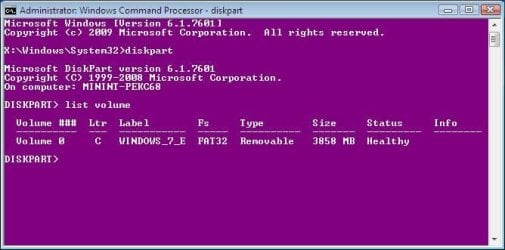
list volume ( list all volumes on your computer )

select volume ? (where ? is number of the volume that you need to remove)

delete volume override

exit

If that works, then it is possible that errant partition entry had caused the difficulty for the Aomei partition recovery module. If Diskpart manages to delete that volume, try running partition recovery module again.
 

My Computers My Computers

  • At a glance

    7 X64i5 84002x8gb 3200mhz
    Computer type
    PC/Desktop
    OS
    7 X64
    CPU
    i5 8400
    Motherboard
    gigabyte b365m ds3h
    Memory
    2x8gb 3200mhz
    Hard Drives
    various
    PSU
    pure power 11 400w cm
    Case
    Coolermaster
    Cooling
    cryorig m9i
  • At a glance

    7x64g54008gb ddr4 2400
    Computer type
    PC/Desktop
    OS
    7x64
    CPU
    g5400
    Motherboard
    ga b365m ds3h
    Memory
    8gb ddr4 2400
    PSU
    xfx pro 450w
Thanks for your reply.
When I do list volume only the bootable pen shows up, none pf the SSD partitions show up.

screenshot04.jpg
 

My Computer My Computer

At a glance

Windows 7 Enterprise 64 bitCore i7 vPro
Computer type
Laptop
Computer Manufacturer/Model Number
DELL Latitude E7470
OS
Windows 7 Enterprise 64 bit
CPU
Core i7 vPro
Hard Drives
Samsung SSD EVO 850
Antivirus
Microsoft Security Essentials
Browser
IE 10
That doesn't sound good.

First unplug and replug the connectors to the SSD - always worth making sure it is properly seated.

If you have important data on there, you might be able to get a data recovery tool to reover it for you. You can try the free Recuva with Deep Scan enabled ( it is included in the boot media), I am doubtful it will work.

Otherwise, can PartGuru find the files you want? If so, you will need to buy a PartGuru license to recover them.

As a last resort:
You could also try rt clicking the disk in Aomei part assist and see if it will let you convert to GPT.
 

My Computers My Computers

  • At a glance

    7 X64i5 84002x8gb 3200mhz
    Computer type
    PC/Desktop
    OS
    7 X64
    CPU
    i5 8400
    Motherboard
    gigabyte b365m ds3h
    Memory
    2x8gb 3200mhz
    Hard Drives
    various
    PSU
    pure power 11 400w cm
    Case
    Coolermaster
    Cooling
    cryorig m9i
  • At a glance

    7x64g54008gb ddr4 2400
    Computer type
    PC/Desktop
    OS
    7x64
    CPU
    g5400
    Motherboard
    ga b365m ds3h
    Memory
    8gb ddr4 2400
    PSU
    xfx pro 450w
On the E7470 specs it says it has a M.2 SSD.
I think there is no volume on the disk because it has been formatted under Linux.
 

My Computers My Computers

  • At a glance

    Windows 7 HP 64i5 6600K - 800MHz to 4200MHz4+4G GSkill DDR4 3000IG - Intel 530
    Computer type
    PC/Desktop
    Computer Manufacturer/Model Number
    custom build
    OS
    Windows 7 HP 64
    CPU
    i5 6600K - 800MHz to 4200MHz
    Motherboard
    GA-Z170-HD3P
    Memory
    4+4G GSkill DDR4 3000
    Graphics Card(s)
    IG - Intel 530
    Monitor(s) Displays
    Samsung 226BW
    Screen Resolution
    1680x1050
    Hard Drives
    (1) -1 SM951 – 128GB M.2 AHCI PCIe SSD drive for Windows 7 and Lubuntu
    (2) -1 WD SATA 3 - 1T for Data
    (3) -1 WD SATA 3 - 1T for backup
    PSU
    Thermaltake 450W TR2 gold
    Keyboard
    Old and good Chicony mechanical keyboard
    Mouse
    Logitech mX performance - 9 buttons (had to disable some)
    Internet Speed
    500Mb/s
    Browser
    Firefox 64
    Other Info
    TinyWall firewall
  • At a glance

    Windows 7 Proi7-4500U 800MHz to 3.0GHz(4+4)G DDR3 1600IG intel 4400 + NVIDIA GeForce GT 745M
    Computer type
    Laptop
    System Manufacturer/Model Number
    Asus Q550LF
    OS
    Windows 7 Pro
    CPU
    i7-4500U 800MHz to 3.0GHz
    Motherboard
    Asus Q550LF
    Memory
    (4+4)G DDR3 1600
    Graphics Card(s)
    IG intel 4400 + NVIDIA GeForce GT 745M
    Sound Card
    Realtek
    Monitor(s) Displays
    LG Display LP156WF4-SPH1
    Screen Resolution
    1920 x 1080
    Hard Drives
    BX500 120G SSD for Windows and programs +
    1T HDD for data
    Internet Speed
    500 Mb/s
    Browser
    Firefox
    Other Info
    TinyWall firewall
Diskpart can't find the disk.

Pguru and Aomei part assist should recognize ext partitions.


On the E7470 specs it says it has a M.2 SSD.
I think there is no volume on the disk because it has been formatted under Linux.
 

My Computers My Computers

  • At a glance

    7 X64i5 84002x8gb 3200mhz
    Computer type
    PC/Desktop
    OS
    7 X64
    CPU
    i5 8400
    Motherboard
    gigabyte b365m ds3h
    Memory
    2x8gb 3200mhz
    Hard Drives
    various
    PSU
    pure power 11 400w cm
    Case
    Coolermaster
    Cooling
    cryorig m9i
  • At a glance

    7x64g54008gb ddr4 2400
    Computer type
    PC/Desktop
    OS
    7x64
    CPU
    g5400
    Motherboard
    ga b365m ds3h
    Memory
    8gb ddr4 2400
    PSU
    xfx pro 450w
Linux didn't format the disk, since when I tried to recover for the first time with a windows bootable pen, it was able to recognize all the partitions correctly. However, after using that pen everything got corrupted.

I remember that I, as I was searching for solutions on the internet, I tried different approaches (different commands) to solve the problem. After each new set of commands entered I re-started the machine. At a given point, after a reboot, the SSD was never recognized again.
 

My Computer My Computer

At a glance

Windows 7 Enterprise 64 bitCore i7 vPro
Computer type
Laptop
Computer Manufacturer/Model Number
DELL Latitude E7470
OS
Windows 7 Enterprise 64 bit
CPU
Core i7 vPro
Hard Drives
Samsung SSD EVO 850
Antivirus
Microsoft Security Essentials
Browser
IE 10
Hi,
Thank you all for helping me with this weird problem. After all the effort, I thought that is wasn't worth it to spend more time trying to solve this problem. By the end I just got tired of this and managed to format the disk and reinstall everything.

Best regards,
Pedro
 

My Computer My Computer

At a glance

Windows 7 Enterprise 64 bitCore i7 vPro
Computer type
Laptop
Computer Manufacturer/Model Number
DELL Latitude E7470
OS
Windows 7 Enterprise 64 bit
CPU
Core i7 vPro
Hard Drives
Samsung SSD EVO 850
Antivirus
Microsoft Security Essentials
Browser
IE 10
Hi pcardoso73,

I think re-installing was always going to be the last option available anyway. Hopefully you have learnt something useful from the answers given for future reference if needed. Sometimes it is difficult to try and give help to resolve an issue when the computer is not in front of us, but we do try.

Good luck and happy computing!
 

My Computer My Computer

At a glance

Win 7 HP SP1 64-bit Vista HB SP2 32-bit Linux...Intel(R) Pentium(R) CPU P6200 @ 2.13GHz4.00 GBIntel(R) Graphics Media Accelerator HD
Computer type
Laptop
Computer Manufacturer/Model Number
Fujitsu LIFEBOOK
OS
Win 7 HP SP1 64-bit Vista HB SP2 32-bit Linux Mint 18.3
CPU
Intel(R) Pentium(R) CPU P6200 @ 2.13GHz
Motherboard
FUJITSU FJNBB06
Memory
4.00 GB
Graphics Card(s)
Intel(R) Graphics Media Accelerator HD
Sound Card
[1] Realtek High Definition Audio [2] Intel(R) Display Audio
Screen Resolution
1366 x 768 x 32 bits (4294967296 colors) @ 59 Hz
Hard Drives
TOSHIBA MK5076GSX
Antivirus
AVG FREE
Yes re-installing is the last option, but in my case I think there was no way out.
Thank you very much for the support.
Best regards,
Pedro
 

My Computer My Computer

At a glance

Windows 7 Enterprise 64 bitCore i7 vPro
Computer type
Laptop
Computer Manufacturer/Model Number
DELL Latitude E7470
OS
Windows 7 Enterprise 64 bit
CPU
Core i7 vPro
Hard Drives
Samsung SSD EVO 850
Antivirus
Microsoft Security Essentials
Browser
IE 10
Back
Top