System Repair and WindowsImageBackup folder on the same disk?

rdl

New member
Local time
4:30 PM
Messages
11
I put the "System Repair" files on an SSD (new and newly NTFS formatted and made active). It boots to the System Repair screen fine. I copied an existing, tested, working WindowsImageBackup folder off a DVD onto the same SSD. When I rebooted from the SSD, System Repair says it can't find a backup. Either I'm doing something wrong or this is impossible. Any ideas?
 

My Computer

Computer type
PC/Desktop
Computer Manufacturer/Model Number
Self assembled
OS
Windows 7 64-bit Professional
CPU
Core i5-3570K
Motherboard
Z77X-UD3H
Memory
8 GB
Graphics Card(s)
GTX-1050 Ti
Monitor(s) Displays
42" Sanyo LED TV
Screen Resolution
1920x1080
Hard Drives
Crucial MX200 250 GB
Western Digital Black 2 x 1 TB
PSU
Seasonic
Internet Speed
Cheapest that Comcast sells
Antivirus
What?
Browser
Pale Moon
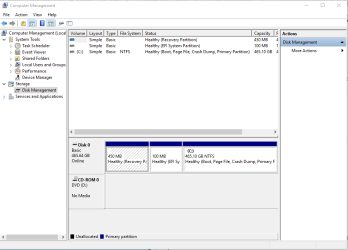
Hello rdl mate can you send us a screen shot of the disk management please.
Streat > Computer > right click > Manage > click Disk Management and post back a screen shot. It should look vry similar to my pic only this is my 10 laptop but very similar.
 

Attachments

  • DRIVE SHOT.PNG
    DRIVE SHOT.PNG
    47.3 KB · Views: 1

My Computer

Computer type
PC/Desktop
Computer Manufacturer/Model Number
Own build (new) Desk1 / Asus ROG Win 7 / Desk2 1st build
OS
Desk1 7 Home Prem / Desk2 10 Pro / Main lap Asus ROG 10 Pro 2 laptop Toshiba 7 Pro Asus P2520 7 & 10
CPU
Desk1 i5 3750K / Laptop i7 GTX 860M / Desk2 i5 2500
Motherboard
Desk1 Asus P877-V / Desk2 Gigabyte H67 UD3H / Laptop ?
Memory
Desk1 8GB (1866) / Desk2 16GB (1333) / Laptop 8Gb DDR3
Graphics Card(s)
Desk 1& 2NVidia GTX 650 & Laptops on board Intel
Sound Card
Desk 1 & 2 -XONAR DG Realtek High Def audio Laptop
Monitor(s) Displays
Desk 1 Benq HD 2450 / Desk2 Philips 24" / Laptop 17.5"
Screen Resolution
1920x1080 D1 & D2 & Laptop 1
Hard Drives
Desk1 Samsung 120GB 830 SSD
Asus ROG 256GB 850 Pro SSD
Desk2 Samsung 840 256 SSD
Toshiba 120GB EVO
PSU
Desk 1 Corsair HX 1050/ Laptop ? / Desk 2 Corsair HX 650
Case
Desk 1 Cooler HAF XM ? Toshiba laptop / Desk2 Coolermaster
Cooling
Fans on all Desk1 -2 Desk2 - all Coolermasters 5 Laptop ?
Keyboard
Desk 1 MS Sidewinder X6 Desk 2 MS Sidewinder X 4
Mouse
Desk 1&2 - Gigabyte MS 900 gamer - laptop - Logitec wireless
Internet Speed
ADSL2+
Other Info
One other Desktop (tester) and spare Toshba laptop both with SSD's
Running Kaspersky 2016 ISS on all machines config'd identically
Logitec audio stereo systems on each machine (x3)
Canon MG5250MFC
Router/modem TP-Link running WPA2SK
Not sure it will help, but here you go.

Disk 1 is where I want to restore from. The R volume is where the repair disk files and folders are. The S volume has the system image folder. I first tried with the drive formatted as just one big partition. That didn't work either.

I'm almost convinced that the restore function has been programmed to not look on the disk it's on. Will it restore from an installed disk at all, or only from a removable drive? I'm pretty certain it completely ignores flash drives.
 

Attachments

  • drv_mgmt.png
    drv_mgmt.png
    104.6 KB · Views: 2

My Computer

Computer type
PC/Desktop
Computer Manufacturer/Model Number
Self assembled
OS
Windows 7 64-bit Professional
CPU
Core i5-3570K
Motherboard
Z77X-UD3H
Memory
8 GB
Graphics Card(s)
GTX-1050 Ti
Monitor(s) Displays
42" Sanyo LED TV
Screen Resolution
1920x1080
Hard Drives
Crucial MX200 250 GB
Western Digital Black 2 x 1 TB
PSU
Seasonic
Internet Speed
Cheapest that Comcast sells
Antivirus
What?
Browser
Pale Moon
Back
Top