system reserved partition on second drive

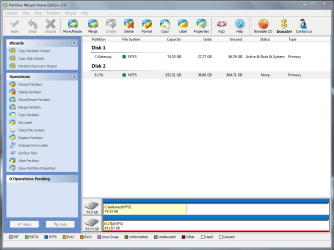
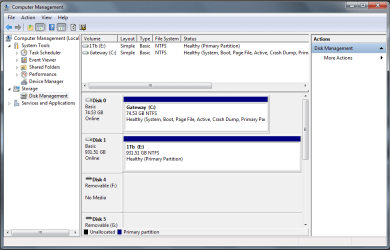
I explained in post #10 why you do not want an Active partition on a data drive.

It can confuse the Repair utility to prevent repair when Win7 will not start.

Install free Partition Wizard, rightclick 1tb partition, Modify>Set to Inactive, OK, Apply.


Thanks Greg.
 

My Computer My Computer

Computer Manufacturer/Model Number
* BFK Customs *
OS
W 7 64-bit Ultimate
CPU
Intel Q9550 Yorkfield
Motherboard
ASUS P5Q Pro
Memory
8GB Dominator 8500C5D
Graphics Card(s)
ATI : XFX 5870
Sound Card
Realtek HD Audio 7-1
Monitor(s) Displays
1x 47" LCD HDMI & 3x 26" LCD HDMI
Screen Resolution
1920x1080P & 1920x1200
Hard Drives
1x 80GB Intel X25-M G2 SSD : 1x 500GB & 1x 640GB WD Caviar Black(s)
PSU
Corsair 620HX
Case
Cooler Master RC-690
Cooling
Tuniq Tower 120, 2x 140mm and 3x 120mm case fans
Keyboard
Microsoft 500
Mouse
Razer Diamondback 3G
Internet Speed
14 Mb/s
Other Info
1x Koutech 3Gb/s SATA HDD Hot Swap Rack
I explained in post #10 why you do not want an Active partition on a data drive.

It can confuse the Repair utility to prevent repair when Win7 will not start.

Install free Partition Wizard, rightclick 1tb partition, Modify>Set to Inactive, OK, Apply.

I didn't know that Partition Wizard could do this. Good to know.

OP you have the option of which backup program to use, Macrium I found is SUPER easy and the process of creating an system image and recovery process is really fast.:)
 

My Computers My Computers

System One System Two

  • Computer type
    PC/Desktop
    Computer Manufacturer/Model Number
    PowerSpec G164
    OS
    WIN10
    CPU
    AMD Ryzen 5 3600 6-Core Processor 3.59 GHz
    Memory
    16.0 GB
    Internet Speed
    VERY FAST>>>!!!
  • Antivirus
    ESET Security Premium
Thanks Greg, I misunderstood your previous post about active partitions. I see now that could have caused me problems later on. I used the free partition wizard to fix the issue--nice program. Thanks for saving me from having to move data just to reformat.

I think I have everything straight now.:)
 

Attachments

  • Capture3.PNG
    Capture3.PNG
    46.7 KB · Views: 61
  • Capture4.PNG
    Capture4.PNG
    29.8 KB · Views: 69

My Computer My Computer

Computer Manufacturer/Model Number
Gateway DX4822
OS
MS Windows 7 Home Premium 64-bit SP1
CPU
Intel Pentium E5300 @ 2.60GHz
Motherboard
Gateway EG43M
Memory
6.0GB Dual-Channel DDR2 @ 399MHz
Graphics Card(s)
512MB GeForce 9800 GTX+ (PNY)
Sound Card
Realtek High Definition Audio
Hard Drives
Seagate Barracuda 7200.10 SATA 80GB
Western Digital WD10EADS SATA 1TB
Glad to hear you got it sorted, thanks for the update.
 

My Computer My Computer

Computer Manufacturer/Model Number
* BFK Customs *
OS
W 7 64-bit Ultimate
CPU
Intel Q9550 Yorkfield
Motherboard
ASUS P5Q Pro
Memory
8GB Dominator 8500C5D
Graphics Card(s)
ATI : XFX 5870
Sound Card
Realtek HD Audio 7-1
Monitor(s) Displays
1x 47" LCD HDMI & 3x 26" LCD HDMI
Screen Resolution
1920x1080P & 1920x1200
Hard Drives
1x 80GB Intel X25-M G2 SSD : 1x 500GB & 1x 640GB WD Caviar Black(s)
PSU
Corsair 620HX
Case
Cooler Master RC-690
Cooling
Tuniq Tower 120, 2x 140mm and 3x 120mm case fans
Keyboard
Microsoft 500
Mouse
Razer Diamondback 3G
Internet Speed
14 Mb/s
Other Info
1x Koutech 3Gb/s SATA HDD Hot Swap Rack
Hope this thread still active.
I have two WD hard drives (Win-7, SATA0) and (Win-10, SATA1).
No SSD is on the system.
MOBO (ASUS H97 Plus) is UEFI / BIOS configurable but because processor is
64 bit and I'm running 32 bit OSes, per Microsoft BIOS is only applicable.
So system is set to use AHCI, CSM and Other OS.


Neither drive has a reserved partition. I originally cloned the XP drive and then installed Win-7 (32 bit) on that drive. For Win-10, I cloned the Win-7 drive and then used Microsoft Free Update which installed Win-10 on that drive.
I have never been able to use my MOBO (ASUS H97 Plus) to select an Alternate Drive to boot from.
However, if "ONLY" one drive is in the system (other physically removed), I can boot from that particular drive. If I have two drives in the system, system will boot the Primary Drive (SATA0) and make the other drive a DATA drive or keep it Offline if the signatures are the same. However, if I try to selectively Boot the 2nd drive (either by selecting F8 and the drive from the boot list) -- OR -- selecting the drive from OVERRIDE, I get a BSOD Error: 0x0000007B, 0x80786A48, 0xC0000034.
In tracing this Error it points to AHCI versus IDE, but changing the suggested registry keys (msahci, pcide, and iaStoreV as well as some others) Start values to 0, did NOT solve the problem and allow one to boot from either selected drive. Someone suggested putting a Reserved Partition might resolve this issue -- however -- my reading indicates it is really not needed (only if BitBlocker is used).

----------------
My Questions
----------------
1) Are the iaStoreA, iaStoreF, and iaStoreV keys only if one has an SSD)?
Logic says msahci applies if AHCI is selected and logic says pcide (also have an intelide) applies if IDE is selected in the UEFI/BIOS.
2) Since I want both drives to be separate and bootable, would I need a reserve partition on each drive -- OR - is a Reserved Partition even needed?

3) Can someone explain how the Reserved Partition factors into selecting and booting either drive as logic says making that selection from the UEFI / BIOS (boot menu or Override) would dictate which drive would be used for booting prior to the Reserved Partition even being discovered?
4) Anything else anyone has to offer appreciated.
 

My Computer My Computer

Computer type
PC/Desktop
Computer Manufacturer/Model Number
build -
OS
Win 7 Pro x32
CPU
Intel I5-4690K
Motherboard
ASUS H-97Plus
Memory
8 GB
Graphics Card(s)
On Board
Sound Card
On Board
Other Info
ASUS MOBO Issues never resolved even by ASUS:
1) MOBO will NOT boot from other than the Default HDD drive.
2) MOBO will NOT boot Most DOS based CDs
Hope this thread still active.
I have two WD hard drives (Win-7, SATA0) and (Win-10, SATA1).
No SSD is on the system.

MOBO (ASUS H97 Plus) is UEFI / BIOS configurable but because processor is
64 bit and I'm running 32 bit OSes, per Microsoft BIOS is only applicable.
So system is set to use AHCI, CSM and Other OS.
Why are you running 32 bits if your system requires 64Bits OSs?


Neither drive has a reserved partition. I originally cloned the XP drive and then installed Win-7 (32 bit) on that drive. For Win-10, I cloned the Win-7 drive and then used Microsoft Free Update which installed Win-10 on that drive.

Disk Manager doesn't show MS reserved partition but Its probably there.

I have never been able to use my MOBO (ASUS H97 Plus) to select an Alternate Drive to boot from.

Fast boot must be disabled on BIOS

However, if "ONLY" one drive is in the system (other physically removed), I can boot from that particular drive. If I have two drives in the system, system will boot the Primary Drive (SATA0) and make the other drive a DATA drive or keep it Offline if the signatures are the same. However, if I try to selectively Boot the 2nd drive (either by selecting F8 and the drive from the boot list) -- OR -- selecting the drive from OVERRIDE, I get a BSOD Error: 0x0000007B, 0x80786A48, 0xC0000034.
In tracing this Error it points to AHCI versus IDE, but changing the suggested registry keys (msahci, pcide, and iaStoreV as well as some others) Start values to 0, did NOT solve the problem and allow one to boot from either selected drive. Someone suggested putting a Reserved Partition might resolve this issue -- however -- my reading indicates it is really not needed (only if BitBlocker is used).
Only Bitlocker (on Win 7 ultimate and Win 10 pro) uses the MS Reserved Partition. If you're not using Bitlocker you don't need MS Reserved Partition.

----------------
My Questions
----------------
1) Are the iaStoreA, iaStoreF, and iaStoreV keys only if one has an SSD)? No, Intel drivers for SATA are needed on HDD and SSDs.
Logic says msahci applies if AHCI is selected and logic says pcide (also have an intelide) applies if IDE is selected in the UEFI/BIOS. Yes. ON your computer AHCI is to be used, not ide.
2) Since I want both drives to be separate and bootable, would I need a reserve partition on each drive -- OR - is a Reserved Partition even needed? No, read above.

3) Can someone explain how the Reserved Partition factors into selecting and booting either drive as logic says making that selection from the UEFI / BIOS (boot menu or Override) would dictate which drive would be used for booting prior to the Reserved Partition even being discovered?

Only Bitlocker (on Win 7 ultimate and Win 10 pro) uses the MS Reserved Partition. If you're not using Bitlocker you don't need MS Reserved Partition.

4) Anything else anyone has to offer appreciated.

Your issues are not related MS Reserved Partition, and you probably have it despite you don't need it if you're not using Bitlocker
Are you with the latest (none Beta) BIOS?
On BIOS, is fast boot disabled?
Does Win 7 and Win 10 are both 32 bits?
On your specs it says you have 8 G of memory, is that correct?
 

My Computers My Computers

System One System Two

  • Computer type
    PC/Desktop
    Computer Manufacturer/Model Number
    custom build
    OS
    Windows 7 HP 64
    CPU
    i5 6600K - 800MHz to 4200MHz
    Motherboard
    GA-Z170-HD3P
    Memory
    4+4G GSkill DDR4 3000
    Graphics Card(s)
    IG - Intel 530
    Monitor(s) Displays
    Samsung 226BW
    Screen Resolution
    1680x1050
    Hard Drives
    (1) -1 SM951 – 128GB M.2 AHCI PCIe SSD drive for Windows 7 and Lubuntu
    (2) -1 WD SATA 3 - 1T for Data
    (3) -1 WD SATA 3 - 1T for backup
    PSU
    Thermaltake 450W TR2 gold
    Keyboard
    Old and good Chicony mechanical keyboard
    Mouse
    Logitech mX performance - 9 buttons (had to disable some)
    Internet Speed
    500Mb/s
    Browser
    Firefox 64
    Other Info
    TinyWall firewall
  • Computer type
    Laptop
    System Manufacturer/Model Number
    Asus Q550LF
    OS
    Windows 7 Pro
    CPU
    i7-4500U 800MHz to 3.0GHz
    Motherboard
    Asus Q550LF
    Memory
    (4+4)G DDR3 1600
    Graphics Card(s)
    IG intel 4400 + NVIDIA GeForce GT 745M
    Sound Card
    Realtek
    Monitor(s) Displays
    LG Display LP156WF4-SPH1
    Screen Resolution
    1920 x 1080
    Hard Drives
    BX500 120G SSD for Windows and programs +
    1T HDD for data
    Internet Speed
    500 Mb/s
    Browser
    Firefox
    Other Info
    TinyWall firewall
Megahertz07: Thanks for responding


Why are you running 32 bits if your system requires 64Bits OSs?
I code mostly using Classic Visual Basic which is 32 bit. Yes I know can be used in 64 bit, but various issues.


Disk Manager doesn't show MS reserved partition but Its probably there.
Interesting. Anyway I can check (diskpart, bcd, etc). Is so, howto syntax would be most helpful.


If you're not using Bitlocker you don't need MS Reserved Partition.
Thanks for confirming as that was I got from my readings.


Are you with the latest (none Beta) BIOS?
Running original American Megatrends v2202. ASUS has a few upgrades -- indicate plug security issues -- but I've never upgraded do to all problems I and others have had with ASUS support especially those who screwed up with a UEFI/BIOS upgrade and could NOT get any support.


Fast boot must be disabled on BIOS
Believe it is but will confirm.


Does Win 7 and Win 10 are both 32 bits?
Yes


On your specs it says you have 8 G of memory, is that correct?
Yes


============================
Hope you might be able to confirm my logic on what's going on:


Once the user sets the various UEFI/BIOS options these should be written to VRAM (CMOS). After (or during POST) those setting are read. With the new UEFI MOBO's everything is first routed to UEFI. IF CSM is "enabled" then the decision tree routes to BIOS mode. Guessing here that part of that logic may be for the VRAM to also read the registry since AHCI and pcide Start and Override settings exist within the registry -- however seems a little illogical at this point as the VRAM table could already contain those values and WHICH disk to use is NOT known yet.
However, at some point the VRAM "Boot" Table is read. Mostly like If User has "NOT invoked" the VRAM setting screen, the code just reads the Boot Table line for last disk used based on a Default flag. That default table entry information would then be used to Boot whatever. IF the User "HAS invoked" the VRAM setting screen and selected either Boot Menu (F8) or selected a particular disk from Disk Override, than that line in the Table would be used. Whether a default flag is set for User last Override for F8 selection is unknown and not significant.
I'm basing the above on how I think the code logic would be implemented to get want's needed to boot.
SO as I see My boot issue lies somewhere in VRAM and NOT the HDD.


MOST important for this thread is to solve the immediate boot problem to allow booting from either drive. The drives are recognized by VRAM, just NOT boot selectable.


ON TOP of that would sure like to know how all this (VRAM settings)and the HDD themselves (both old MBR and new EFI with and without GPT) logically get the info needed to boot.
 

My Computer My Computer

Computer type
PC/Desktop
Computer Manufacturer/Model Number
build -
OS
Win 7 Pro x32
CPU
Intel I5-4690K
Motherboard
ASUS H-97Plus
Memory
8 GB
Graphics Card(s)
On Board
Sound Card
On Board
Other Info
ASUS MOBO Issues never resolved even by ASUS:
1) MOBO will NOT boot from other than the Default HDD drive.
2) MOBO will NOT boot Most DOS based CDs
BIOS has it's own USB and PS2 port driver. If Fast boot is enabled, BIOS doesn't load those drivers and you won't have keyboard and or mouse (and you can't launch boot menu) till the OS (Windows) loads its own.
That is why Fast boot must be disabled. If you cant enter BIOS, unplug the PS cable and reset BIOS by removing the coin battery for 1 minute.
You should go to Asus H-97Plus site and download the latest BIOS and save it to a USB drive. Enter BIOS and launch quick flash. Browse to the BIOS file on the USB drive and run update. DON'T update BIOS under Windows.

Mainly the difference of using Legacy or UEFI is the way BIOS transfer the booting sequence.
- On a Legacy BIOS, BIOS looks for a disk and transfer the boot sequence to the MBR that then transfer to a boot loader on a partition.
- On a UEFI BIOS, BIOS looks for a boot loader on a Fat32 partition and transfer the boot sequence to this boot loader (on the Fat32 partition) that transfer the boot sequence to a OS partition.

You have a very good computer but using 32 bits you will only be able to use 3.2G of memory for the OS. To use all 8G you should install 64bits.
 

My Computers My Computers

System One System Two

  • Computer type
    PC/Desktop
    Computer Manufacturer/Model Number
    custom build
    OS
    Windows 7 HP 64
    CPU
    i5 6600K - 800MHz to 4200MHz
    Motherboard
    GA-Z170-HD3P
    Memory
    4+4G GSkill DDR4 3000
    Graphics Card(s)
    IG - Intel 530
    Monitor(s) Displays
    Samsung 226BW
    Screen Resolution
    1680x1050
    Hard Drives
    (1) -1 SM951 – 128GB M.2 AHCI PCIe SSD drive for Windows 7 and Lubuntu
    (2) -1 WD SATA 3 - 1T for Data
    (3) -1 WD SATA 3 - 1T for backup
    PSU
    Thermaltake 450W TR2 gold
    Keyboard
    Old and good Chicony mechanical keyboard
    Mouse
    Logitech mX performance - 9 buttons (had to disable some)
    Internet Speed
    500Mb/s
    Browser
    Firefox 64
    Other Info
    TinyWall firewall
  • Computer type
    Laptop
    System Manufacturer/Model Number
    Asus Q550LF
    OS
    Windows 7 Pro
    CPU
    i7-4500U 800MHz to 3.0GHz
    Motherboard
    Asus Q550LF
    Memory
    (4+4)G DDR3 1600
    Graphics Card(s)
    IG intel 4400 + NVIDIA GeForce GT 745M
    Sound Card
    Realtek
    Monitor(s) Displays
    LG Display LP156WF4-SPH1
    Screen Resolution
    1920 x 1080
    Hard Drives
    BX500 120G SSD for Windows and programs +
    1T HDD for data
    Internet Speed
    500 Mb/s
    Browser
    Firefox
    Other Info
    TinyWall firewall
Megahertz07: Thanks for responding.


SO you think fast boot may be "the key to the problem" as drivers are Not being loaded. Have to wait about 2 1/2 hours "to confirm disabled" as running something now that I can't stop. However, never had a problem getting into UEFI/BIOS.
I did switch to an old PS2 mouse about a year ago since my USB mouse died, but had this same problem with selecting either XP or Win-7 disks. Just cloned and installed a Win-10 disk about two weeks ago.


I've confirmed though BCD that I'm using Winload.exe (which is MBR mode).
Where my main confusion is coming in is that if either drive is physically removed I can boot that drive. SO that tells me the MBR exists and is intact (functioning) on both drives. So the key is in the Selection. I the USER am making the selection (either boot menu (F8) or Boot Override menu) so I know a selection was made.
How the system takes that selection and deals with it to boot the selected drive is where I'm lost. Wiki MBR writeup does a good job, BUT does NOT address HOW multiple drives in a system are handled. As stated in my previous post, my logic says this has to occur prior to Winload.exe since "each disk" contains a Winload.exe and its own registry.
 

My Computer My Computer

Computer type
PC/Desktop
Computer Manufacturer/Model Number
build -
OS
Win 7 Pro x32
CPU
Intel I5-4690K
Motherboard
ASUS H-97Plus
Memory
8 GB
Graphics Card(s)
On Board
Sound Card
On Board
Other Info
ASUS MOBO Issues never resolved even by ASUS:
1) MOBO will NOT boot from other than the Default HDD drive.
2) MOBO will NOT boot Most DOS based CDs
Here's a very interesting read:
UEFI Secure Boot in Windows 8.1 - Microsoft Community


Of particular interest is (see Bold / Italic line) . Not sure whether this is all modes
UEFI and BIOS or just UEFI given the last paragraph in the quote:
Beginning Windows 8, Microsoft provides their own proprietary UEFI in Laptops manufactured under Windows 8 logo program. In assembled PCs, Windows UEFI can be installed from the Windows 8 installation media which has to be combined with Windows OS installation.

There lies a catch however. In a PC with dual OS requirement, of which one is to be Windows 8 and another non-Windows, there can exist only a single UEFI as the platform firmware. If Windows UEFI assumes the role of platform firmware, the extent to which Windows UEFI will support the booting of other operating systems from within its own UEFI, is a policy matter that is ongoing evolution amongst OS vendors as part of the UEFI committee. One thing is clear though; PCs manufactured by OEMs under the Windows 8 logo program, will not permit dual OS.

If Dual OS is a pre-requisite for a PC, then the safest choice as of now, is to install the operating systems in Legacy BIOS mode. With some time to invest, it can be a worthwhile effort to study and investigate the compatibility of the other operating system in Windows UEFI environment, at least after disabling Secure Boot.
 

My Computer My Computer

Computer type
PC/Desktop
Computer Manufacturer/Model Number
build -
OS
Win 7 Pro x32
CPU
Intel I5-4690K
Motherboard
ASUS H-97Plus
Memory
8 GB
Graphics Card(s)
On Board
Sound Card
On Board
Other Info
ASUS MOBO Issues never resolved even by ASUS:
1) MOBO will NOT boot from other than the Default HDD drive.
2) MOBO will NOT boot Most DOS based CDs
You can have multi boot under UEFI and under Legacy.
I have Win 7 and Linux on one drive (UEFI - GPT) and Win 10 on another drive, (also UEFI - GPT).
I launch the boot menu during POST and choose witch one I want to boot from. Default is Win 7.
On Asus MB, to launch boot menu you have to press F8 as soon as the computer start.
As you have the OS in different drives they are independent and to choose the one that is not the default you must launch boot menu (F8) as soon as the computer start.
 

My Computers My Computers

System One System Two

  • Computer type
    PC/Desktop
    Computer Manufacturer/Model Number
    custom build
    OS
    Windows 7 HP 64
    CPU
    i5 6600K - 800MHz to 4200MHz
    Motherboard
    GA-Z170-HD3P
    Memory
    4+4G GSkill DDR4 3000
    Graphics Card(s)
    IG - Intel 530
    Monitor(s) Displays
    Samsung 226BW
    Screen Resolution
    1680x1050
    Hard Drives
    (1) -1 SM951 – 128GB M.2 AHCI PCIe SSD drive for Windows 7 and Lubuntu
    (2) -1 WD SATA 3 - 1T for Data
    (3) -1 WD SATA 3 - 1T for backup
    PSU
    Thermaltake 450W TR2 gold
    Keyboard
    Old and good Chicony mechanical keyboard
    Mouse
    Logitech mX performance - 9 buttons (had to disable some)
    Internet Speed
    500Mb/s
    Browser
    Firefox 64
    Other Info
    TinyWall firewall
  • Computer type
    Laptop
    System Manufacturer/Model Number
    Asus Q550LF
    OS
    Windows 7 Pro
    CPU
    i7-4500U 800MHz to 3.0GHz
    Motherboard
    Asus Q550LF
    Memory
    (4+4)G DDR3 1600
    Graphics Card(s)
    IG intel 4400 + NVIDIA GeForce GT 745M
    Sound Card
    Realtek
    Monitor(s) Displays
    LG Display LP156WF4-SPH1
    Screen Resolution
    1920 x 1080
    Hard Drives
    BX500 120G SSD for Windows and programs +
    1T HDD for data
    Internet Speed
    500 Mb/s
    Browser
    Firefox
    Other Info
    TinyWall firewall
Megahertz07:

FWIW: Fast boot was and is disabled.


===================
Don't know if you read my note prior post here:
One thing is clear though; PCs manufactured by OEMs under the Windows 8 logo program, will not permit dual OS.
I'm really coming to the conclusion this is what I am up against -- a Microsoft UEFI.
Not sure how one can confirm that.

Have tried both F8 and selecting Override Boot for the disk of interest multiple times over the last several days and NO LUCK. Whether using GPT (don't believe you can run other than UEFI with it) makes a difference ???


At a loss what else to try unless you can think of something.
 

My Computer My Computer

Computer type
PC/Desktop
Computer Manufacturer/Model Number
build -
OS
Win 7 Pro x32
CPU
Intel I5-4690K
Motherboard
ASUS H-97Plus
Memory
8 GB
Graphics Card(s)
On Board
Sound Card
On Board
Other Info
ASUS MOBO Issues never resolved even by ASUS:
1) MOBO will NOT boot from other than the Default HDD drive.
2) MOBO will NOT boot Most DOS based CDs
Yes I read. Never heard it till now.
And you don't have a Win 8 or OEM, so it doesn't apply to you.

I would try first to update the BIOS. Don't do it under Windows. Do it under BIOS (quick flash).
 

My Computers My Computers

System One System Two

  • Computer type
    PC/Desktop
    Computer Manufacturer/Model Number
    custom build
    OS
    Windows 7 HP 64
    CPU
    i5 6600K - 800MHz to 4200MHz
    Motherboard
    GA-Z170-HD3P
    Memory
    4+4G GSkill DDR4 3000
    Graphics Card(s)
    IG - Intel 530
    Monitor(s) Displays
    Samsung 226BW
    Screen Resolution
    1680x1050
    Hard Drives
    (1) -1 SM951 – 128GB M.2 AHCI PCIe SSD drive for Windows 7 and Lubuntu
    (2) -1 WD SATA 3 - 1T for Data
    (3) -1 WD SATA 3 - 1T for backup
    PSU
    Thermaltake 450W TR2 gold
    Keyboard
    Old and good Chicony mechanical keyboard
    Mouse
    Logitech mX performance - 9 buttons (had to disable some)
    Internet Speed
    500Mb/s
    Browser
    Firefox 64
    Other Info
    TinyWall firewall
  • Computer type
    Laptop
    System Manufacturer/Model Number
    Asus Q550LF
    OS
    Windows 7 Pro
    CPU
    i7-4500U 800MHz to 3.0GHz
    Motherboard
    Asus Q550LF
    Memory
    (4+4)G DDR3 1600
    Graphics Card(s)
    IG intel 4400 + NVIDIA GeForce GT 745M
    Sound Card
    Realtek
    Monitor(s) Displays
    LG Display LP156WF4-SPH1
    Screen Resolution
    1920 x 1080
    Hard Drives
    BX500 120G SSD for Windows and programs +
    1T HDD for data
    Internet Speed
    500 Mb/s
    Browser
    Firefox
    Other Info
    TinyWall firewall
Found three interesting things last night.
1) Multibooting (at least Windows) does NOT appear to work as simply as I thought. Winload.exe seems to play a big role. How the UEFI/BIOS knows which disk (Winload.exe) to route to another disk is ???? at this point.


2) "www.multibooters.com" -- Reading there indicates lot of issues with multibooting esp. since UEFI entered the picture.


3) Article from Microsoft Communtiy Forum which indicates to multiboot one needs to go to Control Panel > System > Advanced Settings > StartUp and Recovery (settings button) > System StartUp Frame and select the OS desired from the Combobox > Apply > OK > then Reboot ( and one will boot from the new drive).


Have not tried this yet, but seems a lot of work just to boot from an ALternate drive if it works.
 

My Computer My Computer

Computer type
PC/Desktop
Computer Manufacturer/Model Number
build -
OS
Win 7 Pro x32
CPU
Intel I5-4690K
Motherboard
ASUS H-97Plus
Memory
8 GB
Graphics Card(s)
On Board
Sound Card
On Board
Other Info
ASUS MOBO Issues never resolved even by ASUS:
1) MOBO will NOT boot from other than the Default HDD drive.
2) MOBO will NOT boot Most DOS based CDs
Multi boot on a UEFI-GPT drive is much more simple than on a Legacy- MBR drive.

As you have both Win 7 and Win 10 on different drives, and if you can boot win 7 with win 10 disconnected from MB and if you can boot win 10 with win 7 disconnected, the two installations are independent.

Did you already updated BIOS as instructed?
 

My Computers My Computers

System One System Two

  • Computer type
    PC/Desktop
    Computer Manufacturer/Model Number
    custom build
    OS
    Windows 7 HP 64
    CPU
    i5 6600K - 800MHz to 4200MHz
    Motherboard
    GA-Z170-HD3P
    Memory
    4+4G GSkill DDR4 3000
    Graphics Card(s)
    IG - Intel 530
    Monitor(s) Displays
    Samsung 226BW
    Screen Resolution
    1680x1050
    Hard Drives
    (1) -1 SM951 – 128GB M.2 AHCI PCIe SSD drive for Windows 7 and Lubuntu
    (2) -1 WD SATA 3 - 1T for Data
    (3) -1 WD SATA 3 - 1T for backup
    PSU
    Thermaltake 450W TR2 gold
    Keyboard
    Old and good Chicony mechanical keyboard
    Mouse
    Logitech mX performance - 9 buttons (had to disable some)
    Internet Speed
    500Mb/s
    Browser
    Firefox 64
    Other Info
    TinyWall firewall
  • Computer type
    Laptop
    System Manufacturer/Model Number
    Asus Q550LF
    OS
    Windows 7 Pro
    CPU
    i7-4500U 800MHz to 3.0GHz
    Motherboard
    Asus Q550LF
    Memory
    (4+4)G DDR3 1600
    Graphics Card(s)
    IG intel 4400 + NVIDIA GeForce GT 745M
    Sound Card
    Realtek
    Monitor(s) Displays
    LG Display LP156WF4-SPH1
    Screen Resolution
    1920 x 1080
    Hard Drives
    BX500 120G SSD for Windows and programs +
    1T HDD for data
    Internet Speed
    500 Mb/s
    Browser
    Firefox
    Other Info
    TinyWall firewall
Did you already updated BIOS as instructed?
Not yet. Waiting for the weekend, if then. As indicated if something !@#$%
during the firmware upgrade, support by ASUS is basically non-existent at best.
Several people comment ASUS had them send their boards in to be fixed and one or two mentioned getting back broken boards. Whether they or ASUS was trying to pull a fast one ?? Whatever the case I can't loose this board right now, so still thinking about it.
 

My Computer My Computer

Computer type
PC/Desktop
Computer Manufacturer/Model Number
build -
OS
Win 7 Pro x32
CPU
Intel I5-4690K
Motherboard
ASUS H-97Plus
Memory
8 GB
Graphics Card(s)
On Board
Sound Card
On Board
Other Info
ASUS MOBO Issues never resolved even by ASUS:
1) MOBO will NOT boot from other than the Default HDD drive.
2) MOBO will NOT boot Most DOS based CDs
I just did a BIOS update on my Asus Z97-AR using quick flash under BIOS.
- Detach all USB drives
- Don't shutdown till it asks to do it.
 

My Computers My Computers

System One System Two

  • Computer type
    PC/Desktop
    Computer Manufacturer/Model Number
    custom build
    OS
    Windows 7 HP 64
    CPU
    i5 6600K - 800MHz to 4200MHz
    Motherboard
    GA-Z170-HD3P
    Memory
    4+4G GSkill DDR4 3000
    Graphics Card(s)
    IG - Intel 530
    Monitor(s) Displays
    Samsung 226BW
    Screen Resolution
    1680x1050
    Hard Drives
    (1) -1 SM951 – 128GB M.2 AHCI PCIe SSD drive for Windows 7 and Lubuntu
    (2) -1 WD SATA 3 - 1T for Data
    (3) -1 WD SATA 3 - 1T for backup
    PSU
    Thermaltake 450W TR2 gold
    Keyboard
    Old and good Chicony mechanical keyboard
    Mouse
    Logitech mX performance - 9 buttons (had to disable some)
    Internet Speed
    500Mb/s
    Browser
    Firefox 64
    Other Info
    TinyWall firewall
  • Computer type
    Laptop
    System Manufacturer/Model Number
    Asus Q550LF
    OS
    Windows 7 Pro
    CPU
    i7-4500U 800MHz to 3.0GHz
    Motherboard
    Asus Q550LF
    Memory
    (4+4)G DDR3 1600
    Graphics Card(s)
    IG intel 4400 + NVIDIA GeForce GT 745M
    Sound Card
    Realtek
    Monitor(s) Displays
    LG Display LP156WF4-SPH1
    Screen Resolution
    1920 x 1080
    Hard Drives
    BX500 120G SSD for Windows and programs +
    1T HDD for data
    Internet Speed
    500 Mb/s
    Browser
    Firefox
    Other Info
    TinyWall firewall
Thanks for working with me on this.


This uses EZFlash2 NOT 3. Not sure what you use for the Z97.
While a BIOS upgrade MAY solve the issue, still would like to confirm what is actually occurring between BIOS and the OS.


I did try the recommended Control Panel solution, with both drives (Win-10 and Win-7) in system and booting from the Win-10 drive. While Win-10 always showed in the combobox, could never get Win-7 to appear -- with and without -- duplicate disk signatures on the Win-7 drive. The Microsoft Community article I read indicated they initially had a problem because if one does a free Win-10 upgrade from Win-7 (which I did), that this caused licensing issues. They bought a second Win-10 license, and tried two separate Win-10 disks and that worked using Control Panel solution.


Since you have a Z97 board, I'm guessing your similar to my H97 Plus as Chipsets (I believe) are the same.

Before I go the BIOS upgrade route like to confirm a few things if you don't mind.


1) Could you provide me your BIOS setting so I can compare to mine?
2) What do you do to boot two separate drives with different OSes?
3) What are those OSes ?
4) Do you have a reserved partition on either or both drives?
 

My Computer My Computer

Computer type
PC/Desktop
Computer Manufacturer/Model Number
build -
OS
Win 7 Pro x32
CPU
Intel I5-4690K
Motherboard
ASUS H-97Plus
Memory
8 GB
Graphics Card(s)
On Board
Sound Card
On Board
Other Info
ASUS MOBO Issues never resolved even by ASUS:
1) MOBO will NOT boot from other than the Default HDD drive.
2) MOBO will NOT boot Most DOS based CDs
Back
Top
