
System Restore error message (0x80070057)

MSwhip

New member
Member
VIP
Local time
8:16 AM
Messages
101
System Restore error message in Windows 7 Home Premium 64-bit

When trying to access System Restore to restore my system to an earlier time in the past I am getting the following error message:
QUOTE
There is an unexpected error: The parameter is incorrect (0x80070057)
UNQUOTE
after which the computer says "System Restore will now close"

What is this error messsage about, what is it that is producing it and most importantly : How to correct this?


I would appreciate your help now.

Thank you kindly
 

My Computer

Computer type
PC/Desktop
Computer Manufacturer/Model Number
Custom Built
OS
Windows 7 Home Premium 64 bit
CPU
AMD A10-7870K + onboard Radeon HD Graphics
Motherboard
ASUS A88XM-E
Memory
16 GB in 2 slots: 2 x 8GB Kingston Hyper Blu DDR3 1600Mhz
Graphics Card(s)
Nvidia GT 740 GT SC 4 GB GDRR5 + onboard Radeon HD Graphics
Sound Card
Realtek
Monitor(s) Displays
Dell W2309 16:9 Aspect ratio
Hard Drives
Drive 0: Intel 320 Series 160GB
Drive 1: WD Caviar Black 2TB Sata 2 (no OS installed on it))

External Enclosure USB 2.0 or eSata Interfaces linked to the Desktop PC contain 4 mechanical HDDs for total storage cap
PSU
Corsair RM 550 Modular
Case
Antec P70
Cooling
N/A
Internet Speed
1000 (*UP TO) Mbps Download 50 Mbps Upload (*UP TO)
Antivirus
Active online AVG and Avira -
Browser
Most current Firefox and/or Waterfox alternatively
Other Info
Periodic Scans of the 2 hardware Drives with Malwarebytes, SuperMalwarebytes and Spybot and Destroy

My Computer

Computer Manufacturer/Model Number
Insane hobo technologies. ;-)
OS
Windows 7 x64
CPU
Intel i7 2600k
Motherboard
Asrock z68 extreme 4 gen 3
Memory
G.skill Ripjaw 16gigs @ 1866
Graphics Card(s)
Nvidia gtx580 (evga)
Sound Card
Integrated HD audio + hdmi
Monitor(s) Displays
24" ASUS widescreen + 42" insignia
Screen Resolution
1080p (1920x1080)
Hard Drives
128 Samsung 830
256 Samsung 840
3 x 1tb storage drive (various)
1 western digital 1tb (eSATA)
1 Seagate 1tb (eSATA)
PSU
1 kilowatt SLI/Crossfire rated Silverstone modular
Case
NZXT Phantom + additional 220 fan
Cooling
Zalmann
Keyboard
Microsoft wireless 3000 (v2)
Mouse
MS - wireless 5000 (bluetrack)
Internet Speed
depends on if you ask me or my provider.
Other Info
The above information is provided as is, and the author assumes no responsibility for issues it may cause with your sanity or fanboyism.
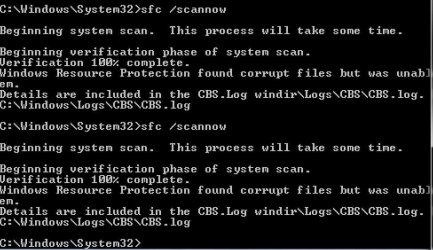
Did the sfc /scannow as you suggested ...

this was the outcome pls see first attachment ...
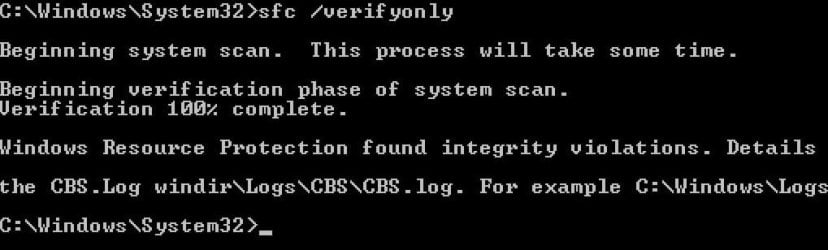
for better measure i also ran the 'sfc /verifyonly' see second attachment

Corrupted files found in both scans.

What is next now to repair it?
 

Attachments

  • EasyCapture1.jpg
    EasyCapture1.jpg
    76.2 KB · Views: 62
  • EasyCapture verifyonly.jpg
    EasyCapture verifyonly.jpg
    34.4 KB · Views: 43
Last edited:

My Computer

Computer type
PC/Desktop
Computer Manufacturer/Model Number
Custom Built
OS
Windows 7 Home Premium 64 bit
CPU
AMD A10-7870K + onboard Radeon HD Graphics
Motherboard
ASUS A88XM-E
Memory
16 GB in 2 slots: 2 x 8GB Kingston Hyper Blu DDR3 1600Mhz
Graphics Card(s)
Nvidia GT 740 GT SC 4 GB GDRR5 + onboard Radeon HD Graphics
Sound Card
Realtek
Monitor(s) Displays
Dell W2309 16:9 Aspect ratio
Hard Drives
Drive 0: Intel 320 Series 160GB
Drive 1: WD Caviar Black 2TB Sata 2 (no OS installed on it))

External Enclosure USB 2.0 or eSata Interfaces linked to the Desktop PC contain 4 mechanical HDDs for total storage cap
PSU
Corsair RM 550 Modular
Case
Antec P70
Cooling
N/A
Internet Speed
1000 (*UP TO) Mbps Download 50 Mbps Upload (*UP TO)
Antivirus
Active online AVG and Avira -
Browser
Most current Firefox and/or Waterfox alternatively
Other Info
Periodic Scans of the 2 hardware Drives with Malwarebytes, SuperMalwarebytes and Spybot and Destroy
My Computer

Computer Manufacturer/Model Number
Insane hobo technologies. ;-)
OS
Windows 7 x64
CPU
Intel i7 2600k
Motherboard
Asrock z68 extreme 4 gen 3
Memory
G.skill Ripjaw 16gigs @ 1866
Graphics Card(s)
Nvidia gtx580 (evga)
Sound Card
Integrated HD audio + hdmi
Monitor(s) Displays
24" ASUS widescreen + 42" insignia
Screen Resolution
1080p (1920x1080)
Hard Drives
128 Samsung 830
256 Samsung 840
3 x 1tb storage drive (various)
1 western digital 1tb (eSATA)
1 Seagate 1tb (eSATA)
PSU
1 kilowatt SLI/Crossfire rated Silverstone modular
Case
NZXT Phantom + additional 220 fan
Cooling
Zalmann
Keyboard
Microsoft wireless 3000 (v2)
Mouse
MS - wireless 5000 (bluetrack)
Internet Speed
depends on if you ask me or my provider.
Other Info
The above information is provided as is, and the author assumes no responsibility for issues it may cause with your sanity or fanboyism.
booted PC this time from safe mode with command prompt.

ran sfc /verifyonly
Report comes with same error message: Windows Resource Protection found integrity violations. With the same example as the attachments above


then ran sfc /scannow
Report came with same error message:
Windows Resource Protection found corrupted files but was unable to fix them. Details are included in the CBS.Log Windir\Logs\CBS\CBS.Log.
For example C:\Windows\Logs\CBS\CBS.Log

What could I try next now?
 

My Computer

Computer type
PC/Desktop
Computer Manufacturer/Model Number
Custom Built
OS
Windows 7 Home Premium 64 bit
CPU
AMD A10-7870K + onboard Radeon HD Graphics
Motherboard
ASUS A88XM-E
Memory
16 GB in 2 slots: 2 x 8GB Kingston Hyper Blu DDR3 1600Mhz
Graphics Card(s)
Nvidia GT 740 GT SC 4 GB GDRR5 + onboard Radeon HD Graphics
Sound Card
Realtek
Monitor(s) Displays
Dell W2309 16:9 Aspect ratio
Hard Drives
Drive 0: Intel 320 Series 160GB
Drive 1: WD Caviar Black 2TB Sata 2 (no OS installed on it))

External Enclosure USB 2.0 or eSata Interfaces linked to the Desktop PC contain 4 mechanical HDDs for total storage cap
PSU
Corsair RM 550 Modular
Case
Antec P70
Cooling
N/A
Internet Speed
1000 (*UP TO) Mbps Download 50 Mbps Upload (*UP TO)
Antivirus
Active online AVG and Avira -
Browser
Most current Firefox and/or Waterfox alternatively
Other Info
Periodic Scans of the 2 hardware Drives with Malwarebytes, SuperMalwarebytes and Spybot and Destroy
Back
Top