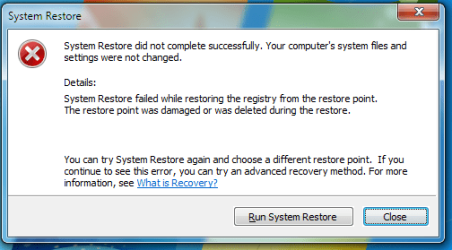
Solved System Restore failed

Nakata

New member
Local time
11:39 AM
Messages
8
Location
Bulgaria
Hello. When I try to restore my PC with System Restore the following error screen appears. I try to boot into Safe Mode but nothing. What I would to do ?
 

Attachments

  • Untitled.png
    Untitled.png
    59.8 KB · Views: 50

My Computer

Computer type
PC/Desktop
Computer Manufacturer/Model Number
Multirama
OS
Windows 7 Ultimate 64bit
Screen Resolution
1920x1080
Antivirus
AVG AntiVirus FREE 2016
Browser
Google Chrome
You can choose an earlier restore point before this problematic restore point.
It will not affect your files.
 

My Computer

Computer type
Laptop
Computer Manufacturer/Model Number
Toshiba L630 and L735
OS
Windows 7 x64
Hard Drives
240 GB SSD
Yes, I know, but there aren`t other restore points
 

My Computer

Computer type
PC/Desktop
Computer Manufacturer/Model Number
Multirama
OS
Windows 7 Ultimate 64bit
Screen Resolution
1920x1080
Antivirus
AVG AntiVirus FREE 2016
Browser
Google Chrome
Hello. When I try to restore my PC with System Restore the following error screen appears. I try to boot into Safe Mode but nothing. What I would to do ?

What error is stated.

As you did not mentioned what about error.
Whatever error it is, it should be resolved first.

Error screen will shown you the error code.
If it is on the HDD, then this system restore point may not worked at all.
 

My Computer

Computer type
Laptop
Computer Manufacturer/Model Number
Toshiba L630 and L735
OS
Windows 7 x64
Hard Drives
240 GB SSD
There aren`t error code in the error screen
 

My Computer

Computer type
PC/Desktop
Computer Manufacturer/Model Number
Multirama
OS
Windows 7 Ultimate 64bit
Screen Resolution
1920x1080
Antivirus
AVG AntiVirus FREE 2016
Browser
Google Chrome
Hi Nakata,
Thats what i call a level 2 error message, not good news, it Failed in the registry.

Have you used a tune-up utility or registry cleaner,
IF so revert the changes, this may or may not help.

And now for the silly bit
System restore relies upon the VSS service, and you MAY be able to access it.
(This tutorial actually talks about deleting VSS copies)
http://www.sevenforums.com/tutorials/166102-shadow-copies-delete.html
You could try to copy the latest version listed

Roy
 

My Computer

Computer type
PC/Desktop
Computer Manufacturer/Model Number
medionl/Aspire 6930G/acer x55a
OS
W7 home premium 32bit/W7HP 64bit/w10 tp insider ring
CPU
E5300 dual core
Motherboard
medion MS7366
Memory
3gb
Graphics Card(s)
Nvidia Geforce 7100 Nforce 630i
Monitor(s) Displays
avixc
Internet Speed
n (isp resticted to 72)
Antivirus
mse/pands
Browser
palemoon
Other Info
Belkin Fd7050 n USB using Railink RT2870 drivers, more upto date
I tryed it, doesn`t solve my problem... maybe re-install solve it ?
 

My Computer

Computer type
PC/Desktop
Computer Manufacturer/Model Number
Multirama
OS
Windows 7 Ultimate 64bit
Screen Resolution
1920x1080
Antivirus
AVG AntiVirus FREE 2016
Browser
Google Chrome
Since there is no error code displayed, there may be no restore points to restore to, or you're not selecting one.

Read through this tutorial to make sure your attempting to restore correctly.
http://www.sevenforums.com/tutorials/700-system-restore.html

Some types of Malware will actually turn off System Restore and erase all the restore points.
Check to see if System Protection is actually turned on.

To verify if the System Protection settings are correct, follow these steps:
  1. Boot into Windows
  2. Click Start
  3. Right-click on Computer
  4. Click Properties
  5. Click System Protection
  6. Check if your hard disk has the Protection column value set to On. If the value of the Protection column is Off, select the hard disk and click Configure.
Run System File Checker (SFC)
The SFC utility will report any corrupt system files that can be the cause for the System Restore did not complete successfully error.
  1. Boot into Windows
  2. Click Start and type command prompt in the search box to open Command Prompt
  3. Right-click on Command Prompt
  4. Click Run as administrator
Disable antivirus software
If you’re running an antivirus software, disable it.

In most cases, the System Restore did not complete successfully error appears because an antivirus program is already running on the computer and System Restore is trying to use a file that’s also being used by the antivirus.


Hope this helps,
John
 
Last edited:

My Computers

System One System Two

  • Computer type
    PC/Desktop
    Computer Manufacturer/Model Number
    HP Pavilion 6751c
    OS
    Win7, Win10, Win11
    Internet Speed
    100 Mbps
    Antivirus
    Norton 360
    Browser
    IE 11
  • Computer type
    PC/Desktop
    System Manufacturer/Model Number
    HP ENVY 750-514 & Dell XPS 8960
    OS
    Win7, Win10, Win11
    Antivirus
    Norton 360
I tried the SFC and there is results... I already view the details but how do I know what are the problems ?
 
Last edited:

My Computer

Computer type
PC/Desktop
Computer Manufacturer/Model Number
Multirama
OS
Windows 7 Ultimate 64bit
Screen Resolution
1920x1080
Antivirus
AVG AntiVirus FREE 2016
Browser
Google Chrome
Sorry for the delay.

Run Windows Update manually to see if it still works.

Run System File Checker (SFC) two more times, sometimes running it more than once will repair corrupt or damaged system files.

If not, do you have a Windows 7 Installation DVD?

If not, see Option 3 in the tutorial below for an explanation of dealing with the CBS.LOG.
http://www.sevenforums.com/tutorials/1538-sfc-scannow-command-system-file-checker.html

Once you've completed all these steps, let us know the results and we will continue to troubleshoot you issue.

John
 

My Computers

System One System Two

  • Computer type
    PC/Desktop
    Computer Manufacturer/Model Number
    HP Pavilion 6751c
    OS
    Win7, Win10, Win11
    Internet Speed
    100 Mbps
    Antivirus
    Norton 360
    Browser
    IE 11
  • Computer type
    PC/Desktop
    System Manufacturer/Model Number
    HP ENVY 750-514 & Dell XPS 8960
    OS
    Win7, Win10, Win11
    Antivirus
    Norton 360
No problem for the delay...
Windows Update still works
I already runed SFC, not work... and I haven`t Windows 7 Installation DVD and I already saw and made Option 3 from tutorial
 

My Computer

Computer type
PC/Desktop
Computer Manufacturer/Model Number
Multirama
OS
Windows 7 Ultimate 64bit
Screen Resolution
1920x1080
Antivirus
AVG AntiVirus FREE 2016
Browser
Google Chrome
No problem for the delay...
Windows Update still works, SFC again don`t solve the problem, I haven`t Windows Installation DVD and I saw and made option 3 in the tutorial
 

My Computer

Computer type
PC/Desktop
Computer Manufacturer/Model Number
Multirama
OS
Windows 7 Ultimate 64bit
Screen Resolution
1920x1080
Antivirus
AVG AntiVirus FREE 2016
Browser
Google Chrome
The reason I asked about the Windows Update was to determine the extent of the damaged or missing system files.

At this point, I'd recommend you backup your files to a USB flash drive, then reinstall Windows.

Did your computer come with a HDD recovery partition or media to reinstall your OS?

If neither, you will need to contact your computer's system builder to purchase recovery media.


John
 

My Computers

System One System Two

  • Computer type
    PC/Desktop
    Computer Manufacturer/Model Number
    HP Pavilion 6751c
    OS
    Win7, Win10, Win11
    Internet Speed
    100 Mbps
    Antivirus
    Norton 360
    Browser
    IE 11
  • Computer type
    PC/Desktop
    System Manufacturer/Model Number
    HP ENVY 750-514 & Dell XPS 8960
    OS
    Win7, Win10, Win11
    Antivirus
    Norton 360
I contacted with my system administrator and reinstalled Windows. Now the problem is fixed. Thank you all for your help !
 

My Computer

Computer type
PC/Desktop
Computer Manufacturer/Model Number
Multirama
OS
Windows 7 Ultimate 64bit
Screen Resolution
1920x1080
Antivirus
AVG AntiVirus FREE 2016
Browser
Google Chrome
Nakata do you have administrator privileges?
 

My Computer

Computer type
PC/Desktop
Computer Manufacturer/Model Number
Home made Desktop
OS
Windows 10 Pro. 64/ version 1709 Windows 7 Pro/64
CPU
Intel i7-6800K @ 4.3
Motherboard
ASUS X-99 Deluxe II
Memory
Corsair Platinum 16 gig @2400
Graphics Card(s)
EVGA GTX 1070 OC
Monitor(s) Displays
Asus 27" LED LCD/VE278Q
Screen Resolution
1920-1080 or 1280-720 HDMI
Hard Drives
INTEL SSD 730-240 Gb Sata 3.0/
PSU
EVGA Platium 1200W
Case
Phanteks Luxe Tempered Glass 8 fans/ one radiator
Cooling
XSPC/ Water Cooled CPU
Keyboard
Das 4 Professional
Mouse
Logitech M705/MX Anywhere 2-S
Internet Speed
100 mbits
Antivirus
Microsoft Security Essentials/ Malwarebytes Premium 3.0/ SAS
Browser
I.E. 11 default/Firefox/ ISP Time Warner Cable/Spectrum
Other Info
LG BluRay Burner/
Sound system-KLipsch-THX/
Icy Dock ssd Hot Swap bays.
I contacted with my system administrator and reinstalled Windows. Now the problem is fixed. Thank you all for your help !

OP has indicated problem was fixed after reinstalling Windows.

We can consider this issue closed.
 

My Computers

System One System Two

  • Computer type
    PC/Desktop
    Computer Manufacturer/Model Number
    HP Pavilion 6751c
    OS
    Win7, Win10, Win11
    Internet Speed
    100 Mbps
    Antivirus
    Norton 360
    Browser
    IE 11
  • Computer type
    PC/Desktop
    System Manufacturer/Model Number
    HP ENVY 750-514 & Dell XPS 8960
    OS
    Win7, Win10, Win11
    Antivirus
    Norton 360
Back
Top
