Solved System restore from a USB stick does not work

Dali362

New member
Member
VIP
Local time
8:56 AM
Messages
114
I have a Compaq 8200 Elite SFF PC and by an unfortunate accident I wiped out a part of my HDD - intended to format an external HDD, noticed my error and stopped the format process, but by that time bootsector, a part of the OS and what is even worse, the recovery partition was gone.
I thought I had a"worst scenario case" security copy of the recovery on my Sandisc cruzer 16GB USB stick(I made it right after I got the PC - actually HP urges you to make either recovery DVDs or a bootable USB stick right away - I did the latter) but the stick does not work - it will not boot. I managed to find the reason - the stick was supposed to be completely formatted before copying the recovery OS copy onto it, but it did not format completely, because apart from being a USB stick, it is also a sort of DVD(Called U3) and that part refuses to get formatted.
Now, I have the necessary system recovery files on the stick, but is there any way to make it bootable? I´d hate to have to buy expensive recovery discs if I can avoid it. Due to copyright reasons (only ONE OS recovery prer PC) I cannot transfer the recovery files to another medium.
Here´s list of files on the USB:
boot Folder
Documents Folder
hp Folder
preload Folder
U3 systems Folder
boot.mgr File
CSP.DAT DAT-file
hpdrcu.prc PRC-file
language config.
Launch U3 Program
Preload size Text file
RP CONFIG "
Set Duimp "
Set info "

Any ideas?
 
Last edited:

My Computer

OS
Windows 7 Home Premium
What exactly did you do with harddisk and with what software? did you format C or wipe whole disk?

What happens if you try to boot from usb stick? Give me error message. Are you sure the partition is primary and active? Sure you force in bios to boot from usb?
 

My Computer

Computer type
Laptop
Computer Manufacturer/Model Number
ACER ASPIRE 5742G
OS
Microsoft Windows 7 Home Premium 64-bits 7601 Multiprocessor Free Service Pack 1
CPU
Intel(R) Core(TM) i3 CPU M 370 @ 2.40GHz
Motherboard
Acer Aspire 5742G
Memory
4,00 GB
Graphics Card(s)
ATI Mobility Radeon HD 5400 Series
Sound Card
(1) AMD High Definition Audio Device (2) Realtek High Defi
Screen Resolution
1366 x 768 x 32 bits (4294967296 colors) @ 60 Hz
Hard Drives
WDC WD5000BEVT-22ZAT0
Sorry for the belated reply. I reformatted a part of the HDD (instead of formatting an external HDD) by G-parted. The whole HDD is not gone. but all the recovery partition and a part of the system partition are gone.
When I try to force boot from the USB stick, I get this message(rough translation from Norwegian)

Windows could not start. The required unit for startup is not available.

Solution: Insert a WINDOWS installations CD etc etc

Status: 0xc000000f
 

My Computer

OS
Windows 7 Home Premium
Sorry for the belated reply. I reformatted a part of the HDD (instead of formatting an external HDD) by G-parted. The whole HDD is not gone. but all the recovery partition and a part of the system partition are gone.
When I try to force boot from the USB stick, I get this message(rough translation from Norwegian)

Windows could not start. The required unit for startup is not available.

Solution: Insert a WINDOWS installations CD etc etc

Status: 0xc000000f
Sure you did format an not delete the partition?

Sure you did boot from usb? It is booting from some partition.... have to know for sure it's usb stick.
More info available except Status: 0xc000000f? For example:

File: /boot/bcd
Status: 0xc000000f
Info: an error occurred while attempting to read the boot configuration data.

or

The requested system device cannot be found.
The “Windows Boot Configuration Data File is Missing Required Information
The “Windows Boot Configuration Data File is Missing
An error occurred while attempting to read the boot configuration data
 

My Computer

Computer type
Laptop
Computer Manufacturer/Model Number
ACER ASPIRE 5742G
OS
Microsoft Windows 7 Home Premium 64-bits 7601 Multiprocessor Free Service Pack 1
CPU
Intel(R) Core(TM) i3 CPU M 370 @ 2.40GHz
Motherboard
Acer Aspire 5742G
Memory
4,00 GB
Graphics Card(s)
ATI Mobility Radeon HD 5400 Series
Sound Card
(1) AMD High Definition Audio Device (2) Realtek High Defi
Screen Resolution
1366 x 768 x 32 bits (4294967296 colors) @ 60 Hz
Hard Drives
WDC WD5000BEVT-22ZAT0
I assume recovery partition is gone. And old OS partition as well. There's no such thing as half formatted partition.

So you get The requested system device cannot be found.... I think.
Put the usb stick in a working machine. In my example I use G as drive letter. Replace G with actual drive letter. From http://www.sevenforums.com/tutorials/783-elevated-command-prompt.html

Code:
bcdedit/enum  all  /store  G:\boot\bcd > G:\bcd.txt

Post G:\bcd.txt. You may delete the file afterwards
 

My Computer

Computer type
Laptop
Computer Manufacturer/Model Number
ACER ASPIRE 5742G
OS
Microsoft Windows 7 Home Premium 64-bits 7601 Multiprocessor Free Service Pack 1
CPU
Intel(R) Core(TM) i3 CPU M 370 @ 2.40GHz
Motherboard
Acer Aspire 5742G
Memory
4,00 GB
Graphics Card(s)
ATI Mobility Radeon HD 5400 Series
Sound Card
(1) AMD High Definition Audio Device (2) Realtek High Defi
Screen Resolution
1366 x 768 x 32 bits (4294967296 colors) @ 60 Hz
Hard Drives
WDC WD5000BEVT-22ZAT0
I´m not sure I did not delete the partition, after I found out what was going on I panicked. Stupid of me to do computer chores when I was dead tired after a hard day´s work.

Anyway, the message I get after I try to force to boot from the USB reads actually (in proper translation now) The requested device cannot be found. Except for the Status 0xc000000f there is unfortunately no other message. I think that because the PC cannot boot from the USB stick. it then tries to boot from a no-good partition on the HDD. Maybe there´s a way to make the USB stick bootable - the system recovery files are all there, but this stupid U3 thing (a sort of a DVD on the stick) prevents from booting from it.

I´m afrad I´ll have to call it a day now, have to get up at 5:15 AM tomorrow, but hope to continue the discussion tomorrow.
 

My Computer

OS
Windows 7 Home Premium
Our replies got crossed in cyberspace. I´ll try the USB stick on a working machine as you suggest tomorrow and will let you know. Thanks a lot and good night.
 

My Computer

OS
Windows 7 Home Premium
Most likely to usb stick is sort of a double disk. One part is kind of dvd drive and one a fat partition. If you boot from it it actually boots from the dvd part and reads files from the fat partition, which you did format by making the recovery stuff. Best thing to do:

  • Use another usb stick. Make 1 primary partition on it and make partition active.
  • Copy all files over from stick to new stick (not the dvd part)
Be sure to copy everything, so make hidden and system protected files visible! http://www.sevenforums.com/tutorials/394-hidden-files-folders-show-hide.html step 2 and 4
to make a partition active http://www.sevenforums.com/tutorials/71432-partition-mark-active.html
 

My Computer

Computer type
Laptop
Computer Manufacturer/Model Number
ACER ASPIRE 5742G
OS
Microsoft Windows 7 Home Premium 64-bits 7601 Multiprocessor Free Service Pack 1
CPU
Intel(R) Core(TM) i3 CPU M 370 @ 2.40GHz
Motherboard
Acer Aspire 5742G
Memory
4,00 GB
Graphics Card(s)
ATI Mobility Radeon HD 5400 Series
Sound Card
(1) AMD High Definition Audio Device (2) Realtek High Defi
Screen Resolution
1366 x 768 x 32 bits (4294967296 colors) @ 60 Hz
Hard Drives
WDC WD5000BEVT-22ZAT0
I tried the solution you suggested in No 5, but it did not work (the fact that the recovery files are for WIN 64 bit while my laptop is 32 bit only might have to do with it, or worse - my HDD on the laptop is a "goner" - the laptop was sluggish and I could not get rid of some software that came with a hadrare product), trying to boot from USB nothing happened for some time and eventually BOOT MGR missing message appeared. And that was the end of operation of my laptop, it won´t boot (BOOT MGR MIssing every time I try to boot) and even the recovery discs do not help - they start to work, but after some time a message "Image Failed" and then again Bott Mgr Missing.
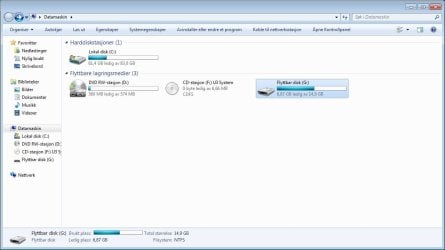
So, having no PC at all, I resorted to a desparte step - loaned a bootleg WIN 7 64bit DVD from an acquitance and installed it on my "erroneously reformatted" HDD machine and I´m using it right now. I tried the step described in No 8 answer, making the part active and showing hidden files worked, but then I found out that there was not enoguh space on the 8 GB USB I have (only about 260Kb space missing to get the recovery files on it!) so I´ll have to get a larger capacity USB before I proceed, this may take some time. By the way, you are right, the Sandisc is a sort of combined pendrive/dvd drive, it shows as such
Scrshot.jpg

I´ll have to leave the recovery of my HP PC for the time being and will return when another USB is in my hands. By the way, I checked the recovery didcs from Hp only to find that they were NO longer in stock, so I´m really stuck here and my only hope is that transfer of the recovery files from my Sandisk Pendrive/DVD combined stick to a regular USB stick really works.
However, as I have another problem on my neck - my laptop refuses to boot now with the BOOT MGR missing message- any ideas how to remedy this (Manufacturers recovery discs do not work) or find out if its HDD has "gone with the wind".
 

My Computer

OS
Windows 7 Home Premium
However, as I have another problem on my neck - my laptop refuses to boot now with the BOOT MGR missing message- any ideas how to remedy this (Manufacturers recovery discs do not work) or find out if its HDD has "gone with the wind".

If bootmgr is missing on a boot partition on harddisk
 

My Computer

Computer type
Laptop
Computer Manufacturer/Model Number
ACER ASPIRE 5742G
OS
Microsoft Windows 7 Home Premium 64-bits 7601 Multiprocessor Free Service Pack 1
CPU
Intel(R) Core(TM) i3 CPU M 370 @ 2.40GHz
Motherboard
Acer Aspire 5742G
Memory
4,00 GB
Graphics Card(s)
ATI Mobility Radeon HD 5400 Series
Sound Card
(1) AMD High Definition Audio Device (2) Realtek High Defi
Screen Resolution
1366 x 768 x 32 bits (4294967296 colors) @ 60 Hz
Hard Drives
WDC WD5000BEVT-22ZAT0

My Computer

Computer type
Laptop
Computer Manufacturer/Model Number
ACER ASPIRE 5742G
OS
Microsoft Windows 7 Home Premium 64-bits 7601 Multiprocessor Free Service Pack 1
CPU
Intel(R) Core(TM) i3 CPU M 370 @ 2.40GHz
Motherboard
Acer Aspire 5742G
Memory
4,00 GB
Graphics Card(s)
ATI Mobility Radeon HD 5400 Series
Sound Card
(1) AMD High Definition Audio Device (2) Realtek High Defi
Screen Resolution
1366 x 768 x 32 bits (4294967296 colors) @ 60 Hz
Hard Drives
WDC WD5000BEVT-22ZAT0
How do I find out if the right partition is active (it should be - the PC worked before) if the PC refuses to boot?

I created a system repair disc on my stationary PC , but unfortunately it will not work with my laptop, since the repair disc is a 64 bit and my laptop can only handle 32 bit. My neighbour has a PC with WIN XP on it - can I use it to create a system repair disc and try it on my laptop? If so, how a system rep. disc is created on a PC with WIN XP?
 

My Computer

OS
Windows 7 Home Premium

My Computer

Computer type
Laptop
Computer Manufacturer/Model Number
ACER ASPIRE 5742G
OS
Microsoft Windows 7 Home Premium 64-bits 7601 Multiprocessor Free Service Pack 1
CPU
Intel(R) Core(TM) i3 CPU M 370 @ 2.40GHz
Motherboard
Acer Aspire 5742G
Memory
4,00 GB
Graphics Card(s)
ATI Mobility Radeon HD 5400 Series
Sound Card
(1) AMD High Definition Audio Device (2) Realtek High Defi
Screen Resolution
1366 x 768 x 32 bits (4294967296 colors) @ 60 Hz
Hard Drives
WDC WD5000BEVT-22ZAT0
Hi again, this is like reading Kafka ´s castle. If everything else fails, I´ll follow your advice (answer no 11) although a part of the factory bloatware on my stationery PC I´d like to keep as e. g. a Micr Office 2010 and also an imaging software, which I´d like to continue to use, my regular Microsoft office bought 2003 does not work satisfactorily with some files.

Now to my Missing Boot Magr problem on my laptop: I downloaded the ISO file, burnt it without problems and booted it. Everyrhing went fine, right after language selection I selected Repair computer - it continued to progress for a short while, but hen got stuck at the startup repair.

Message: Starup repair cannot repair this computer automatically.
Problem signature:
Problem events name: Startup repair offline
Problem signature 01 6.1.7600.16385
Problem sign o2 same as above
03 unknown
04 - 1
05 External media
06 1
07 MissingBoot Manager
Locale ID 1033

It then urges me top restart computer, only to bring forward Boot Mgr Missing again upon restart. The odd thing is that the repair process did not list the WIN 7 that was installed before, it ´s all empty, but probably the manufacturers recovery discs deleted the previous WIN7 when I tried to recover and then and did not succeed in recovering the OS. So, any ideas what what next?
 

My Computer

OS
Windows 7 Home Premium
Hi again, this is like reading Kafka ´s castle. If everything else fails, I´ll follow your advice (answer no 11) although a part of the factory bloatware on my stationery PC I´d like to keep as e. g. a Micr Office 2010 and also an imaging software, which I´d like to continue to use, my regular Microsoft office bought 2003 does not work satisfactorily with some files.

Now to my Missing Boot Magr problem on my laptop: I downloaded the ISO file, burnt it without problems and booted it. Everyrhing went fine, right after language selection I selected Repair computer - it continued to progress for a short while, but hen got stuck at the startup repair.

Message: Starup repair cannot repair this computer automatically.
Problem signature:
Problem events name: Startup repair offline
Problem signature 01 6.1.7600.16385
Problem sign o2 same as above
03 unknown
04 - 1
05 External media
06 1
07 MissingBoot Manager
Locale ID 1033

It then urges me top restart computer, only to bring forward Boot Mgr Missing again upon restart. The odd thing is that the repair process did not list the WIN 7 that was installed before, it ´s all empty, but probably the manufacturers recovery discs deleted the previous WIN7 when I tried to recover and then and did not succeed in recovering the OS. So, any ideas what what next?

Enter the recovery environment again on laptop with missing bootmgr. Select "command prompt"

Code:
diskpart
list disks  (how many disks? Ignore the usb stick)
select disk 0 (or 1. previous command displayed the size of disk, so you know what number of harddisk is)
list part
list vol
exit

Show us the output or explain what you see.
 

My Computer

Computer type
Laptop
Computer Manufacturer/Model Number
ACER ASPIRE 5742G
OS
Microsoft Windows 7 Home Premium 64-bits 7601 Multiprocessor Free Service Pack 1
CPU
Intel(R) Core(TM) i3 CPU M 370 @ 2.40GHz
Motherboard
Acer Aspire 5742G
Memory
4,00 GB
Graphics Card(s)
ATI Mobility Radeon HD 5400 Series
Sound Card
(1) AMD High Definition Audio Device (2) Realtek High Defi
Screen Resolution
1366 x 768 x 32 bits (4294967296 colors) @ 60 Hz
Hard Drives
WDC WD5000BEVT-22ZAT0
Enter the recovery environment again on laptop with missing bootmgr. Select "command prompt"
Code:
dir  c:\users
dir  d:\users
dir  e:\users

and so on. What is drive letter of disk with folder "users"? Does it show your account name?
 

My Computer

Computer type
Laptop
Computer Manufacturer/Model Number
ACER ASPIRE 5742G
OS
Microsoft Windows 7 Home Premium 64-bits 7601 Multiprocessor Free Service Pack 1
CPU
Intel(R) Core(TM) i3 CPU M 370 @ 2.40GHz
Motherboard
Acer Aspire 5742G
Memory
4,00 GB
Graphics Card(s)
ATI Mobility Radeon HD 5400 Series
Sound Card
(1) AMD High Definition Audio Device (2) Realtek High Defi
Screen Resolution
1366 x 768 x 32 bits (4294967296 colors) @ 60 Hz
Hard Drives
WDC WD5000BEVT-22ZAT0
I´ll do as you asked me in about two hours ,right now I have to go, see you then.
 

My Computer

OS
Windows 7 Home Premium
Well, here we go, results of the command prompt actions:

funny thing, the root is marked by an x: on command prompt, X:\>

Part 1 Primary 232 GB Offset 1024 kb
Part 2 Primary 16MB " 232GB


Volume 0 LTR D Label GSP1RMCHPFR FS:UDF Type DVD-ROM

Volume 1 G WIN7 NTFS Type partition

volume in drive X is boot

volume ser no D60A-OPC2

Directory of x: users file not found

11/20/2010 05:25 DIR
11/20/2010 05:25 DIr
0 files 3 dir(s)
30707717 bytes free


dir c : volume in drive c: is WIN7

directory of c: / file not found


volume drive d is GSP1RMCHPHRER_EN_DVD

volume serial number is FE4C-B36E


drive e:/ The system cannot find the path specified
 

My Computer

OS
Windows 7 Home Premium
Forget about X, it's a ram drive from recovery environment.
C is window 7.

Sure disk 0 is the main harddrive.. it has 2 partitions size 232GB? 1 partition is 232GB in size, the other is 16MB?

what the heck is G?
Code:
dir c:\
dir e:\
dir f:\
dir g:\
Is C your windows partition?

Code:
diskpart
select  vol  c
detail partition
exit
Give me the details
 

My Computer

Computer type
Laptop
Computer Manufacturer/Model Number
ACER ASPIRE 5742G
OS
Microsoft Windows 7 Home Premium 64-bits 7601 Multiprocessor Free Service Pack 1
CPU
Intel(R) Core(TM) i3 CPU M 370 @ 2.40GHz
Motherboard
Acer Aspire 5742G
Memory
4,00 GB
Graphics Card(s)
ATI Mobility Radeon HD 5400 Series
Sound Card
(1) AMD High Definition Audio Device (2) Realtek High Defi
Screen Resolution
1366 x 768 x 32 bits (4294967296 colors) @ 60 Hz
Hard Drives
WDC WD5000BEVT-22ZAT0
Prove C is the win7 volume!

Code:
dir  c:\windows
dir  "c:\Program Files"
dir  c:\users

All those folders exist? c:\users shows your logon name?
 

My Computer

Computer type
Laptop
Computer Manufacturer/Model Number
ACER ASPIRE 5742G
OS
Microsoft Windows 7 Home Premium 64-bits 7601 Multiprocessor Free Service Pack 1
CPU
Intel(R) Core(TM) i3 CPU M 370 @ 2.40GHz
Motherboard
Acer Aspire 5742G
Memory
4,00 GB
Graphics Card(s)
ATI Mobility Radeon HD 5400 Series
Sound Card
(1) AMD High Definition Audio Device (2) Realtek High Defi
Screen Resolution
1366 x 768 x 32 bits (4294967296 colors) @ 60 Hz
Hard Drives
WDC WD5000BEVT-22ZAT0
Back
Top