system restore image please help.....

Intel Core i7-820QM Quad Core Mobile CPU
4GB Shared Dual Channel DDR3 at 1066MHz
15.6 Inch Full High Definition (1080p
ATI Mobility Radeon HD 5470, 1GB
500GB 7200 RPM SATA Hard Disk Drive
PC-Restore, Dim/Insp
Genuine Windows 7 Home Premium, 64bit, English
4X Slot Load Bluray (BDRW) Rewritable Drive (BD Read and Write)
Intel 6250 Wireless-N w/WiMAX (2x2) Mini Card
Wireless 365 Bluetooth Module (2.1)
 

My Computer

Computer Manufacturer/Model Number
dell studio 15
OS
windows 7 home
CPU
intel icore 7
Memory
500
Did you have any luck getting into the recovery partition?
 

My Computer

Computer type
PC/Desktop
Computer Manufacturer/Model Number
Medion Erazer (note to self: insert model number) - with custom additions
OS
Windows 10 Pro x64
CPU
Intel Core i5 7400 @ 3.00GHz
Motherboard
OEM supllied with PC
Memory
8GB 2133Mhz DDR4 (OEM supplied)
Graphics Card(s)
Gygabyte Windforce GTX 1050Ti (Factory Overclocked)
Sound Card
Realtek
Monitor(s) Displays
Acer Al1980 + HKC
Screen Resolution
1360*768(HKC) / 1280*1024(Acer)
Hard Drives
1TB Toshiba
1TB WD Caviar Green
120GB Samsung Evo 840
PSU
OEM supplied (no power rating on case)
Case
OEM Supplied
Cooling
Stock
Keyboard
Logitech Wireless
Mouse
Logitect Wireless
Internet Speed
40Mb/s Down 10Mb/s Up
Antivirus
Defender
Browser
Firefox
no i went to bed
 

My Computer

Computer Manufacturer/Model Number
dell studio 15
OS
windows 7 home
CPU
intel icore 7
Memory
500
:(:confused:
 

Attachments

  • IMG00181-20100712-1949.jpg
    IMG00181-20100712-1949.jpg
    355 KB · Views: 26
  • IMG00180-20100712-1948.jpg
    IMG00180-20100712-1948.jpg
    354.6 KB · Views: 27

My Computer

Computer Manufacturer/Model Number
dell studio 15
OS
windows 7 home
CPU
intel icore 7
Memory
500
As I said last night: Try and get into the recovery partition, your manual should tell you how. Otherwise its going to have to be a clean Install and goodbye to the programs that came to the laptop I suspect.
 

My Computer

Computer type
PC/Desktop
Computer Manufacturer/Model Number
Medion Erazer (note to self: insert model number) - with custom additions
OS
Windows 10 Pro x64
CPU
Intel Core i5 7400 @ 3.00GHz
Motherboard
OEM supllied with PC
Memory
8GB 2133Mhz DDR4 (OEM supplied)
Graphics Card(s)
Gygabyte Windforce GTX 1050Ti (Factory Overclocked)
Sound Card
Realtek
Monitor(s) Displays
Acer Al1980 + HKC
Screen Resolution
1360*768(HKC) / 1280*1024(Acer)
Hard Drives
1TB Toshiba
1TB WD Caviar Green
120GB Samsung Evo 840
PSU
OEM supplied (no power rating on case)
Case
OEM Supplied
Cooling
Stock
Keyboard
Logitech Wireless
Mouse
Logitect Wireless
Internet Speed
40Mb/s Down 10Mb/s Up
Antivirus
Defender
Browser
Firefox
let me ask you something... when you make an image file, doesnt it save everything? including programs and settings? isnt that what its suposed to do?
 

My Computer

Computer Manufacturer/Model Number
dell studio 15
OS
windows 7 home
CPU
intel icore 7
Memory
500
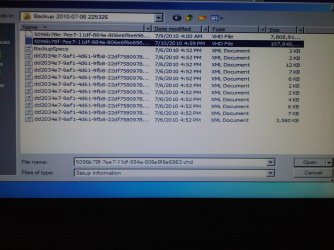
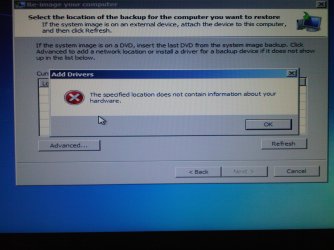
ok tried again to look in the manual for instructions on how to restore from recovery but no answers. i again went into F8 to find the image. when it loads up it doesnt show any image in my computer and i dont know how to have it explore to find it on my external hard drive. its when i hit advance it allows me to navagate to find image and thats where im getting the "add drivers" window. so .... if it doesnt show up on the first screen how can i navagate to have windows see it?
 

My Computer

Computer Manufacturer/Model Number
dell studio 15
OS
windows 7 home
CPU
intel icore 7
Memory
500
Ok. I see whats going on here. What a bloody Palava.

Basically, WinRE cant find drivers for your external HDD. Did it come with a disk? If so you can load drivers off of there. If not, then its going to be a little trickier, as you will need to get the Image onto a partition on the HDD on the laptop.
 

My Computer

Computer type
PC/Desktop
Computer Manufacturer/Model Number
Medion Erazer (note to self: insert model number) - with custom additions
OS
Windows 10 Pro x64
CPU
Intel Core i5 7400 @ 3.00GHz
Motherboard
OEM supllied with PC
Memory
8GB 2133Mhz DDR4 (OEM supplied)
Graphics Card(s)
Gygabyte Windforce GTX 1050Ti (Factory Overclocked)
Sound Card
Realtek
Monitor(s) Displays
Acer Al1980 + HKC
Screen Resolution
1360*768(HKC) / 1280*1024(Acer)
Hard Drives
1TB Toshiba
1TB WD Caviar Green
120GB Samsung Evo 840
PSU
OEM supplied (no power rating on case)
Case
OEM Supplied
Cooling
Stock
Keyboard
Logitech Wireless
Mouse
Logitect Wireless
Internet Speed
40Mb/s Down 10Mb/s Up
Antivirus
Defender
Browser
Firefox
If you need certain apps and have the Dell apps disk or can order it then a clean install using your Win7 installer is best anyway. Let us know if you need to unlock your licensed version in installer to install using product key on sticker

If you cannot run Recovery and are trying to mount the image file from your Recovery partition then as stated it cannot be mounted using WinRE Repair console.

THe person who can help you find it and mount it using free 3rd party app like Paragon Rescue Disk is SIW2.

Or you can boot Paragon disk and browse to Recovery to find the file which contains the image for mounting.

But I would PM SIW2 to help you as he will save you time and get it done if it can be. He is my teacher.

.
 
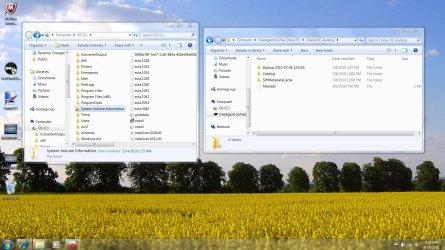
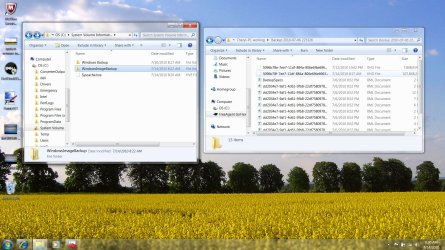
heres a thought... i dont know if it will work or not. can i copy and paste the backup information that i saved on my external hard drive to the C/System Volume Information?
would that work to load the image and have windows backup and restore or F8 see that there is a image there?
 

Attachments

  • system volume information.jpg
    system volume information.jpg
    312.9 KB · Views: 12
  • will it work if i copy and paste.jpg
    will it work if i copy and paste.jpg
    337 KB · Views: 8

My Computer

Computer Manufacturer/Model Number
dell studio 15
OS
windows 7 home
CPU
intel icore 7
Memory
500
DOnt copy it to System Volume Information.

I was going to suggest this yesterday, but I didn't know if you had access to a working Install on the computer in question.

If you make a new Partition on the Hard Drive: http://www.sevenforums.com/tutorials/2674-partition-volume-create-new.html and copy the entire Windows Image backup folder onto it then hopefully WinRE will see the Image. DONT put it on your C drive, as it will be overwritten and corrupt itself halfway through the restore.
 

My Computer

Computer type
PC/Desktop
Computer Manufacturer/Model Number
Medion Erazer (note to self: insert model number) - with custom additions
OS
Windows 10 Pro x64
CPU
Intel Core i5 7400 @ 3.00GHz
Motherboard
OEM supllied with PC
Memory
8GB 2133Mhz DDR4 (OEM supplied)
Graphics Card(s)
Gygabyte Windforce GTX 1050Ti (Factory Overclocked)
Sound Card
Realtek
Monitor(s) Displays
Acer Al1980 + HKC
Screen Resolution
1360*768(HKC) / 1280*1024(Acer)
Hard Drives
1TB Toshiba
1TB WD Caviar Green
120GB Samsung Evo 840
PSU
OEM supplied (no power rating on case)
Case
OEM Supplied
Cooling
Stock
Keyboard
Logitech Wireless
Mouse
Logitect Wireless
Internet Speed
40Mb/s Down 10Mb/s Up
Antivirus
Defender
Browser
Firefox
ewwwwwwwwwwwwwwwwww...
 

My Computer

Computer Manufacturer/Model Number
dell studio 15
OS
windows 7 home
CPU
intel icore 7
Memory
500
good thing you replied fast..... lol i thought it was a fix ... guess not :confused: ok ill try the new partion thing later when i get home from work. thanks
 

My Computer

Computer Manufacturer/Model Number
dell studio 15
OS
windows 7 home
CPU
intel icore 7
Memory
500
No problemo. Remember: DO NOT UNDER ANY CIRCUMSTANCES PUT IT IN EITHER SYSTEM VOLUME INFORMATION OR ON YOUR C DRIVE It needs to go into the Root of your new partition (D probably)

Incedentally.... why ewww?
 

My Computer

Computer type
PC/Desktop
Computer Manufacturer/Model Number
Medion Erazer (note to self: insert model number) - with custom additions
OS
Windows 10 Pro x64
CPU
Intel Core i5 7400 @ 3.00GHz
Motherboard
OEM supllied with PC
Memory
8GB 2133Mhz DDR4 (OEM supplied)
Graphics Card(s)
Gygabyte Windforce GTX 1050Ti (Factory Overclocked)
Sound Card
Realtek
Monitor(s) Displays
Acer Al1980 + HKC
Screen Resolution
1360*768(HKC) / 1280*1024(Acer)
Hard Drives
1TB Toshiba
1TB WD Caviar Green
120GB Samsung Evo 840
PSU
OEM supplied (no power rating on case)
Case
OEM Supplied
Cooling
Stock
Keyboard
Logitech Wireless
Mouse
Logitect Wireless
Internet Speed
40Mb/s Down 10Mb/s Up
Antivirus
Defender
Browser
Firefox
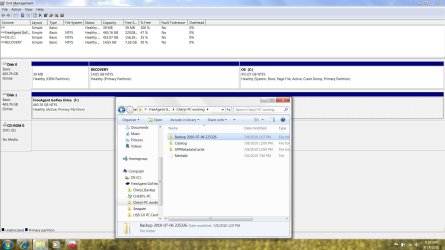
because im inpatient... and was just about to try it. ummm... question.. when i create the new partition what file or files do i copy over. all in back up? ex: backup 2010... or all the folder that are shown like calalog,SPPMetadataCache,MediaId
 

Attachments

  • disk management.jpg
    disk management.jpg
    181.1 KB · Views: 9

My Computer

Computer Manufacturer/Model Number
dell studio 15
OS
windows 7 home
CPU
intel icore 7
Memory
500
I have never actually done this, but as Image backup creates all those folders, I assume it needs all of them. Copy the entire Cheryl-PC working folder over.

by the way why is it called that? that might be causing your issues, try renaming the folder back to Cheryl-PC when you copy it over.

because im inpatient...
Must be a language misunderstanding :huh: In British English ewwww normally means that you find something disgusting or unsavoury

Also :) I would like to apologise if I seemed rude yesterday, I was a little preoccupied and in a bad mood. I realise I wasn't being very helpful, so I'm sorry
 

My Computer

Computer type
PC/Desktop
Computer Manufacturer/Model Number
Medion Erazer (note to self: insert model number) - with custom additions
OS
Windows 10 Pro x64
CPU
Intel Core i5 7400 @ 3.00GHz
Motherboard
OEM supllied with PC
Memory
8GB 2133Mhz DDR4 (OEM supplied)
Graphics Card(s)
Gygabyte Windforce GTX 1050Ti (Factory Overclocked)
Sound Card
Realtek
Monitor(s) Displays
Acer Al1980 + HKC
Screen Resolution
1360*768(HKC) / 1280*1024(Acer)
Hard Drives
1TB Toshiba
1TB WD Caviar Green
120GB Samsung Evo 840
PSU
OEM supplied (no power rating on case)
Case
OEM Supplied
Cooling
Stock
Keyboard
Logitech Wireless
Mouse
Logitect Wireless
Internet Speed
40Mb/s Down 10Mb/s Up
Antivirus
Defender
Browser
Firefox
well the "ewwww" responce should have been a " ohhhhhhhhhhhhhhhh" or "eekkkk" as if ,oh boy i might have made a HUGEEEEEE mistake. as far as your concerned, no apology needed :) its all good. i appreciate your help... Trust ME!! ok, off to work. ill ttul i hope .... if i dont mess up things any more then they are lol have a nice day :)
 

My Computer

Computer Manufacturer/Model Number
dell studio 15
OS
windows 7 home
CPU
intel icore 7
Memory
500
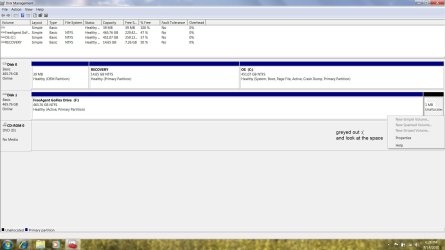
problemo... look... :cry:
 

Attachments

  • disk management.jpg
    disk management.jpg
    121.1 KB · Views: 14

My Computer

Computer Manufacturer/Model Number
dell studio 15
OS
windows 7 home
CPU
intel icore 7
Memory
500
right. How big is the system image? RIght Click the Folder with all the folders in it and click Properties, tell me the size, and I will make you a personalised guide.
 

My Computer

Computer type
PC/Desktop
Computer Manufacturer/Model Number
Medion Erazer (note to self: insert model number) - with custom additions
OS
Windows 10 Pro x64
CPU
Intel Core i5 7400 @ 3.00GHz
Motherboard
OEM supllied with PC
Memory
8GB 2133Mhz DDR4 (OEM supplied)
Graphics Card(s)
Gygabyte Windforce GTX 1050Ti (Factory Overclocked)
Sound Card
Realtek
Monitor(s) Displays
Acer Al1980 + HKC
Screen Resolution
1360*768(HKC) / 1280*1024(Acer)
Hard Drives
1TB Toshiba
1TB WD Caviar Green
120GB Samsung Evo 840
PSU
OEM supplied (no power rating on case)
Case
OEM Supplied
Cooling
Stock
Keyboard
Logitech Wireless
Mouse
Logitect Wireless
Internet Speed
40Mb/s Down 10Mb/s Up
Antivirus
Defender
Browser
Firefox
Back
Top