system restore image please help.....

Ok One last thing to try before we give this up as a lost cause.

Did your external HDD come with a driver disk?

If not, what is the make and model?

By the way... How are you booting Windows Recovery Environment if you don't have installation media?
 

My Computer

Computer type
PC/Desktop
Computer Manufacturer/Model Number
Medion Erazer (note to self: insert model number) - with custom additions
OS
Windows 10 Pro x64
CPU
Intel Core i5 7400 @ 3.00GHz
Motherboard
OEM supllied with PC
Memory
8GB 2133Mhz DDR4 (OEM supplied)
Graphics Card(s)
Gygabyte Windforce GTX 1050Ti (Factory Overclocked)
Sound Card
Realtek
Monitor(s) Displays
Acer Al1980 + HKC
Screen Resolution
1360*768(HKC) / 1280*1024(Acer)
Hard Drives
1TB Toshiba
1TB WD Caviar Green
120GB Samsung Evo 840
PSU
OEM supplied (no power rating on case)
Case
OEM Supplied
Cooling
Stock
Keyboard
Logitech Wireless
Mouse
Logitect Wireless
Internet Speed
40Mb/s Down 10Mb/s Up
Antivirus
Defender
Browser
Firefox
external hard drive is a seagate free agent goflex 500 gb. im not sure what you mean about a driver for it..
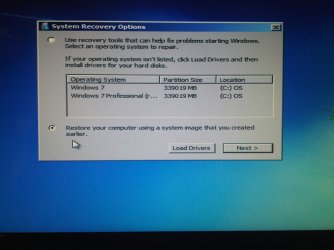
i recieved the windows 7 oem cd today from dell ( operating system reinstallation dvd windows 7 home premium 64 bit). i put it in the drive reboot F12 boot from cd/dvd, it loads windows i click restore (not install) system recovery options ect... what the heck am i doing wrong? it doesnt see the partion we created.... on the c drive uggggggg...... :cry: :cry: :cry: :cry: :cry:
 

Attachments

  • recovery snapshot.jpg
    recovery snapshot.jpg
    276.3 KB · Views: 7
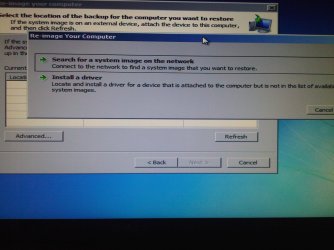
  • recovery snapshot 2.jpg
    recovery snapshot 2.jpg
    337.7 KB · Views: 7

My Computer

Computer Manufacturer/Model Number
dell studio 15
OS
windows 7 home
CPU
intel icore 7
Memory
500
Did the External Hard Drive come with a Cd or a DVD?
 

My Computer

Computer type
PC/Desktop
Computer Manufacturer/Model Number
Medion Erazer (note to self: insert model number) - with custom additions
OS
Windows 10 Pro x64
CPU
Intel Core i5 7400 @ 3.00GHz
Motherboard
OEM supllied with PC
Memory
8GB 2133Mhz DDR4 (OEM supplied)
Graphics Card(s)
Gygabyte Windforce GTX 1050Ti (Factory Overclocked)
Sound Card
Realtek
Monitor(s) Displays
Acer Al1980 + HKC
Screen Resolution
1360*768(HKC) / 1280*1024(Acer)
Hard Drives
1TB Toshiba
1TB WD Caviar Green
120GB Samsung Evo 840
PSU
OEM supplied (no power rating on case)
Case
OEM Supplied
Cooling
Stock
Keyboard
Logitech Wireless
Mouse
Logitect Wireless
Internet Speed
40Mb/s Down 10Mb/s Up
Antivirus
Defender
Browser
Firefox
when i click advance it comes up with that window " reimage your computer" with only those 2 options " search for system image on network or install a driver"
 

My Computer

Computer Manufacturer/Model Number
dell studio 15
OS
windows 7 home
CPU
intel icore 7
Memory
500
I got that bit. Its not going to work obviously.

I have one more Idea, before I just tell you to reinstall and have done with it. but I need an answer to my question. Did the External Hard Drive come with a CD or a DVD?
 

My Computer

Computer type
PC/Desktop
Computer Manufacturer/Model Number
Medion Erazer (note to self: insert model number) - with custom additions
OS
Windows 10 Pro x64
CPU
Intel Core i5 7400 @ 3.00GHz
Motherboard
OEM supllied with PC
Memory
8GB 2133Mhz DDR4 (OEM supplied)
Graphics Card(s)
Gygabyte Windforce GTX 1050Ti (Factory Overclocked)
Sound Card
Realtek
Monitor(s) Displays
Acer Al1980 + HKC
Screen Resolution
1360*768(HKC) / 1280*1024(Acer)
Hard Drives
1TB Toshiba
1TB WD Caviar Green
120GB Samsung Evo 840
PSU
OEM supplied (no power rating on case)
Case
OEM Supplied
Cooling
Stock
Keyboard
Logitech Wireless
Mouse
Logitect Wireless
Internet Speed
40Mb/s Down 10Mb/s Up
Antivirus
Defender
Browser
Firefox
external didnt come with cd.. omg im soooo sorry to be putting you threw all this you mus be tired and at your wits end :(
 

My Computer

Computer Manufacturer/Model Number
dell studio 15
OS
windows 7 home
CPU
intel icore 7
Memory
500
Damn it.

Ok I'm sorry to have to tell you this, you're not going to like what you hear.

It seems the Image is corrupt, that is why Windows can't see it, Unfortunately there is nothing we can do about this. I actually suspected this back on Page 5, but I was hoping it was a problem with the External Hard Drive.

This leaves us with one option. Reinstall Windows from the Dell OEM CD. That should get you your programs back (assuming they came with the computer.)

I'm really sorry, there is nothing else I can do to help you
 

My Computer

Computer type
PC/Desktop
Computer Manufacturer/Model Number
Medion Erazer (note to self: insert model number) - with custom additions
OS
Windows 10 Pro x64
CPU
Intel Core i5 7400 @ 3.00GHz
Motherboard
OEM supllied with PC
Memory
8GB 2133Mhz DDR4 (OEM supplied)
Graphics Card(s)
Gygabyte Windforce GTX 1050Ti (Factory Overclocked)
Sound Card
Realtek
Monitor(s) Displays
Acer Al1980 + HKC
Screen Resolution
1360*768(HKC) / 1280*1024(Acer)
Hard Drives
1TB Toshiba
1TB WD Caviar Green
120GB Samsung Evo 840
PSU
OEM supplied (no power rating on case)
Case
OEM Supplied
Cooling
Stock
Keyboard
Logitech Wireless
Mouse
Logitect Wireless
Internet Speed
40Mb/s Down 10Mb/s Up
Antivirus
Defender
Browser
Firefox
ugggggg...... oh boy...... ok... we tried very hard ...... thank you for all your help you were extreamly patient and i appreciate what you had done. in the future.... after i reinstall windows and ect should i use the windows imagining or something else like ghost or...... ugggg...
 

My Computer

Computer Manufacturer/Model Number
dell studio 15
OS
windows 7 home
CPU
intel icore 7
Memory
500
im going to keep the image on my external incase ..... you wake up from a dream and say to your self " ahhhhh we should try that" lol my hopes..of course.. lol lol or maybe i should wake up and just say it aint gonna work ... well .. we gave it our best shot.
cheers and sleep well (maybe you will wake up with an idea)
 

My Computer

Computer Manufacturer/Model Number
dell studio 15
OS
windows 7 home
CPU
intel icore 7
Memory
500
I personally, would use Windows Backup, or Acronis, but Acronis is Payware.

Do yourself a favour, backup your files onto your external HDD before you reinstall, and delete the system image from E:\

Here is a tutorial: http://www.sevenforums.com/tutorials/1649-clean-install-windows-7-a.html make sure you format the C drive before installing (the tutorial will explain how)

Honestly, we have tried everything, I know you don't see it, but behind the scenes, a team of Guru's have been helping me out with this thread, giving me ideas and such. We have exauhsted every avenue.
 

My Computer

Computer type
PC/Desktop
Computer Manufacturer/Model Number
Medion Erazer (note to self: insert model number) - with custom additions
OS
Windows 10 Pro x64
CPU
Intel Core i5 7400 @ 3.00GHz
Motherboard
OEM supllied with PC
Memory
8GB 2133Mhz DDR4 (OEM supplied)
Graphics Card(s)
Gygabyte Windforce GTX 1050Ti (Factory Overclocked)
Sound Card
Realtek
Monitor(s) Displays
Acer Al1980 + HKC
Screen Resolution
1360*768(HKC) / 1280*1024(Acer)
Hard Drives
1TB Toshiba
1TB WD Caviar Green
120GB Samsung Evo 840
PSU
OEM supplied (no power rating on case)
Case
OEM Supplied
Cooling
Stock
Keyboard
Logitech Wireless
Mouse
Logitect Wireless
Internet Speed
40Mb/s Down 10Mb/s Up
Antivirus
Defender
Browser
Firefox
ok... thanks again for all your help. your a doll...
 

My Computer

Computer Manufacturer/Model Number
dell studio 15
OS
windows 7 home
CPU
intel icore 7
Memory
500
Your very welcome, I'm only sorry that it all ended up absolutely nowhere.
 

My Computer

Computer type
PC/Desktop
Computer Manufacturer/Model Number
Medion Erazer (note to self: insert model number) - with custom additions
OS
Windows 10 Pro x64
CPU
Intel Core i5 7400 @ 3.00GHz
Motherboard
OEM supllied with PC
Memory
8GB 2133Mhz DDR4 (OEM supplied)
Graphics Card(s)
Gygabyte Windforce GTX 1050Ti (Factory Overclocked)
Sound Card
Realtek
Monitor(s) Displays
Acer Al1980 + HKC
Screen Resolution
1360*768(HKC) / 1280*1024(Acer)
Hard Drives
1TB Toshiba
1TB WD Caviar Green
120GB Samsung Evo 840
PSU
OEM supplied (no power rating on case)
Case
OEM Supplied
Cooling
Stock
Keyboard
Logitech Wireless
Mouse
Logitect Wireless
Internet Speed
40Mb/s Down 10Mb/s Up
Antivirus
Defender
Browser
Firefox
to all the guru's out there in cyber world and to you martin ...thank you all again....... i bid you good night, cheers :)
 

My Computer

Computer Manufacturer/Model Number
dell studio 15
OS
windows 7 home
CPU
intel icore 7
Memory
500
Can I please make a small suggestion for next time you post.

I don't mean this as a criticism, but this thread is 3 times as long as it should be because of your triple posting.

If you have something else to add, please use the Edit button on your posts.
 

My Computer

Computer type
PC/Desktop
Computer Manufacturer/Model Number
Medion Erazer (note to self: insert model number) - with custom additions
OS
Windows 10 Pro x64
CPU
Intel Core i5 7400 @ 3.00GHz
Motherboard
OEM supllied with PC
Memory
8GB 2133Mhz DDR4 (OEM supplied)
Graphics Card(s)
Gygabyte Windforce GTX 1050Ti (Factory Overclocked)
Sound Card
Realtek
Monitor(s) Displays
Acer Al1980 + HKC
Screen Resolution
1360*768(HKC) / 1280*1024(Acer)
Hard Drives
1TB Toshiba
1TB WD Caviar Green
120GB Samsung Evo 840
PSU
OEM supplied (no power rating on case)
Case
OEM Supplied
Cooling
Stock
Keyboard
Logitech Wireless
Mouse
Logitect Wireless
Internet Speed
40Mb/s Down 10Mb/s Up
Antivirus
Defender
Browser
Firefox
If I am reading the screenshot of your External HD correctly, I believe you have a subfolder of the WindowsImageBackup file there which will not be autodetected by the booted Win7 Image Restore utility.

In my experience, the folder must be in the root of the External and can only be named WindowsImageBackup and nothing else.

It looks like you have the next sub-folder Cheryl-PC instead. You can create a New folder named WindowsImageBackup and place Cheryl-PC inside and the imaging utillity should autodetect it if it's not corrupted.

Sorry I didn't see this earlier.
 
Omg! That was it!! It found my external hard drive image and now preparing to restore. Oh crap just recieced error message. "The system image restore failed" error details: the volume I'd could not be found. (0x80070495). What's that?
 

My Computer

Computer Manufacturer/Model Number
dell studio 15
OS
windows 7 home
CPU
intel icore 7
Memory
500
a quick google suggests that it is either a corrupt boot sector on the Image, or a problem with RAID. As you don't have a RAID array, I think we can eliminate that one.

I'm thinking Clean Install again, but wait and see what Greg thinks, he is more experienced in these things than I am.
 

My Computer

Computer type
PC/Desktop
Computer Manufacturer/Model Number
Medion Erazer (note to self: insert model number) - with custom additions
OS
Windows 10 Pro x64
CPU
Intel Core i5 7400 @ 3.00GHz
Motherboard
OEM supllied with PC
Memory
8GB 2133Mhz DDR4 (OEM supplied)
Graphics Card(s)
Gygabyte Windforce GTX 1050Ti (Factory Overclocked)
Sound Card
Realtek
Monitor(s) Displays
Acer Al1980 + HKC
Screen Resolution
1360*768(HKC) / 1280*1024(Acer)
Hard Drives
1TB Toshiba
1TB WD Caviar Green
120GB Samsung Evo 840
PSU
OEM supplied (no power rating on case)
Case
OEM Supplied
Cooling
Stock
Keyboard
Logitech Wireless
Mouse
Logitect Wireless
Internet Speed
40Mb/s Down 10Mb/s Up
Antivirus
Defender
Browser
Firefox
If you want to try a version of Acronis for use on a Seagate HDD (internal or external) check this free version from Seagate.

You must have a Seagate HDD in your system for this to work.
I have used it many times for backups and restoring, cloning new HDDs, it works very well.

Seagate DiscWizard, a version of Acronis
 

My Computer

Computer type
PC/Desktop
Computer Manufacturer/Model Number
76~2.0
OS
Windows 7 Ult x64 - SP1/ Windows 8 Pro x64
CPU
Intel Core i5-3570K 4.6GHz
Motherboard
Gigabyte GA-Z77X UD3H, f18
Memory
8GB (2X4GB) DDR3 1600 Corsair Vengeance CL8 1.5v
Graphics Card(s)
Sapphire HD 7770 Vapor-X OC 1GB DDR5
Sound Card
Onboard VIA VT2021
Monitor(s) Displays
22" LCD Dell
Screen Resolution
1680x1050
Hard Drives
Samsung 840Pro 128GB SSD,
Seagate Barracuda 500GB SATA2 7200rpm 32MB cache, Seagate Barracuda 1TB SATA2 7200rpm 32MB cache,
PSU
Corsair HX650W
Case
Cooler Master Storm Scout
Cooling
Corsair H80 2x12cm Noctua NF P12 , 2x14cm case fans
Keyboard
Logitech Wave
Mouse
CM Sentinel
Internet Speed
Dismal
Antivirus
Avast
Browser
Opera Next
Other Info
Haswell laptop: HP Envy 17t-j, i7-4700MQ, GeForce 740M 2GB DDR3, 17.3" Full HD 1920x1080, 16GB RAM, Samsung 840 Pro 128GB, 1TB Hitachi 7200 HDD,
Desktop: eSATA ports,
External eSATA Seagate 500GB SATA2 7200rpm,
External WD USB 500GB
OMG!!! it worked!!!! at first i tried to boot from external HD thats when i got that error. so i restarted and booted from windows cd. it saw the file named "windowsbackup" and it worked im back woooooooooooohooooooooohhhhhhhhhhoooooooooo......................
thanks guys !!! your all Geniuses
i have a few little errors i have to work out from bluetooth and word
but i hope i should beable to get them sorted out.
 

My Computer

Computer Manufacturer/Model Number
dell studio 15
OS
windows 7 home
CPU
intel icore 7
Memory
500
Glad it worked.

I found this out trying to juggle multiple backup image files for all 7 of our computers here on one external. You can change the name of the file, stick it in a folder, etc. But it has to be renamed exactly WindowsImageBackup and placed in the root like cheese on a mousetrap.

Many users don't like Windows Backup imaging because of this.

Just post any other issues you have in General or the specific forum if it's obvious.
 
Back
Top