
System Restore not creating automatic restore points

abecanamar

New member
Local time
6:57 PM
Messages
10
System Restore is no longer creating automatic restore points. All the necessary services are set to automatic, ie: task scheduler, volume shadow copy, microsoft software volume shadow copy, windows backup, and remote procedure call.

I tried disabling SR, then performed a disc cleanup, rebooted, then enabled SR. All that did was enable me to create ONE system restore point ONLY. If i try to create an additional restore point, I get the following error message:
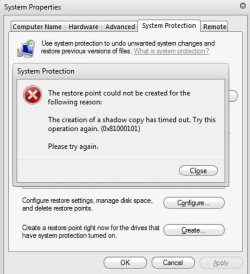
SR ERROR.JPG

Help!!

abe
 

My Computer

Computer Manufacturer/Model Number
HP dv6 1355 dx Notebook
OS
Windows 7 Home Premium 64-bit
CPU
Intel Core 2 Duo T6600, 2200 MHz (11 x 200)
Motherboard
Hewlett-Packard 3627 18.50
Memory
4 GB
Monitor(s) Displays
Mobile Intel(R) 4 Series Express Chipset Family
Screen Resolution
1366 x 768
Hard Drives
Disk Drive WDC WD5000BEVT-60ZAT1 (465 GB, IDE)
Mouse
Microsoft USB Wireless Mouse (IntelliPoint)
Internet Speed
Download: 5110 (Kbps) Upload 655 (Kbps)
Hi,

You might want to try

  • Do you have any security software installed on the computer?
  • Are any third party backup programs installed on your computer?
Verify if these two services are started and running on your computer. If it’s not started, start the services and check if you can create a system restore point.

a) Volume Shadow Copy service
b) Windows backup

Also ensure that their dependency services are running.
Verify if their dependency services are running.

You can check this information from services.msc. To do this follow the steps below:

a) Go to start and type services.msc in the search field.
b) Locate the two services.
c) Right-Click on the service one at a time.
d) Select properties.
e) Go to Dependencies Tab.
f) Note the dependency services.
g) Make sure they’re also running.
h) To start a service, right click on it and select start.


From many users facing the same issue, turning off system restore for the hard disk on which Windows is installed and turning it back on seems to have solved the issue.
You may try the same.

Original Source


OS
 

My Computer

Computer Manufacturer/Model Number
Compaq Desktop
OS
Windows 7 Ultimate x64
CPU
AMD Sempron Dual Core
Memory
3GB
Graphics Card(s)
NVIDIA GeForce 6150SE nForce 430
Screen Resolution
1024x768
Hard Drives
150GB Sata
i am running avast anti-virus free.. other programs i have are malwarebytes antimalware, spybot search and destroy and ad aware.

both services are running as well as their dependencies.

i might also add, in addition to not being able to create anymore restore points, the system is also not creating them say when i install or uninstall a program....
 

My Computer

Computer Manufacturer/Model Number
HP dv6 1355 dx Notebook
OS
Windows 7 Home Premium 64-bit
CPU
Intel Core 2 Duo T6600, 2200 MHz (11 x 200)
Motherboard
Hewlett-Packard 3627 18.50
Memory
4 GB
Monitor(s) Displays
Mobile Intel(R) 4 Series Express Chipset Family
Screen Resolution
1366 x 768
Hard Drives
Disk Drive WDC WD5000BEVT-60ZAT1 (465 GB, IDE)
Mouse
Microsoft USB Wireless Mouse (IntelliPoint)
Internet Speed
Download: 5110 (Kbps) Upload 655 (Kbps)
Back
Top