System Restore not working anymore?

pafkata90

New member
Member
Local time
4:11 AM
Messages
73
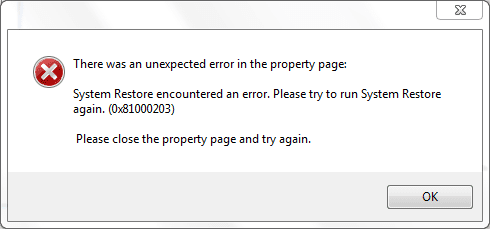
I noticed that when I go to my System Restore I there aren't any restore point. When I go to System Protection under the Properties of the Computer there is an error (I've attached a screen shot). "There was an unexpected error in the properties page: System Restore encountered an error. Please try to run System Restore again. (0x81000203)
Please close the property page and try again."
I tried it after Windows restart and it's the same. I was doing a little optimization in the services. Maybe I have stopped accidentally something important, although I'm pretty sure that I haven't done anything wrong there. I was following a guide from another Win 7 forum.
I would appreciate your help :)
 

Attachments

  • Capture.PNG
    Capture.PNG
    5.3 KB · Views: 108

My Computer

Computer Manufacturer/Model Number
Dell Vostro 1700
OS
Windows 7 Ultimate x64
CPU
Intel Core2Duo T9300 @2.5 GHz, 6 MB L2 cache
Motherboard
Dell
Memory
2x2048 DDR2 800 MHz
Graphics Card(s)
nVidia GeForce 8600M GT 256 MB DDR2
Screen Resolution
1440x900
Hard Drives
Samsung 470 Series 128GB SSD;
Western Digital Scorpio 250GB SATA 5400RPM 8 MB Cache
check your services list against the one's on this site Black Viper's Web Site if you still have a problem come back and we'll look into it some more
 

My Computer

Computer Manufacturer/Model Number
Custom
OS
Windows 7 Ultimate Signature Edition
CPU
Intel Core i7 Extreme 3.33GHz
Motherboard
EVGA X-58 SLI Classified
Memory
12GB DDR3
Graphics Card(s)
2x EVGA 285 2GB in SLI
Sound Card
Creative Labs X-Fi ExtremeGamer
Monitor(s) Displays
30" Viewsonic
Hard Drives
2x1TB Western Digital 7200RPM in RAID 0/1TB WD My Book External HDD
PSU
Thermaltake 1000w supporting quad SLI
Case
Thermaltake Armor Full Tower
Cooling
Thermaltake V1 CPU+DIY Liquid cooling
I just figured it out. It was the service Microsoft Software Shadow Copy Provider. I thought that it's only for the Back up, but obviously it affects System Restore as well. It's all good now.
 

My Computer

Computer Manufacturer/Model Number
Dell Vostro 1700
OS
Windows 7 Ultimate x64
CPU
Intel Core2Duo T9300 @2.5 GHz, 6 MB L2 cache
Motherboard
Dell
Memory
2x2048 DDR2 800 MHz
Graphics Card(s)
nVidia GeForce 8600M GT 256 MB DDR2
Screen Resolution
1440x900
Hard Drives
Samsung 470 Series 128GB SSD;
Western Digital Scorpio 250GB SATA 5400RPM 8 MB Cache
okay, glad you got that taken care of.
 

My Computer

Computer Manufacturer/Model Number
Custom
OS
Windows 7 Ultimate Signature Edition
CPU
Intel Core i7 Extreme 3.33GHz
Motherboard
EVGA X-58 SLI Classified
Memory
12GB DDR3
Graphics Card(s)
2x EVGA 285 2GB in SLI
Sound Card
Creative Labs X-Fi ExtremeGamer
Monitor(s) Displays
30" Viewsonic
Hard Drives
2x1TB Western Digital 7200RPM in RAID 0/1TB WD My Book External HDD
PSU
Thermaltake 1000w supporting quad SLI
Case
Thermaltake Armor Full Tower
Cooling
Thermaltake V1 CPU+DIY Liquid cooling
I have the same problem ....... how did you fix it ??? please tell me :eek:
 

My Computer

OS
windows 7 Ultimate x32
CPU
Intel Quad Core 2.83Ghz
Motherboard
Intel Media Series DG45ID
Memory
DDR 2 6GB
Graphics Card(s)
Asus GTS 250 1GB GDDR3
Sound Card
Creative 5.1 Sound Blaster
Monitor(s) Displays
Dell 19" wide screen LCD
Screen Resolution
1366x768
Hard Drives
Samsung 1TB
this error can occur if the shadow copy services are not running, the backup applications and system restore depend on these services as well. you may do the following:

  • open control panel
  • click the classic view in the tasks pane
  • double click administrative tools
  • double click services
  • look for the microsoft software shadow copy provider and double click it
  • in the start up type menu (select automatic)
  • in the start button click it
  • click apply and then ok
  • look for volume shadow copy service and perform the same procedure
  • exit and reboot the computer
source: cnet forums
 

My Computer

Computer type
PC/Desktop
Computer Manufacturer/Model Number
Dell inspiron 1564
OS
MS Windows 8
CPU
Intel Core i5 @ 2.27GHz Arrandale 32nm Technology
Motherboard
Dell Inc. 0M9XW4 (U2E1)
Memory
8.0GB Dual-Channel DDR3 @ 532MHz (7-7-7-20)
Graphics Card(s)
ATI Mobility Radeon HD 4300 Series (Dell)
Sound Card
Realtek High Definition Audio
Monitor(s) Displays
Generic PnP Monitor on ATI Mobility Radeon HD 4330
Screen Resolution
1366x768 pixels
Hard Drives
1 tb TOSHIBA (SATA)
PSU
built-in
Case
Dell Laptop
Cooling
built-in
Keyboard
built-in
Mouse
Dell Touchpad/Microsoft Arc Mouse
Other Info
Snake Laptop Skin, Detachable Alfa USB wifi with custom 15dbi antenna (for better signal range)
hehe it worked thanks alot :D
 

My Computer

OS
windows 7 Ultimate x32
CPU
Intel Quad Core 2.83Ghz
Motherboard
Intel Media Series DG45ID
Memory
DDR 2 6GB
Graphics Card(s)
Asus GTS 250 1GB GDDR3
Sound Card
Creative 5.1 Sound Blaster
Monitor(s) Displays
Dell 19" wide screen LCD
Screen Resolution
1366x768
Hard Drives
Samsung 1TB
I've experienced the same issue several times while using TuneUp Utilities 2011... Once I got rid of it, everything jumped back to normal.

-Sent from my HTC HD7 Windows Phone.
 

My Computer

Computer Manufacturer/Model Number
Toshiba® Satellite® [L755D-s5359]
OS
Windows® 7 Home Premium SP1 [x64]
CPU
AMD A6 APU [2.4GHz O/C]
Memory
G.Skill DDR3 So-Dimm [8GB]
Graphics Card(s)
ATI Radeon™ HD 6520g [512MB]
Sound Card
Conexant® SmartAudio HD
Screen Resolution
1366x768
Hard Drives
Western Digital 500GB [Internal]
Western Digital 1TB Passport [External]
Keyboard
Microsoft® Comfort Curve 2000
Mouse
Microsoft® Wireless Mobile Mouse 6000
Internet Speed
Comcast Xfinity 100MBPS
Other Info
Common Devices:: HTC Titan, Microsoft ZuneHD 32GB

My Computer

Computer type
PC/Desktop
Computer Manufacturer/Model Number
Dell inspiron 1564
OS
MS Windows 8
CPU
Intel Core i5 @ 2.27GHz Arrandale 32nm Technology
Motherboard
Dell Inc. 0M9XW4 (U2E1)
Memory
8.0GB Dual-Channel DDR3 @ 532MHz (7-7-7-20)
Graphics Card(s)
ATI Mobility Radeon HD 4300 Series (Dell)
Sound Card
Realtek High Definition Audio
Monitor(s) Displays
Generic PnP Monitor on ATI Mobility Radeon HD 4330
Screen Resolution
1366x768 pixels
Hard Drives
1 tb TOSHIBA (SATA)
PSU
built-in
Case
Dell Laptop
Cooling
built-in
Keyboard
built-in
Mouse
Dell Touchpad/Microsoft Arc Mouse
Other Info
Snake Laptop Skin, Detachable Alfa USB wifi with custom 15dbi antenna (for better signal range)
Back
Top