System Restore Point Shortcut

How to Make a "Create System Restore Point" Shortcut in XP, Vista, Windows 7, and Windows 8

   Information
This tutorial will provide you with a create a manual system restore point shortcut that will instantly create a restore point with an optional description and success message in XP, Vista, Windows 7, and Windows 8.

System Restore isn't available for Windows RT.

   Note
Restore points contain information about registry settings and other system information that Windows uses. System Restore points do not include personal user files in the C:\Users\(user-name) folders.

   Warning
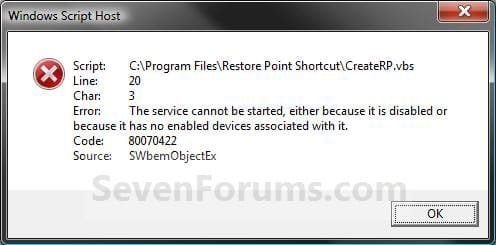
For this shortcut to work, you must have System Protection turned on for the C: (Windows) drive. If you do not have it on, then you will get the error below when you try to use the shortcut.
Error_Message.jpg


EXAMPLE: Create System Restore Point with description and message shortcut
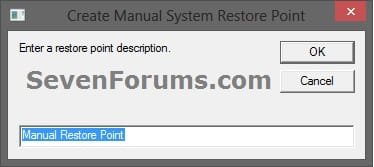
NOTE: When you click on the Create System Restore Point shortcut, you will see this window. Just type in a name for the restore point, and click on OK to create the restore point.
Decription_Prompt.jpg

Success_Message2.jpg


OPTION ONE

To Create the "Create Restore Point" Shortcut


1. Do step 2, 3, or 4 below for what type of shortcut you would like to use to create a restore point with.
2. For an Instant Create Restore Point Shortcut
NOTE: This shortcut will instantly create a restore point named Instant Restore Point in System Restore without prompting for a description or giving you any type of success message. If you didn't get an error, then the restore point was created successfully after a few moments.
A) Click/tap on the Download button below to download the file below, and go to step 5 below.
Instant_Restore_Point.zip

Download


3. For a Create Restore Point with Description Prompt Shortcut
NOTE: This shortcut will prompt you to enter a description name for the restore point, then create the restore point. If you didn't get an error, then the restore point was created successfully after a few moments.
A) Click/tap on the Download button below to download the file below, and go to step 5 below.
Restore_Point_Shortcut.zip

Download


4. For a Create Restore Point with Description and Success Message Shortcut
NOTE: This shortcut will prompt you to enter a description for the restore point, create the restore point, and give you a successfully completed message when it's finished.
A) Click/tap on the Download button below to download the file below, and go to step 5 below.
Restore_Point_Message_Shortcut.zip

Download


5. Save the downloaded .zip file to your desktop.

6. Unblock the downloaded .zip file.

7. Open the downloaded .zip file, right click on the Instant_Restore_Point (step 2), or Restore Point Shortcut (step 3), or Restore Point Message Shortcut (step 4) folder, and click/tap on Copy.

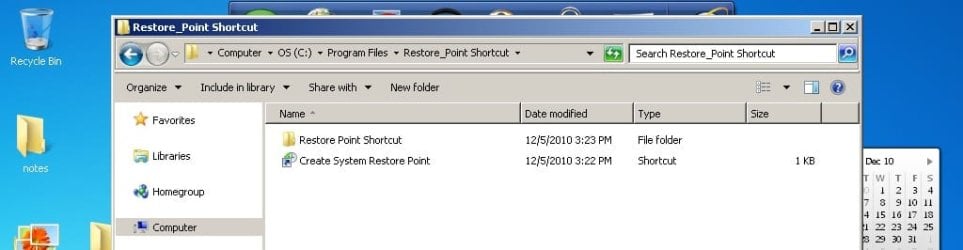
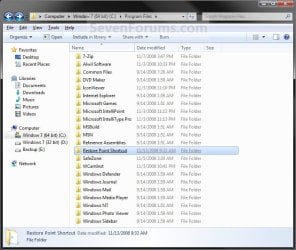
8. Navigate to and open the C:\Program Files folder in Windows Explorer, then right click or press and hold on an empty area in the folder window, and click/tap on Paste. (see screenshot below step 10)

9. If prompted by UAC, then click on Continue and Yes.

10. You should now see the Instant_Restore_Point (step 2), or Restore Point Shortcut (step 3), or Restore Point Message Shortcut (step 4) folder in the C:\Program Files window now. (see screenshot below)
Program_Files.jpg
11. Open the downloaded .zip file, extract (drag and drop) the Create System Restore Point or Instant Restore Point shortcut to your desktop.

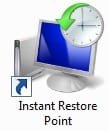
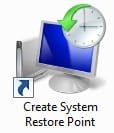
13. You can now leave the Create System Restore Point (left screenshot below) or Instant Restore Point (right screenshot below) shortcut on the desktop or move it to where you like for easy use of it.
Shortcut-1.jpgShortcut.jpg


OPTION TWO

To Remove the "Create Restore Point" Shortcut


1. Navigate to C:\Program Files in Windows Explorer, then right click on either the Instant_Restore_Point (step 2 above), or Restore Point Shortcut (step 3 above), or Restore Point Message Shortcut (step 4 above) folder, and click on Delete. (see screenshot below)
Program_Files.jpg
2. If prompted by UAC, then click/tap on Yes (Windows 7/8) or Continue (Vista).

3. Right click or press and hold on the Create System Restore Point (left screenshot below) or Instant Restore Point (right screenshot below) shortcut, and click/tap on Delete.
Shortcut-1.jpgShortcut.jpg
That's it,
Shawn


Attachments

Last edited:
Thanks for the input/help but I did use the one with the name -- IMHO, not just only a few extra keystrokes, but also a great reminder of what was going on at the time.
Yeah, you're right, the name one doesn't provide any confirmation of successful restore point creation either. I could have sworn it used to though, but I guess I was wrong about that.

I do have another short cut on my computer right click context menu (that I think I got from the utility I mentioned in my previous post) that brings up the system restore "restore files and settings" dialog with just one click (well two clicks if you count the click to bring up the right click context menu). That dialog contains the name of the last restore point created so it provides a two click way of checking and obtaining confirmation that the restore point that was just named was actually created. Of course one still doesn't know if the restore point will actually work as intended without successfully using it to do an actual restore. I have found on occasion that my system restore points fail to successfully restore, but most of the time they work.
 

My Computer

Computer Manufacturer/Model Number
HP DV8t quad
OS
Windows 7 Ultimate x64 (Retail)
CPU
i7-Q 720
Motherboard
Motherboard Chipset Intel Ibex Peak-M PM55, Intel Lynnfield
Memory
6 GB
Graphics Card(s)
nVidia GeForce GT 230M (1GB)
Sound Card
IDT High Definition Audio CODEC
Monitor(s) Displays
18.4 inch HP Infinity FHD (Samsung 184HT03-001)
Screen Resolution
1920 x 1080
Hard Drives
Hitachi 500GB 7200 rpm (x2)
Seagate FreeAgent 1.5 TB External USB (x2)
Thermaltake BlacX eSATA/USB 2.0 3.5/2.5 HD dock
Cooling
Zalman NC-2000 notebook cooling pad
Keyboard
laptop
Mouse
Logitech VX Revolution
Other Info
Backup Unit: Lenovo T61p
thanks for the tip - I'll look for that. That'll provide at least a bit more reassurance.

Not knowing if the restore point will actually work is frustrating but, with it that close at hand, remembering to do more restore points before significant events will be easier so hopefully one of the last several will work (or Win7's weekly one).
 

My Computer

Computer type
Laptop
Computer Manufacturer/Model Number
Toshiba Satellite A665
OS
Win7 64 bit
Antivirus
Avast Free
.zip files don't seem to be working

Hi Shawn,

Hope you can help me. Neither the Create System Restore Point nor the Instant System Restore Point are working for me, and I'm sure it's because I have an Italian language version of Windows 7. I get the following message when I try to open Instant Restore Point:

Impossibile trovare il file di script C:\Program Files\Instant_Restore_Point\Instant_Restore_Point.vbs

which basically means that the file cannot be found. This is evidently because 'Program Files' is called 'Programmi (x86)' on my computer. Is there some way I can change the directory within the .vbs file (or where necessary), or do you know if I can find an Italian version of the .zip file?

Many thanks,

Florio
 

My Computer

OS
Windows 7 Home Premium 64bit
Hello Florio,

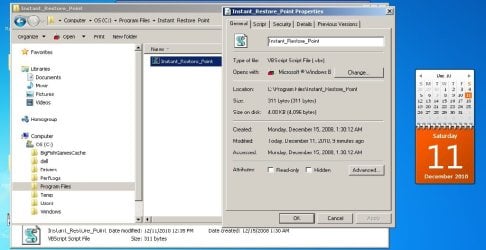
Yes, you can right click on the shortcut, click on Properties, change the Target to have the correct language version of the path to the VBS file, then click on OK to apply.

Properties.jpg

Hope this helps,
Shawn
 

My Computer

Computer type
PC/Desktop
Computer Manufacturer/Model Number
Self built custom
OS
64-bit Windows 11 Pro for Workstations
CPU
Intel i7-8700K OC'd to 5 GHz
Motherboard
ASUS ROG Maximus XI Formula Z390
Memory
64 GB (4x16GB) G.SKILL TridentZ RGB DDR4 3600 MHz
Graphics Card(s)
ASUS ROG-STRIX-GTX1080TI-O11G-GAMING
Sound Card
Integrated
Monitor(s) Displays
2 x Samsung Odyssey G7 27"
Screen Resolution
2560x1440
Hard Drives
1TB Samsung 990 PRO M.2,
4TB Samsung 990 PRO PRO M.2,
TerraMaster F8 SSD Plus NAS
PSU
Seasonic Prime Titanium 850W
Case
Thermaltake Core P3
Cooling
Corsair Hydro H115i
Keyboard
Logitech wireless K800
Mouse
Logitech MX Master 4
Internet Speed
2 Gb/s Download and 100 Mb/s Upload
Antivirus
Malwarebyte Anti-Malware Premium
Browser
Google Chrome
Other Info
Logitech Z625 speaker system,
Logitech BRIO 4K Pro webcam,
HP Color LaserJet Pro MFP M477fdn,
APC SMART-UPS RT 1000 XL - SURT1000XLI,
Galaxy S23 Plus phone
Thanks very much, greatly appreciated!
Florio
 

My Computer

OS
Windows 7 Home Premium 64bit
... spoke too soon! I cannot change the name. Even though I have indicated the correct directory, the new name [i.e., Programmi (x86) instead of Program Files (x86)] is apparently not valid. Any suggestions?
Florio
 

My Computer

OS
Windows 7 Home Premium 64bit
thanks for the tip - I'll look for that. That'll provide at least a bit more reassurance.

Not knowing if the restore point will actually work is frustrating but, with it that close at hand, remembering to do more restore points before significant events will be easier so hopefully one of the last several will work (or Win7's weekly one).
Another thing I feel that should be mentioned here is that while system restore can be very handy, convenient and useful for many situations (when it works), it is in no way a substitute for having a system (preferably automatic requiring little or no user intervention) in place and operating to make regular real backups of your entire configuration (i.e., C drive) plus data (if the data is in a separate partition on another drive. Having such backups (hopefully recent) is very very helpful when for some reason it is impossible to boot into Windows or when any restore points fail to work properly (has happened to me) to fix the problem at hand.

I'm sure most people here probably already do make system and data backups in addition to using system restore but I thought I should mention it just in case. And, of course there are numerous threads in which the various methods and approaches for backing up are discussed.
 

My Computer

Computer Manufacturer/Model Number
HP DV8t quad
OS
Windows 7 Ultimate x64 (Retail)
CPU
i7-Q 720
Motherboard
Motherboard Chipset Intel Ibex Peak-M PM55, Intel Lynnfield
Memory
6 GB
Graphics Card(s)
nVidia GeForce GT 230M (1GB)
Sound Card
IDT High Definition Audio CODEC
Monitor(s) Displays
18.4 inch HP Infinity FHD (Samsung 184HT03-001)
Screen Resolution
1920 x 1080
Hard Drives
Hitachi 500GB 7200 rpm (x2)
Seagate FreeAgent 1.5 TB External USB (x2)
Thermaltake BlacX eSATA/USB 2.0 3.5/2.5 HD dock
Cooling
Zalman NC-2000 notebook cooling pad
Keyboard
laptop
Mouse
Logitech VX Revolution
Other Info
Backup Unit: Lenovo T61p
... spoke too soon! I cannot change the name. Even though I have indicated the correct directory, the new name [i.e., Programmi (x86) instead of Program Files (x86)] is apparently not valid. Any suggestions?
Florio

Florio,


Give this a try to see how it goes instead:
  • After the VBS file has been "unblocked", move the Instant_Restore_Point folder with the VBS file in it to the "Program Files" (Programmi) folder instead and not Programmi (x86).
  • Afterwards see how the shortcut runs with either of the location in the Target field below.
"C:\Program Files\Instant_Restore_Point\Instant_Restore_Point.vbs"

"C:\Programmi\Instant_Restore_Point\Instant_Restore_Point.vbs"


If not, then right click on the VBS file from the location above, and click on Send To and Desktop (Create shortcut). Next, rename the shortcut to what you like, and change the shortcut icon to this below.
%SystemRoot%\System32\rstrui.exe
 

My Computer

Computer type
PC/Desktop
Computer Manufacturer/Model Number
Self built custom
OS
64-bit Windows 11 Pro for Workstations
CPU
Intel i7-8700K OC'd to 5 GHz
Motherboard
ASUS ROG Maximus XI Formula Z390
Memory
64 GB (4x16GB) G.SKILL TridentZ RGB DDR4 3600 MHz
Graphics Card(s)
ASUS ROG-STRIX-GTX1080TI-O11G-GAMING
Sound Card
Integrated
Monitor(s) Displays
2 x Samsung Odyssey G7 27"
Screen Resolution
2560x1440
Hard Drives
1TB Samsung 990 PRO M.2,
4TB Samsung 990 PRO PRO M.2,
TerraMaster F8 SSD Plus NAS
PSU
Seasonic Prime Titanium 850W
Case
Thermaltake Core P3
Cooling
Corsair Hydro H115i
Keyboard
Logitech wireless K800
Mouse
Logitech MX Master 4
Internet Speed
2 Gb/s Download and 100 Mb/s Upload
Antivirus
Malwarebyte Anti-Malware Premium
Browser
Google Chrome
Other Info
Logitech Z625 speaker system,
Logitech BRIO 4K Pro webcam,
HP Color LaserJet Pro MFP M477fdn,
APC SMART-UPS RT 1000 XL - SURT1000XLI,
Galaxy S23 Plus phone
I have found that System Restore doesn't work more than about 60% of the time. Since I'm religious about backing things up, this doesn't kill me, but it can be a pain and for the majority of users who, being realistic, don't back up all that often, it can be a lot worse. Example: neither my brother nor his wife even own an external hard drive. They don't believe me when I tell them that they're playing with fire. At least she occasionally uses thumb drives, but not him - no way.
 

My Computer

Computer Manufacturer/Model Number
Home Made
OS
Windows 7 Home Premium
CPU
Intel I5Core750
Motherboard
Gigabyte P55A-UD3
Memory
6 GB Corsair DDR3 1600
Graphics Card(s)
Zotac GeForce 9600 GT
Sound Card
7:1 on otherboard
Monitor(s) Displays
ViewSonic VG2030m (one of the last 4 by 3 monitors)
Screen Resolution
1400 by 1050 (Native Resolution)
Hard Drives
2 500 GB Western Digital SATA
PSU
Thermaltake TR2 500W
Case
Cooler Master Elite 332
Cooling
Thermaltake SpinQ
Keyboard
400 v1.0
Mouse
Logitech LX-8
Internet Speed
9.82 Mbs download speed 1.87 Mbs Upload speed
Other Info
Monochrome Laser Printer -HP 1020
Ink-Jet color all in one without fax - Canon Pixma MP 170
500GB external portable hard drive - Iomega
create a restore point works great!

This shortcut works great for me!

I found that when you unzip the files to the desktop, you must copy the "Restore Point Shortcut" FOLDER into C:\Program files (the path is longer, but this is just an example).

The "create a restore point" shortcut will NOT work if you just copy the (unzipped) .vbs script file into C:\Program files.

The above info is for anyone who thought they could "take a shortcut" - :D - by just copying the file into C:\Program files ... (Like I did!).
I created a restore point for each of the five times I tested the shortcut right after installing it. I went to "System Restore" and confirmed that they were there, by looking at the recommended restore point and the "choose a different restore point" option.

DOES ANYONE KNOW HOW TO TURN OFF THE UAC PROMPT JUST FOR THIS SCRIPT, so I can GET RIGHT TO IT?
 
Last edited:

My Computer

OS
Windows 7 Home Premium
This shortcut works great for me!

I found that when you unzip the files to the desktop, you must copy the "Restore Point Shortcut" FOLDER into C:\Program files (the path is longer, but this is just an example).

The "create a restore point" shortcut will NOT work if you just copy the (unzipped) .vbs script file into C:\Program files.

The above info is for anyone who thought they could "take a shortcut" - :D - by just copying the file into C:\Program files ... (Like I did!).
I created a restore point for each of the five times I tested the shortcut right after installing it. I went to "System Restore" and confirmed that they were there, by looking at the recommended restore point and the "choose a different restore point" option.

DOES ANYONE KNOW HOW TO TURN OFF THE UAC PROMPT JUST FOR THIS SCRIPT, so I can GET RIGHT TO IT?

Hello Huntforit,

Did you unblock the files in step 8 before you moved them into the C:\Program Files folder?
 
Last edited:

My Computer

Computer type
PC/Desktop
Computer Manufacturer/Model Number
Self built custom
OS
64-bit Windows 11 Pro for Workstations
CPU
Intel i7-8700K OC'd to 5 GHz
Motherboard
ASUS ROG Maximus XI Formula Z390
Memory
64 GB (4x16GB) G.SKILL TridentZ RGB DDR4 3600 MHz
Graphics Card(s)
ASUS ROG-STRIX-GTX1080TI-O11G-GAMING
Sound Card
Integrated
Monitor(s) Displays
2 x Samsung Odyssey G7 27"
Screen Resolution
2560x1440
Hard Drives
1TB Samsung 990 PRO M.2,
4TB Samsung 990 PRO PRO M.2,
TerraMaster F8 SSD Plus NAS
PSU
Seasonic Prime Titanium 850W
Case
Thermaltake Core P3
Cooling
Corsair Hydro H115i
Keyboard
Logitech wireless K800
Mouse
Logitech MX Master 4
Internet Speed
2 Gb/s Download and 100 Mb/s Upload
Antivirus
Malwarebyte Anti-Malware Premium
Browser
Google Chrome
Other Info
Logitech Z625 speaker system,
Logitech BRIO 4K Pro webcam,
HP Color LaserJet Pro MFP M477fdn,
APC SMART-UPS RT 1000 XL - SURT1000XLI,
Galaxy S23 Plus phone
unblocked files and shortcut doesn't work

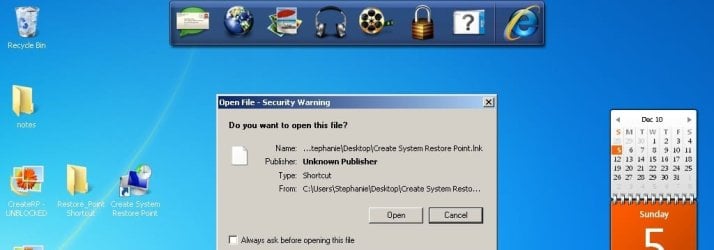
I followed the instructions to "Unblock a File to stop the "Open File - Security Warning" Prompt for the File.

I can no longer create a restore point. I originally followed all the steps except the "unblocking" and it worked fine except that I kept getting the "open file security warning".

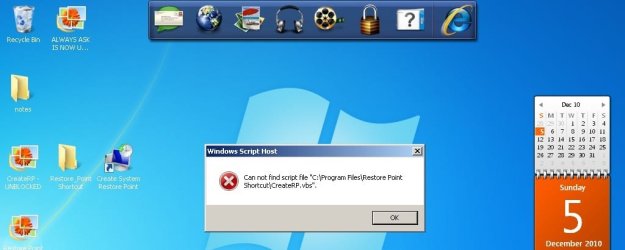
BTW, when extracting the files, a folder is created named "Restore Point Shortcut" that only contains the "CreateRP.vbs" file. The shortcut itself is created outside of this folder. i was able to unblock the CreateRP file, but NOT the actual shortcut file.

I also tested the CreateRP file and it reacts the same way as the create a restore point shortcut - it will allow me to create one after I "approve" it.

Anyway, I took screenshots of the results of the various steps. The screenshot names are what I did and are numbered in the order in which I did them. (phew!) :)
 

Attachments

  • 5 - UNCHECKED ALWAYS ASK AND CLICKED TO OPEN - CANNOT FIND SCRIPT FILE.jpg
    5 - UNCHECKED ALWAYS ASK AND CLICKED TO OPEN - CANNOT FIND SCRIPT FILE.jpg
    99.3 KB · Views: 275
  • 3 - ALWAYS ASK IS CHECKED.jpg
    3 - ALWAYS ASK IS CHECKED.jpg
    91.2 KB · Views: 275
  • 2 - CreateRP - UNBLOCKED.jpg
    2 - CreateRP - UNBLOCKED.jpg
    118.4 KB · Views: 337
  • 1 - Restore Point Shortcut - location.jpg
    1 - Restore Point Shortcut - location.jpg
    72.3 KB · Views: 269
  • 4 - ALWAYS ASK IS NOW UNCHECKED.jpg
    4 - ALWAYS ASK IS NOW UNCHECKED.jpg
    91.1 KB · Views: 230

My Computer

OS
Windows 7 Home Premium
No worries. You will just have to move the folder into the C:\Program Files folder first before you will be able to unblock the shortcut on the desktop. See steps 8 to 13 for more on this. :)
 

My Computer

Computer type
PC/Desktop
Computer Manufacturer/Model Number
Self built custom
OS
64-bit Windows 11 Pro for Workstations
CPU
Intel i7-8700K OC'd to 5 GHz
Motherboard
ASUS ROG Maximus XI Formula Z390
Memory
64 GB (4x16GB) G.SKILL TridentZ RGB DDR4 3600 MHz
Graphics Card(s)
ASUS ROG-STRIX-GTX1080TI-O11G-GAMING
Sound Card
Integrated
Monitor(s) Displays
2 x Samsung Odyssey G7 27"
Screen Resolution
2560x1440
Hard Drives
1TB Samsung 990 PRO M.2,
4TB Samsung 990 PRO PRO M.2,
TerraMaster F8 SSD Plus NAS
PSU
Seasonic Prime Titanium 850W
Case
Thermaltake Core P3
Cooling
Corsair Hydro H115i
Keyboard
Logitech wireless K800
Mouse
Logitech MX Master 4
Internet Speed
2 Gb/s Download and 100 Mb/s Upload
Antivirus
Malwarebyte Anti-Malware Premium
Browser
Google Chrome
Other Info
Logitech Z625 speaker system,
Logitech BRIO 4K Pro webcam,
HP Color LaserJet Pro MFP M477fdn,
APC SMART-UPS RT 1000 XL - SURT1000XLI,
Galaxy S23 Plus phone
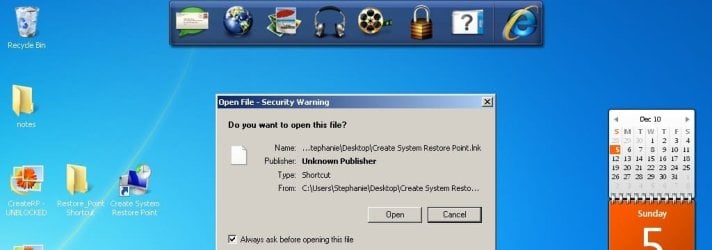
unblocked files, still have "open file security warning".

"No worries. You will just have to move the folder into the C:\Program Files folder first before you will be able to unblock the shortcut on the desktop. See steps 8 to 13 for more on this."


Tried the above a million times now and "open file security warning" still pops up even though the vbs file is unblocked. This is on my Windows 7 Starter version netbook. The shortcut works great on my home premium desktop.

I tried the instant create restore point shortcut - see screenshot please - and it does the same thing. :cry:

Thank you.
 

Attachments

  • unblocked.jpg
    unblocked.jpg
    141.2 KB · Views: 323

My Computer

OS
Windows 7 Home Premium

My Computer

Computer type
PC/Desktop
Computer Manufacturer/Model Number
Self built custom
OS
64-bit Windows 11 Pro for Workstations
CPU
Intel i7-8700K OC'd to 5 GHz
Motherboard
ASUS ROG Maximus XI Formula Z390
Memory
64 GB (4x16GB) G.SKILL TridentZ RGB DDR4 3600 MHz
Graphics Card(s)
ASUS ROG-STRIX-GTX1080TI-O11G-GAMING
Sound Card
Integrated
Monitor(s) Displays
2 x Samsung Odyssey G7 27"
Screen Resolution
2560x1440
Hard Drives
1TB Samsung 990 PRO M.2,
4TB Samsung 990 PRO PRO M.2,
TerraMaster F8 SSD Plus NAS
PSU
Seasonic Prime Titanium 850W
Case
Thermaltake Core P3
Cooling
Corsair Hydro H115i
Keyboard
Logitech wireless K800
Mouse
Logitech MX Master 4
Internet Speed
2 Gb/s Download and 100 Mb/s Upload
Antivirus
Malwarebyte Anti-Malware Premium
Browser
Google Chrome
Other Info
Logitech Z625 speaker system,
Logitech BRIO 4K Pro webcam,
HP Color LaserJet Pro MFP M477fdn,
APC SMART-UPS RT 1000 XL - SURT1000XLI,
Galaxy S23 Plus phone
I created an elevated task shortcut and it worked for a different program, but I can't find the executable name in C:\Windows\system32\ to create a system restore point.

What is it, please, or is that a secret?
 

My Computer

OS
Windows 7 Home Premium
Hunforit,

You can create a elevated task shortcut using the VBS file in the tutorial on the first page. ;)
 

My Computer

Computer type
PC/Desktop
Computer Manufacturer/Model Number
Self built custom
OS
64-bit Windows 11 Pro for Workstations
CPU
Intel i7-8700K OC'd to 5 GHz
Motherboard
ASUS ROG Maximus XI Formula Z390
Memory
64 GB (4x16GB) G.SKILL TridentZ RGB DDR4 3600 MHz
Graphics Card(s)
ASUS ROG-STRIX-GTX1080TI-O11G-GAMING
Sound Card
Integrated
Monitor(s) Displays
2 x Samsung Odyssey G7 27"
Screen Resolution
2560x1440
Hard Drives
1TB Samsung 990 PRO M.2,
4TB Samsung 990 PRO PRO M.2,
TerraMaster F8 SSD Plus NAS
PSU
Seasonic Prime Titanium 850W
Case
Thermaltake Core P3
Cooling
Corsair Hydro H115i
Keyboard
Logitech wireless K800
Mouse
Logitech MX Master 4
Internet Speed
2 Gb/s Download and 100 Mb/s Upload
Antivirus
Malwarebyte Anti-Malware Premium
Browser
Google Chrome
Other Info
Logitech Z625 speaker system,
Logitech BRIO 4K Pro webcam,
HP Color LaserJet Pro MFP M477fdn,
APC SMART-UPS RT 1000 XL - SURT1000XLI,
Galaxy S23 Plus phone
Great Tutorial Shawn. Thank You, David
 

My Computer

Computer Manufacturer/Model Number
Acer Aspire 5532
OS
Windows 7 Home Premium 64 bit SP1
CPU
AMD Athlon 64 processor TF-20 1.6 GHz. 1 Core
Motherboard
MB.PGY02.001/MBPGY02001
Memory
3 GB (2.75 available)
Graphics Card(s)
ATI Radion HD 3200
Sound Card
Realtek High Definition Audio
Monitor(s) Displays
Generic PnP 15.6"
Screen Resolution
1366 x 768
Hard Drives
250 GB HDD (220 available)
PSU
?
Case
?
Cooling
Single cycling fan, on cooling stand
Keyboard
PNP Device ID ACPI\PNP0303\4&12734F14&0
Mouse
Microsoft Laser 7000
Internet Speed
Ultra high speed download 2500 kb/s upload 720 kb/s
Other Info
Norton Internet Security 2011
Sorry but this is the best I could do.
I used the tutorial for finding the missing info but still could not find it. Special Thanks to PooMan UK and DocBrown for their help in filling out these specs.
You're most welcome David. Thank you. :)
 

My Computer

Computer type
PC/Desktop
Computer Manufacturer/Model Number
Self built custom
OS
64-bit Windows 11 Pro for Workstations
CPU
Intel i7-8700K OC'd to 5 GHz
Motherboard
ASUS ROG Maximus XI Formula Z390
Memory
64 GB (4x16GB) G.SKILL TridentZ RGB DDR4 3600 MHz
Graphics Card(s)
ASUS ROG-STRIX-GTX1080TI-O11G-GAMING
Sound Card
Integrated
Monitor(s) Displays
2 x Samsung Odyssey G7 27"
Screen Resolution
2560x1440
Hard Drives
1TB Samsung 990 PRO M.2,
4TB Samsung 990 PRO PRO M.2,
TerraMaster F8 SSD Plus NAS
PSU
Seasonic Prime Titanium 850W
Case
Thermaltake Core P3
Cooling
Corsair Hydro H115i
Keyboard
Logitech wireless K800
Mouse
Logitech MX Master 4
Internet Speed
2 Gb/s Download and 100 Mb/s Upload
Antivirus
Malwarebyte Anti-Malware Premium
Browser
Google Chrome
Other Info
Logitech Z625 speaker system,
Logitech BRIO 4K Pro webcam,
HP Color LaserJet Pro MFP M477fdn,
APC SMART-UPS RT 1000 XL - SURT1000XLI,
Galaxy S23 Plus phone
Hello;

When I downloaded and and unzipped the first Shortcut creation file (shown below) and executed it I received the following error:

"The system cannot find the path specified"

:confused:

OPTION ONE
To Create the Shortcut

1. For a Create Restore Point with Description Shortcut
NOTE: See the example above for what you will see when you use this shortcut. A) Click on the Download button below to download the file below. Restore_Point_Shortcut.zip


My Computer

Computer Manufacturer/Model Number
HP Pavilion dv7 Notebook
OS
Window 7 Ultimate (x64)
CPU
AMD 2.3Ghz Dual Core
Motherboard
HP
Memory
4 GB
Graphics Card(s)
ATI Rageon 3200 Series
Sound Card
ATI & IDT
Monitor(s) Displays
17"
Hard Drives
500 GB
Back
Top