System Restore Point Shortcut

How to Make a "Create System Restore Point" Shortcut in XP, Vista, Windows 7, and Windows 8

   Information
This tutorial will provide you with a create a manual system restore point shortcut that will instantly create a restore point with an optional description and success message in XP, Vista, Windows 7, and Windows 8.

System Restore isn't available for Windows RT.

   Note
Restore points contain information about registry settings and other system information that Windows uses. System Restore points do not include personal user files in the C:\Users\(user-name) folders.

   Warning
For this shortcut to work, you must have System Protection turned on for the C: (Windows) drive. If you do not have it on, then you will get the error below when you try to use the shortcut.
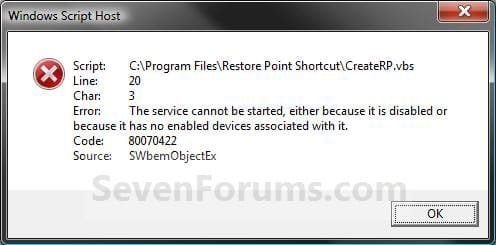
Error_Message.jpg


EXAMPLE: Create System Restore Point with description and message shortcut
NOTE: When you click on the Create System Restore Point shortcut, you will see this window. Just type in a name for the restore point, and click on OK to create the restore point.
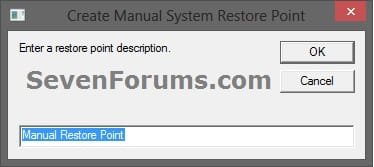
Decription_Prompt.jpg

Success_Message2.jpg


OPTION ONE

To Create the "Create Restore Point" Shortcut


1. Do step 2, 3, or 4 below for what type of shortcut you would like to use to create a restore point with.
2. For an Instant Create Restore Point Shortcut
NOTE: This shortcut will instantly create a restore point named Instant Restore Point in System Restore without prompting for a description or giving you any type of success message. If you didn't get an error, then the restore point was created successfully after a few moments.
A) Click/tap on the Download button below to download the file below, and go to step 5 below.
Instant_Restore_Point.zip

Download


3. For a Create Restore Point with Description Prompt Shortcut
NOTE: This shortcut will prompt you to enter a description name for the restore point, then create the restore point. If you didn't get an error, then the restore point was created successfully after a few moments.
A) Click/tap on the Download button below to download the file below, and go to step 5 below.
Restore_Point_Shortcut.zip

Download


4. For a Create Restore Point with Description and Success Message Shortcut
NOTE: This shortcut will prompt you to enter a description for the restore point, create the restore point, and give you a successfully completed message when it's finished.
A) Click/tap on the Download button below to download the file below, and go to step 5 below.
Restore_Point_Message_Shortcut.zip

Download


5. Save the downloaded .zip file to your desktop.

6. Unblock the downloaded .zip file.

7. Open the downloaded .zip file, right click on the Instant_Restore_Point (step 2), or Restore Point Shortcut (step 3), or Restore Point Message Shortcut (step 4) folder, and click/tap on Copy.

8. Navigate to and open the C:\Program Files folder in Windows Explorer, then right click or press and hold on an empty area in the folder window, and click/tap on Paste. (see screenshot below step 10)

9. If prompted by UAC, then click on Continue and Yes.

10. You should now see the Instant_Restore_Point (step 2), or Restore Point Shortcut (step 3), or Restore Point Message Shortcut (step 4) folder in the C:\Program Files window now. (see screenshot below)
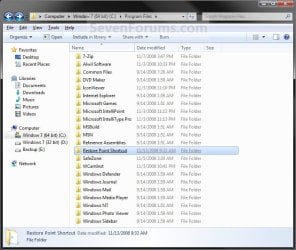
Program_Files.jpg
11. Open the downloaded .zip file, extract (drag and drop) the Create System Restore Point or Instant Restore Point shortcut to your desktop.

13. You can now leave the Create System Restore Point (left screenshot below) or Instant Restore Point (right screenshot below) shortcut on the desktop or move it to where you like for easy use of it.
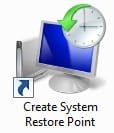
Shortcut-1.jpgShortcut.jpg


OPTION TWO

To Remove the "Create Restore Point" Shortcut


1. Navigate to C:\Program Files in Windows Explorer, then right click on either the Instant_Restore_Point (step 2 above), or Restore Point Shortcut (step 3 above), or Restore Point Message Shortcut (step 4 above) folder, and click on Delete. (see screenshot below)
Program_Files.jpg
2. If prompted by UAC, then click/tap on Yes (Windows 7/8) or Continue (Vista).

3. Right click or press and hold on the Create System Restore Point (left screenshot below) or Instant Restore Point (right screenshot below) shortcut, and click/tap on Delete.
Shortcut-1.jpgShortcut.jpg
That's it,
Shawn


Attachments

Last edited:
No, because I had created them all with your shortcut. Question on your shortcut which is a .vbs: When I try to run it with Task Scheduler, it wants to know "how to open it"; I tried using PowerShell.exe, but that failed, what's the answer??
 

My Computer

Computer Manufacturer/Model Number
Dell 17-1750 Laptop
OS
Windows 7 Home Premium 64
CPU
Pentium Duo 2.54
Memory
4GB
Screen Resolution
1920 x 1080
Hard Drives
1 500GB
Mouse
Dell Optical
Internet Speed
768KB

My Computer

Computer type
PC/Desktop
Computer Manufacturer/Model Number
Self built custom
OS
64-bit Windows 11 Pro for Workstations
CPU
Intel i7-8700K OC'd to 5 GHz
Motherboard
ASUS ROG Maximus XI Formula Z390
Memory
64 GB (4x16GB) G.SKILL TridentZ RGB DDR4 3600 MHz
Graphics Card(s)
ASUS ROG-STRIX-GTX1080TI-O11G-GAMING
Sound Card
Integrated
Monitor(s) Displays
2 x Samsung Odyssey G7 27"
Screen Resolution
2560x1440
Hard Drives
1TB Samsung 990 PRO M.2,
4TB Samsung 990 PRO PRO M.2,
TerraMaster F8 SSD Plus NAS
PSU
Seasonic Prime Titanium 850W
Case
Thermaltake Core P3
Cooling
Corsair Hydro H115i
Keyboard
Logitech wireless K800
Mouse
Logitech MX Master 4
Internet Speed
2 Gb/s Download and 100 Mb/s Upload
Antivirus
Malwarebyte Anti-Malware Premium
Browser
Google Chrome
Other Info
Logitech Z625 speaker system,
Logitech BRIO 4K Pro webcam,
HP Color LaserJet Pro MFP M477fdn,
APC SMART-UPS RT 1000 XL - SURT1000XLI,
Galaxy S23 Plus phone
I actually turned off system restore before the "list" deleted itself.

Took a look at Method 2; I downloaded "System Scheduler" and it is working ok. The issue, and I appreciate everything, is that if I have to do a "Refresh" (win8) or a new install, I have my work cut out for me to get the system back up. DOS was so simple...
 

My Computer

Computer Manufacturer/Model Number
Dell 17-1750 Laptop
OS
Windows 7 Home Premium 64
CPU
Pentium Duo 2.54
Memory
4GB
Screen Resolution
1920 x 1080
Hard Drives
1 500GB
Mouse
Dell Optical
Internet Speed
768KB
That's a nice program. I hope the refresh goes smoothly.
 

My Computer

Computer type
PC/Desktop
Computer Manufacturer/Model Number
Self built custom
OS
64-bit Windows 11 Pro for Workstations
CPU
Intel i7-8700K OC'd to 5 GHz
Motherboard
ASUS ROG Maximus XI Formula Z390
Memory
64 GB (4x16GB) G.SKILL TridentZ RGB DDR4 3600 MHz
Graphics Card(s)
ASUS ROG-STRIX-GTX1080TI-O11G-GAMING
Sound Card
Integrated
Monitor(s) Displays
2 x Samsung Odyssey G7 27"
Screen Resolution
2560x1440
Hard Drives
1TB Samsung 990 PRO M.2,
4TB Samsung 990 PRO PRO M.2,
TerraMaster F8 SSD Plus NAS
PSU
Seasonic Prime Titanium 850W
Case
Thermaltake Core P3
Cooling
Corsair Hydro H115i
Keyboard
Logitech wireless K800
Mouse
Logitech MX Master 4
Internet Speed
2 Gb/s Download and 100 Mb/s Upload
Antivirus
Malwarebyte Anti-Malware Premium
Browser
Google Chrome
Other Info
Logitech Z625 speaker system,
Logitech BRIO 4K Pro webcam,
HP Color LaserJet Pro MFP M477fdn,
APC SMART-UPS RT 1000 XL - SURT1000XLI,
Galaxy S23 Plus phone
I have a simple mind and I need simple programs - they did a brain scan on me and they are looking for anything they can find.
 

My Computer

Computer Manufacturer/Model Number
Dell 17-1750 Laptop
OS
Windows 7 Home Premium 64
CPU
Pentium Duo 2.54
Memory
4GB
Screen Resolution
1920 x 1080
Hard Drives
1 500GB
Mouse
Dell Optical
Internet Speed
768KB
LOL, I know how that is. :)
 

My Computer

Computer type
PC/Desktop
Computer Manufacturer/Model Number
Self built custom
OS
64-bit Windows 11 Pro for Workstations
CPU
Intel i7-8700K OC'd to 5 GHz
Motherboard
ASUS ROG Maximus XI Formula Z390
Memory
64 GB (4x16GB) G.SKILL TridentZ RGB DDR4 3600 MHz
Graphics Card(s)
ASUS ROG-STRIX-GTX1080TI-O11G-GAMING
Sound Card
Integrated
Monitor(s) Displays
2 x Samsung Odyssey G7 27"
Screen Resolution
2560x1440
Hard Drives
1TB Samsung 990 PRO M.2,
4TB Samsung 990 PRO PRO M.2,
TerraMaster F8 SSD Plus NAS
PSU
Seasonic Prime Titanium 850W
Case
Thermaltake Core P3
Cooling
Corsair Hydro H115i
Keyboard
Logitech wireless K800
Mouse
Logitech MX Master 4
Internet Speed
2 Gb/s Download and 100 Mb/s Upload
Antivirus
Malwarebyte Anti-Malware Premium
Browser
Google Chrome
Other Info
Logitech Z625 speaker system,
Logitech BRIO 4K Pro webcam,
HP Color LaserJet Pro MFP M477fdn,
APC SMART-UPS RT 1000 XL - SURT1000XLI,
Galaxy S23 Plus phone
Thank You!

I've been an "Apple" guy since way back in 1984, but during my working days I always needed to be able to use Windows based machines. Somehow, the fascination with how the Windows operating systems worked (or didn't) and how to "tweak" certain programs and settings always kept me interested. So much so that now (retired) I find myself mostly "tinkering" with my Toshiba laptop. But to the point . . . I was interested in understanding more about Restore Points and how to create them, just "in case" (I did say I tinker a lot, didn't I). Found this site, and from this tutorial I was able to create:
1. A Scheduled Task which creates a System Restore Point, once daily.
2. A Shortcut that I can create a System Restore Point with manually.
3. And, both of the above run without the "Do you want this program to run . . ." prompt.

Took a few tries to get it all done, but I'm feeling pretty proud of myself this morning.

So again, thank you Brink!
 

My Computer

Computer type
Laptop
Computer Manufacturer/Model Number
Toshiba Satellite C655-S5049
OS
Windows 7 Home Premium x64
You're most welcome Homer, and welcome to Seven Forums. I'm glad that we were able to help. :)
 

My Computer

Computer type
PC/Desktop
Computer Manufacturer/Model Number
Self built custom
OS
64-bit Windows 11 Pro for Workstations
CPU
Intel i7-8700K OC'd to 5 GHz
Motherboard
ASUS ROG Maximus XI Formula Z390
Memory
64 GB (4x16GB) G.SKILL TridentZ RGB DDR4 3600 MHz
Graphics Card(s)
ASUS ROG-STRIX-GTX1080TI-O11G-GAMING
Sound Card
Integrated
Monitor(s) Displays
2 x Samsung Odyssey G7 27"
Screen Resolution
2560x1440
Hard Drives
1TB Samsung 990 PRO M.2,
4TB Samsung 990 PRO PRO M.2,
TerraMaster F8 SSD Plus NAS
PSU
Seasonic Prime Titanium 850W
Case
Thermaltake Core P3
Cooling
Corsair Hydro H115i
Keyboard
Logitech wireless K800
Mouse
Logitech MX Master 4
Internet Speed
2 Gb/s Download and 100 Mb/s Upload
Antivirus
Malwarebyte Anti-Malware Premium
Browser
Google Chrome
Other Info
Logitech Z625 speaker system,
Logitech BRIO 4K Pro webcam,
HP Color LaserJet Pro MFP M477fdn,
APC SMART-UPS RT 1000 XL - SURT1000XLI,
Galaxy S23 Plus phone
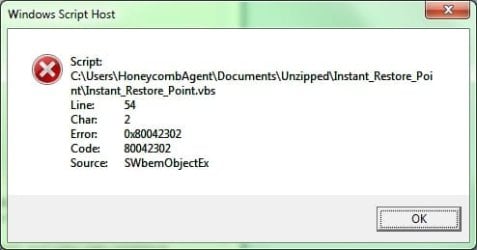
I tried to run this at boot time and all I got is:script_error_instant_restore_point.jpg
 

My Computer

Computer type
PC/Desktop
Computer Manufacturer/Model Number
Custom
OS
Microsoft Windows 7 Home Premium 64-bit Service Pack 1
CPU
AMD A10-6800K APU with Radeon(tm)™ HD Graphics 4100
Motherboard
ASRock FM2A85X Extreme4-M
Memory
(2) G.Skill F3-12800CL10-8GBXL
Graphics Card(s)
ASUS R7 250 Series (0x6610)
Sound Card
Realtek High Definition Audio
Monitor(s) Displays
Acer X213H LCD monitor, 21"
Screen Resolution
1920 x 1080 x 32 bits @ 60 Hz
Hard Drives
WD Black, 1.0TB, WDC WD1002FAEX-00Z3A0
PSU
Rosewill Quark-650
Case
Raidmax Comet SECC Steel ATX Mid Tower Computer Case
Cooling
1 x 80mm + 2 x 120mm + Stock cooler
Mouse
Gear Head Wireless Optical 5-button mouse
Internet Speed
FTTx 6000 / 1000
Antivirus
Avast! Free Antivirus 2015.10.0.2208
Browser
Google Chrome Version 40.0.2214.115
Other Info
*AMD Dual-Graphics
*Uses OpenDNS
*Uses Folding@Home
*HP 16x Super-Multi DVD Writer
*Superspeed 74-in-1 Card Reader
*Maximum overclock has not been determined.

My Computer

Computer type
PC/Desktop
Computer Manufacturer/Model Number
Self built custom
OS
64-bit Windows 11 Pro for Workstations
CPU
Intel i7-8700K OC'd to 5 GHz
Motherboard
ASUS ROG Maximus XI Formula Z390
Memory
64 GB (4x16GB) G.SKILL TridentZ RGB DDR4 3600 MHz
Graphics Card(s)
ASUS ROG-STRIX-GTX1080TI-O11G-GAMING
Sound Card
Integrated
Monitor(s) Displays
2 x Samsung Odyssey G7 27"
Screen Resolution
2560x1440
Hard Drives
1TB Samsung 990 PRO M.2,
4TB Samsung 990 PRO PRO M.2,
TerraMaster F8 SSD Plus NAS
PSU
Seasonic Prime Titanium 850W
Case
Thermaltake Core P3
Cooling
Corsair Hydro H115i
Keyboard
Logitech wireless K800
Mouse
Logitech MX Master 4
Internet Speed
2 Gb/s Download and 100 Mb/s Upload
Antivirus
Malwarebyte Anti-Malware Premium
Browser
Google Chrome
Other Info
Logitech Z625 speaker system,
Logitech BRIO 4K Pro webcam,
HP Color LaserJet Pro MFP M477fdn,
APC SMART-UPS RT 1000 XL - SURT1000XLI,
Galaxy S23 Plus phone
Did you unblock the VBS file?
I didn't see Unblock when I uncompressed the files. I did have a little shortcut trouble because I wanted it to run from my personal Documents folders.
I would have tried the Task Scheduler option but I've completely turned off System Restore on this tower. I'm having hell with my Volume Shadow Copy service again! Because if Volume Shadow Copy doesn't work ... then System Restore don't work, and then Windows Backup doesn't work, and Action Center for weeks has been asking me to set-up a backup drive.
 
Last edited:

My Computer

Computer type
PC/Desktop
Computer Manufacturer/Model Number
Custom
OS
Microsoft Windows 7 Home Premium 64-bit Service Pack 1
CPU
AMD A10-6800K APU with Radeon(tm)™ HD Graphics 4100
Motherboard
ASRock FM2A85X Extreme4-M
Memory
(2) G.Skill F3-12800CL10-8GBXL
Graphics Card(s)
ASUS R7 250 Series (0x6610)
Sound Card
Realtek High Definition Audio
Monitor(s) Displays
Acer X213H LCD monitor, 21"
Screen Resolution
1920 x 1080 x 32 bits @ 60 Hz
Hard Drives
WD Black, 1.0TB, WDC WD1002FAEX-00Z3A0
PSU
Rosewill Quark-650
Case
Raidmax Comet SECC Steel ATX Mid Tower Computer Case
Cooling
1 x 80mm + 2 x 120mm + Stock cooler
Mouse
Gear Head Wireless Optical 5-button mouse
Internet Speed
FTTx 6000 / 1000
Antivirus
Avast! Free Antivirus 2015.10.0.2208
Browser
Google Chrome Version 40.0.2214.115
Other Info
*AMD Dual-Graphics
*Uses OpenDNS
*Uses Folding@Home
*HP 16x Super-Multi DVD Writer
*Superspeed 74-in-1 Card Reader
*Maximum overclock has not been determined.
If you turned off System Protection for you C: (Windows) drive, then that is why your are getting the error when you run the .vbs file. The .vbs file uses Windows built-in create a restore point, but does it automatically for you.
 

My Computer

Computer type
PC/Desktop
Computer Manufacturer/Model Number
Self built custom
OS
64-bit Windows 11 Pro for Workstations
CPU
Intel i7-8700K OC'd to 5 GHz
Motherboard
ASUS ROG Maximus XI Formula Z390
Memory
64 GB (4x16GB) G.SKILL TridentZ RGB DDR4 3600 MHz
Graphics Card(s)
ASUS ROG-STRIX-GTX1080TI-O11G-GAMING
Sound Card
Integrated
Monitor(s) Displays
2 x Samsung Odyssey G7 27"
Screen Resolution
2560x1440
Hard Drives
1TB Samsung 990 PRO M.2,
4TB Samsung 990 PRO PRO M.2,
TerraMaster F8 SSD Plus NAS
PSU
Seasonic Prime Titanium 850W
Case
Thermaltake Core P3
Cooling
Corsair Hydro H115i
Keyboard
Logitech wireless K800
Mouse
Logitech MX Master 4
Internet Speed
2 Gb/s Download and 100 Mb/s Upload
Antivirus
Malwarebyte Anti-Malware Premium
Browser
Google Chrome
Other Info
Logitech Z625 speaker system,
Logitech BRIO 4K Pro webcam,
HP Color LaserJet Pro MFP M477fdn,
APC SMART-UPS RT 1000 XL - SURT1000XLI,
Galaxy S23 Plus phone
But System Restore doesn't even work!

Because if Volume Shadow Copy doesn't work ...

If you turned off System Protection for you C: (Windows) drive...
How is it when I had System Protection turned ON before, the Volume Shadow Copy Service doesn't even work NOW? Now I have no restore points, and no prior history of all my installed Windows updates, and programs will fail at installing. That is, if they do try to call up functions that include "create a restore point" in the future.

How do I fix the Volume Shadow Copy service?
 

My Computer

Computer type
PC/Desktop
Computer Manufacturer/Model Number
Custom
OS
Microsoft Windows 7 Home Premium 64-bit Service Pack 1
CPU
AMD A10-6800K APU with Radeon(tm)™ HD Graphics 4100
Motherboard
ASRock FM2A85X Extreme4-M
Memory
(2) G.Skill F3-12800CL10-8GBXL
Graphics Card(s)
ASUS R7 250 Series (0x6610)
Sound Card
Realtek High Definition Audio
Monitor(s) Displays
Acer X213H LCD monitor, 21"
Screen Resolution
1920 x 1080 x 32 bits @ 60 Hz
Hard Drives
WD Black, 1.0TB, WDC WD1002FAEX-00Z3A0
PSU
Rosewill Quark-650
Case
Raidmax Comet SECC Steel ATX Mid Tower Computer Case
Cooling
1 x 80mm + 2 x 120mm + Stock cooler
Mouse
Gear Head Wireless Optical 5-button mouse
Internet Speed
FTTx 6000 / 1000
Antivirus
Avast! Free Antivirus 2015.10.0.2208
Browser
Google Chrome Version 40.0.2214.115
Other Info
*AMD Dual-Graphics
*Uses OpenDNS
*Uses Folding@Home
*HP 16x Super-Multi DVD Writer
*Superspeed 74-in-1 Card Reader
*Maximum overclock has not been determined.

My Computer

Computer type
PC/Desktop
Computer Manufacturer/Model Number
Self built custom
OS
64-bit Windows 11 Pro for Workstations
CPU
Intel i7-8700K OC'd to 5 GHz
Motherboard
ASUS ROG Maximus XI Formula Z390
Memory
64 GB (4x16GB) G.SKILL TridentZ RGB DDR4 3600 MHz
Graphics Card(s)
ASUS ROG-STRIX-GTX1080TI-O11G-GAMING
Sound Card
Integrated
Monitor(s) Displays
2 x Samsung Odyssey G7 27"
Screen Resolution
2560x1440
Hard Drives
1TB Samsung 990 PRO M.2,
4TB Samsung 990 PRO PRO M.2,
TerraMaster F8 SSD Plus NAS
PSU
Seasonic Prime Titanium 850W
Case
Thermaltake Core P3
Cooling
Corsair Hydro H115i
Keyboard
Logitech wireless K800
Mouse
Logitech MX Master 4
Internet Speed
2 Gb/s Download and 100 Mb/s Upload
Antivirus
Malwarebyte Anti-Malware Premium
Browser
Google Chrome
Other Info
Logitech Z625 speaker system,
Logitech BRIO 4K Pro webcam,
HP Color LaserJet Pro MFP M477fdn,
APC SMART-UPS RT 1000 XL - SURT1000XLI,
Galaxy S23 Plus phone
Administrator required?

Anyone know what privileges to assign regular non-administrator users to allow them to be able to create a restore point? I tried adding them to backup operators but no love there...
-Thanks
 

My Computer

Computer type
PC/Desktop
OS
Win7 x64
Hello NutronShadow, and welcome to Seven Forums.

A user must have administrator rights to be able to create a restore point.
 

My Computer

Computer type
PC/Desktop
Computer Manufacturer/Model Number
Self built custom
OS
64-bit Windows 11 Pro for Workstations
CPU
Intel i7-8700K OC'd to 5 GHz
Motherboard
ASUS ROG Maximus XI Formula Z390
Memory
64 GB (4x16GB) G.SKILL TridentZ RGB DDR4 3600 MHz
Graphics Card(s)
ASUS ROG-STRIX-GTX1080TI-O11G-GAMING
Sound Card
Integrated
Monitor(s) Displays
2 x Samsung Odyssey G7 27"
Screen Resolution
2560x1440
Hard Drives
1TB Samsung 990 PRO M.2,
4TB Samsung 990 PRO PRO M.2,
TerraMaster F8 SSD Plus NAS
PSU
Seasonic Prime Titanium 850W
Case
Thermaltake Core P3
Cooling
Corsair Hydro H115i
Keyboard
Logitech wireless K800
Mouse
Logitech MX Master 4
Internet Speed
2 Gb/s Download and 100 Mb/s Upload
Antivirus
Malwarebyte Anti-Malware Premium
Browser
Google Chrome
Other Info
Logitech Z625 speaker system,
Logitech BRIO 4K Pro webcam,
HP Color LaserJet Pro MFP M477fdn,
APC SMART-UPS RT 1000 XL - SURT1000XLI,
Galaxy S23 Plus phone
Yes, I understand the Administrators group has already been granted those rights, but also many others! I was hoping someone knew which ones were specifically needed to create a restore point.

Remember, being in the administrators group doesn't change your account in any way, it just grants you many additional rights that can each be controlled individually. If an organization can't give users full admin rights, they typically grant them just the ones they need.
Thanks,
 

My Computer

Computer type
PC/Desktop
OS
Win7 x64
Yes, usually that's handled through secpol.msc under Local Policies -> User Rights Assignment. However, there is not one listed for restore points, system protection, or shadow copy to be able to assign a standard user rights to create a restore point.

So far, the only way that I know of are by members of the Administrators group. :(
 

My Computer

Computer type
PC/Desktop
Computer Manufacturer/Model Number
Self built custom
OS
64-bit Windows 11 Pro for Workstations
CPU
Intel i7-8700K OC'd to 5 GHz
Motherboard
ASUS ROG Maximus XI Formula Z390
Memory
64 GB (4x16GB) G.SKILL TridentZ RGB DDR4 3600 MHz
Graphics Card(s)
ASUS ROG-STRIX-GTX1080TI-O11G-GAMING
Sound Card
Integrated
Monitor(s) Displays
2 x Samsung Odyssey G7 27"
Screen Resolution
2560x1440
Hard Drives
1TB Samsung 990 PRO M.2,
4TB Samsung 990 PRO PRO M.2,
TerraMaster F8 SSD Plus NAS
PSU
Seasonic Prime Titanium 850W
Case
Thermaltake Core P3
Cooling
Corsair Hydro H115i
Keyboard
Logitech wireless K800
Mouse
Logitech MX Master 4
Internet Speed
2 Gb/s Download and 100 Mb/s Upload
Antivirus
Malwarebyte Anti-Malware Premium
Browser
Google Chrome
Other Info
Logitech Z625 speaker system,
Logitech BRIO 4K Pro webcam,
HP Color LaserJet Pro MFP M477fdn,
APC SMART-UPS RT 1000 XL - SURT1000XLI,
Galaxy S23 Plus phone
Thank you for this awesome VBscript. I made a little adjust mention so that the final message box also displays the label of the Restore Point.

MsgBox "The restore point, " + sDesc + ", was created successfully.", 0, "Create Manual System Restore Point"

My question is how does one format the sDesc so that it shows as bold? I am not familiar with programming beyond basic (DOS) programming and suspect it can be accomplished via object oriented programming.

Any suggestions would be greatly appreciated.
 

My Computer

Computer type
PC/Desktop
Computer Manufacturer/Model Number
HP
OS
Windows 7
CPU
Intel Quad core 2.8
Motherboard
Asus
Memory
8GB PC3
Graphics Card(s)
Zotex
Sound Card
Built in
Monitor(s) Displays
Samsubng 24 inch
Screen Resolution
MAX!!
Internet Speed
Broad Band 50
Browser
FireFox / Chrome
Hello Rob, and welcome to Seven Forums.

Nice addition. Thank you.

If I remember correctly, I don't think there's an option to make the text bold like that in a msgbox.

EDIT:
If you like, you can use this instead to have quotes around it to make it easier to see. I've updated the download in the tutorial to use this below instead now. :)

Code:
MsgBox "The restore point " & Chr(34) & sDesc & Chr(34) & " was created successfully.", 0, "Create Manual System Restore Point"
 
Last edited:

My Computer

Computer type
PC/Desktop
Computer Manufacturer/Model Number
Self built custom
OS
64-bit Windows 11 Pro for Workstations
CPU
Intel i7-8700K OC'd to 5 GHz
Motherboard
ASUS ROG Maximus XI Formula Z390
Memory
64 GB (4x16GB) G.SKILL TridentZ RGB DDR4 3600 MHz
Graphics Card(s)
ASUS ROG-STRIX-GTX1080TI-O11G-GAMING
Sound Card
Integrated
Monitor(s) Displays
2 x Samsung Odyssey G7 27"
Screen Resolution
2560x1440
Hard Drives
1TB Samsung 990 PRO M.2,
4TB Samsung 990 PRO PRO M.2,
TerraMaster F8 SSD Plus NAS
PSU
Seasonic Prime Titanium 850W
Case
Thermaltake Core P3
Cooling
Corsair Hydro H115i
Keyboard
Logitech wireless K800
Mouse
Logitech MX Master 4
Internet Speed
2 Gb/s Download and 100 Mb/s Upload
Antivirus
Malwarebyte Anti-Malware Premium
Browser
Google Chrome
Other Info
Logitech Z625 speaker system,
Logitech BRIO 4K Pro webcam,
HP Color LaserJet Pro MFP M477fdn,
APC SMART-UPS RT 1000 XL - SURT1000XLI,
Galaxy S23 Plus phone
Back
Top