System Restore Point Shortcut

How to Make a "Create System Restore Point" Shortcut in XP, Vista, Windows 7, and Windows 8

   Information
This tutorial will provide you with a create a manual system restore point shortcut that will instantly create a restore point with an optional description and success message in XP, Vista, Windows 7, and Windows 8.

System Restore isn't available for Windows RT.

   Note
Restore points contain information about registry settings and other system information that Windows uses. System Restore points do not include personal user files in the C:\Users\(user-name) folders.

   Warning
For this shortcut to work, you must have System Protection turned on for the C: (Windows) drive. If you do not have it on, then you will get the error below when you try to use the shortcut.
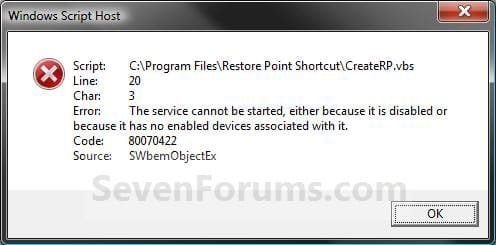
Error_Message.jpg


EXAMPLE: Create System Restore Point with description and message shortcut
NOTE: When you click on the Create System Restore Point shortcut, you will see this window. Just type in a name for the restore point, and click on OK to create the restore point.
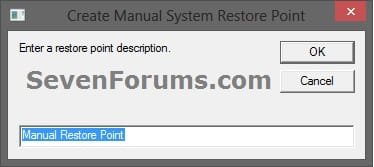
Decription_Prompt.jpg

Success_Message2.jpg


OPTION ONE

To Create the "Create Restore Point" Shortcut


1. Do step 2, 3, or 4 below for what type of shortcut you would like to use to create a restore point with.
2. For an Instant Create Restore Point Shortcut
NOTE: This shortcut will instantly create a restore point named Instant Restore Point in System Restore without prompting for a description or giving you any type of success message. If you didn't get an error, then the restore point was created successfully after a few moments.
A) Click/tap on the Download button below to download the file below, and go to step 5 below.
Instant_Restore_Point.zip

Download


3. For a Create Restore Point with Description Prompt Shortcut
NOTE: This shortcut will prompt you to enter a description name for the restore point, then create the restore point. If you didn't get an error, then the restore point was created successfully after a few moments.
A) Click/tap on the Download button below to download the file below, and go to step 5 below.
Restore_Point_Shortcut.zip

Download


4. For a Create Restore Point with Description and Success Message Shortcut
NOTE: This shortcut will prompt you to enter a description for the restore point, create the restore point, and give you a successfully completed message when it's finished.
A) Click/tap on the Download button below to download the file below, and go to step 5 below.
Restore_Point_Message_Shortcut.zip

Download


5. Save the downloaded .zip file to your desktop.

6. Unblock the downloaded .zip file.

7. Open the downloaded .zip file, right click on the Instant_Restore_Point (step 2), or Restore Point Shortcut (step 3), or Restore Point Message Shortcut (step 4) folder, and click/tap on Copy.

8. Navigate to and open the C:\Program Files folder in Windows Explorer, then right click or press and hold on an empty area in the folder window, and click/tap on Paste. (see screenshot below step 10)

9. If prompted by UAC, then click on Continue and Yes.

10. You should now see the Instant_Restore_Point (step 2), or Restore Point Shortcut (step 3), or Restore Point Message Shortcut (step 4) folder in the C:\Program Files window now. (see screenshot below)
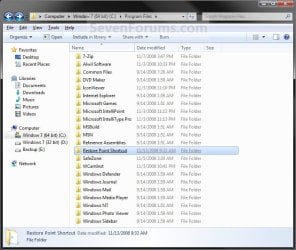
Program_Files.jpg
11. Open the downloaded .zip file, extract (drag and drop) the Create System Restore Point or Instant Restore Point shortcut to your desktop.

13. You can now leave the Create System Restore Point (left screenshot below) or Instant Restore Point (right screenshot below) shortcut on the desktop or move it to where you like for easy use of it.
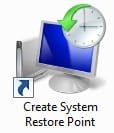
Shortcut-1.jpgShortcut.jpg


OPTION TWO

To Remove the "Create Restore Point" Shortcut


1. Navigate to C:\Program Files in Windows Explorer, then right click on either the Instant_Restore_Point (step 2 above), or Restore Point Shortcut (step 3 above), or Restore Point Message Shortcut (step 4 above) folder, and click on Delete. (see screenshot below)
Program_Files.jpg
2. If prompted by UAC, then click/tap on Yes (Windows 7/8) or Continue (Vista).

3. Right click or press and hold on the Create System Restore Point (left screenshot below) or Instant Restore Point (right screenshot below) shortcut, and click/tap on Delete.
Shortcut-1.jpgShortcut.jpg
That's it,
Shawn


Attachments

Last edited:
Thank you for the information. :)
 

My Computer

Computer type
PC/Desktop
Computer Manufacturer/Model Number
HP
OS
Windows 7
CPU
Intel Quad core 2.8
Motherboard
Asus
Memory
8GB PC3
Graphics Card(s)
Zotex
Sound Card
Built in
Monitor(s) Displays
Samsubng 24 inch
Screen Resolution
MAX!!
Internet Speed
Broad Band 50
Browser
FireFox / Chrome
Hello,I use Restore Point Message Shortcut and it's not working for me.
I follow step by step instruction and no luck.
Am I missing something?
 

My Computer

Computer type
PC/Desktop
OS
Windows 7 x64
Hello BC66, and welcome to Seven Forums. :)

Are you getting any error messages?

Check to make sure that you have System Protection turned on for your C: (Windows) drive.
http://www.sevenforums.com/tutorials/330-system-protection-turn-off.html
Double check to make sure that you have unblocked the downloaded files, and moved them exactly to where in the steps to see if a possible mistake may have been made.
 

My Computer

Computer type
PC/Desktop
Computer Manufacturer/Model Number
Self built custom
OS
64-bit Windows 11 Pro for Workstations
CPU
Intel i7-8700K OC'd to 5 GHz
Motherboard
ASUS ROG Maximus XI Formula Z390
Memory
64 GB (4x16GB) G.SKILL TridentZ RGB DDR4 3600 MHz
Graphics Card(s)
ASUS ROG-STRIX-GTX1080TI-O11G-GAMING
Sound Card
Integrated
Monitor(s) Displays
2 x Samsung Odyssey G7 27"
Screen Resolution
2560x1440
Hard Drives
1TB Samsung 990 PRO M.2,
4TB Samsung 990 PRO PRO M.2,
TerraMaster F8 SSD Plus NAS
PSU
Seasonic Prime Titanium 850W
Case
Thermaltake Core P3
Cooling
Corsair Hydro H115i
Keyboard
Logitech wireless K800
Mouse
Logitech MX Master 4
Internet Speed
2 Gb/s Download and 100 Mb/s Upload
Antivirus
Malwarebyte Anti-Malware Premium
Browser
Google Chrome
Other Info
Logitech Z625 speaker system,
Logitech BRIO 4K Pro webcam,
HP Color LaserJet Pro MFP M477fdn,
APC SMART-UPS RT 1000 XL - SURT1000XLI,
Galaxy S23 Plus phone
hello, thank you for your reply

Yes my system protection is always on.
the CMD just pop on my screen for a split second when i click on on the shortcut on desktop
yes they are unblock
 

My Computer

Computer type
PC/Desktop
OS
Windows 7 x64
Start over again in case you may have made an unknown mistake.


When you click on the Create System Restore Point with message shortcut (step 4), you should see this in this order below without seeing a command prompt flash.
  1. UAC prompt to click on Yes to approve running the shortcut elevated.
  2. A "Create Manual System Restore Point" dialog to enter a name for the restore point, and click on OK.
  3. After a few moments, another "Create Manual System Restore Point" dialog appears saying that the restore point was successfully created.
 

My Computer

Computer type
PC/Desktop
Computer Manufacturer/Model Number
Self built custom
OS
64-bit Windows 11 Pro for Workstations
CPU
Intel i7-8700K OC'd to 5 GHz
Motherboard
ASUS ROG Maximus XI Formula Z390
Memory
64 GB (4x16GB) G.SKILL TridentZ RGB DDR4 3600 MHz
Graphics Card(s)
ASUS ROG-STRIX-GTX1080TI-O11G-GAMING
Sound Card
Integrated
Monitor(s) Displays
2 x Samsung Odyssey G7 27"
Screen Resolution
2560x1440
Hard Drives
1TB Samsung 990 PRO M.2,
4TB Samsung 990 PRO PRO M.2,
TerraMaster F8 SSD Plus NAS
PSU
Seasonic Prime Titanium 850W
Case
Thermaltake Core P3
Cooling
Corsair Hydro H115i
Keyboard
Logitech wireless K800
Mouse
Logitech MX Master 4
Internet Speed
2 Gb/s Download and 100 Mb/s Upload
Antivirus
Malwarebyte Anti-Malware Premium
Browser
Google Chrome
Other Info
Logitech Z625 speaker system,
Logitech BRIO 4K Pro webcam,
HP Color LaserJet Pro MFP M477fdn,
APC SMART-UPS RT 1000 XL - SURT1000XLI,
Galaxy S23 Plus phone
i have two computers both are windows 7 x64.
i tried on my main computer it wouldn't work so i tried on my second computer and it works!
So is there any file missing on my main computer that wouldn't work?
 

My Computer

Computer type
PC/Desktop
OS
Windows 7 x64
It works on all editions of Windows 7.

It could be something as simple as a minor unknown mistake made while setting it up. Start over to see how it may work after a second try. :)
 

My Computer

Computer type
PC/Desktop
Computer Manufacturer/Model Number
Self built custom
OS
64-bit Windows 11 Pro for Workstations
CPU
Intel i7-8700K OC'd to 5 GHz
Motherboard
ASUS ROG Maximus XI Formula Z390
Memory
64 GB (4x16GB) G.SKILL TridentZ RGB DDR4 3600 MHz
Graphics Card(s)
ASUS ROG-STRIX-GTX1080TI-O11G-GAMING
Sound Card
Integrated
Monitor(s) Displays
2 x Samsung Odyssey G7 27"
Screen Resolution
2560x1440
Hard Drives
1TB Samsung 990 PRO M.2,
4TB Samsung 990 PRO PRO M.2,
TerraMaster F8 SSD Plus NAS
PSU
Seasonic Prime Titanium 850W
Case
Thermaltake Core P3
Cooling
Corsair Hydro H115i
Keyboard
Logitech wireless K800
Mouse
Logitech MX Master 4
Internet Speed
2 Gb/s Download and 100 Mb/s Upload
Antivirus
Malwarebyte Anti-Malware Premium
Browser
Google Chrome
Other Info
Logitech Z625 speaker system,
Logitech BRIO 4K Pro webcam,
HP Color LaserJet Pro MFP M477fdn,
APC SMART-UPS RT 1000 XL - SURT1000XLI,
Galaxy S23 Plus phone
Great news. :)
 

My Computer

Computer type
PC/Desktop
Computer Manufacturer/Model Number
Self built custom
OS
64-bit Windows 11 Pro for Workstations
CPU
Intel i7-8700K OC'd to 5 GHz
Motherboard
ASUS ROG Maximus XI Formula Z390
Memory
64 GB (4x16GB) G.SKILL TridentZ RGB DDR4 3600 MHz
Graphics Card(s)
ASUS ROG-STRIX-GTX1080TI-O11G-GAMING
Sound Card
Integrated
Monitor(s) Displays
2 x Samsung Odyssey G7 27"
Screen Resolution
2560x1440
Hard Drives
1TB Samsung 990 PRO M.2,
4TB Samsung 990 PRO PRO M.2,
TerraMaster F8 SSD Plus NAS
PSU
Seasonic Prime Titanium 850W
Case
Thermaltake Core P3
Cooling
Corsair Hydro H115i
Keyboard
Logitech wireless K800
Mouse
Logitech MX Master 4
Internet Speed
2 Gb/s Download and 100 Mb/s Upload
Antivirus
Malwarebyte Anti-Malware Premium
Browser
Google Chrome
Other Info
Logitech Z625 speaker system,
Logitech BRIO 4K Pro webcam,
HP Color LaserJet Pro MFP M477fdn,
APC SMART-UPS RT 1000 XL - SURT1000XLI,
Galaxy S23 Plus phone
Your sholution doesn't work for me

Hi,

I have all the conditions set appropriately for your Restore Point Message Shortcut to work, including 3 services automatically starting as noted in another solution to my problem (Volume Shadow Copy & Task Scheduler & Microsoft Software Shadow Copy Provider Service). System Restore is "on" for the C:\ drive, which is the only partition I am concerned about.

When I click on the shortcut, what looks like a command line window flashes for an instant and closes. There is no window to name the Restore point or confirmation that it was created. I have Task Manager set to create a startup System Restore Point and a nightly System Restore Point. Neither is created.

However, when I open System Restore, I CAN manually create System Restore points which show up in the list of available Restore points.

I am writing because prior to this I was successfully using another script, "CreateRestorePoint.vbs" and tried your shortcut/script when this one suddenly stopped working.

Can you help me solve this problem?

Thanks!
 

My Computer

Computer type
PC/Desktop
Computer Manufacturer/Model Number
DELL
OS
Windows 7 Pro 64bit SP1
CPU
Intel® Core™ i7-4770 @ 3.40 GHz
Memory
12.0GB
Graphics Card(s)
AMD Radeon HD 7500 Series
Hard Drives
2 1TB HDD RAID1 Array
Antivirus
AdAware Anti-Virus Free Edition
Browser
Firefox

My Computer

Computer type
PC/Desktop
Computer Manufacturer/Model Number
Self built custom
OS
64-bit Windows 11 Pro for Workstations
CPU
Intel i7-8700K OC'd to 5 GHz
Motherboard
ASUS ROG Maximus XI Formula Z390
Memory
64 GB (4x16GB) G.SKILL TridentZ RGB DDR4 3600 MHz
Graphics Card(s)
ASUS ROG-STRIX-GTX1080TI-O11G-GAMING
Sound Card
Integrated
Monitor(s) Displays
2 x Samsung Odyssey G7 27"
Screen Resolution
2560x1440
Hard Drives
1TB Samsung 990 PRO M.2,
4TB Samsung 990 PRO PRO M.2,
TerraMaster F8 SSD Plus NAS
PSU
Seasonic Prime Titanium 850W
Case
Thermaltake Core P3
Cooling
Corsair Hydro H115i
Keyboard
Logitech wireless K800
Mouse
Logitech MX Master 4
Internet Speed
2 Gb/s Download and 100 Mb/s Upload
Antivirus
Malwarebyte Anti-Malware Premium
Browser
Google Chrome
Other Info
Logitech Z625 speaker system,
Logitech BRIO 4K Pro webcam,
HP Color LaserJet Pro MFP M477fdn,
APC SMART-UPS RT 1000 XL - SURT1000XLI,
Galaxy S23 Plus phone
Addition infor on my problem

I tried running sfc /scannow from the command line (C:\Windows\system32\cmd.exe) but it said "You must be an administrator running a console session in order to use the sfc utility). I am the only user and I have Administrator status, so I used Ctrl+Shift+Enter to open the "cmd" in Run. The command line window briefly flashes (as it does when I try to use the CreateSystemRestorePoint shortcut. Now what?
 

My Computer

Computer type
PC/Desktop
Computer Manufacturer/Model Number
DELL
OS
Windows 7 Pro 64bit SP1
CPU
Intel® Core™ i7-4770 @ 3.40 GHz
Memory
12.0GB
Graphics Card(s)
AMD Radeon HD 7500 Series
Hard Drives
2 1TB HDD RAID1 Array
Antivirus
AdAware Anti-Virus Free Edition
Browser
Firefox
How does right clicking on "cmd" and clicking on "Run as administrator" work?
 

My Computer

Computer type
PC/Desktop
Computer Manufacturer/Model Number
Self built custom
OS
64-bit Windows 11 Pro for Workstations
CPU
Intel i7-8700K OC'd to 5 GHz
Motherboard
ASUS ROG Maximus XI Formula Z390
Memory
64 GB (4x16GB) G.SKILL TridentZ RGB DDR4 3600 MHz
Graphics Card(s)
ASUS ROG-STRIX-GTX1080TI-O11G-GAMING
Sound Card
Integrated
Monitor(s) Displays
2 x Samsung Odyssey G7 27"
Screen Resolution
2560x1440
Hard Drives
1TB Samsung 990 PRO M.2,
4TB Samsung 990 PRO PRO M.2,
TerraMaster F8 SSD Plus NAS
PSU
Seasonic Prime Titanium 850W
Case
Thermaltake Core P3
Cooling
Corsair Hydro H115i
Keyboard
Logitech wireless K800
Mouse
Logitech MX Master 4
Internet Speed
2 Gb/s Download and 100 Mb/s Upload
Antivirus
Malwarebyte Anti-Malware Premium
Browser
Google Chrome
Other Info
Logitech Z625 speaker system,
Logitech BRIO 4K Pro webcam,
HP Color LaserJet Pro MFP M477fdn,
APC SMART-UPS RT 1000 XL - SURT1000XLI,
Galaxy S23 Plus phone
First, thanks a million for your fast replies.

I used METHOD TWO to remove the Program Files folder and the Desktop Shortcut.

I again went to Accessories/command prompt. When I right-click on it there is no option to "Run as Administrator." To solve another problem, I recently installed a registry modification to easily "Take ownership" of folders, which solved the other problem. Clicking on the opens the W1indows Command Processor UAC, which I OK. Theoretically I now have Administrative ownership of the Command Prompt.

BTW: I don't understand about an "updated" .vbs file. My first use of your solution was downloading the .zip file less than an hour ago, so I assume I've been working with the latest.
 

My Computer

Computer type
PC/Desktop
Computer Manufacturer/Model Number
DELL
OS
Windows 7 Pro 64bit SP1
CPU
Intel® Core™ i7-4770 @ 3.40 GHz
Memory
12.0GB
Graphics Card(s)
AMD Radeon HD 7500 Series
Hard Drives
2 1TB HDD RAID1 Array
Antivirus
AdAware Anti-Virus Free Edition
Browser
Firefox
Did you create the system restore point task using METHOD TWO below. If not, then try it instead.

http://www.sevenforums.com/tutorials/67114-system-restore-point-create-system-startup.html

It sounds like the "Take Ownership" context menu replaced "Run as administrator". Download and merge the .reg file for the listed .exe option in the tutorial below. It will restore the default associations and registry entries for .exe files that should restore "Run as administrator" when you right click on .exe files.

http://www.sevenforums.com/tutorials/19449-default-file-type-associations-restore.html
 

My Computer

Computer type
PC/Desktop
Computer Manufacturer/Model Number
Self built custom
OS
64-bit Windows 11 Pro for Workstations
CPU
Intel i7-8700K OC'd to 5 GHz
Motherboard
ASUS ROG Maximus XI Formula Z390
Memory
64 GB (4x16GB) G.SKILL TridentZ RGB DDR4 3600 MHz
Graphics Card(s)
ASUS ROG-STRIX-GTX1080TI-O11G-GAMING
Sound Card
Integrated
Monitor(s) Displays
2 x Samsung Odyssey G7 27"
Screen Resolution
2560x1440
Hard Drives
1TB Samsung 990 PRO M.2,
4TB Samsung 990 PRO PRO M.2,
TerraMaster F8 SSD Plus NAS
PSU
Seasonic Prime Titanium 850W
Case
Thermaltake Core P3
Cooling
Corsair Hydro H115i
Keyboard
Logitech wireless K800
Mouse
Logitech MX Master 4
Internet Speed
2 Gb/s Download and 100 Mb/s Upload
Antivirus
Malwarebyte Anti-Malware Premium
Browser
Google Chrome
Other Info
Logitech Z625 speaker system,
Logitech BRIO 4K Pro webcam,
HP Color LaserJet Pro MFP M477fdn,
APC SMART-UPS RT 1000 XL - SURT1000XLI,
Galaxy S23 Plus phone
Ok.. realized you were referring to the blue link in your reply. Went there. Will try that in a couple hours when I get back. Thanks again.
 

My Computer

Computer type
PC/Desktop
Computer Manufacturer/Model Number
DELL
OS
Windows 7 Pro 64bit SP1
CPU
Intel® Core™ i7-4770 @ 3.40 GHz
Memory
12.0GB
Graphics Card(s)
AMD Radeon HD 7500 Series
Hard Drives
2 1TB HDD RAID1 Array
Antivirus
AdAware Anti-Virus Free Edition
Browser
Firefox
:thumbsup:
 

My Computer

Computer type
PC/Desktop
Computer Manufacturer/Model Number
Self built custom
OS
64-bit Windows 11 Pro for Workstations
CPU
Intel i7-8700K OC'd to 5 GHz
Motherboard
ASUS ROG Maximus XI Formula Z390
Memory
64 GB (4x16GB) G.SKILL TridentZ RGB DDR4 3600 MHz
Graphics Card(s)
ASUS ROG-STRIX-GTX1080TI-O11G-GAMING
Sound Card
Integrated
Monitor(s) Displays
2 x Samsung Odyssey G7 27"
Screen Resolution
2560x1440
Hard Drives
1TB Samsung 990 PRO M.2,
4TB Samsung 990 PRO PRO M.2,
TerraMaster F8 SSD Plus NAS
PSU
Seasonic Prime Titanium 850W
Case
Thermaltake Core P3
Cooling
Corsair Hydro H115i
Keyboard
Logitech wireless K800
Mouse
Logitech MX Master 4
Internet Speed
2 Gb/s Download and 100 Mb/s Upload
Antivirus
Malwarebyte Anti-Malware Premium
Browser
Google Chrome
Other Info
Logitech Z625 speaker system,
Logitech BRIO 4K Pro webcam,
HP Color LaserJet Pro MFP M477fdn,
APC SMART-UPS RT 1000 XL - SURT1000XLI,
Galaxy S23 Plus phone
First: Your registry "fix" to restore "Run as Administrator" to EXE files does not resolve the issue. "Take Ownership" is still there and there is still no "Run as Administrator." Interesting, since the script I used to create the "Take Ownership" option is your "Add_Take_Ownership_and_EXE.reg". I would think your fix could undo it or modify it to restore "Run as Administrator" for EXE files at least. (Yes, I did restart my computer.)

Second: Can't follow Method Two on the page you linked.
1) Downloaded Scheduled_Instant_Restore_Point.zip.

2) Unzipped it and moved the VBS file to the desktop, but unblock? Doesn't seem "blocked." Opening it (left click or right-click/open) brings up the "Open File - Security Warning" window and clicking Open brings up the UAC window and clicking Yes brings back the Desktop and everything on it.

3) Moved "the extracted and unblocked VBS file" to the C:\Program Files" folder. However, the screenshot on your tutorial shows it being Pasted into a Wi...(blocked by the options menu) FOLDER in Program files. Nowhere do you state to create an "Instant_Restore_Point" FOLDER. But I created one anyway and put the VBS file into it. I did not encounter an "Access Denied" dialog box you show in step 4.

4) I followed 5., 6. (Daily 11:00:00PM), 7. you state "now browse to C:\Program Files and click the Instant_Restore_Point file you extracted there in step #2 above and click Open, then click the Instant_Restore_Point script and click Open again." The file extracted there in Step #2 IS the VBS file, so I could only highlight it and click Open ONCE, 8. Clicked OK (Create Task/Actions window).

5) At your Step 9 (Create Task window) when I click OK I get Task Scheduler window "An error has occurred for task Scheduled Restore Point. Error message: User account restriction error. The possible reasons are that blank passwords not allowed, or that a policy restriction has been enforced. OK. Nothing else. Clicking OK goes back to the Create Task Window. Repeat ad infinitum.

So what.. I need to create a Windows 7 Password for my User Account and start over? Or maybe something else is going on here (too)?

I swear I've never had any problems with XP and the only reason I have Win7 Pro/64 on this new computer is because it came with Win8 and that was a reincarnation of Vista, so I bought and installed Win7 Pro/64. Less problems than Win8 (which would not accept upgrade to 8.1) but still a pain in the you-know-what.

Wouldn't blame you if you gave up on this and left me to dig down to System Restore and manually create additional restore points each time I think it necessary. I didn't mention that System Restore does create some restore points, apparently whenever I do such things as trying to make your Scheduled_Instant_Restore_Point work. There are six (6) "Install" System Restore points between 9:24 PM and 11:45 PM tonight (five of them between 11:41:58 PM and 11:45:49 PM when I repeatedly clicked on the VBS file - Description "Scheduled Restore Point").

The only other System Restore points are: 2 early this AM when I manually created test restore points; 1 on 10/30 "Automatic Restore Point" Type System; and 3 in August and September when I made system images.

I had, a week or so ago, used the Task Scheduler to (SUPPOSEDLY) schedule System Restore points at Startup and 10:00PM nightly. The Task Scheduler Library/Microsoft/Windows/System Restore window shows SR, Ready, Multiple triggers defined, Next Run Time 11/6/2014 10:00:00 PM, Last Run Time 11/5/2014 10:06:52 PM, Last Run Result The operation completed successfully. (0x0). But, as noted, none show up as available System Restore Points to use to restore the system.

Anyway, thanks for trying.
 

My Computer

Computer type
PC/Desktop
Computer Manufacturer/Model Number
DELL
OS
Windows 7 Pro 64bit SP1
CPU
Intel® Core™ i7-4770 @ 3.40 GHz
Memory
12.0GB
Graphics Card(s)
AMD Radeon HD 7500 Series
Hard Drives
2 1TB HDD RAID1 Array
Antivirus
AdAware Anti-Virus Free Edition
Browser
Firefox
NEW INFO 12:58AM 11/6/2014:
Reviewed Task Scheduler settings for System Restore. Added checkmark to Security options/Run with highest privileges. Unchecked Conditions/Start the task only if the computer is idle for:

Right-clicked to highlight SR, clicked Run. Much activity on HDD. Last Run 11/6/2014 12:56:21 AM, The operation completed successfully. (0x0).

No new restore point shows in the System Restore "Choose a different restore point/Show more restore points."
 

My Computer

Computer type
PC/Desktop
Computer Manufacturer/Model Number
DELL
OS
Windows 7 Pro 64bit SP1
CPU
Intel® Core™ i7-4770 @ 3.40 GHz
Memory
12.0GB
Graphics Card(s)
AMD Radeon HD 7500 Series
Hard Drives
2 1TB HDD RAID1 Array
Antivirus
AdAware Anti-Virus Free Edition
Browser
Firefox
Sometimes it may take a bit for the new restore point to show up. Keep checking off and on for up to a few hours to see it may show up.

Use step 6 below to remove "Take Ownership". This will also restore "Run as administrator". Afterwards, use step 2 instead of step 3 to add "Take Ownership" back without it affecting .exe files.

http://www.sevenforums.com/tutorials/1911-take-ownership-shortcut.html
 
Last edited:

My Computer

Computer type
PC/Desktop
Computer Manufacturer/Model Number
Self built custom
OS
64-bit Windows 11 Pro for Workstations
CPU
Intel i7-8700K OC'd to 5 GHz
Motherboard
ASUS ROG Maximus XI Formula Z390
Memory
64 GB (4x16GB) G.SKILL TridentZ RGB DDR4 3600 MHz
Graphics Card(s)
ASUS ROG-STRIX-GTX1080TI-O11G-GAMING
Sound Card
Integrated
Monitor(s) Displays
2 x Samsung Odyssey G7 27"
Screen Resolution
2560x1440
Hard Drives
1TB Samsung 990 PRO M.2,
4TB Samsung 990 PRO PRO M.2,
TerraMaster F8 SSD Plus NAS
PSU
Seasonic Prime Titanium 850W
Case
Thermaltake Core P3
Cooling
Corsair Hydro H115i
Keyboard
Logitech wireless K800
Mouse
Logitech MX Master 4
Internet Speed
2 Gb/s Download and 100 Mb/s Upload
Antivirus
Malwarebyte Anti-Malware Premium
Browser
Google Chrome
Other Info
Logitech Z625 speaker system,
Logitech BRIO 4K Pro webcam,
HP Color LaserJet Pro MFP M477fdn,
APC SMART-UPS RT 1000 XL - SURT1000XLI,
Galaxy S23 Plus phone
Back
Top