System Restore Points - Manually Extract Files and Folders

How to Extract Files and Folders from System Restore Points in Windows 7 and Vista

   Information
This will show you how to use a free program System Restore Explorer to be able to mount specific restore points to be able to browse and copy individual files and folders from a mounted restore point back into Windows 7 and Vista without having to use Previous Versions or to do a full System Restore. When finished copying and restoring what you like from the mounted restore point, you could unmount the restore point.

You must be logged in as an administrator to be able run System Restore Explorer.

   Note
You could also use the System Restore Explorer program to delete specific restore points. See OPTION FOUR here for more on this feature.


Here's How:

1. If you have not already, download and install the free program System Restore Explorer and run it.


Download


2. To Mount a Restore Point

   Note
Mounting a restore point will create a shortcut to that particular restore point on the root directory of the Windows C: drive which will allow you to be able to browse and copy files and folders from the mounted restore point.
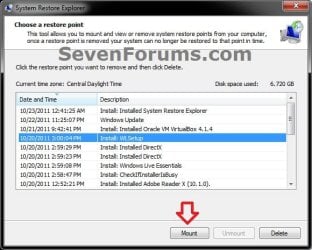
A) In System Restore Explorer, select a specific restore point that you would like to mount, and click on the Mount button. (see screenshot below)mount-1.jpg

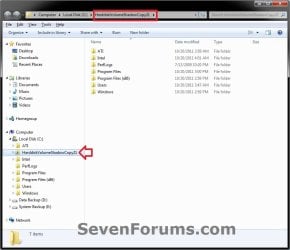
B) This will now open the mounted restore point in a Windows Explorer window where you can now browse and copy any file and folder you like. (see screenshot below)mount-2.jpg

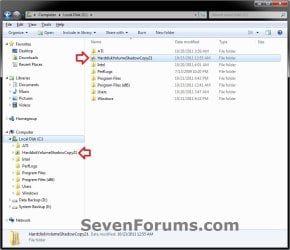
C) The shortcut of the mounted restore point will stay in the root directory of the Windows C: drive until you unmount it in step 3 below. If you like, you could leave the restore point mounted for as long as you like though for easy access. (see screenshot below)mount-3.jpg


3. To Unmount a Mounted Restore Point

   Note
Unmounting a selected mounted restore point will remove the shortcut of the mounted restore point from the root directory of the Windows C: drive.

Unmounting a mounted restore point will not delete the restore point.

A) Do either step B or C below to unmount a mounted restore point.

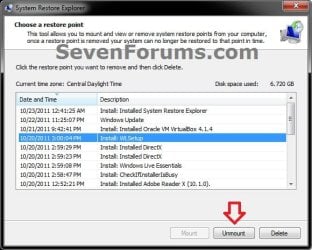
B) In System Restore Explorer, select a specific mounted restore point that you would like to unmount, and click on the Unmount button. (see screenshot below)Unmount-1.jpg

OR

C) In the root directory of the Windows C: drive, right click on the shortcut of a specific mounted restore point that you would like to unmount, and click on Delete. (see screenshot below)mount-3.jpg


4. When finished, you can close System Restore Explorer.


That's it,
Shawn


Attachments

Last edited:
Well, I'm here, a week late. But I need to buy an external HDD to back up my files. I'll do it this week and I'll be back again.

I'm posting this just to inform you. :)
 

My Computer My Computer

At a glance

Windows 7 Ultimate x86Intel Core 2 Duo T9550
Computer type
PC/Desktop
Computer Manufacturer/Model Number
Asus
OS
Windows 7 Ultimate x86
CPU
Intel Core 2 Duo T9550
Ok Erchamion. I hope it goes smoothly for you. :)
 

My Computer My Computer

At a glance

64-bit Windows 11 Pro for WorkstationsIntel i7-8700K OC'd to 5 GHz64 GB (4x16GB) G.SKILL TridentZ RGB DDR4 3600...ASUS ROG-STRIX-GTX1080TI-O11G-GAMING
Computer type
PC/Desktop
Computer Manufacturer/Model Number
Self built custom
OS
64-bit Windows 11 Pro for Workstations
CPU
Intel i7-8700K OC'd to 5 GHz
Motherboard
ASUS ROG Maximus XI Formula Z390
Memory
64 GB (4x16GB) G.SKILL TridentZ RGB DDR4 3600 MHz
Graphics Card(s)
ASUS ROG-STRIX-GTX1080TI-O11G-GAMING
Sound Card
Integrated
Monitor(s) Displays
2 x Samsung Odyssey G7 27"
Screen Resolution
2560x1440
Hard Drives
1TB Samsung 990 PRO M.2,
4TB Samsung 990 PRO PRO M.2,
TerraMaster F8 SSD Plus NAS
PSU
Seasonic Prime Titanium 850W
Case
Thermaltake Core P3
Cooling
Corsair Hydro H115i
Keyboard
Logitech wireless K800
Mouse
Logitech MX Master 4
Internet Speed
2 Gb/s Download and 100 Mb/s Upload
Antivirus
Malwarebyte Anti-Malware Premium
Browser
Google Chrome
Other Info
Logitech Z625 speaker system,
Logitech BRIO 4K Pro webcam,
HP Color LaserJet Pro MFP M477fdn,
APC SMART-UPS RT 1000 XL - SURT1000XLI,
Galaxy S23 Plus phone
so can i delete files and folder within a restore point on win10 64 with this? i tried and i keep getting an error "the disk is write protected".

the icloud and onedrive folders and files seem to be a curse for system restore and in turn cause a restore operation to fail.

if i could get inside there and shitcan those folders, i could use the restore point and life would be groovy again. tia.
 

My Computer My Computer

At a glance

win 7 64 ultimatei716ati
Computer type
PC/Desktop
Computer Manufacturer/Model Number
alienware
OS
win 7 64 ultimate
CPU
i7
Motherboard
alienware
Memory
16
Graphics Card(s)
ati
Hard Drives
intel ssd
Antivirus
malwarebytes
Browser
opera
Hello bloort, :-)

This is designed to help manually extract files and folders included in a restore point when you do not want to system restore the whole restore point.
 

My Computer My Computer

At a glance

64-bit Windows 11 Pro for WorkstationsIntel i7-8700K OC'd to 5 GHz64 GB (4x16GB) G.SKILL TridentZ RGB DDR4 3600...ASUS ROG-STRIX-GTX1080TI-O11G-GAMING
Computer type
PC/Desktop
Computer Manufacturer/Model Number
Self built custom
OS
64-bit Windows 11 Pro for Workstations
CPU
Intel i7-8700K OC'd to 5 GHz
Motherboard
ASUS ROG Maximus XI Formula Z390
Memory
64 GB (4x16GB) G.SKILL TridentZ RGB DDR4 3600 MHz
Graphics Card(s)
ASUS ROG-STRIX-GTX1080TI-O11G-GAMING
Sound Card
Integrated
Monitor(s) Displays
2 x Samsung Odyssey G7 27"
Screen Resolution
2560x1440
Hard Drives
1TB Samsung 990 PRO M.2,
4TB Samsung 990 PRO PRO M.2,
TerraMaster F8 SSD Plus NAS
PSU
Seasonic Prime Titanium 850W
Case
Thermaltake Core P3
Cooling
Corsair Hydro H115i
Keyboard
Logitech wireless K800
Mouse
Logitech MX Master 4
Internet Speed
2 Gb/s Download and 100 Mb/s Upload
Antivirus
Malwarebyte Anti-Malware Premium
Browser
Google Chrome
Other Info
Logitech Z625 speaker system,
Logitech BRIO 4K Pro webcam,
HP Color LaserJet Pro MFP M477fdn,
APC SMART-UPS RT 1000 XL - SURT1000XLI,
Galaxy S23 Plus phone
This is a great little App. I needed it to compare and contrast an old Prefs.js file with the current version from my browser. However, the link to this software is now dead. So I got it from Majorgeeks. May want to update the link I reckon.
 

My Computer My Computer

At a glance

Windows 7 Ultimate x64
Computer type
PC/Desktop
OS
Windows 7 Ultimate x64
This is a great little App. I needed it to compare and contrast an old Prefs.js file with the current version from my browser. However, the link to this software is now dead. So I got it from Majorgeeks. May want to update the link I reckon.

Hey mate, :-)

Link updated, and direct download now available.
 

My Computer My Computer

At a glance

64-bit Windows 11 Pro for WorkstationsIntel i7-8700K OC'd to 5 GHz64 GB (4x16GB) G.SKILL TridentZ RGB DDR4 3600...ASUS ROG-STRIX-GTX1080TI-O11G-GAMING
Computer type
PC/Desktop
Computer Manufacturer/Model Number
Self built custom
OS
64-bit Windows 11 Pro for Workstations
CPU
Intel i7-8700K OC'd to 5 GHz
Motherboard
ASUS ROG Maximus XI Formula Z390
Memory
64 GB (4x16GB) G.SKILL TridentZ RGB DDR4 3600 MHz
Graphics Card(s)
ASUS ROG-STRIX-GTX1080TI-O11G-GAMING
Sound Card
Integrated
Monitor(s) Displays
2 x Samsung Odyssey G7 27"
Screen Resolution
2560x1440
Hard Drives
1TB Samsung 990 PRO M.2,
4TB Samsung 990 PRO PRO M.2,
TerraMaster F8 SSD Plus NAS
PSU
Seasonic Prime Titanium 850W
Case
Thermaltake Core P3
Cooling
Corsair Hydro H115i
Keyboard
Logitech wireless K800
Mouse
Logitech MX Master 4
Internet Speed
2 Gb/s Download and 100 Mb/s Upload
Antivirus
Malwarebyte Anti-Malware Premium
Browser
Google Chrome
Other Info
Logitech Z625 speaker system,
Logitech BRIO 4K Pro webcam,
HP Color LaserJet Pro MFP M477fdn,
APC SMART-UPS RT 1000 XL - SURT1000XLI,
Galaxy S23 Plus phone
Back
Top