Hello Everyone - it's been a while since I posted here, so I apologize for any errors I may make.
I have a Dell Inspiron Core I5 Windows 7 SP1 PC with Norton internet security.
My question is: what are the rules that govern when the system will make automatic restore points. I've read several threads here, and there seems to be multiple opinions, from "every 7 days", when volume shadow copy is started, when task scheduler has proper triggers and no conflicting conditions.
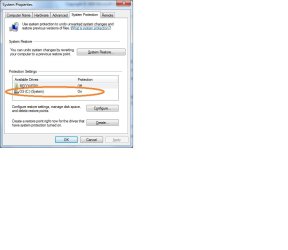
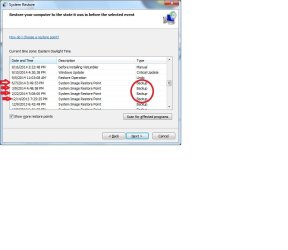
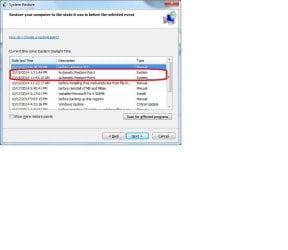
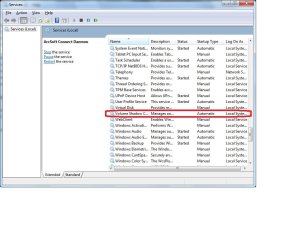
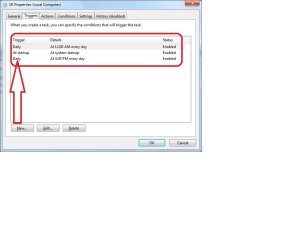
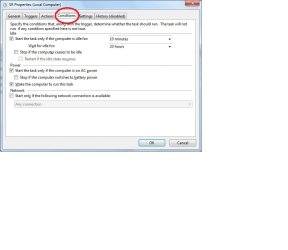
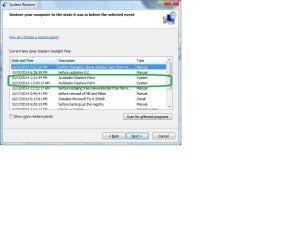
My PC wasn't creating restore points automatically. I tried changing the Volume shadow copy to automatic. I added a new task under SR to start at 3:30 PM (as a test), I checked the box to wake computer for this task. The system created two restore points hours apart once, but none since then.
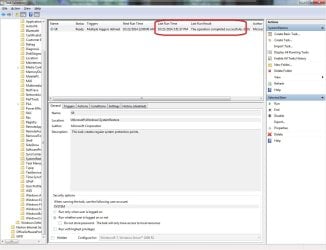
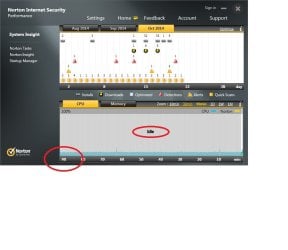
I've attached screen shots showing all my settings, including one that seems to indicate the task did run, but no restore point can be seen for that time. NIS did show the system at an idle state at the time the tasks should have ran.
So to sum it up, do I have my settings incorrect? Is there a glitch in my system? How often should SR create automatic restore points (aside from program updates)?
SR has bailed me out a few times and is quicker than restoring from a system image which I do periodically, along with a separate file backup.
Any suggestions, help, explanations, would be greatly appreciated.
Thank you.
I have a Dell Inspiron Core I5 Windows 7 SP1 PC with Norton internet security.
My question is: what are the rules that govern when the system will make automatic restore points. I've read several threads here, and there seems to be multiple opinions, from "every 7 days", when volume shadow copy is started, when task scheduler has proper triggers and no conflicting conditions.
My PC wasn't creating restore points automatically. I tried changing the Volume shadow copy to automatic. I added a new task under SR to start at 3:30 PM (as a test), I checked the box to wake computer for this task. The system created two restore points hours apart once, but none since then.
I've attached screen shots showing all my settings, including one that seems to indicate the task did run, but no restore point can be seen for that time. NIS did show the system at an idle state at the time the tasks should have ran.
So to sum it up, do I have my settings incorrect? Is there a glitch in my system? How often should SR create automatic restore points (aside from program updates)?
SR has bailed me out a few times and is quicker than restoring from a system image which I do periodically, along with a separate file backup.
Any suggestions, help, explanations, would be greatly appreciated.
Thank you.
My Computer
At a glance
Windows 7 Home Premium 64 bitIntel Core i5-760 @ 2.80 ghz8 GB - DDR3-SERAM (1333mhz)ATI Radeon HD 5450 - 1 GB
- Computer Manufacturer/Model Number
- Dell Inspiron 580
- OS
- Windows 7 Home Premium 64 bit
- CPU
- Intel Core i5-760 @ 2.80 ghz
- Motherboard
- Dell OC2KJT / Intel PCH H57
- Memory
- 8 GB - DDR3-SERAM (1333mhz)
- Graphics Card(s)
- ATI Radeon HD 5450 - 1 GB
- Sound Card
- Realtek HD Audio / Intel Display Audio / ATI HI Audio Device
- Monitor(s) Displays
- Acer AL1916
- Hard Drives
- Samsung HD103SJ ATA Device
- Internet Speed
- Comcast Max Blast (150mb)
- Antivirus
- Norton Security
- Browser
- Firefox
- Other Info
- Malwarebytes