
System Restore points not loading

Chuckamundo

New member
Local time
4:42 AM
Messages
24
Hi. Having issues with any of my restore points in Win7 restoring my system. I think I have a lead on what's happened which may be a bigger problem. I have Win 2000 Pro SP4 on my 80 Gig HD (drive C:\ initially, works fine and my first OS. Decided (finally) to install Win7 Home Premium x64 on my 250 Gig HD. Installed, booted into Win7 (hurray!), all hardware recognized, and then did a re-boot (suprize!) and found "Boot menu" with "load previous version of windows" and "load Win 7". So have used "both" Os's back and forth, no real problems till I tried to restore Win 7 to a earlier point & froze pc, reboot, tried again, froze, reboot & did a system restore from recovery menu, and got error message "System restore could not open file *** (sorry, can't remember file name but it is a FireFox setting file on my drive C:\ ), system restore failed. Now, Win 2000 "see's" Win 7 on the 250 Gig drive D:\ in explorer BUT Win 7 does not see the Win 2000 on the drive C:\ . I am thinking of doing a Win 7 fresh re-install and do a/the boot menu repair tutorial I found here. Will this affect Win 2000 in any way and b) will the boot menu repair keep Win 7 off the Win 2000 drive when the boot menu is fixed / corrected?
 

My Computer

Computer type
PC/Desktop
Computer Manufacturer/Model Number
Intel
OS
Win 2000 Pro x32 SP4 / Win 7 Home Premium x64
CPU
3.2 Gig Dual Core
Motherboard
Asus P5G41T-M/CSM
Memory
4 gIG
Graphics Card(s)
Nvidia GeForce 8300 GS
Hard Drives
C: NTFS 80 Gig SATA Win 2000 Pro Os
D: NTFS 250 Gig SATA Win 7 Os
E: NTFS 500 Gig SATA File Archive
F: NTFS 500 Gig IDE USB External File Archive backup

My Computer

Computer type
PC/Desktop
Computer Manufacturer/Model Number
Custom Built
OS
Windows 10 Pro
CPU
AMD Ryzen 5 2400G Processor with Radeon RX Vega 11 Graphics
Motherboard
ASRock X470 Master SLI/AC AM4 AMD Promontory X470 SATA 6Gb/s
Memory
G.SKILL Ripjaws V Series 16GB (2 x 8GB) 288-Pin DDR4 SDRAM D
Graphics Card(s)
2047MB NVIDIA GeForce GTX 1060 6GB (EVGA)
Sound Card
Motherboard Built in
Monitor(s) Displays
Acer R240HY bidx 23.8-Inch IPS HDMI DVI VGA (1920 x 1080) Wi
Screen Resolution
1920 x 1080
Hard Drives
1TB Sandisk SSD PLUS (Main drive)
500 GB Seagate 7200 RPM (Games)
500 GB Western Digital 7200 RPM (Virtual Machines)
PSU
CORSAIR TX Series TX650M 650W 80+ Gold Modular Power Supply
Case
CORSAIR CARBIDE SPEC-02 Mid-Tower Gaming Case, Red LED Fan
Cooling
220mm, two 120mm, and four 60mm fans
Keyboard
Wired Dell keyboard
Mouse
Wireless Logitech mouse
Internet Speed
250mb down, 30mb up
Antivirus
Panda Cloud Antivirus
Browser
Chrome-ish x64
Other Info
Your awesome for reading this.
We had problems with XP Dual Boots interfering with Restore Points earlier on, so I can only imagine what Win2000 can do.

Let us see a Win7 Disk Mgmt drive map and listings snip to see if anything is obvious. Did Win7 configure the Dual Boot or did you add it manually or with EasyBCD?
 
Let us see a Win7 Disk Mgmt drive map and listings snip
Ok, sorry newbie here. How do I do that for you?
 
Last edited:

My Computer

Computer type
PC/Desktop
Computer Manufacturer/Model Number
Intel
OS
Win 2000 Pro x32 SP4 / Win 7 Home Premium x64
CPU
3.2 Gig Dual Core
Motherboard
Asus P5G41T-M/CSM
Memory
4 gIG
Graphics Card(s)
Nvidia GeForce 8300 GS
Hard Drives
C: NTFS 80 Gig SATA Win 2000 Pro Os
D: NTFS 250 Gig SATA Win 7 Os
E: NTFS 500 Gig SATA File Archive
F: NTFS 500 Gig IDE USB External File Archive backup
Win 7 set up the dual boot, Win 2000 was first / original.
 

My Computer

Computer type
PC/Desktop
Computer Manufacturer/Model Number
Intel
OS
Win 2000 Pro x32 SP4 / Win 7 Home Premium x64
CPU
3.2 Gig Dual Core
Motherboard
Asus P5G41T-M/CSM
Memory
4 gIG
Graphics Card(s)
Nvidia GeForce 8300 GS
Hard Drives
C: NTFS 80 Gig SATA Win 2000 Pro Os
D: NTFS 250 Gig SATA Win 7 Os
E: NTFS 500 Gig SATA File Archive
F: NTFS 500 Gig IDE USB External File Archive backup
"Let us see a Windows 7 Disk Mgmt drive map and listings snip" got it, found your tutorial page/url on Disk Management, How to post/upload attachment/pic, and working on it...
 

My Computer

Computer type
PC/Desktop
Computer Manufacturer/Model Number
Intel
OS
Win 2000 Pro x32 SP4 / Win 7 Home Premium x64
CPU
3.2 Gig Dual Core
Motherboard
Asus P5G41T-M/CSM
Memory
4 gIG
Graphics Card(s)
Nvidia GeForce 8300 GS
Hard Drives
C: NTFS 80 Gig SATA Win 2000 Pro Os
D: NTFS 250 Gig SATA Win 7 Os
E: NTFS 500 Gig SATA File Archive
F: NTFS 500 Gig IDE USB External File Archive backup
Type Snipping Tool in Start search box, make a rectangular snip of entire Disk Mgmt window which you maximize first. Then Save and attach with paper clip in reply box.
 
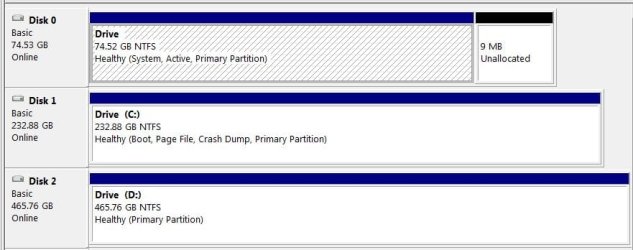
Here's the DM window. Note no drive letter for the 80 Gig drive. I have read the "how to add / change drive letters in Win7" tutorial here BUT I would like to know "IF" I designate / change a drive letter to this drive (this is my Win2000 OS drive) if it will screw up / DOH! / Damn-it!!! Win2000 from working?
 

Attachments

  • disk management drive window circled.JPG
    disk management drive window circled.JPG
    28.6 KB · Views: 3

My Computer

Computer type
PC/Desktop
Computer Manufacturer/Model Number
Intel
OS
Win 2000 Pro x32 SP4 / Win 7 Home Premium x64
CPU
3.2 Gig Dual Core
Motherboard
Asus P5G41T-M/CSM
Memory
4 gIG
Graphics Card(s)
Nvidia GeForce 8300 GS
Hard Drives
C: NTFS 80 Gig SATA Win 2000 Pro Os
D: NTFS 250 Gig SATA Win 7 Os
E: NTFS 500 Gig SATA File Archive
F: NTFS 500 Gig IDE USB External File Archive backup
Read the instructions again. Need the drivemap.

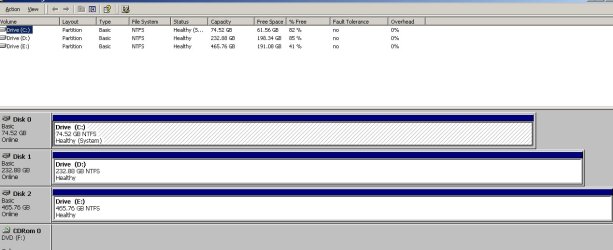
Also can you get a Win2000 screenshot by pasting Prnt Scrn to Paint?

Since the issue is present with no drive letter for the other OS in Win7, it might be solved removing 7's drive letter in 2000.
 
Here's what Win7 "see's" & what Win2000 "see's"...

Hhmmm, that's wierd, 9 Meg unallocated in the 80 Gig Win7 DM.

WARNING:
I am not willing to change / alter / reset / rename / C:\format the drive(s) in Win2000 IF at all possible to correct / fix Win7 unless it / this will work & "Problem Solved". I'me not one to "solve a problem and create another", it hurts my forehead too much after the slap.
 

Attachments

  • Drive Map Win7.JPG
    Drive Map Win7.JPG
    44.7 KB · Views: 5
  • Win2000 DM.jpg
    Win2000 DM.jpg
    66.6 KB · Views: 5
Last edited:

My Computer

Computer type
PC/Desktop
Computer Manufacturer/Model Number
Intel
OS
Win 2000 Pro x32 SP4 / Win 7 Home Premium x64
CPU
3.2 Gig Dual Core
Motherboard
Asus P5G41T-M/CSM
Memory
4 gIG
Graphics Card(s)
Nvidia GeForce 8300 GS
Hard Drives
C: NTFS 80 Gig SATA Win 2000 Pro Os
D: NTFS 250 Gig SATA Win 7 Os
E: NTFS 500 Gig SATA File Archive
F: NTFS 500 Gig IDE USB External File Archive backup
I understand why you wouldn't want to experiment if you are otherwise happy with your legacy Dual Boot.

What sometimes works with XP is moving the System boot files which have been placed on the older OS partition as signified by the System flag, to Win7 partition. This is done by marking Win7 partition Active then running Startup Repair from the disk up to 3 separate times. Then when it starts up to Win7 install EasyBCD to add the legacy OS on its Add Boot Entry tab.

However we simply don't have enough experience with Win2000 to vouch whether this would work, so it would indeed need to be experimental with an image of Win2000 backed up first. EasyBCD does support 2000 so maybe you could interact with their forums to find out if adding Win2000 from the more advanced Win7 (instead of reverse) might solve your issue. EasyBCD - Wikipedia, the free encyclopedia
 
Sir, I bow to your experience and expertise!
<- Chuckamundo takes a bow to gregrocker
Yes, i am very happy and impressed with Win2000, I have taken it around the block a few times and NO BSOD, it has told me on occasion to "Bite Me!" when I have tried a few things, but you can tweak it if you're nice about it.
Now I wonder IF I run EasyBCD and correct the missing Win2000 entry in my boot menu and add a drive letter to the Disk 0 in Win7 if that may sort out the System Restore failed in 7?
"done by marking Windows 7 partition Active then running Startup Repair from the disk" um, uh, well, how do I do this Sir?
I'll definitely check the Easy forums & Wikipedia (never thought of that 1)!
 

My Computer

Computer type
PC/Desktop
Computer Manufacturer/Model Number
Intel
OS
Win 2000 Pro x32 SP4 / Win 7 Home Premium x64
CPU
3.2 Gig Dual Core
Motherboard
Asus P5G41T-M/CSM
Memory
4 gIG
Graphics Card(s)
Nvidia GeForce 8300 GS
Hard Drives
C: NTFS 80 Gig SATA Win 2000 Pro Os
D: NTFS 250 Gig SATA Win 7 Os
E: NTFS 500 Gig SATA File Archive
F: NTFS 500 Gig IDE USB External File Archive backup
It couldn't hurt to give XP a drive letter in Win7 to see if it resolves the System Restore problem first.

You can always remove it if it causes any problems. But I would want to see my files from both OS's.
 
Back
Top