Solved System restore points saved to recovery partition, possible damage?

eddie1170

New member
Local time
1:58 AM
Messages
12
Hello,

I have done a good bit of searching around the internet about system protection monitoring on recovery partitions.

It seems that by default system protection was turned on for the recovery partition of my laptop and many restore points have been saved to the recovery partition. I only realised when I was defragging my system hard drive that I noticed my recovery partition was 2% fragmented, which is odd seeing as it is never meant to be edited. I have never seen it fragmented previously. Since noticing this I turned off system protection for the recovery partition and removed the restore points from the system protection menu. I am assuming that the 2% fragmentation as caused by the saving of restore points to the recovery partition.

My question is that is the act of saving system restore points to the recovery partition going to cause any damage to the recovery partition itself or its functioning? Also if it is possible, would there be any advantage of defragging the recovery partition?

Thanks in advance to anyone who answers!

Ed
 

My Computer My Computer

At a glance

windows 7 64 bit
Computer type
PC/Desktop
OS
windows 7 64 bit
The only way that system recovery points would be on the recovery drive is if the drive was used for other purposes. Windows will not do this otherwise. Your policy towards the recovery partition should be a strict hands off. No modifications of it in any way. certainly not a defrag.
 

My Computer My Computer

At a glance

Windows 7 Pro 64 bitXeon W35208 GBNvidia Geforce 210
Computer type
PC/Desktop
Computer Manufacturer/Model Number
HP
OS
Windows 7 Pro 64 bit
CPU
Xeon W3520
Memory
8 GB
Graphics Card(s)
Nvidia Geforce 210
I also thought that there as no way to alter the contents of the recovery partition but according to the system protection menu, 3.47 GB of restore points were in use on that recovery partition before I turned it off.

What would your assessment be on the chances of this damaging or altering the recovery partition?
 

My Computer My Computer

At a glance

windows 7 64 bit
Computer type
PC/Desktop
OS
windows 7 64 bit
Is this an OEM machine? The only way I can see that happening is that you changed the restore point options to include the drive. There shouldn't be restore points on a Recovery Partition. It IS the restore point for the factory install. That partition should be locked from your access and only available using the OEM recovery disc. (That you should have created right after you bought the PC.) Restore points on the Recovery Partition is wasted space.

It's best not to change system settings you don't understand.
 

My Computer My Computer

At a glance

Windows 7 Pro-x64i7-2600 3.4GHz - 3.8GHz Turbo8Gb - 2x4GB, Muskin 991770 PC3-1333Integrated Intel HD 2000
Computer type
PC/Desktop
Computer Manufacturer/Model Number
Built 2/11/2011
OS
Windows 7 Pro-x64
CPU
i7-2600 3.4GHz - 3.8GHz Turbo
Motherboard
Intel DH67BL-B3
Memory
8Gb - 2x4GB, Muskin 991770 PC3-1333
Graphics Card(s)
Integrated Intel HD 2000
Sound Card
Integrated Intel 10.1 HD, RealTek ALC892
Monitor(s) Displays
Asus LCD VH222H, Haier HL24XSL2a
Screen Resolution
1920x1080, 1920x1080
Hard Drives
Crucial SSD C300-128Gb,
Western Digital WD5002AALX - 500Gb,
Western Digital WD7501AALS - 750Gb
PSU
Seasonic 650W 80+ Gold Modular
Case
Rosewill Defender
Cooling
Stock CPU, Four 120mm case fans, PCH fan added
Keyboard
Logitech EX100 Y-RBH94 Wireless
Mouse
Logitech EX100 M-RCE95 Wireless
Internet Speed
3.0/1.5 Mbs
Antivirus
Microsoft Security Essentials
Browser
Microsoft Internet Explorer 11
Other Info
Antec Veris Premier-Multimedia IR Station,
Cyber Accoustics-3602 Speakers,
AFT XM-5U Card Reader,
Hauppauge TV-HVR-2250,
Sony LX300 USB Turntable
Its a Dell laptop. Just did a fresh recovery using the recovery partition and while I was setting everything up I noticed system protection was enabled and saving restore points to the partition. In this case no recovery disc is needed, there is a tool installed by Dell that runs the recovery partition if a recovery is needed. Also the partition is locked from my access, which is weird how windows can save 3.47 gig of restore points to it.

Back to my original question, I know it is wasted space but... is the act of saving system restore points to the recovery partition going to cause any damage to the recovery partition itself or its functioning?

I am not going to continue to save them to the drive, I am working if what has happened has altered the recovery partition in any way. Thanks
 

My Computer My Computer

At a glance

windows 7 64 bit
Computer type
PC/Desktop
OS
windows 7 64 bit
It didn't hurt anything. It just made it larger. The restore points are compacted images of system files.

Is there a backup procedure for the Recovery Partition? What if the partition or disk goes belly up? Does Dell provide a disc to restore the partition?
 

My Computer My Computer

At a glance

Windows 7 Pro-x64i7-2600 3.4GHz - 3.8GHz Turbo8Gb - 2x4GB, Muskin 991770 PC3-1333Integrated Intel HD 2000
Computer type
PC/Desktop
Computer Manufacturer/Model Number
Built 2/11/2011
OS
Windows 7 Pro-x64
CPU
i7-2600 3.4GHz - 3.8GHz Turbo
Motherboard
Intel DH67BL-B3
Memory
8Gb - 2x4GB, Muskin 991770 PC3-1333
Graphics Card(s)
Integrated Intel HD 2000
Sound Card
Integrated Intel 10.1 HD, RealTek ALC892
Monitor(s) Displays
Asus LCD VH222H, Haier HL24XSL2a
Screen Resolution
1920x1080, 1920x1080
Hard Drives
Crucial SSD C300-128Gb,
Western Digital WD5002AALX - 500Gb,
Western Digital WD7501AALS - 750Gb
PSU
Seasonic 650W 80+ Gold Modular
Case
Rosewill Defender
Cooling
Stock CPU, Four 120mm case fans, PCH fan added
Keyboard
Logitech EX100 Y-RBH94 Wireless
Mouse
Logitech EX100 M-RCE95 Wireless
Internet Speed
3.0/1.5 Mbs
Antivirus
Microsoft Security Essentials
Browser
Microsoft Internet Explorer 11
Other Info
Antec Veris Premier-Multimedia IR Station,
Cyber Accoustics-3602 Speakers,
AFT XM-5U Card Reader,
Hauppauge TV-HVR-2250,
Sony LX300 USB Turntable
Good, I was worried in case the restore point files may have done something to the recovery partition. So we are sure it wouldn't have touched any of the files? How could it write the files to the partition if it has no drive letter though? I'm a little confused. Yes they do supply operating system and driver discs just in case the partition fails. Hopefully it never does. Thanks for your responses
 

My Computer My Computer

At a glance

windows 7 64 bit
Computer type
PC/Desktop
OS
windows 7 64 bit
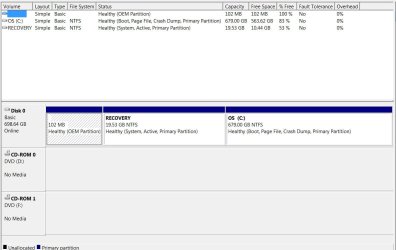
Post an image of your Disk Management screen.

Start > right click Computer > Disk Management. Then expand the screen to show all fields then snip.
 

My Computer My Computer

At a glance

Windows 7 Pro-x64i7-2600 3.4GHz - 3.8GHz Turbo8Gb - 2x4GB, Muskin 991770 PC3-1333Integrated Intel HD 2000
Computer type
PC/Desktop
Computer Manufacturer/Model Number
Built 2/11/2011
OS
Windows 7 Pro-x64
CPU
i7-2600 3.4GHz - 3.8GHz Turbo
Motherboard
Intel DH67BL-B3
Memory
8Gb - 2x4GB, Muskin 991770 PC3-1333
Graphics Card(s)
Integrated Intel HD 2000
Sound Card
Integrated Intel 10.1 HD, RealTek ALC892
Monitor(s) Displays
Asus LCD VH222H, Haier HL24XSL2a
Screen Resolution
1920x1080, 1920x1080
Hard Drives
Crucial SSD C300-128Gb,
Western Digital WD5002AALX - 500Gb,
Western Digital WD7501AALS - 750Gb
PSU
Seasonic 650W 80+ Gold Modular
Case
Rosewill Defender
Cooling
Stock CPU, Four 120mm case fans, PCH fan added
Keyboard
Logitech EX100 Y-RBH94 Wireless
Mouse
Logitech EX100 M-RCE95 Wireless
Internet Speed
3.0/1.5 Mbs
Antivirus
Microsoft Security Essentials
Browser
Microsoft Internet Explorer 11
Other Info
Antec Veris Premier-Multimedia IR Station,
Cyber Accoustics-3602 Speakers,
AFT XM-5U Card Reader,
Hauppauge TV-HVR-2250,
Sony LX300 USB Turntable
Attached. Thanks for helping out.
 

Attachments

  • disk.jpg
    disk.jpg
    60.8 KB · Views: 0

My Computer My Computer

At a glance

windows 7 64 bit
Computer type
PC/Desktop
OS
windows 7 64 bit
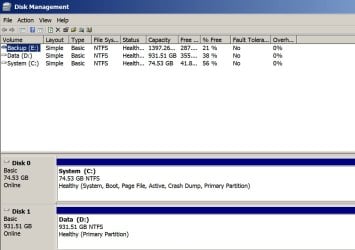
Recovery partition marked as system and active??? I don't use recovery partitions, but that doesn't look right to me. Here's my Disk Management, with C marked as system and active.
 

Attachments

  • Untitled-1.jpg
    Untitled-1.jpg
    83.9 KB · Views: 0

My Computer My Computer

At a glance

Windows 7 Home Premium SP1, 64-bitIntel Skylake i5-6600K, not overclocked8 GB HyperX DDR4-2666 (2 x 4 GB)none; graphics are integrated on CPU
Computer type
PC/Desktop
Computer Manufacturer/Model Number
Ignatz Special; 4 speed manual gearbox; factory air conditioning; one of one
OS
Windows 7 Home Premium SP1, 64-bit
CPU
Intel Skylake i5-6600K, not overclocked
Motherboard
AsRock Z170M Extreme 4, micro ATX
Memory
8 GB HyperX DDR4-2666 (2 x 4 GB)
Graphics Card(s)
none; graphics are integrated on CPU
Sound Card
onboard: Realtek ALC1150; external: USB Behringer UF0-202
Monitor(s) Displays
Dell S2340M 23 inch IPS
Screen Resolution
1600 x 900
Hard Drives
System: Crucial MX100 series SSD, 128 GB;
Data: Samsung Spinpoint 103SJ, 1 TB;
Backup: WD Caviar Green WD30EZRX-00D8PB0, 3 TB
PSU
Rosewill SilentNight 500 watt fanless, semi-modular
Case
Antec Solo II
Cooling
Noctua NH-U12S; Noctua F12 intake, Noctua S12A exhaust
Keyboard
Microsoft 200 6JH-00001 USB
Mouse
Dell or Microsoft optical wired; USB
Antivirus
Microsoft Security Essentials and Malwarebytes Premium
Browser
Pale Moon
Other Info
All fans PWM; speeds at idle: CPU circa 500 rpm; intake circa 600 rpm; exhaust circa 600 rpm; CPU temps 27 idle and 47 C load in a warm room (27 C/81 F) when running Intel Extreme Tuning Utility stress test.
I thought it looked odd to. That is just after a fresh reinstall using the recover partition so that is how it always has been since I got the laptop 2 years ago as I assume the partition never changes.
 

My Computer My Computer

At a glance

windows 7 64 bit
Computer type
PC/Desktop
OS
windows 7 64 bit
The only way you can be POSITIVE the recovery partition will work is to attempt to recover with it.

I would NOT want to assume it will work, only to find out it won't when I get in a jam and actually need it.

You say you have separate Dell recovery disks. I'd much rather rely on them than a possibly good possibly bad recovery partition.

Actually, my preference would be to rely on neither. You can always do a clean install of Windows assuming you have a valid Product Key and are willing to do without whatever extra loveliness Dell may have included in the original OEM install---none of which is liable to be noteworthy. A clean install will leave you without a recovery partition. Death, where is thy sting? You'd still have the recovery disks from Dell if ever absolutely necessary.

But in your shoes, I wouldn't assume that recovery partition will work. You could test it to find out, but if it fails, what is your Plan B??
 

My Computer My Computer

At a glance

Windows 7 Home Premium SP1, 64-bitIntel Skylake i5-6600K, not overclocked8 GB HyperX DDR4-2666 (2 x 4 GB)none; graphics are integrated on CPU
Computer type
PC/Desktop
Computer Manufacturer/Model Number
Ignatz Special; 4 speed manual gearbox; factory air conditioning; one of one
OS
Windows 7 Home Premium SP1, 64-bit
CPU
Intel Skylake i5-6600K, not overclocked
Motherboard
AsRock Z170M Extreme 4, micro ATX
Memory
8 GB HyperX DDR4-2666 (2 x 4 GB)
Graphics Card(s)
none; graphics are integrated on CPU
Sound Card
onboard: Realtek ALC1150; external: USB Behringer UF0-202
Monitor(s) Displays
Dell S2340M 23 inch IPS
Screen Resolution
1600 x 900
Hard Drives
System: Crucial MX100 series SSD, 128 GB;
Data: Samsung Spinpoint 103SJ, 1 TB;
Backup: WD Caviar Green WD30EZRX-00D8PB0, 3 TB
PSU
Rosewill SilentNight 500 watt fanless, semi-modular
Case
Antec Solo II
Cooling
Noctua NH-U12S; Noctua F12 intake, Noctua S12A exhaust
Keyboard
Microsoft 200 6JH-00001 USB
Mouse
Dell or Microsoft optical wired; USB
Antivirus
Microsoft Security Essentials and Malwarebytes Premium
Browser
Pale Moon
Other Info
All fans PWM; speeds at idle: CPU circa 500 rpm; intake circa 600 rpm; exhaust circa 600 rpm; CPU temps 27 idle and 47 C load in a warm room (27 C/81 F) when running Intel Extreme Tuning Utility stress test.
Thats very true. I'll have to find the discs and install manually when I have time. I guess then I could create my own system image. I'm only just after using the recovery to restore my laptop that I am using right now and it seems ok. It has been that since then that system protection was writing to it.
 

My Computer My Computer

At a glance

windows 7 64 bit
Computer type
PC/Desktop
OS
windows 7 64 bit
Thats very true. I'll have to find the discs and install manually when I have time. I guess then I could create my own system image.

Sounds like a better plan, given where you are now. Macrium Reflect Free Edition is an excellent imaging app for that purpose. Learning curve not steep, well designed, quick. Make an image every month or so and hope you never need to restore them.
 

My Computer My Computer

At a glance

Windows 7 Home Premium SP1, 64-bitIntel Skylake i5-6600K, not overclocked8 GB HyperX DDR4-2666 (2 x 4 GB)none; graphics are integrated on CPU
Computer type
PC/Desktop
Computer Manufacturer/Model Number
Ignatz Special; 4 speed manual gearbox; factory air conditioning; one of one
OS
Windows 7 Home Premium SP1, 64-bit
CPU
Intel Skylake i5-6600K, not overclocked
Motherboard
AsRock Z170M Extreme 4, micro ATX
Memory
8 GB HyperX DDR4-2666 (2 x 4 GB)
Graphics Card(s)
none; graphics are integrated on CPU
Sound Card
onboard: Realtek ALC1150; external: USB Behringer UF0-202
Monitor(s) Displays
Dell S2340M 23 inch IPS
Screen Resolution
1600 x 900
Hard Drives
System: Crucial MX100 series SSD, 128 GB;
Data: Samsung Spinpoint 103SJ, 1 TB;
Backup: WD Caviar Green WD30EZRX-00D8PB0, 3 TB
PSU
Rosewill SilentNight 500 watt fanless, semi-modular
Case
Antec Solo II
Cooling
Noctua NH-U12S; Noctua F12 intake, Noctua S12A exhaust
Keyboard
Microsoft 200 6JH-00001 USB
Mouse
Dell or Microsoft optical wired; USB
Antivirus
Microsoft Security Essentials and Malwarebytes Premium
Browser
Pale Moon
Other Info
All fans PWM; speeds at idle: CPU circa 500 rpm; intake circa 600 rpm; exhaust circa 600 rpm; CPU temps 27 idle and 47 C load in a warm room (27 C/81 F) when running Intel Extreme Tuning Utility stress test.
Thanks very much for your help. Over the past few days I have learnt to be cautious about relying upon the recovery partition alone. Thanks again.


EDIT: I have just been thinking about ho to keep system images. I know this would require an external hard drive, would I be able to use the hard drive for other backups? I guess I mean is the system image one file or a selection of files and folders that you wouldn't want to tamper with or accidentally alter?
 
Last edited:

My Computer My Computer

At a glance

windows 7 64 bit
Computer type
PC/Desktop
OS
windows 7 64 bit
EDIT: I have just been thinking about ho to keep system images. I know this would require an external hard drive, would I be able to use the hard drive for other backups? I guess I mean is the system image one file or a selection of files and folders that you wouldn't want to tamper with or accidentally alter?

It would not require an external drive. Internal is fine. The image file is just that--a file. Like any other. You could put whatever else you want on that same drive or in that same partition. I just keep mine in an ordinary folder on D called "images".

It's probably best to keep them on an entirely different physical drive rather than just on a separate partition on the same drive as C. Because if the entire drive fails, you don't want to lose your image files as well as C--if you did, you couldn't restore. My D drive is a different physical drive, not just another partition on the same drive as C.

The image file only becomes "a bunch of files" AFTER it is restored--at which point it is a bootable partition, if all has worked as expected.

What you can't do is restore an image to the same partition that the image file resides on. That is: if you make an image of C, don't store it on C. You can't restore from C to C. Store it on D, E, or F.

No, you wouldn't want to tamper with it, but that's easily done. Just as easily avoided as not tampering with a Word document or a JPEG. They take up quite a bit of space--roughly 40% of the occupied space of the partition imaged (if you have an 120 GB C partition with 50 occupied, the Macrium image file using standard compression would be somewhere around 40% of 50 GB aka 20 GB).

I keep 3 images: one made shortly after C is installed and one for each of the last 2 months. I just made a March image and deleted my January image. The 3 I have are March, February, and the old one from 2011 when I last installed Windows.

I back them up to another drive just like any other valuable piece of data.
 

My Computer My Computer

At a glance

Windows 7 Home Premium SP1, 64-bitIntel Skylake i5-6600K, not overclocked8 GB HyperX DDR4-2666 (2 x 4 GB)none; graphics are integrated on CPU
Computer type
PC/Desktop
Computer Manufacturer/Model Number
Ignatz Special; 4 speed manual gearbox; factory air conditioning; one of one
OS
Windows 7 Home Premium SP1, 64-bit
CPU
Intel Skylake i5-6600K, not overclocked
Motherboard
AsRock Z170M Extreme 4, micro ATX
Memory
8 GB HyperX DDR4-2666 (2 x 4 GB)
Graphics Card(s)
none; graphics are integrated on CPU
Sound Card
onboard: Realtek ALC1150; external: USB Behringer UF0-202
Monitor(s) Displays
Dell S2340M 23 inch IPS
Screen Resolution
1600 x 900
Hard Drives
System: Crucial MX100 series SSD, 128 GB;
Data: Samsung Spinpoint 103SJ, 1 TB;
Backup: WD Caviar Green WD30EZRX-00D8PB0, 3 TB
PSU
Rosewill SilentNight 500 watt fanless, semi-modular
Case
Antec Solo II
Cooling
Noctua NH-U12S; Noctua F12 intake, Noctua S12A exhaust
Keyboard
Microsoft 200 6JH-00001 USB
Mouse
Dell or Microsoft optical wired; USB
Antivirus
Microsoft Security Essentials and Malwarebytes Premium
Browser
Pale Moon
Other Info
All fans PWM; speeds at idle: CPU circa 500 rpm; intake circa 600 rpm; exhaust circa 600 rpm; CPU temps 27 idle and 47 C load in a warm room (27 C/81 F) when running Intel Extreme Tuning Utility stress test.
Thanks very much for the reply, I think I might use the same methods once I made a fresh reinstall. So how can windows see and write to the recovery partition in the system protection menu if it does not have a drive letter?

EDIT: I just downloaded Macrium, it seems that the recovery partition does have a drive letter assigned to it. What would be the difference from creating a system image using the windows option as opposed to Macrium?
 
Last edited:

My Computer My Computer

At a glance

windows 7 64 bit
Computer type
PC/Desktop
OS
windows 7 64 bit
What would be the difference from creating a system image using the windows option as opposed to Macrium?

Both should work, but Macrium is more flexible and considerably more intuitive and easier to understand.

Did you get it here?

http://www.macrium.com/reflectfree.aspx

But you need to get the peculiarities of your setup ironed out before you make an image of any type. As it is now, you've got some goofy things going on with System Restore, which disk is marked "system", which is marked "active", etc.

Get the kinks worked out (maybe through a clean install or through a recovery using your recovery disks (not the recovery partition) and then start thinking about Macrium.

You could of course make an image with Macrium right now, but if you later restored that image, you'd be right back where you are now---unexplained stuff going on with System Restore, etc. Macrium isn't going to "correct" anything. All it can do is bring you back to the state you were in at the time the image file was made--which could be a good state or a bad state. You need to get to a good state.

You could also do nothing now and just plan to rely on your recovery disks (not the recovery partition) if you ever get in a bad jam. Personally, I'd be antsy about relying on either the recovery disks or the recovery partition. I like to have an official ordinary Windows installation disk.
 

My Computer My Computer

At a glance

Windows 7 Home Premium SP1, 64-bitIntel Skylake i5-6600K, not overclocked8 GB HyperX DDR4-2666 (2 x 4 GB)none; graphics are integrated on CPU
Computer type
PC/Desktop
Computer Manufacturer/Model Number
Ignatz Special; 4 speed manual gearbox; factory air conditioning; one of one
OS
Windows 7 Home Premium SP1, 64-bit
CPU
Intel Skylake i5-6600K, not overclocked
Motherboard
AsRock Z170M Extreme 4, micro ATX
Memory
8 GB HyperX DDR4-2666 (2 x 4 GB)
Graphics Card(s)
none; graphics are integrated on CPU
Sound Card
onboard: Realtek ALC1150; external: USB Behringer UF0-202
Monitor(s) Displays
Dell S2340M 23 inch IPS
Screen Resolution
1600 x 900
Hard Drives
System: Crucial MX100 series SSD, 128 GB;
Data: Samsung Spinpoint 103SJ, 1 TB;
Backup: WD Caviar Green WD30EZRX-00D8PB0, 3 TB
PSU
Rosewill SilentNight 500 watt fanless, semi-modular
Case
Antec Solo II
Cooling
Noctua NH-U12S; Noctua F12 intake, Noctua S12A exhaust
Keyboard
Microsoft 200 6JH-00001 USB
Mouse
Dell or Microsoft optical wired; USB
Antivirus
Microsoft Security Essentials and Malwarebytes Premium
Browser
Pale Moon
Other Info
All fans PWM; speeds at idle: CPU circa 500 rpm; intake circa 600 rpm; exhaust circa 600 rpm; CPU temps 27 idle and 47 C load in a warm room (27 C/81 F) when running Intel Extreme Tuning Utility stress test.
Yes I got it from the official website just to get a good look at it and get a feel for it. Going to do a fresh reinstall the next time I have a few days and create an image of the fresh install like you suggested as my new backup. After that then back it up every so often.

I know that windows is working fine now, the problem is that I do not trust that it has been done right. Sometimes mild OCD can be beneficial in the long run haha.

Thank you very much for your help and advice!
 

My Computer My Computer

At a glance

windows 7 64 bit
Computer type
PC/Desktop
OS
windows 7 64 bit

My Computers My Computers

  • At a glance

    7 X64i5 84002x8gb 3200mhz
    Computer type
    PC/Desktop
    OS
    7 X64
    CPU
    i5 8400
    Motherboard
    gigabyte b365m ds3h
    Memory
    2x8gb 3200mhz
    Hard Drives
    various
    PSU
    pure power 11 400w cm
    Case
    Coolermaster
    Cooling
    cryorig m9i
  • At a glance

    7x64g54008gb ddr4 2400
    Computer type
    PC/Desktop
    OS
    7x64
    CPU
    g5400
    Motherboard
    ga b365m ds3h
    Memory
    8gb ddr4 2400
    PSU
    xfx pro 450w
Back
Top