(System Restore) Something very strange happened...

Kari

An Angry Old Man
Guru
VIP
SF Team
Local time
5:48 PM
Messages
17,473
Location
A Finnish ex-pat in Leipzig, Germany
Can anybody explain this:

For a reason I had to do System Restore. It worked and told me my system was restored to a restore point I had chosen.

Reboot, everything seemed fine. Logon screen, my password, and then the usual Welcome-screen which normally lasts only a couple of seconds before opening my desktop. But this time welcome-screen was all I got; HD didn´t work at all, computer just stayed so, showing "Welcome" in the middle of the screen. After couple of minutes a friend called in and I forgot it. Returning to my computer over two hours later it was still doing nothing. "Welcome" was still on display.

It just happens I made a full system image yesterday, so problem was not so big. I just restored this image and everything worked. But I was curios so I thought what the hell, let´s play.

I´ve now made 4 attempts: after restoring system image I have created a restore point, installed something small and then tried to restore my system to the point I just created. Every time the same result: rebooting brings me only to Welcome-screen and system freezes.

At the moment I don´t think I can use System Restore, at least I do no longer trust it. Luckily, like I just proved to myself, using Windows 7 system image recovery option works fine.

Anybody out there with same kind problem with restore?
 

My Computer

Computer type
Laptop
Computer Manufacturer/Model Number
HP ENVY 17-1150eg
OS
Windows 10 Pro x64 EN-GB
CPU
1.6 GHz Intel Core i7-720QM Processor
Memory
6 GB
Graphics Card(s)
ATI Mobility Radeon HD 5850 Graphics
Sound Card
Beats sound system with integrated subwoofer
Monitor(s) Displays
17" laptop display, 22" LED and 32" Full HD TV through HDMI
Screen Resolution
1600*900 (1), 1920*1080 (2&3)
Hard Drives
Internal: 2 x 500 GB SATA Hard Disk Drive 7200 rpm
External: 2TB for backups, 3TB USB3 network drive for media
Cooling
As Envy runs a bit warm, I have it on a Cooler Master pad
Keyboard
Logitech diNovo Media Desktop Laser (bluetooth)
Mouse
Logitech Performance Mouse MX
Internet Speed
50/10 Mbps VDSL
Antivirus
Windows Defender 4.3.9431.0
Browser
Maxthon 3.5.2., IE11
sorry havnt tried sys restore only restore image which like you worked

could be a glitch in rc 7100

cheers brad
 

My Computer

Computer type
PC/Desktop
Computer Manufacturer/Model Number
my own build
OS
xp/vista/win7/win8/10 tech preview
CPU
PHENOM II X4 Quad Core 965 Black Edition CPU, 3.40 GHz
Motherboard
GA-MA790FXT-UD5P
Memory
G.Skill 8GB (4x XMS3 2GB) PC-12800 (1600MHz
Graphics Card(s)
nvidia 9500 gt
Sound Card
on board
Monitor(s) Displays
T231H / X243H ACER
Screen Resolution
1980/1080
Hard Drives
Hitachi 500 samsung1terabyte wd 750
PSU
550 watt
Case
cooler master
Cooling
stock
Keyboard
microsoft
Mouse
logitech
Internet Speed
20000 dl 1020 ul exetel
Other Info
booting xp32 2x dual pci-e digital tv tuners
xp pro v 1xusb2 digital tv tuner
vista ultimate 64
win7 64 win8 64
I had this on a few builds. When it does get stuck... shut it down(by holding the power button) then boot in to safe mode with networking(by repeatedly pressing F8, but it should be up by default after a hard power down). Do not do a system restore. Just log all the way in Safe Mode. The reboot again and see if then you can log in fine.
 

My Computer

Computer Manufacturer/Model Number
Built Myself
OS
Windows 7 7600.16384 x64
CPU
Intel Core i7 OC'd to 3.20 GHz
Motherboard
Gigabyte
Memory
6GB GSkillz Triple Channel DDR3 OC'd to 1600 MHz
Graphics Card(s)
Nvidia GTX 280
Sound Card
X-Fi Platinum
Monitor(s) Displays
Dual 2001FWP
Screen Resolution
1680x1050 x 2
Hard Drives
System - Dual 150GB Raptors Raid0
Doc Storage - 1TB SATA 32MB cache Samsung
TV Recordings - 1TB SATA 32MB cache Samsung
PSU
Gigawatt Antec
Case
Antec 900
Keyboard
Saitek
Mouse
logitech MX 10000
Internet Speed
30 mb/s
I had this on a few builds. When it does get stuck... shut it down(by holding the power button) then boot in to safe mode with networking(by repeatedly pressing F8, but it should be up by default after a hard power down). Do not do a system restore. Just log all the way in Safe Mode. The reboot again and see if then you can log in fine.
Problem was, I had to do a System Restore. After that, also booting in Safe Mode failed freezing already before the Logon screen.

But like I said earlier I think in the future I´ll rather do Image Recovery, if needed.
 

My Computer

Computer type
Laptop
Computer Manufacturer/Model Number
HP ENVY 17-1150eg
OS
Windows 10 Pro x64 EN-GB
CPU
1.6 GHz Intel Core i7-720QM Processor
Memory
6 GB
Graphics Card(s)
ATI Mobility Radeon HD 5850 Graphics
Sound Card
Beats sound system with integrated subwoofer
Monitor(s) Displays
17" laptop display, 22" LED and 32" Full HD TV through HDMI
Screen Resolution
1600*900 (1), 1920*1080 (2&3)
Hard Drives
Internal: 2 x 500 GB SATA Hard Disk Drive 7200 rpm
External: 2TB for backups, 3TB USB3 network drive for media
Cooling
As Envy runs a bit warm, I have it on a Cooler Master pad
Keyboard
Logitech diNovo Media Desktop Laser (bluetooth)
Mouse
Logitech Performance Mouse MX
Internet Speed
50/10 Mbps VDSL
Antivirus
Windows Defender 4.3.9431.0
Browser
Maxthon 3.5.2., IE11

My Computer

Computer Manufacturer/Model Number
Compaq Desktop
OS
Windows 7 Ultimate x64
CPU
AMD Sempron Dual Core
Memory
3GB
Graphics Card(s)
NVIDIA GeForce 6150SE nForce 430
Screen Resolution
1024x768
Hard Drives
150GB Sata

OK, played some more. Your first tip works. After doing the System Restore once more about an hour ago after reading your post, same thing happened. Computer freezes after logon, showing only the Welcome-screen. So I rebooted with W7 installation CD, chose "Repair your computer"-option and did startup repair. After that my computer booted normally. Thanks, this means I can use system restore now when I know that in worst case I have to do a startup repair after restoring.

Upgrade installation don´t work, because after restore I can´t open Windows, and when booting from CD the upgrade option is not available.
 

My Computer

Computer type
Laptop
Computer Manufacturer/Model Number
HP ENVY 17-1150eg
OS
Windows 10 Pro x64 EN-GB
CPU
1.6 GHz Intel Core i7-720QM Processor
Memory
6 GB
Graphics Card(s)
ATI Mobility Radeon HD 5850 Graphics
Sound Card
Beats sound system with integrated subwoofer
Monitor(s) Displays
17" laptop display, 22" LED and 32" Full HD TV through HDMI
Screen Resolution
1600*900 (1), 1920*1080 (2&3)
Hard Drives
Internal: 2 x 500 GB SATA Hard Disk Drive 7200 rpm
External: 2TB for backups, 3TB USB3 network drive for media
Cooling
As Envy runs a bit warm, I have it on a Cooler Master pad
Keyboard
Logitech diNovo Media Desktop Laser (bluetooth)
Mouse
Logitech Performance Mouse MX
Internet Speed
50/10 Mbps VDSL
Antivirus
Windows Defender 4.3.9431.0
Browser
Maxthon 3.5.2., IE11
FWIW - I had the same issue ....
  • Created a manual restore point
  • Installed some drivers I hoped would enable my integrated web-cam (on my lappie)
  • Reboot - no joy, the computer just went ape s***
  • Did the rollback to the manual restore point
  • Hung on the reboot just as in the OP
  • Did the not think to do a repair but did a bunch of other things with no joy
  • Because I'm less smart than others (and maybe a bit impatient) I just did a clean install - what did it cost my but about 30 minutes.
Thanks to this thread, I now know I can recover from a flaky restore.
 

My Computer

Computer Manufacturer/Model Number
Cobbled together :)
OS
Win7 Ultimate, x64
CPU
i7 920, currently NOT OC
Motherboard
Asrock X58 Deluxe
Memory
OCZ Platinum 12GB (6 x 2GB) 240-Pin DDR3 SDRAM DDR3 1600
Graphics Card(s)
nvidia geforce 7600 gt
Sound Card
integrated
Monitor(s) Displays
Samsung SyncMaster 204t (dual monitors)
Screen Resolution
1600 x 1200
Hard Drives
WDC WD2000JS-00MHB0 ATA
WDC WD5000AAKS-65YGA0 ATA
PSU
750w
Cooling
Air, 4 120mm
FWIW - I had the same issue ....
  • Created a manual restore point
  • Installed some drivers I hoped would enable my integrated web-cam (on my lappie)
  • Reboot - no joy, the computer just went ape s***
  • Did the rollback to the manual restore point
  • Hung on the reboot just as in the OP
  • Did the not think to do a repair but did a bunch of other things with no joy
  • Because I'm less smart than others (and maybe a bit impatient) I just did a clean install - what did it cost my but about 30 minutes.
Thanks to this thread, I now know I can recover from a flaky restore.
Ya, I had to rep Orbital Shark. Tip is nice and simple, but it completely solved my issue.
 

My Computer

Computer type
Laptop
Computer Manufacturer/Model Number
HP ENVY 17-1150eg
OS
Windows 10 Pro x64 EN-GB
CPU
1.6 GHz Intel Core i7-720QM Processor
Memory
6 GB
Graphics Card(s)
ATI Mobility Radeon HD 5850 Graphics
Sound Card
Beats sound system with integrated subwoofer
Monitor(s) Displays
17" laptop display, 22" LED and 32" Full HD TV through HDMI
Screen Resolution
1600*900 (1), 1920*1080 (2&3)
Hard Drives
Internal: 2 x 500 GB SATA Hard Disk Drive 7200 rpm
External: 2TB for backups, 3TB USB3 network drive for media
Cooling
As Envy runs a bit warm, I have it on a Cooler Master pad
Keyboard
Logitech diNovo Media Desktop Laser (bluetooth)
Mouse
Logitech Performance Mouse MX
Internet Speed
50/10 Mbps VDSL
Antivirus
Windows Defender 4.3.9431.0
Browser
Maxthon 3.5.2., IE11
Aww, shucks...:o

Thanks :p

Glad it worked :D
 

My Computer

Computer Manufacturer/Model Number
Compaq Desktop
OS
Windows 7 Ultimate x64
CPU
AMD Sempron Dual Core
Memory
3GB
Graphics Card(s)
NVIDIA GeForce 6150SE nForce 430
Screen Resolution
1024x768
Hard Drives
150GB Sata
I've got one for you. 7 created restore points before installing drivers, updating AV etc., but all these get wiped once I reboot. If I create a point manually, it stays there fine. I haven't had to restore (thankfully from what I see of others experiences) but was just wondering why this might be?
 

My Computer

Computer Manufacturer/Model Number
Hewlett Packard dv1610tn
OS
Windows 7 and XP (Dual boot)
I've got one for you. 7 created restore points before installing drivers, updating AV etc., but all these get wiped once I reboot. If I create a point manually, it stays there fine. I haven't had to restore (thankfully from what I see of others experiences) but was just wondering why this might be?
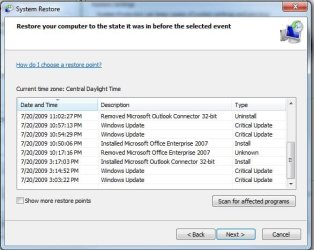
There's an option/button on the dialog used to view restore points to "view more restore points". I've never clicked it, but I wonder if this might not show you all the restore points. I have a hard time believing that any of them would be deleted from the "database" of restore points.
 

My Computer

Computer Manufacturer/Model Number
Cobbled together :)
OS
Win7 Ultimate, x64
CPU
i7 920, currently NOT OC
Motherboard
Asrock X58 Deluxe
Memory
OCZ Platinum 12GB (6 x 2GB) 240-Pin DDR3 SDRAM DDR3 1600
Graphics Card(s)
nvidia geforce 7600 gt
Sound Card
integrated
Monitor(s) Displays
Samsung SyncMaster 204t (dual monitors)
Screen Resolution
1600 x 1200
Hard Drives
WDC WD2000JS-00MHB0 ATA
WDC WD5000AAKS-65YGA0 ATA
PSU
750w
Cooling
Air, 4 120mm
I've got one for you. 7 created restore points before installing drivers, updating AV etc., but all these get wiped once I reboot. If I create a point manually, it stays there fine. I haven't had to restore (thankfully from what I see of others experiences) but was just wondering why this might be?


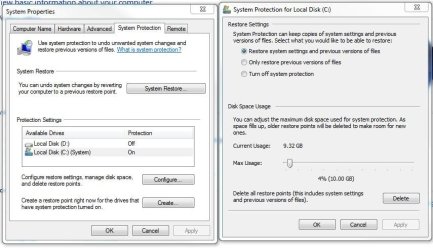
These shouldn't get wiped after a reboot, they should stay there according to your space threshold.

Is it enabled? Is the usage set high enough?

Make sure it is enabled with enough space.

Also included an example of mine, I have had many reboots since these, and these were all created automagically.
 

Attachments

  • sysres.JPG
    sysres.JPG
    69.4 KB · Views: 6
  • sysresexample.JPG
    sysresexample.JPG
    51.4 KB · Views: 4

My Computer

Computer Manufacturer/Model Number
Built Myself
OS
Windows 7 7600.16384 x64
CPU
Intel Core i7 OC'd to 3.20 GHz
Motherboard
Gigabyte
Memory
6GB GSkillz Triple Channel DDR3 OC'd to 1600 MHz
Graphics Card(s)
Nvidia GTX 280
Sound Card
X-Fi Platinum
Monitor(s) Displays
Dual 2001FWP
Screen Resolution
1680x1050 x 2
Hard Drives
System - Dual 150GB Raptors Raid0
Doc Storage - 1TB SATA 32MB cache Samsung
TV Recordings - 1TB SATA 32MB cache Samsung
PSU
Gigawatt Antec
Case
Antec 900
Keyboard
Saitek
Mouse
logitech MX 10000
Internet Speed
30 mb/s
Back
Top