
System Restore

How to Do a System Restore in Windows 7

   Information
This will show you how to do a System Restore to restore your Windows 7 system files to an earlier point in time. It's a way to undo system changes to your computer without affecting your personal user files, such as e‑mail, documents, or photos.

   Note
System Restore uses a feature called System Protection to regularly create and save restore points of selected hard disks in your computer. These restore points contain information about registry settings and other system information that Windows 7 uses. You can also create restore points manually.

   Warning
A System Restore will uninstall programs and drivers (step 8 in Option One below) that were installed after the date of the selected restore point.

A System Restore will replace the password of all local user accounts to what they were at the time of the selected restore point.

If you do a System Restore when the computer is in safe mode or Windows Recovery Environment (WinRE), then you will not be able to undo the restore operation. However, you are able to still run System Restore again and choose a different restore point if available.


CONTENTS:
  • Option One: To Do a System Restore in Windows 7 using System Protection
  • Option Two: To Do a System Restore at Boot using System Recovery Options


OPTION ONE

To Do a System Restore in Windows 7 using System Protection


NOTE: Be sure to temporarily disable your antivirus program first to prevent it from possibly preventing you from doing a system restore.
1. Do step 2, step 3, step 4, or step 5 below for how you would like to open System Restore.

2. Open the Start Menu, type rstrui.exe in the search box, press Enter, and go to step 6 below.

3. Open the Start Menu.
A) Click on All Programs, Accessories, System Tools, and System Restore, and go to step 6 below. (see screenshot below)
Start_Menu.jpg
4. Open the Control Panel (icons view).
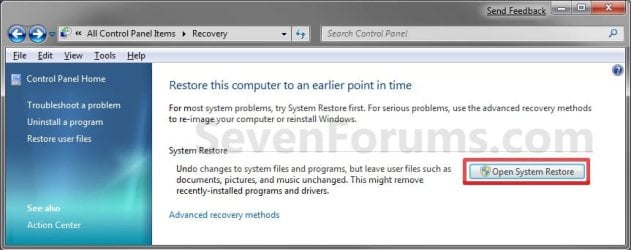
A) Click on the Recovery icon.

B) Click on the Open System Restore button. (see screenshot below)
Recovery.jpg
C) Go to step 7 or step 8 below.
5. Open the Start Menu.
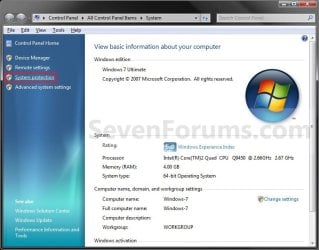
A) Right click on the Computer button and click on Properties.

B) Click on the System Protection link. (see screenshot below)
System.jpg
C) Close the System window, and go to step 6 below. (see screenshot above)
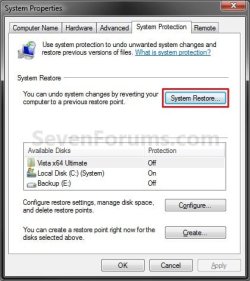
6. Click on the System Restore button. (see screenshot below)
System_Properties.jpg
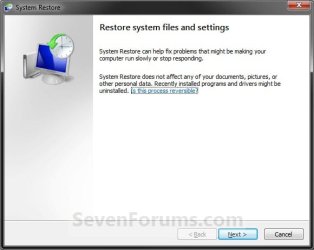
7. If You Have Not Done a System Restore Before
A) Click on the Next button, and go to step 9 below. (see screenshot below)
Restore.jpg
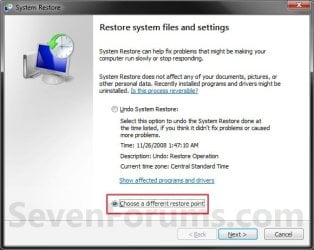
8. If You Have Done a System Restore Before
A) Select (dot) Choose a different restore point, click on the Next button, and go to step 9 below. (see screenshot below)
Restore_Point-2.jpg
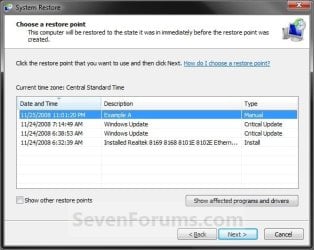
9. Select (click on) a listed restore point that you want to restore the drives that were included in the restore point back to how they were when the restore point was created. (see screenshot below)
NOTE: Check the Show other restore points box to see any restore points (older) that may not be listed here.
System_Restore.jpg
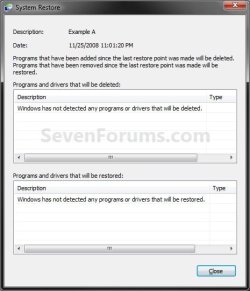
10. To Show Affected Programs and Drivers
NOTE: This will show you a list of programs and drivers that will be deleted and restored by the selected restore point.
A) Click on the Show affected programs and drivers button. (See screenshot above)

B) When done reviewing, click on the Close button. (see screenshot below)
Affected_Programs.jpg
11. Click on the Next button. (see screenshot below step 8)
NOTE: Make sure that the restore point you want is still selected (highlighted).

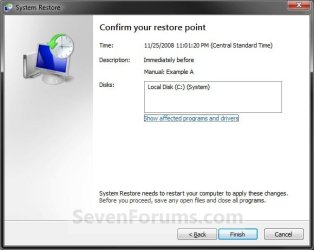
12. Click on the Finish button. (see screenshot below)
NOTE: The listed drives here will be restored back to how they were for the selected restore point.
Confirm.jpg
13. Click on Yes to confirm. (see screenshot below)
WARNING: This will immediately restart your computer to finish the system restore.
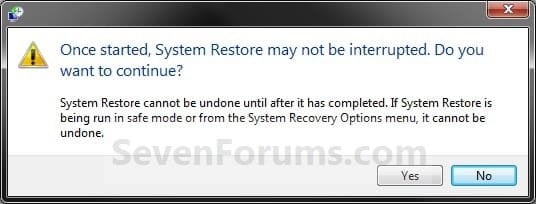
Last_Chance.jpg
14. After the computer has restarted, click on the Close button. (see screenshot below)
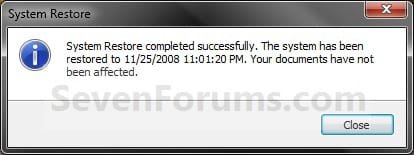
After_Reboot.jpg


OPTION TWO

To Do a System Restore at Boot using System Recovery Options


NOTE: This will allow you to restore Windows 7 to a earlier restore point with a Windows 7 installation disc or System Repair Disc from the System Recovery Options screen at bootup. This can be handy if you cannot startup Windows 7.
1. Using your retail Windows 7 installation disc or System Repair Disc, boot to the System Recovery Options screen.

2. Select the System Restore option. (see screenshot below)
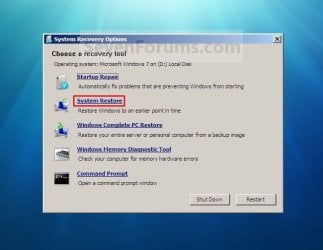
System_Recovery_Options.jpg
3. Continue starting with step 7 or step 8 in Option One above.
That's it,
Shawn


Last edited:
Can you tell me the difference in the system restore and the disc d. Tht is for recovery ? Thanks
 

My Computer

OS
windows 7
The tutorial below can help show you how to. It includes a link to download a Windows 7 ISO to create a bootable Windows 7 installation DVD or USB with.

http://www.sevenforums.com/tutorials/219487-clean-reinstall-factory-oem-windows-7-a.html

Before you start, be sure to also make sure that you have your product key number available on the COA sticker on the bottom of your laptop, or under it's battery. Without it, you will not be able to activate the new installation of Windows 7.
 

My Computer

Computer type
PC/Desktop
Computer Manufacturer/Model Number
Self built custom
OS
64-bit Windows 11 Pro for Workstations
CPU
Intel i7-8700K OC'd to 5 GHz
Motherboard
ASUS ROG Maximus XI Formula Z390
Memory
64 GB (4x16GB) G.SKILL TridentZ RGB DDR4 3600 MHz
Graphics Card(s)
ASUS ROG-STRIX-GTX1080TI-O11G-GAMING
Sound Card
Integrated
Monitor(s) Displays
2 x Samsung Odyssey G7 27"
Screen Resolution
2560x1440
Hard Drives
1TB Samsung 990 PRO M.2,
4TB Samsung 990 PRO PRO M.2,
TerraMaster F8 SSD Plus NAS
PSU
Seasonic Prime Titanium 850W
Case
Thermaltake Core P3
Cooling
Corsair Hydro H115i
Keyboard
Logitech wireless K800
Mouse
Logitech MX Master 4
Internet Speed
2 Gb/s Download and 100 Mb/s Upload
Antivirus
Malwarebyte Anti-Malware Premium
Browser
Google Chrome
Other Info
Logitech Z625 speaker system,
Logitech BRIO 4K Pro webcam,
HP Color LaserJet Pro MFP M477fdn,
APC SMART-UPS RT 1000 XL - SURT1000XLI,
Galaxy S23 Plus phone
lost music and pictures

I did the system restore and it all went smoothly. when my laptop started up again,my music and picture folders were there,but when I opened them they had no files. The music file had all the iTunes folder, but all my music and MP3 files are gone. How do I get these back?
 

My Computer

Computer type
Laptop
Computer Manufacturer/Model Number
Dell
OS
Windows Vista
Memory
3.00 GB

My Computer

Computer type
PC/Desktop
Computer Manufacturer/Model Number
Self built custom
OS
64-bit Windows 11 Pro for Workstations
CPU
Intel i7-8700K OC'd to 5 GHz
Motherboard
ASUS ROG Maximus XI Formula Z390
Memory
64 GB (4x16GB) G.SKILL TridentZ RGB DDR4 3600 MHz
Graphics Card(s)
ASUS ROG-STRIX-GTX1080TI-O11G-GAMING
Sound Card
Integrated
Monitor(s) Displays
2 x Samsung Odyssey G7 27"
Screen Resolution
2560x1440
Hard Drives
1TB Samsung 990 PRO M.2,
4TB Samsung 990 PRO PRO M.2,
TerraMaster F8 SSD Plus NAS
PSU
Seasonic Prime Titanium 850W
Case
Thermaltake Core P3
Cooling
Corsair Hydro H115i
Keyboard
Logitech wireless K800
Mouse
Logitech MX Master 4
Internet Speed
2 Gb/s Download and 100 Mb/s Upload
Antivirus
Malwarebyte Anti-Malware Premium
Browser
Google Chrome
Other Info
Logitech Z625 speaker system,
Logitech BRIO 4K Pro webcam,
HP Color LaserJet Pro MFP M477fdn,
APC SMART-UPS RT 1000 XL - SURT1000XLI,
Galaxy S23 Plus phone
Maybe you can add the fact that "system restore from recovery environment" doesn't create a "undo restore point".

system restore is also possible from "safe mode with command prompt": just type: rstrui.exe
system restore is possible from safe mode. Handy if system doesn't boot normally.
 

My Computer

Computer type
Laptop
Computer Manufacturer/Model Number
ACER ASPIRE 5742G
OS
Microsoft Windows 7 Home Premium 64-bits 7601 Multiprocessor Free Service Pack 1
CPU
Intel(R) Core(TM) i3 CPU M 370 @ 2.40GHz
Motherboard
Acer Aspire 5742G
Memory
4,00 GB
Graphics Card(s)
ATI Mobility Radeon HD 5400 Series
Sound Card
(1) AMD High Definition Audio Device (2) Realtek High Defi
Screen Resolution
1366 x 768 x 32 bits (4294967296 colors) @ 60 Hz
Hard Drives
WDC WD5000BEVT-22ZAT0
Hello Ron,

Thank you, but it's already there as the last item in the red warning box at the top. Is that the same as what you meant? :D
 

My Computer

Computer type
PC/Desktop
Computer Manufacturer/Model Number
Self built custom
OS
64-bit Windows 11 Pro for Workstations
CPU
Intel i7-8700K OC'd to 5 GHz
Motherboard
ASUS ROG Maximus XI Formula Z390
Memory
64 GB (4x16GB) G.SKILL TridentZ RGB DDR4 3600 MHz
Graphics Card(s)
ASUS ROG-STRIX-GTX1080TI-O11G-GAMING
Sound Card
Integrated
Monitor(s) Displays
2 x Samsung Odyssey G7 27"
Screen Resolution
2560x1440
Hard Drives
1TB Samsung 990 PRO M.2,
4TB Samsung 990 PRO PRO M.2,
TerraMaster F8 SSD Plus NAS
PSU
Seasonic Prime Titanium 850W
Case
Thermaltake Core P3
Cooling
Corsair Hydro H115i
Keyboard
Logitech wireless K800
Mouse
Logitech MX Master 4
Internet Speed
2 Gb/s Download and 100 Mb/s Upload
Antivirus
Malwarebyte Anti-Malware Premium
Browser
Google Chrome
Other Info
Logitech Z625 speaker system,
Logitech BRIO 4K Pro webcam,
HP Color LaserJet Pro MFP M477fdn,
APC SMART-UPS RT 1000 XL - SURT1000XLI,
Galaxy S23 Plus phone
Hello Ron,

Thank you, but it's already there as the last item in the red warning box at the top. Is that the same as what you meant? :D
No I meant: If you perform a system restore from "recovery environment" it can't be undone. It won't create a "undo restore point"
 

My Computer

Computer type
Laptop
Computer Manufacturer/Model Number
ACER ASPIRE 5742G
OS
Microsoft Windows 7 Home Premium 64-bits 7601 Multiprocessor Free Service Pack 1
CPU
Intel(R) Core(TM) i3 CPU M 370 @ 2.40GHz
Motherboard
Acer Aspire 5742G
Memory
4,00 GB
Graphics Card(s)
ATI Mobility Radeon HD 5400 Series
Sound Card
(1) AMD High Definition Audio Device (2) Realtek High Defi
Screen Resolution
1366 x 768 x 32 bits (4294967296 colors) @ 60 Hz
Hard Drives
WDC WD5000BEVT-22ZAT0
Ah, ok. Did you confirm this yourself? I had always thought that you could undo a system restore unless it was done in Safe Mode or Safe Mode w/Command.
 

My Computer

Computer type
PC/Desktop
Computer Manufacturer/Model Number
Self built custom
OS
64-bit Windows 11 Pro for Workstations
CPU
Intel i7-8700K OC'd to 5 GHz
Motherboard
ASUS ROG Maximus XI Formula Z390
Memory
64 GB (4x16GB) G.SKILL TridentZ RGB DDR4 3600 MHz
Graphics Card(s)
ASUS ROG-STRIX-GTX1080TI-O11G-GAMING
Sound Card
Integrated
Monitor(s) Displays
2 x Samsung Odyssey G7 27"
Screen Resolution
2560x1440
Hard Drives
1TB Samsung 990 PRO M.2,
4TB Samsung 990 PRO PRO M.2,
TerraMaster F8 SSD Plus NAS
PSU
Seasonic Prime Titanium 850W
Case
Thermaltake Core P3
Cooling
Corsair Hydro H115i
Keyboard
Logitech wireless K800
Mouse
Logitech MX Master 4
Internet Speed
2 Gb/s Download and 100 Mb/s Upload
Antivirus
Malwarebyte Anti-Malware Premium
Browser
Google Chrome
Other Info
Logitech Z625 speaker system,
Logitech BRIO 4K Pro webcam,
HP Color LaserJet Pro MFP M477fdn,
APC SMART-UPS RT 1000 XL - SURT1000XLI,
Galaxy S23 Plus phone
Ah, ok. Did you confirm this yourself? I had always thought that you could undo a system restore unless it was done in Safe Mode or Safe Mode w/Command.
Not 1000% sure, but I had that problem at a client machine a year ago as I can remember.


ub_clear.gif

System Restore From the Windows Recovery Environment (WinRE)

If for any reason you cannot boot into Windows, you can try to use the Windows Recovery Environment (WinRE) to run System Restore. In that case you will be doing what is called an "Offline Restore". Note: While in WinRE, System Restore is not able to create an undo restore point prior to any rollback. Therefore, undoing a rollback is not supported from WinRE.
 

My Computer

Computer type
Laptop
Computer Manufacturer/Model Number
ACER ASPIRE 5742G
OS
Microsoft Windows 7 Home Premium 64-bits 7601 Multiprocessor Free Service Pack 1
CPU
Intel(R) Core(TM) i3 CPU M 370 @ 2.40GHz
Motherboard
Acer Aspire 5742G
Memory
4,00 GB
Graphics Card(s)
ATI Mobility Radeon HD 5400 Series
Sound Card
(1) AMD High Definition Audio Device (2) Realtek High Defi
Screen Resolution
1366 x 768 x 32 bits (4294967296 colors) @ 60 Hz
Hard Drives
WDC WD5000BEVT-22ZAT0
Okey doke. Added. :)
 

My Computer

Computer type
PC/Desktop
Computer Manufacturer/Model Number
Self built custom
OS
64-bit Windows 11 Pro for Workstations
CPU
Intel i7-8700K OC'd to 5 GHz
Motherboard
ASUS ROG Maximus XI Formula Z390
Memory
64 GB (4x16GB) G.SKILL TridentZ RGB DDR4 3600 MHz
Graphics Card(s)
ASUS ROG-STRIX-GTX1080TI-O11G-GAMING
Sound Card
Integrated
Monitor(s) Displays
2 x Samsung Odyssey G7 27"
Screen Resolution
2560x1440
Hard Drives
1TB Samsung 990 PRO M.2,
4TB Samsung 990 PRO PRO M.2,
TerraMaster F8 SSD Plus NAS
PSU
Seasonic Prime Titanium 850W
Case
Thermaltake Core P3
Cooling
Corsair Hydro H115i
Keyboard
Logitech wireless K800
Mouse
Logitech MX Master 4
Internet Speed
2 Gb/s Download and 100 Mb/s Upload
Antivirus
Malwarebyte Anti-Malware Premium
Browser
Google Chrome
Other Info
Logitech Z625 speaker system,
Logitech BRIO 4K Pro webcam,
HP Color LaserJet Pro MFP M477fdn,
APC SMART-UPS RT 1000 XL - SURT1000XLI,
Galaxy S23 Plus phone
Sysyem Restore Error

i made a a mistake once of forgetting to uncheck the box for 'always use this program to open this kind of file' and now all my programs attempt to open in adobe reader. i tried fixing this error with system restore but i always get a response that system recovery failed even when i switch off my antivirus. is there anything i can do to reverse the situation or fix system restore?:cry::cry:
 

My Computer

Computer type
Laptop
Computer Manufacturer/Model Number
dell
OS
Windows 7 professional 32 bit
Memory
465 gb
Antivirus
avast
Browser
mozilla firefox

My Computer

Computer type
PC/Desktop
Computer Manufacturer/Model Number
Self built custom
OS
64-bit Windows 11 Pro for Workstations
CPU
Intel i7-8700K OC'd to 5 GHz
Motherboard
ASUS ROG Maximus XI Formula Z390
Memory
64 GB (4x16GB) G.SKILL TridentZ RGB DDR4 3600 MHz
Graphics Card(s)
ASUS ROG-STRIX-GTX1080TI-O11G-GAMING
Sound Card
Integrated
Monitor(s) Displays
2 x Samsung Odyssey G7 27"
Screen Resolution
2560x1440
Hard Drives
1TB Samsung 990 PRO M.2,
4TB Samsung 990 PRO PRO M.2,
TerraMaster F8 SSD Plus NAS
PSU
Seasonic Prime Titanium 850W
Case
Thermaltake Core P3
Cooling
Corsair Hydro H115i
Keyboard
Logitech wireless K800
Mouse
Logitech MX Master 4
Internet Speed
2 Gb/s Download and 100 Mb/s Upload
Antivirus
Malwarebyte Anti-Malware Premium
Browser
Google Chrome
Other Info
Logitech Z625 speaker system,
Logitech BRIO 4K Pro webcam,
HP Color LaserJet Pro MFP M477fdn,
APC SMART-UPS RT 1000 XL - SURT1000XLI,
Galaxy S23 Plus phone
i made a a mistake once of forgetting to uncheck the box for 'always use this program to open this kind of file' and now all my programs attempt to open in adobe reader. i tried fixing this error with system restore but i always get a response that system recovery failed even when i switch off my antivirus. is there anything i can do to reverse the situation or fix system restore?:cry::cry:
What file extension did you open with acrobat reader and forgot to uncheck "always use this program to open this kind of file"?
 

My Computer

Computer type
Laptop
Computer Manufacturer/Model Number
ACER ASPIRE 5742G
OS
Microsoft Windows 7 Home Premium 64-bits 7601 Multiprocessor Free Service Pack 1
CPU
Intel(R) Core(TM) i3 CPU M 370 @ 2.40GHz
Motherboard
Acer Aspire 5742G
Memory
4,00 GB
Graphics Card(s)
ATI Mobility Radeon HD 5400 Series
Sound Card
(1) AMD High Definition Audio Device (2) Realtek High Defi
Screen Resolution
1366 x 768 x 32 bits (4294967296 colors) @ 60 Hz
Hard Drives
WDC WD5000BEVT-22ZAT0
What file extension did you open with acrobat reader and forgot to uncheck "always use this program to open this kind of file"?

.lnk
 

My Computer

Computer type
Laptop
Computer Manufacturer/Model Number
dell
OS
Windows 7 professional 32 bit
Memory
465 gb
Antivirus
avast
Browser
mozilla firefox

My Computer

Computer type
PC/Desktop
Computer Manufacturer/Model Number
Self built custom
OS
64-bit Windows 11 Pro for Workstations
CPU
Intel i7-8700K OC'd to 5 GHz
Motherboard
ASUS ROG Maximus XI Formula Z390
Memory
64 GB (4x16GB) G.SKILL TridentZ RGB DDR4 3600 MHz
Graphics Card(s)
ASUS ROG-STRIX-GTX1080TI-O11G-GAMING
Sound Card
Integrated
Monitor(s) Displays
2 x Samsung Odyssey G7 27"
Screen Resolution
2560x1440
Hard Drives
1TB Samsung 990 PRO M.2,
4TB Samsung 990 PRO PRO M.2,
TerraMaster F8 SSD Plus NAS
PSU
Seasonic Prime Titanium 850W
Case
Thermaltake Core P3
Cooling
Corsair Hydro H115i
Keyboard
Logitech wireless K800
Mouse
Logitech MX Master 4
Internet Speed
2 Gb/s Download and 100 Mb/s Upload
Antivirus
Malwarebyte Anti-Malware Premium
Browser
Google Chrome
Other Info
Logitech Z625 speaker system,
Logitech BRIO 4K Pro webcam,
HP Color LaserJet Pro MFP M477fdn,
APC SMART-UPS RT 1000 XL - SURT1000XLI,
Galaxy S23 Plus phone

My Computer

Computer type
Laptop
Computer Manufacturer/Model Number
dell
OS
Windows 7 professional 32 bit
Memory
465 gb
Antivirus
avast
Browser
mozilla firefox
You're most welcome. :)
 

My Computer

Computer type
PC/Desktop
Computer Manufacturer/Model Number
Self built custom
OS
64-bit Windows 11 Pro for Workstations
CPU
Intel i7-8700K OC'd to 5 GHz
Motherboard
ASUS ROG Maximus XI Formula Z390
Memory
64 GB (4x16GB) G.SKILL TridentZ RGB DDR4 3600 MHz
Graphics Card(s)
ASUS ROG-STRIX-GTX1080TI-O11G-GAMING
Sound Card
Integrated
Monitor(s) Displays
2 x Samsung Odyssey G7 27"
Screen Resolution
2560x1440
Hard Drives
1TB Samsung 990 PRO M.2,
4TB Samsung 990 PRO PRO M.2,
TerraMaster F8 SSD Plus NAS
PSU
Seasonic Prime Titanium 850W
Case
Thermaltake Core P3
Cooling
Corsair Hydro H115i
Keyboard
Logitech wireless K800
Mouse
Logitech MX Master 4
Internet Speed
2 Gb/s Download and 100 Mb/s Upload
Antivirus
Malwarebyte Anti-Malware Premium
Browser
Google Chrome
Other Info
Logitech Z625 speaker system,
Logitech BRIO 4K Pro webcam,
HP Color LaserJet Pro MFP M477fdn,
APC SMART-UPS RT 1000 XL - SURT1000XLI,
Galaxy S23 Plus phone
System Restore vs. Program Uninstaller

I have a System Restore "effectiveness" question for any expert that cares to respond.

If I create a System Restore point (in Win 7 Pro) before I install a program that includes drivers (Intel PRO/Set Wireless Software, for example), and I later want to completely remove/uninstall the program and its drivers.....

Which is more effective at removing all traces of the program and its drivers (Program Files, ProgramData, Registry entries, etc.):
1.) using Programs and Features "Uninstall", or
2.) restoring the System Restore point that was created before the application was installed?

Thanks.
 

My Computer

Computer type
PC/Desktop
Computer Manufacturer/Model Number
Dell
OS
Win7 Pro x64
CPU
Intel i7-4790
Motherboard
Dell
Memory
24GB
Graphics Card(s)
AMD Radeon R9 270
Hard Drives
256GB mSATA SSD
2TB Hard Drive
Antivirus
Norton
Browser
Firefox, Internet Explorer
Hello Toby,

If the program is fully compatible with Windows 7, then it should fully uninstall using Programs and Features.

With that said, you know as well as I do, that not all programs will always uninstall fully and cleanly without having some remnants left behind. Doing a system restore using a restore point dated before you installed the program will restore Windows back to how it was when the restore point was created leaving no trace of any programs installed after the date of the restore point.

Hope this helps, :)
Shawn
 

My Computer

Computer type
PC/Desktop
Computer Manufacturer/Model Number
Self built custom
OS
64-bit Windows 11 Pro for Workstations
CPU
Intel i7-8700K OC'd to 5 GHz
Motherboard
ASUS ROG Maximus XI Formula Z390
Memory
64 GB (4x16GB) G.SKILL TridentZ RGB DDR4 3600 MHz
Graphics Card(s)
ASUS ROG-STRIX-GTX1080TI-O11G-GAMING
Sound Card
Integrated
Monitor(s) Displays
2 x Samsung Odyssey G7 27"
Screen Resolution
2560x1440
Hard Drives
1TB Samsung 990 PRO M.2,
4TB Samsung 990 PRO PRO M.2,
TerraMaster F8 SSD Plus NAS
PSU
Seasonic Prime Titanium 850W
Case
Thermaltake Core P3
Cooling
Corsair Hydro H115i
Keyboard
Logitech wireless K800
Mouse
Logitech MX Master 4
Internet Speed
2 Gb/s Download and 100 Mb/s Upload
Antivirus
Malwarebyte Anti-Malware Premium
Browser
Google Chrome
Other Info
Logitech Z625 speaker system,
Logitech BRIO 4K Pro webcam,
HP Color LaserJet Pro MFP M477fdn,
APC SMART-UPS RT 1000 XL - SURT1000XLI,
Galaxy S23 Plus phone
Hi Brink,

Thanks for the quick reply. I appreciate your help.

Toby
 

My Computer

Computer type
PC/Desktop
Computer Manufacturer/Model Number
Dell
OS
Win7 Pro x64
CPU
Intel i7-4790
Motherboard
Dell
Memory
24GB
Graphics Card(s)
AMD Radeon R9 270
Hard Drives
256GB mSATA SSD
2TB Hard Drive
Antivirus
Norton
Browser
Firefox, Internet Explorer
Back
Top