System sounds are very low

AnnJ

New member
Member
Local time
4:52 AM
Messages
25
Hi,
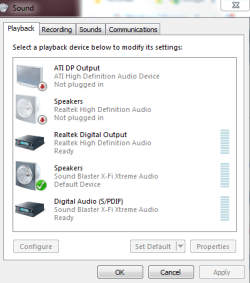
I've been having problems with sound issues in this 3 month old system since day one and have searched here for days for a possible solution. I've tried all of the suggestions to no avail. My system sounds (on the volume mixer bar) never go higher than 10-15%. Media Player seems OK but not great volume. Internet sounds (You tube) reach around 50%.

I noticed a windows (optional update) this month is for a new driver for my Soundblaster card from Creative and I am thinking maybe I should try that first before further exploring.... BUT, I notice the new driver is released in August of 2009!!!! but published 6/2/2011. Is that possible?

My current driver is dated May 2009. Gee... was Creative on strike for 2 years?

Since the new driver is 41mb, I am assuming it will install a new control panel. My question, at the moment :D... is, if I have to roll back the driver because it's worse, will I automatically get back my control panel?

I've never dealt with drivers, sound cards etc... and very shy about all of this. I really appreciate any help I can get. The Creative forums were pathetic (in my humble opinon) as 1,000's of posts never get responses.

Thanks,
Ann
 

Attachments
  • sound_panel.PNG
    sound_panel.PNG
    15.7 KB · Views: 25

My Computer My Computer

Computer Manufacturer/Model Number
Dell Studio XPS 7100
OS
Windows 7 Professional x 64 SP1
CPU
AMD Phenom II 1090 Processor 3.2 GHZ
Memory
8GB
Graphics Card(s)
ATI radeon 5670
Sound Card
X-Fi Extreme Audio PCle - Harmon Kardon speakers HK395 2.1
Monitor(s) Displays
Dell 24-in wide ST2420L
Screen Resolution
1920 X 1080
Hard Drives
1TB Serial ATA2 7200 RPM
PSU
460W
Case
MINI TOWER DELL
Mouse
USB 6 BUTTON LASER MOUSE
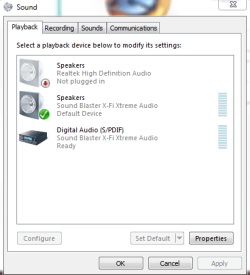
I suggest completely disabling any audio device you are not actually using for starters.

To do this click on the device, for instance the ati output
click the properties button, and at the bottom of the window that opens use the dropdown to disable the device.
It appears you are also not using the built in realtek device. The ideal thing to do here would be to disable the onboard audio in the system bios.
But following the above mentioned steps should do essentially the same thing.

If you aren't scared of your bios settings going in there and disabling the onboard audio would be best.

You do want to leave the x-fi stuff on, as that is your main audio device.
 

My Computer My Computer

Computer Manufacturer/Model Number
Insane hobo technologies. ;-)
OS
Windows 7 x64
CPU
Intel i7 2600k
Motherboard
Asrock z68 extreme 4 gen 3
Memory
G.skill Ripjaw 16gigs @ 1866
Graphics Card(s)
Nvidia gtx580 (evga)
Sound Card
Integrated HD audio + hdmi
Monitor(s) Displays
24" ASUS widescreen + 42" insignia
Screen Resolution
1080p (1920x1080)
Hard Drives
128 Samsung 830
256 Samsung 840
3 x 1tb storage drive (various)
1 western digital 1tb (eSATA)
1 Seagate 1tb (eSATA)
PSU
1 kilowatt SLI/Crossfire rated Silverstone modular
Case
NZXT Phantom + additional 220 fan
Cooling
Zalmann
Keyboard
Microsoft wireless 3000 (v2)
Mouse
MS - wireless 5000 (bluetrack)
Internet Speed
depends on if you ask me or my provider.
Other Info
The above information is provided as is, and the author assumes no responsibility for issues it may cause with your sanity or fanboyism.
Hi and thanks...
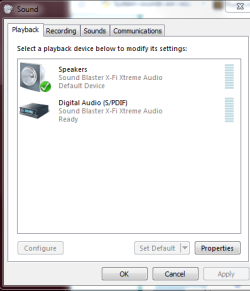
I disabled them but no change as yet... Do I have to restart for it to be effective? As you can see, I'm soundology 101 DUMB!

Ann
 

Attachments

  • sound_panel2.PNG
    sound_panel2.PNG
    13.2 KB · Views: 9

My Computer My Computer

Computer Manufacturer/Model Number
Dell Studio XPS 7100
OS
Windows 7 Professional x 64 SP1
CPU
AMD Phenom II 1090 Processor 3.2 GHZ
Memory
8GB
Graphics Card(s)
ATI radeon 5670
Sound Card
X-Fi Extreme Audio PCle - Harmon Kardon speakers HK395 2.1
Monitor(s) Displays
Dell 24-in wide ST2420L
Screen Resolution
1920 X 1080
Hard Drives
1TB Serial ATA2 7200 RPM
PSU
460W
Case
MINI TOWER DELL
Mouse
USB 6 BUTTON LASER MOUSE
you can also remove speakers (realtek high definition audio)

Once we get to that step we can start focusing on the actual properties of the two that are left.
 

My Computer My Computer

Computer Manufacturer/Model Number
Insane hobo technologies. ;-)
OS
Windows 7 x64
CPU
Intel i7 2600k
Motherboard
Asrock z68 extreme 4 gen 3
Memory
G.skill Ripjaw 16gigs @ 1866
Graphics Card(s)
Nvidia gtx580 (evga)
Sound Card
Integrated HD audio + hdmi
Monitor(s) Displays
24" ASUS widescreen + 42" insignia
Screen Resolution
1080p (1920x1080)
Hard Drives
128 Samsung 830
256 Samsung 840
3 x 1tb storage drive (various)
1 western digital 1tb (eSATA)
1 Seagate 1tb (eSATA)
PSU
1 kilowatt SLI/Crossfire rated Silverstone modular
Case
NZXT Phantom + additional 220 fan
Cooling
Zalmann
Keyboard
Microsoft wireless 3000 (v2)
Mouse
MS - wireless 5000 (bluetrack)
Internet Speed
depends on if you ask me or my provider.
Other Info
The above information is provided as is, and the author assumes no responsibility for issues it may cause with your sanity or fanboyism.
Done! :D
 

Attachments

  • sound_panel3.PNG
    sound_panel3.PNG
    12.2 KB · Views: 11

My Computer My Computer

Computer Manufacturer/Model Number
Dell Studio XPS 7100
OS
Windows 7 Professional x 64 SP1
CPU
AMD Phenom II 1090 Processor 3.2 GHZ
Memory
8GB
Graphics Card(s)
ATI radeon 5670
Sound Card
X-Fi Extreme Audio PCle - Harmon Kardon speakers HK395 2.1
Monitor(s) Displays
Dell 24-in wide ST2420L
Screen Resolution
1920 X 1080
Hard Drives
1TB Serial ATA2 7200 RPM
PSU
460W
Case
MINI TOWER DELL
Mouse
USB 6 BUTTON LASER MOUSE
okay now just to be specific can you tell me what speakers you are dealing with, and are we certain the normal volume level is at high? (the thing you get when you click the tray speaker)
 

My Computer My Computer

Computer Manufacturer/Model Number
Insane hobo technologies. ;-)
OS
Windows 7 x64
CPU
Intel i7 2600k
Motherboard
Asrock z68 extreme 4 gen 3
Memory
G.skill Ripjaw 16gigs @ 1866
Graphics Card(s)
Nvidia gtx580 (evga)
Sound Card
Integrated HD audio + hdmi
Monitor(s) Displays
24" ASUS widescreen + 42" insignia
Screen Resolution
1080p (1920x1080)
Hard Drives
128 Samsung 830
256 Samsung 840
3 x 1tb storage drive (various)
1 western digital 1tb (eSATA)
1 Seagate 1tb (eSATA)
PSU
1 kilowatt SLI/Crossfire rated Silverstone modular
Case
NZXT Phantom + additional 220 fan
Cooling
Zalmann
Keyboard
Microsoft wireless 3000 (v2)
Mouse
MS - wireless 5000 (bluetrack)
Internet Speed
depends on if you ask me or my provider.
Other Info
The above information is provided as is, and the author assumes no responsibility for issues it may cause with your sanity or fanboyism.
The speakers are....Dell AX210 Speaker 2.0 1.2W

Yes, volume in tray set to 100. I also set it to 100 in Speakers panel. All in tray set to 100... Speakers, system sounds, IE and whenever I open an application I check to see that it is at 100... :D
 

My Computer My Computer

Computer Manufacturer/Model Number
Dell Studio XPS 7100
OS
Windows 7 Professional x 64 SP1
CPU
AMD Phenom II 1090 Processor 3.2 GHZ
Memory
8GB
Graphics Card(s)
ATI radeon 5670
Sound Card
X-Fi Extreme Audio PCle - Harmon Kardon speakers HK395 2.1
Monitor(s) Displays
Dell 24-in wide ST2420L
Screen Resolution
1920 X 1080
Hard Drives
1TB Serial ATA2 7200 RPM
PSU
460W
Case
MINI TOWER DELL
Mouse
USB 6 BUTTON LASER MOUSE
Those aren't exactly loud speakers to begin with.

Have you set up the x-fi for stereo sound?
My next thought is that the high end audio card may be defaulting to a 5.1 or even 7.1 sound set up. This would lose you a lot of volume from the left and right channels. It also wouldn't hurt to click configure and make sure it's set for stereo in the default audio config.
 

My Computer My Computer

Computer Manufacturer/Model Number
Insane hobo technologies. ;-)
OS
Windows 7 x64
CPU
Intel i7 2600k
Motherboard
Asrock z68 extreme 4 gen 3
Memory
G.skill Ripjaw 16gigs @ 1866
Graphics Card(s)
Nvidia gtx580 (evga)
Sound Card
Integrated HD audio + hdmi
Monitor(s) Displays
24" ASUS widescreen + 42" insignia
Screen Resolution
1080p (1920x1080)
Hard Drives
128 Samsung 830
256 Samsung 840
3 x 1tb storage drive (various)
1 western digital 1tb (eSATA)
1 Seagate 1tb (eSATA)
PSU
1 kilowatt SLI/Crossfire rated Silverstone modular
Case
NZXT Phantom + additional 220 fan
Cooling
Zalmann
Keyboard
Microsoft wireless 3000 (v2)
Mouse
MS - wireless 5000 (bluetrack)
Internet Speed
depends on if you ask me or my provider.
Other Info
The above information is provided as is, and the author assumes no responsibility for issues it may cause with your sanity or fanboyism.
Oops... you lost me on this one... Where do I go to do that? I don't see "stereo" as an option anywhere. I sure don't mind if I have to get new speakers ... if I have to but I wouldn't even begin to know how to install em. (I'm telling too much, huh?)
 

My Computer My Computer

Computer Manufacturer/Model Number
Dell Studio XPS 7100
OS
Windows 7 Professional x 64 SP1
CPU
AMD Phenom II 1090 Processor 3.2 GHZ
Memory
8GB
Graphics Card(s)
ATI radeon 5670
Sound Card
X-Fi Extreme Audio PCle - Harmon Kardon speakers HK395 2.1
Monitor(s) Displays
Dell 24-in wide ST2420L
Screen Resolution
1920 X 1080
Hard Drives
1TB Serial ATA2 7200 RPM
PSU
460W
Case
MINI TOWER DELL
Mouse
USB 6 BUTTON LASER MOUSE
I'm having problems with my keyboard and mouse.... couldn't type in here without changing editor mode. Also my mouse wheel isn't working. This all happened after I typed my last post to you....:cry: Also, everything is getting highlighted when I try to click on things... Just went to open Word and all my desktop icons highlighted as I clicked on WORD

Think I should restart this machine or what?
 

My Computer My Computer

Computer Manufacturer/Model Number
Dell Studio XPS 7100
OS
Windows 7 Professional x 64 SP1
CPU
AMD Phenom II 1090 Processor 3.2 GHZ
Memory
8GB
Graphics Card(s)
ATI radeon 5670
Sound Card
X-Fi Extreme Audio PCle - Harmon Kardon speakers HK395 2.1
Monitor(s) Displays
Dell 24-in wide ST2420L
Screen Resolution
1920 X 1080
Hard Drives
1TB Serial ATA2 7200 RPM
PSU
460W
Case
MINI TOWER DELL
Mouse
USB 6 BUTTON LASER MOUSE
Well.... all that stuff stopped and it looks like I can scroll now and could type here without changing editor modes.
 

My Computer My Computer

Computer Manufacturer/Model Number
Dell Studio XPS 7100
OS
Windows 7 Professional x 64 SP1
CPU
AMD Phenom II 1090 Processor 3.2 GHZ
Memory
8GB
Graphics Card(s)
ATI radeon 5670
Sound Card
X-Fi Extreme Audio PCle - Harmon Kardon speakers HK395 2.1
Monitor(s) Displays
Dell 24-in wide ST2420L
Screen Resolution
1920 X 1080
Hard Drives
1TB Serial ATA2 7200 RPM
PSU
460W
Case
MINI TOWER DELL
Mouse
USB 6 BUTTON LASER MOUSE
yeah don't know what happened there you should be able to just go back into the playback settings panel click on the remaining item and click configure.
 

My Computer My Computer

Computer Manufacturer/Model Number
Insane hobo technologies. ;-)
OS
Windows 7 x64
CPU
Intel i7 2600k
Motherboard
Asrock z68 extreme 4 gen 3
Memory
G.skill Ripjaw 16gigs @ 1866
Graphics Card(s)
Nvidia gtx580 (evga)
Sound Card
Integrated HD audio + hdmi
Monitor(s) Displays
24" ASUS widescreen + 42" insignia
Screen Resolution
1080p (1920x1080)
Hard Drives
128 Samsung 830
256 Samsung 840
3 x 1tb storage drive (various)
1 western digital 1tb (eSATA)
1 Seagate 1tb (eSATA)
PSU
1 kilowatt SLI/Crossfire rated Silverstone modular
Case
NZXT Phantom + additional 220 fan
Cooling
Zalmann
Keyboard
Microsoft wireless 3000 (v2)
Mouse
MS - wireless 5000 (bluetrack)
Internet Speed
depends on if you ask me or my provider.
Other Info
The above information is provided as is, and the author assumes no responsibility for issues it may cause with your sanity or fanboyism.
I suggest, if Windows allows, going to Playback devices, click on the default device, and click on Properties near the bottom the window. That'll let you into the Properties, and from there, go to the Enhancements tab and see if Loudness Equalization is able to be enabled. Hit ok, and that in theory should bring up the volume loudness. But I can't say for sure for ATI sound cards.
 

My Computer My Computer

Computer Manufacturer/Model Number
ASUS
OS
Windows 7 Ultimate x64
CPU
AMD Athlon 240 II @ 2.8-4.004 ghz
Motherboard
M4A78LT-M LE
Memory
SuperTalent 4gb DDR3
Graphics Card(s)
ATI Radeon 3000HD
Screen Resolution
1440*900
Case
Re-modded Dell Dimension 4550
Cooling
Vantec 92mm Tornado x2
Other Info
It looks pretty.
Yeah... those things had me nervous for awhile!

OK... I went in and checked the configuraqtion of the speakers and they are set to stereo and I tested while I was there. It's funny, but those sounds bounce all the way up on the volume meter in the tray...

Thanks for trying to help me...
Ann
 

My Computer My Computer

Computer Manufacturer/Model Number
Dell Studio XPS 7100
OS
Windows 7 Professional x 64 SP1
CPU
AMD Phenom II 1090 Processor 3.2 GHZ
Memory
8GB
Graphics Card(s)
ATI radeon 5670
Sound Card
X-Fi Extreme Audio PCle - Harmon Kardon speakers HK395 2.1
Monitor(s) Displays
Dell 24-in wide ST2420L
Screen Resolution
1920 X 1080
Hard Drives
1TB Serial ATA2 7200 RPM
PSU
460W
Case
MINI TOWER DELL
Mouse
USB 6 BUTTON LASER MOUSE
Hi CokeRobot (love that name).... I checked it out and there is no enhancement tab. I checked all of the tabs in properties and no mention of equalization anywhere.
Thanks for the effort though...
Ann
 

My Computer My Computer

Computer Manufacturer/Model Number
Dell Studio XPS 7100
OS
Windows 7 Professional x 64 SP1
CPU
AMD Phenom II 1090 Processor 3.2 GHZ
Memory
8GB
Graphics Card(s)
ATI radeon 5670
Sound Card
X-Fi Extreme Audio PCle - Harmon Kardon speakers HK395 2.1
Monitor(s) Displays
Dell 24-in wide ST2420L
Screen Resolution
1920 X 1080
Hard Drives
1TB Serial ATA2 7200 RPM
PSU
460W
Case
MINI TOWER DELL
Mouse
USB 6 BUTTON LASER MOUSE
This is probably handled by something int he creative labs controls, which I don't currently have so I can't walk him through.
The ati isn't controlling his sound btw it's the creative labs x-fi card.
 

My Computer My Computer

Computer Manufacturer/Model Number
Insane hobo technologies. ;-)
OS
Windows 7 x64
CPU
Intel i7 2600k
Motherboard
Asrock z68 extreme 4 gen 3
Memory
G.skill Ripjaw 16gigs @ 1866
Graphics Card(s)
Nvidia gtx580 (evga)
Sound Card
Integrated HD audio + hdmi
Monitor(s) Displays
24" ASUS widescreen + 42" insignia
Screen Resolution
1080p (1920x1080)
Hard Drives
128 Samsung 830
256 Samsung 840
3 x 1tb storage drive (various)
1 western digital 1tb (eSATA)
1 Seagate 1tb (eSATA)
PSU
1 kilowatt SLI/Crossfire rated Silverstone modular
Case
NZXT Phantom + additional 220 fan
Cooling
Zalmann
Keyboard
Microsoft wireless 3000 (v2)
Mouse
MS - wireless 5000 (bluetrack)
Internet Speed
depends on if you ask me or my provider.
Other Info
The above information is provided as is, and the author assumes no responsibility for issues it may cause with your sanity or fanboyism.
Update

For anyone following this thread....
I had a Dell tech remotely look at my system and he went to all of the areas we discussed here plus things I had tried on my own before my original post..... made no changes.... then he went into the BIOS and disabled the onboard sound. Still system sounds are around 5-10 on the volume scale..... even when I win at solitaire you can't hear the fireworks display!! :cry:

I remembered I have a subwoofer with 2 speakers (Harman Kardon) from my old system and will hire someone to come swap out my speakers for me. Hope this helps.

Will update more when that happens and thanks for trying to help me, Maguscreed!

Ann

PS... The Dell tech said that was the best he could do with my system and I can't help but feel he is wrong!
 

My Computer My Computer

Computer Manufacturer/Model Number
Dell Studio XPS 7100
OS
Windows 7 Professional x 64 SP1
CPU
AMD Phenom II 1090 Processor 3.2 GHZ
Memory
8GB
Graphics Card(s)
ATI radeon 5670
Sound Card
X-Fi Extreme Audio PCle - Harmon Kardon speakers HK395 2.1
Monitor(s) Displays
Dell 24-in wide ST2420L
Screen Resolution
1920 X 1080
Hard Drives
1TB Serial ATA2 7200 RPM
PSU
460W
Case
MINI TOWER DELL
Mouse
USB 6 BUTTON LASER MOUSE
You shouldn't need someone's help to set up the other speakers for you, I assure you it's not very complicated.
 

My Computer My Computer

Computer Manufacturer/Model Number
Insane hobo technologies. ;-)
OS
Windows 7 x64
CPU
Intel i7 2600k
Motherboard
Asrock z68 extreme 4 gen 3
Memory
G.skill Ripjaw 16gigs @ 1866
Graphics Card(s)
Nvidia gtx580 (evga)
Sound Card
Integrated HD audio + hdmi
Monitor(s) Displays
24" ASUS widescreen + 42" insignia
Screen Resolution
1080p (1920x1080)
Hard Drives
128 Samsung 830
256 Samsung 840
3 x 1tb storage drive (various)
1 western digital 1tb (eSATA)
1 Seagate 1tb (eSATA)
PSU
1 kilowatt SLI/Crossfire rated Silverstone modular
Case
NZXT Phantom + additional 220 fan
Cooling
Zalmann
Keyboard
Microsoft wireless 3000 (v2)
Mouse
MS - wireless 5000 (bluetrack)
Internet Speed
depends on if you ask me or my provider.
Other Info
The above information is provided as is, and the author assumes no responsibility for issues it may cause with your sanity or fanboyism.
Thanks... I should have stated why I needed help with the swap-out ... I have a fractured back and cannot lift the computer off the floor or even tip it so I could insert the jack connections. I even had to have an installer set me up when I got this machine.... Boy, it was rough watching someone do what I've always done myself!

Since my old speakers were fantastic, I'm keeping my fingers crossed.

Ann
 

My Computer My Computer

Computer Manufacturer/Model Number
Dell Studio XPS 7100
OS
Windows 7 Professional x 64 SP1
CPU
AMD Phenom II 1090 Processor 3.2 GHZ
Memory
8GB
Graphics Card(s)
ATI radeon 5670
Sound Card
X-Fi Extreme Audio PCle - Harmon Kardon speakers HK395 2.1
Monitor(s) Displays
Dell 24-in wide ST2420L
Screen Resolution
1920 X 1080
Hard Drives
1TB Serial ATA2 7200 RPM
PSU
460W
Case
MINI TOWER DELL
Mouse
USB 6 BUTTON LASER MOUSE

My Computer My Computer

Computer type
PC/Desktop
Computer Manufacturer/Model Number
Bruce ... somewhere in his 40's
OS
Windows 7 Ultimate 32bit SP1
CPU
Intel(R) Core(TM)2 Quad CPU @ 2.40GHz, 2400 MHz
Motherboard
INTEL/D975XBX2
Memory
4 GB
Graphics Card(s)
ATI Radeon HD 2600 Pro
Monitor(s) Displays
Samsung SyncMaster 914v
Screen Resolution
1280 x 1024
Hard Drives
2/500GB each ... ST3500630AS ATA Device.
One is not connected
PSU
Rocketfish 700 W
Case
G.Skill Gigabyte Chassis
Keyboard
Standard PS/2 Keyboard
Mouse
Microsoft PS/2 Mouse
Internet Speed
DSL
Antivirus
Avira Internet Security
Browser
IE 11
Other Info
ATI HDMI Audio
Back
Top