System sounds won't stay muted

mkr10001

New member
Member
VIP
Local time
2:58 AM
Messages
103
I like to have my system sounds muted but it likes to unmute itself. The ping of the UAC annoys me especially when I'm watching something that needs the volume turning up quite a bit.

I drag the bar down or click mute but next time the UAC pops up it pings again and it's back on full volume.

It didn't always do that.

Any ideas? :huh:
 

My Computer My Computer

At a glance

Windows 7 Professional 32-bit2GB
Computer Manufacturer/Model Number
Compaq Presario CQ61-223SA
OS
Windows 7 Professional 32-bit
Memory
2GB
That's not normal behavior at all. Have you updated your sound driver? Something sure has corrupted it....have you checked your system lately for any malware, spyware and adware? Start there first with all the bugs. If that doesn't work, then update sound driver.
 

My Computer My Computer

At a glance

Windows 7 Ultimate 64 bitAMD Phenom II X4 965 Black EditionGSkill 4 X 2 GB PC 8500XFX Radeon HD 6790 D
Computer Manufacturer/Model Number
Custom built
OS
Windows 7 Ultimate 64 bit
CPU
AMD Phenom II X4 965 Black Edition
Motherboard
Gigabyte GA-MA790X-DS4
Memory
GSkill 4 X 2 GB PC 8500
Graphics Card(s)
XFX Radeon HD 6790 D
Sound Card
On board RealTek HD
Monitor(s) Displays
Dual monitors:Samsung SyncMaster S20B300
Screen Resolution
1600 X 900
Hard Drives
Seagate Barracuda 1TB (primary)
Seagate Barracuda 2 X 320 GB
PSU
Ultra X4 750 watt fully modular
Case
Thermaltake Overseer RX 1 full tower
Cooling
Core-Contact 92 mm CPU Cooler
Keyboard
Logitech G510
Mouse
Razor DeathAdder
Internet Speed
50/5 Mbps UL/DL
Other Info
Optical: Super Muliti DVD burner w/lightscribe, Hauppauge WinTV HVR-1800
Version is 23.03.2010. Says that's the latest but windows update isn't the most reliable and the HP site is pretty rubbish aswell. Says the latest is 2009 :rolleyes: IDT site is useless too. Can't find any specifics about which driver I would need.

It shouldn't be malware as I run scans often.
 

My Computer My Computer

At a glance

Windows 7 Professional 32-bit2GB
Computer Manufacturer/Model Number
Compaq Presario CQ61-223SA
OS
Windows 7 Professional 32-bit
Memory
2GB
If you could provide the exact make and model of the sound device others may have better luck.
 

My Computer My Computer

At a glance

Windows 7 x64Intel i7 2600kG.skill Ripjaw 16gigs @ 1866Nvidia gtx580 (evga)
Computer Manufacturer/Model Number
Insane hobo technologies. ;-)
OS
Windows 7 x64
CPU
Intel i7 2600k
Motherboard
Asrock z68 extreme 4 gen 3
Memory
G.skill Ripjaw 16gigs @ 1866
Graphics Card(s)
Nvidia gtx580 (evga)
Sound Card
Integrated HD audio + hdmi
Monitor(s) Displays
24" ASUS widescreen + 42" insignia
Screen Resolution
1080p (1920x1080)
Hard Drives
128 Samsung 830
256 Samsung 840
3 x 1tb storage drive (various)
1 western digital 1tb (eSATA)
1 Seagate 1tb (eSATA)
PSU
1 kilowatt SLI/Crossfire rated Silverstone modular
Case
NZXT Phantom + additional 220 fan
Cooling
Zalmann
Keyboard
Microsoft wireless 3000 (v2)
Mouse
MS - wireless 5000 (bluetrack)
Internet Speed
depends on if you ask me or my provider.
Other Info
The above information is provided as is, and the author assumes no responsibility for issues it may cause with your sanity or fanboyism.
IDT High Definition Audio CODEC

I'm on 6.10.6276.0 , 23/03/2010

That's pretty much all information it gives

Just found this thread

Windows 7 Volume Mixer - Overclock.net - Overclocking.net

Doesn't give a proper solution though but that's what is happening to me. It does seem to be only when the UAC pops up that it does it.
 

My Computer My Computer

At a glance

Windows 7 Professional 32-bit2GB
Computer Manufacturer/Model Number
Compaq Presario CQ61-223SA
OS
Windows 7 Professional 32-bit
Memory
2GB
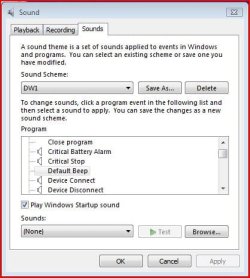
You could always create your own Sound Scheme.
You can turn off the Default Beep and save it as a new scheme.
Load your new scheme when needed or the Windows Default Scheme.
Capture.JPG
 

My Computer My Computer

At a glance

Windows 7 Home Premium 64 bitIntel Core i7-4790G.SKILL 8GB (2 x 4GB) DDR3 F3-10666CL9D-8GBNTAMD Radeon R7 250
Computer type
PC/Desktop
Computer Manufacturer/Model Number
Custom Build
OS
Windows 7 Home Premium 64 bit
CPU
Intel Core i7-4790
Motherboard
GA-Z87X-D3H
Memory
G.SKILL 8GB (2 x 4GB) DDR3 F3-10666CL9D-8GBNT
Graphics Card(s)
AMD Radeon R7 250
Sound Card
Realtek ALC892
Monitor(s) Displays
Samsung UN32EH5000, Dell 1703FPT
Screen Resolution
1920 x 1080, 1280 x 1024
Hard Drives
WD5003AZEX
WD10EZEX
Samsung HD103SJ
Samsung 128 GB 840 PRO
PSU
SeaSonic M12II SS-500GM
Case
Fractal Design Define R4
Cooling
Zalman CNPS9900ALED
Keyboard
Logitech K800
Mouse
Logitech M705
Internet Speed
16 Mbps
Antivirus
Avast
Browser
Firefox
Other Info
Bose Companion 2 Multimedia Speakers
You could always create your own Sound Scheme.
You can turn off the Default Beep and save it as a new scheme.
Load your new scheme when needed or the Windows Default Scheme.
View attachment 134998

I did think of turning the beep off but other system sounds would still come back on surely.
 

My Computer My Computer

At a glance

Windows 7 Professional 32-bit2GB
Computer Manufacturer/Model Number
Compaq Presario CQ61-223SA
OS
Windows 7 Professional 32-bit
Memory
2GB
Back
Top