System Update Readiness Tool for Windows 7

kpo6969

New member
Power User
VIP
Local time
8:56 AM
Messages
363
Location
Pennsylvania
System Update Readiness Tool for Windows 7 (KB947821) [January 2010]

This tool is being offered because an inconsistency was found in the Windows servicing store which may prevent the successful installation of future updates, service packs, and software.


Download details: System Update Readiness Tool for Windows 7 (KB947821) [January 2010]

Download details: System Update Readiness Tool for Windows 7 for x64-based Systems (KB947821) [January 2010]


http://news.softpedia.com/news/Windows-7-SP1-System-Update-Readiness-Tool-Available-133213.shtml
 
Last edited:

My Computer

Computer type
PC/Desktop
Computer Manufacturer/Model Number
Black Shadow IV
OS
Win7 x64
CPU
i5-3570K
Motherboard
Asrock Z77 Extreme4
Memory
2x4GB Rip Jaws 8-9-9-24
Graphics Card(s)
Asus R9 280X
Sound Card
X-Fi Extreme Music
Monitor(s) Displays
Dell U2412M
Screen Resolution
1920x1200
Hard Drives
Samsung Evo 250GB /
OCZ Vertex 4 128GB
PSU
Seasonic 660XP2
Case
Fractal Design R4
Cooling
Noctua NH-U12S

My Computer

Computer Manufacturer/Model Number
Dell Dimension c521
OS
Windows 7 Home Premium 64bit
CPU
AMD Athnlon 64 X2 Dual Core 6400+ 3.21GHz
Motherboard
Dell 0HY175
Memory
2 x 1024 DDR-2 Sdram. Crucial Part# CT12864AA667.M8FA.
Graphics Card(s)
NVIDIA GeForce 6150 LE (OnBoard)
Sound Card
N/A
Monitor(s) Displays
Dell E207wfp
Screen Resolution
1680 x 1050 60hz
Hard Drives
Hitachi Deskstar Model HDS728080PLA380
PSU
Dell L280P-01. 280 Watts
Case
Dell desktop/tower.
Cooling
Cpu: Dell Heatsink with 120MM fan. Chipset: ZALMAN ZM-NBF47
Keyboard
Microsoft Natural Ergonomic 4000 v. 1.0
Mouse
Microsoft Wireless mouse 5000
Internet Speed
Cable modem. Motorola sb5101 1megabyte/s
Other Info
I was going to build my own system, naturally, but dell gave me free monitor and a large discount for being a college student :-)
thanks for this man
 

My Computer

OS
Windows 7 Ultimate edition x64
CPU
AMD Athlon 64 x2 Dual Core 4600+ 2.39GHz
Memory
4GB
Graphics Card(s)
Nvidia Gforce 9600 GT 512
Sound Card
Realtek HD
Monitor(s) Displays
LG 19`
Screen Resolution
1280X1024
Hard Drives
two HDs 300GB
Internet Speed
1Mb
Thanks KPO I got it.Jerry
 

My Computer

Computer type
PC/Desktop
Computer Manufacturer/Model Number
HP comp.IQ524
OS
64 bit windows 7 home premium
CPU
Intel(R)core(TM)2Duo cpu t6400 @2.ooGHz 2.00GHz
Motherboard
pegatron corporation maureen(cpu1)
Memory
4GB dual-channel ddr2@398MHZ(6-6-6-18)
Graphics Card(s)
generic PNP Montor(1680x1050@60HZ
Sound Card
(SoundMax Integrated Digited HD Audio)
Monitor(s) Displays
hp touchsmart 22"
Screen Resolution
1600/900
Hard Drives
500GB internal/650GB external
Cooling
Fan Speed 2423 RPM Average Temp. 55%
Keyboard
HP WIRELESS
Mouse
microsoft natural wireless laser mouse 6000
Antivirus
Free AVIRA
Browser
Mazola Fire Fox
Other Info
Pen and Touch: Single Touch Input Available
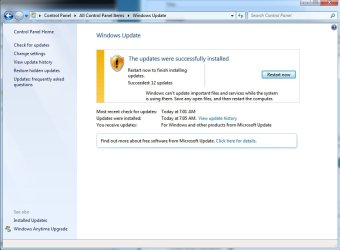
Wow. This actually fixed a problem I've been having with Windows Update since the beginning. I've searched all over the internet, without even thinking to look here. Thanks. And FINALLY! I haven't seen this message in a long time.
 

Attachments

  • HUZZAH.jpg
    HUZZAH.jpg
    51.2 KB · Views: 473

My Computer

Computer Manufacturer/Model Number
Dell Inspiron 546
OS
Windows 7 Home Premium 64-Bit
CPU
AMD Athlon II X@ 215 Processor 2.70 Ghz
Memory
4.00 GB
Graphics Card(s)
ATI Radeon HD 3200 Graphics
Screen Resolution
1600x900
Cannot install updates

I downloaded the system readiness tool and when I tried to run it I got the following error:
installer encountered an error: 0X800B0001
unknown trust provider


Please help-thank you
 

My Computer

OS
windows 7
I downloaded the system readiness tool and when I tried to run it I got the following error:
installer encountered an error: 0X800B0001
unknown trust provider


Please help-thank you

I didn't notice before this is error with readiness Tool

1.Run this "MS Fix It" http://go.microsoft.com/?linkid=9665683 in aggressive mode

2.See also this tutorial http://www.sevenforums.com/tutorials/111245-troubleshooting-system-update-readiness-tool.html?filter[2]=Performance%20Maintenance
 

My Computer

Computer Manufacturer/Model Number
Custom made
OS
Windows 7 Professional x64 PL
CPU
AMD Athlon 4450e
Motherboard
Giga-Byte GA-MA69G-S3H
Memory
GoodRam DDR2 2x2048MB (FSB 800MHz)
Graphics Card(s)
nVidia GeForce 9600GT (G94-300) 1024 MB
Monitor(s) Displays
SAMSUNG SyncMaster HS2P301688
Hard Drives
Seagate ST3750330AS 750GB
PSU
Corsair 550W
Cooling
AeroCool ExtremeEngine 3T
There are a lot of people, who seem to have similar problems with Windows Update. For all errors that can't be resolved automatically by the System Update Readiness Tool, there is a pretty good guideline on Microsoft TechNet, describing all necessery steps in detail:

Advanced guidelines for diagnosing and fixing servicing corruption

Don't worry about the fact, that it is posted under Windows Server; as you can see in the article, it is vor Windows Vista and 7 as well.
 

My Computer

OS
Windows 7 Professional x64

My Computer

Computer Manufacturer/Model Number
Custom made
OS
Windows 7 Professional x64 PL
CPU
AMD Athlon 4450e
Motherboard
Giga-Byte GA-MA69G-S3H
Memory
GoodRam DDR2 2x2048MB (FSB 800MHz)
Graphics Card(s)
nVidia GeForce 9600GT (G94-300) 1024 MB
Monitor(s) Displays
SAMSUNG SyncMaster HS2P301688
Hard Drives
Seagate ST3750330AS 750GB
PSU
Corsair 550W
Cooling
AeroCool ExtremeEngine 3T

My Computer

Computer Manufacturer/Model Number
System
OS
Operating System
CPU
Intel Core 2 Quad Q6600 @ 2.4GHz / Core i7 Q740 @ 1.73GHz
Motherboard
A
Memory
A
Graphics Card(s)
A
Sound Card
A
Monitor(s) Displays
S
Screen Resolution
s
Hard Drives
A
PSU
A
Case
A
Cooling
A
Keyboard
A
Mouse
A
Internet Speed
A
Other Info
A
Back
Top