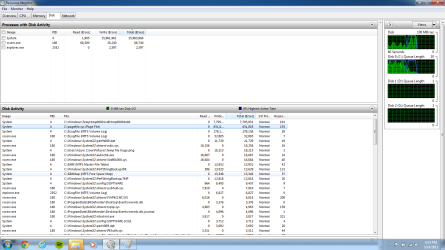
Solved System using 17mil b/sec normal or something in computer dead

sicex

New member
Local time
4:54 AM
Messages
14
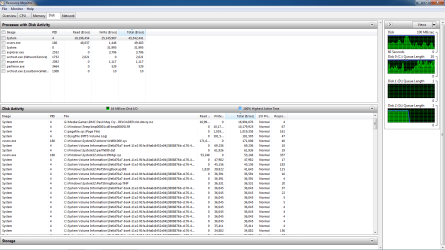
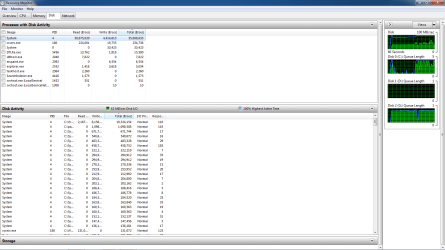
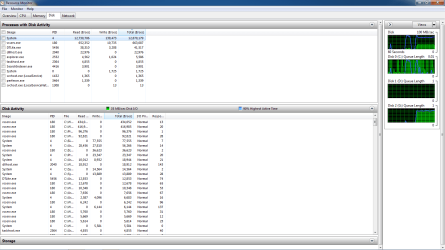
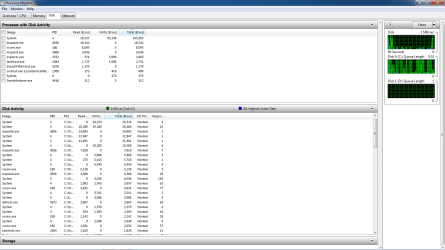
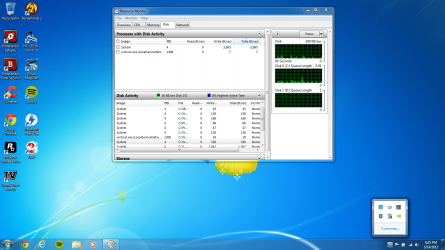
Is this normal? I am guessing it is not. Is something dying/dead in my laptop? This is fresh install. 1.5 tb dual hdd. The most concerning part is this keeps occurring re-install after re-install. System is using 100% disk usage at 17million bytes per second total and up to but not limited to 23 million when installing large programs (games) which when looking through resource monitor the system is using all of the disk and the installation is next to none and is labeled suspend
 

Attachments
  • System usage.png
    System usage.png
    1.1 MB · Views: 15
  • Temp file huge.png
    Temp file huge.png
    124.5 KB · Views: 13
  • System Spike.png
    System Spike.png
    959.9 KB · Views: 13
  • Even more.png
    Even more.png
    102.7 KB · Views: 8
  • huge spike.png
    huge spike.png
    96.2 KB · Views: 6
  • Back down.png
    Back down.png
    91.6 KB · Views: 6
  • lowering 22mil.png
    lowering 22mil.png
    138.5 KB · Views: 7
  • Ram usage.png
    Ram usage.png
    110.9 KB · Views: 5
Last edited:

My Computer

OS
windows 7 premium 64bit
Looks like bitdefender is running scans. let them complete and then change the settings.
 

My Computer

Computer type
PC/Desktop
Computer Manufacturer/Model Number
Self Build
OS
Windows 7 Ultimate x64
CPU
Intel Core2 Quad Q8300 2.5Ghz
Motherboard
Asus P5QD Turbo
Memory
Kingston HyperX 4x1GB DDR2 1066Mhz
Graphics Card(s)
Asus/Nvidia 9500GT 1GB
Sound Card
On-Board HD
Monitor(s) Displays
22" Widescreen TFT
Screen Resolution
1920x1080
Hard Drives
2x 320Gb Seagate SATAII RAID 0
2x 80Gb Seagate SATAII RAID 0
1x 1tb hybrid (8gb ssd)
PSU
650w
Case
ATX
Cooling
140mm front, 120mm Rear, 80mm Chipset + stock CPU and GPU
Keyboard
Plastic one
Mouse
Plastic one
Internet Speed
4Mbps
Other Info
Laptop: HP Elitebook 2560p
i5 @2.7Ghz 4GB DDR3
Its not that and it should not be causing the laptop to lag. Its almost as if there is no cap on how much system is using the disk. Today running 2 game installations simultaneously showed system using over 1billion bytes per second. I moved the pagefile to my second HDD and that has somewhat helped the lag spikes. Games run phenomenal its just everyday usage that seems to cause this. Like running installations or anything with large files causes the system to lag horribly
 

My Computer

OS
windows 7 premium 64bit
Have you got your motherboard chipset drivers installed, including any SATA/RAID drivers available?
 

My Computer

Computer type
PC/Desktop
Computer Manufacturer/Model Number
Self Build
OS
Windows 7 Ultimate x64
CPU
Intel Core2 Quad Q8300 2.5Ghz
Motherboard
Asus P5QD Turbo
Memory
Kingston HyperX 4x1GB DDR2 1066Mhz
Graphics Card(s)
Asus/Nvidia 9500GT 1GB
Sound Card
On-Board HD
Monitor(s) Displays
22" Widescreen TFT
Screen Resolution
1920x1080
Hard Drives
2x 320Gb Seagate SATAII RAID 0
2x 80Gb Seagate SATAII RAID 0
1x 1tb hybrid (8gb ssd)
PSU
650w
Case
ATX
Cooling
140mm front, 120mm Rear, 80mm Chipset + stock CPU and GPU
Keyboard
Plastic one
Mouse
Plastic one
Internet Speed
4Mbps
Other Info
Laptop: HP Elitebook 2560p
i5 @2.7Ghz 4GB DDR3
try to go into indexing options (Start and then write "indexing options" in the search box) and ask it to pause the indexing (if it is indexing anyway). If it was that, the disk usage should then go back to normal for a while (30 mins or so).

If it's just that, then leave it overnight, eventually it will stop (once it has indexed everything it was supposed to). Otherwise disable it if you don't want it.
 

My Computer

Computer type
PC/Desktop
Computer Manufacturer/Model Number
custom built
OS
Win 7 Pro 64-bit 7601
CPU
AMD Phenom 9650 QuadCore, revision DR-B3
Motherboard
ASUS M4A78
Memory
5 GB yes I run 2x 2GB and 1x 1GB, different brand, spank me.
Graphics Card(s)
NVIDIA GeForce 9800 GT 512 Mb, unknown manufacturer.
Sound Card
Crappy Realtek Integrated Audio
Monitor(s) Displays
Fujitsu Siemens P19-3P
Screen Resolution
1280 x 1024 x 32 bits @ 60 Hz Oh yeah, 4:3 rocks!
Hard Drives
(1) MAXTOR S TM3320613AS SATA Disk Device (2) STM35004 18AS SATA Disk Device (3) TOSHIBA USB 2.5"-HDD
PSU
whatever, around 450w
Case
Scavenged from old company PC, 10+ years old
Cooling
CPU fan, GPU fan, case fan, nothing fancy
Keyboard
Microsoft, PS/2, white.
Mouse
Optical, logitec.
Internet Speed
effective max speeds: 70-ish kB/s down 30-ish kB/s up
Antivirus
Avira, free edition.
Browser
Firefox with FXChrome to make it look like Google Chrome :P
Other Info
Was discarded by previous owner due to "horrible performance".
Was running Win Xp from a IDE drive. Yeah. Was a pain.
SATA II drive and Win7 and it zips away! Yay!
Actually whats the main issue seemed to be was Bitdefender. It was not only scanning files in the background but copying them constantly! Seems to be an ongoing issue with different people. I simple went back to avast and made a 20gb pagefile partition on my second 1tb hdd. Everything seems to be running better than ever
 

My Computer

OS
windows 7 premium 64bit
Glad you got the issue resolved.
 

My Computer

Computer type
PC/Desktop
Computer Manufacturer/Model Number
Self Build
OS
Windows 7 Ultimate x64
CPU
Intel Core2 Quad Q8300 2.5Ghz
Motherboard
Asus P5QD Turbo
Memory
Kingston HyperX 4x1GB DDR2 1066Mhz
Graphics Card(s)
Asus/Nvidia 9500GT 1GB
Sound Card
On-Board HD
Monitor(s) Displays
22" Widescreen TFT
Screen Resolution
1920x1080
Hard Drives
2x 320Gb Seagate SATAII RAID 0
2x 80Gb Seagate SATAII RAID 0
1x 1tb hybrid (8gb ssd)
PSU
650w
Case
ATX
Cooling
140mm front, 120mm Rear, 80mm Chipset + stock CPU and GPU
Keyboard
Plastic one
Mouse
Plastic one
Internet Speed
4Mbps
Other Info
Laptop: HP Elitebook 2560p
i5 @2.7Ghz 4GB DDR3
Back
Top