
System Volume Information on an external hard drive

Senator

New member
Local time
1:27 PM
Messages
29
I have an external hard drive where I keep things like drive images, backup files (CrashPlan), offline data, etc.

I'm beginning to get concerned about available space. I ran a report using an application called TreeSize and noticed that I have a considerable amount of space being consumed by System Volume Information, which I understand are Restore Points.
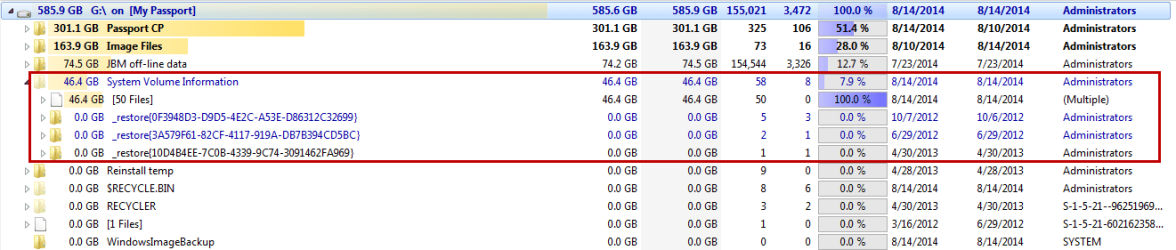
2014-08-14_11-04-37.png

But I also have the same folder on my Drive C, so do I really need the information contained on the external HDD? I know I will not be able to delete the folder. If I do, Windows will automatically replace it. But do I need to keep this restore point information on the external HDD?

Cheers
 

My Computer My Computer

At a glance

Windows 7 Professional 64bitCore2 Duo4GB
Computer type
PC/Desktop
Computer Manufacturer/Model Number
HP
OS
Windows 7 Professional 64bit
CPU
Core2 Duo
Memory
4GB
Hard Drives
1TB WD
There will be a "System Volume Information" folder on each drive for which system protection is enabled. It will contain data relevant only to that drive.
 

My Computer My Computer

At a glance

Windows 7 Pro 64 bitXeon W35208 GBNvidia Geforce 210
Computer type
PC/Desktop
Computer Manufacturer/Model Number
HP
OS
Windows 7 Pro 64 bit
CPU
Xeon W3520
Memory
8 GB
Graphics Card(s)
Nvidia Geforce 210
OK then. Sounds like I should just leave it be.
 

My Computer My Computer

At a glance

Windows 7 Professional 64bitCore2 Duo4GB
Computer type
PC/Desktop
Computer Manufacturer/Model Number
HP
OS
Windows 7 Professional 64bit
CPU
Core2 Duo
Memory
4GB
Hard Drives
1TB WD
I have an external hard drive where I keep things like drive images, backup files (CrashPlan), offline data, etc
Since that drive is just for offline and backup data (no system settings or files. No active databases, etc.) I don't see a reason to have System Protection enabled for that drive. I'd turn it off for that drive only and recover that 46GB for your own use
 

My Computer My Computer

At a glance

Desk 1: Win 7 Pro x32; Desk 2: Windows 10 x64
Computer type
PC/Desktop
Computer Manufacturer/Model Number
Dell Optiplex 360 and Optiplex 755
OS
Desk 1: Win 7 Pro x32; Desk 2: Windows 10 x64
Hard Drives
500GB Crucial SSD in both Desktops
Other Info
Buffalo 6TB NAS, Raid 1
Well, there seems to be a difference of opinion. I have searched other forums and can't seem to find a clear answer.

Do I need to enable System Protection for an external HDD? If so, why? If not, why not?
 

My Computer My Computer

At a glance

Windows 7 Professional 64bitCore2 Duo4GB
Computer type
PC/Desktop
Computer Manufacturer/Model Number
HP
OS
Windows 7 Professional 64bit
CPU
Core2 Duo
Memory
4GB
Hard Drives
1TB WD
Do I need to enable System Protection for an external HDD?
I do not rely on restore points and have system protection turned off. I certainly rely on backups of various types especially system images to external HDDs and turning off system protection hasn't caused me problems.
 

My Computer My Computer

At a glance

Windows 7x64 Home Premium SP1Intel i7 2600kG.Skill Ripjaws (DDR3-1600) 2x4GBNvidia GeForce GTS 450; Intel HD Graphics 300...
Computer type
PC/Desktop
Computer Manufacturer/Model Number
Own build
OS
Windows 7x64 Home Premium SP1
CPU
Intel i7 2600k
Motherboard
ASUS P8Z68 Deluxe
Memory
G.Skill Ripjaws (DDR3-1600) 2x4GB
Graphics Card(s)
Nvidia GeForce GTS 450; Intel HD Graphics 3000(GT2+)
Monitor(s) Displays
Dell Ultrasharp IPS panel U2311H, Samsung SyncMaster P2350
Screen Resolution
1920x1080
Hard Drives
Samsung 850 Pro SSD 256GB, Samsung SSD 840 120GB, Seagates 1TB Barracuda ST31000528AS x2
PSU
Seasonic M12II 520W
Case
Lian Li Lancool PC-K60
Cooling
Case: 1x120mm, 3x140mm CPU: Hyper 212+
Keyboard
Logitech MK520 (wireless)
Mouse
Logitech MK520
Internet Speed
6-7 Mbps
Antivirus
Norton Security Premium, Malwarebytes on 2 (MSE on 3rd PC)
Browser
FireFox
Other Info
Audio: Logitech Z523 2.1
MS wrote the following Understanding System Restore about XP but it's still true

What's changed since XP?
MS saves even more info in system restore about regsitry settings, system state, system, driver and program files, etc. To help System Restore to a prior machine state

What's not changed?
MS doesn't do anything that affects your personal data. Nor does it save any of your personal data in restore points. So if your external drive is all personal data and offline backups (no program data, driver files, Windows files and settings, etc.) IMHO System Restore has no value if enabled for that drive
 

My Computer My Computer

At a glance

Desk 1: Win 7 Pro x32; Desk 2: Windows 10 x64
Computer type
PC/Desktop
Computer Manufacturer/Model Number
Dell Optiplex 360 and Optiplex 755
OS
Desk 1: Win 7 Pro x32; Desk 2: Windows 10 x64
Hard Drives
500GB Crucial SSD in both Desktops
Other Info
Buffalo 6TB NAS, Raid 1
System restore does not effect user files. You wouldn't like it if it did.

Imagine what it would be like if that were the case:

You have a number of important files you have been working on when your computer develops a minor but annoying problem. You decide to do a system restore to a week ago. Problem solved. But then you find that all of your personal files you have been working on have reverted back to the state they were in a week ago. A weeks work lost.

Remember that System Restore restores the system files and portions of the registry to what they were at the time the restore point was created. Good for system files, but very bad for personal files.
 

My Computer My Computer

At a glance

Windows 7 Pro 64 bitXeon W35208 GBNvidia Geforce 210
Computer type
PC/Desktop
Computer Manufacturer/Model Number
HP
OS
Windows 7 Pro 64 bit
CPU
Xeon W3520
Memory
8 GB
Graphics Card(s)
Nvidia Geforce 210
I do not rely on restore points and have system protection turned off.

That's a very interesting perspective, especially from a seasoned veteran such as yourself. Personally, restore points have helped me recover from several incidents, such as a new application install gone bad or from changing a system setting that I shouldn't have. So I'm in favor of Restore Points and in fact use the Task Scheduler to create a daily Restore Point for just that reason.

However, I don't understand the significance of System Volume Information, System Protection or Restore Points when it comes to an external HDD.
 

My Computer My Computer

At a glance

Windows 7 Professional 64bitCore2 Duo4GB
Computer type
PC/Desktop
Computer Manufacturer/Model Number
HP
OS
Windows 7 Professional 64bit
CPU
Core2 Duo
Memory
4GB
Hard Drives
1TB WD
There is one aspect of System Protection that has not been mentioned and that is the storage of previous versions of files (Shadow Copies), including data files. If System protection is enabled, copies of previous versions files are maintained along with the restore points and can be retrieved by selecting file properties/previous version.
 

My Computer My Computer

At a glance

Windows 10 Pro x64, Windows 8.1 Pro x64, Wind...INTEL i9-7920X LGA 206664 GB (4 X 16 GB) G-Skill V Series DDR4 3200 ...EVGA GTX 1060 SC 3 GB
Computer type
PC/Desktop
Computer Manufacturer/Model Number
Custom Built
OS
Windows 10 Pro x64, Windows 8.1 Pro x64, Windows 7 Ultimate x64 SP1,
CPU
INTEL i9-7920X LGA 2066
Motherboard
Gigabyte X299-WU8 F3
Memory
64 GB (4 X 16 GB) G-Skill V Series DDR4 3200 Quad Channel
Graphics Card(s)
EVGA GTX 1060 SC 3 GB
Sound Card
Realtek Onboard ALC1220
Monitor(s) Displays
2 x Samsung S27E310
Screen Resolution
1920x1080
Hard Drives
Samsung 2 x 970 EVO Plus 500 GB NVMe
1 x 6TB WD 6003FZBX SATA
1 x 6TB WD 60EFRX SATA
12 x 3TB WD 30EFRX SATA
PSU
Seasonic X-1050
Case
Thermaltake Armor+
Cooling
Corsair H80i V2 Liquid AOI Cooler
Keyboard
Logitech G510s
Mouse
Logitech MX Master 2S
Internet Speed
200 Mb/s
Antivirus
ESET NOD32 13.1
Browser
EDGE (Dev, Canary, Beta), Chrome
Other Info
ASUS RT-AC68U router
Malwarebytes 4.0.4
There is one aspect of System Protection that has not been mentioned and that is the storage of previous versions of files (Shadow Copies), including data files. If System protection is enabled, copies of previous versions files are maintained along with the restore points and can be retrieved by selecting file properties/previous version.
That's a very good point I overlooked as i don't use System Protection for that purpose.

I keep System Protection turned off on external drives as I prefer doing my own Disk and file/folder backups where needed. I'd rather use the extra space Sys Volume info takes up on my data or backup drives as my own backup space.
 

My Computer My Computer

At a glance

Desk 1: Win 7 Pro x32; Desk 2: Windows 10 x64
Computer type
PC/Desktop
Computer Manufacturer/Model Number
Dell Optiplex 360 and Optiplex 755
OS
Desk 1: Win 7 Pro x32; Desk 2: Windows 10 x64
Hard Drives
500GB Crucial SSD in both Desktops
Other Info
Buffalo 6TB NAS, Raid 1
That's a very interesting perspective, especially from a seasoned veteran such as yourself. Personally, restore points have helped me recover from several incidents, such as a new application install gone bad or from changing a system setting that I shouldn't have. So I'm in favor of Restore Points and in fact use the Task Scheduler to create a daily Restore Point for just that reason.
Hello Senator,
It really is a personal choice on how reliant you want to be on restore points. Some (many?) feel restore points are useful like yourself and that's why I guess they were designed into the OS.
Restore points may not always give you a clean recovery as I have found out so I lost confidence in them. Regular system images will always get you out of trouble except perhaps for a motherboard failure.
There used to be some claimed advantage in not using restore points with SSDs (space saving and limiting number of writes) but this may be debatable now.

So: You don't need to use restore points if you don't want to and I firmly believe system images are a more robust recovery mechanism.
 

My Computer My Computer

At a glance

Windows 7x64 Home Premium SP1Intel i7 2600kG.Skill Ripjaws (DDR3-1600) 2x4GBNvidia GeForce GTS 450; Intel HD Graphics 300...
Computer type
PC/Desktop
Computer Manufacturer/Model Number
Own build
OS
Windows 7x64 Home Premium SP1
CPU
Intel i7 2600k
Motherboard
ASUS P8Z68 Deluxe
Memory
G.Skill Ripjaws (DDR3-1600) 2x4GB
Graphics Card(s)
Nvidia GeForce GTS 450; Intel HD Graphics 3000(GT2+)
Monitor(s) Displays
Dell Ultrasharp IPS panel U2311H, Samsung SyncMaster P2350
Screen Resolution
1920x1080
Hard Drives
Samsung 850 Pro SSD 256GB, Samsung SSD 840 120GB, Seagates 1TB Barracuda ST31000528AS x2
PSU
Seasonic M12II 520W
Case
Lian Li Lancool PC-K60
Cooling
Case: 1x120mm, 3x140mm CPU: Hyper 212+
Keyboard
Logitech MK520 (wireless)
Mouse
Logitech MK520
Internet Speed
6-7 Mbps
Antivirus
Norton Security Premium, Malwarebytes on 2 (MSE on 3rd PC)
Browser
FireFox
Other Info
Audio: Logitech Z523 2.1
The System Protection provided by the system really isn't much of a backup. The file copies remain on the same drive so if it fails you will lose everything. User configured backups to an external drive provide many more options with greater security.

But System protection has one big advantage - it works right out of the box with no extra hardware and no configuration required. And for many people it is the only backup they will ever have.
 

My Computer My Computer

At a glance

Windows 7 Pro 64 bitXeon W35208 GBNvidia Geforce 210
Computer type
PC/Desktop
Computer Manufacturer/Model Number
HP
OS
Windows 7 Pro 64 bit
CPU
Xeon W3520
Memory
8 GB
Graphics Card(s)
Nvidia Geforce 210
Why not use both.
Restore points and a backup. They were never designed to replace each other.
 

My Computer My Computer

At a glance

Windows 10 Pro. 64/ version 1709 Windows 7 Pr...Intel i7-6800K @ 4.3Corsair Platinum 16 gig @2400EVGA GTX 1070 OC
Computer type
PC/Desktop
Computer Manufacturer/Model Number
Home made Desktop
OS
Windows 10 Pro. 64/ version 1709 Windows 7 Pro/64
CPU
Intel i7-6800K @ 4.3
Motherboard
ASUS X-99 Deluxe II
Memory
Corsair Platinum 16 gig @2400
Graphics Card(s)
EVGA GTX 1070 OC
Monitor(s) Displays
Asus 27" LED LCD/VE278Q
Screen Resolution
1920-1080 or 1280-720 HDMI
Hard Drives
INTEL SSD 730-240 Gb Sata 3.0/
PSU
EVGA Platium 1200W
Case
Phanteks Luxe Tempered Glass 8 fans/ one radiator
Cooling
XSPC/ Water Cooled CPU
Keyboard
Das 4 Professional
Mouse
Logitech M705/MX Anywhere 2-S
Internet Speed
100 mbits
Antivirus
Microsoft Security Essentials/ Malwarebytes Premium 3.0/ SAS
Browser
I.E. 11 default/Firefox/ ISP Time Warner Cable/Spectrum
Other Info
LG BluRay Burner/
Sound system-KLipsch-THX/
Icy Dock ssd Hot Swap bays.
Back
Top