Solved System Volume Information taking up 73% of my HD

massivetimesink

New member
Local time
10:22 PM
Messages
2
Is this normal?
How can I free up some space?
Thank you!
 

Attachments

  • 0.JPG
    0.JPG
    96.3 KB · Views: 3
  • 1.JPG
    1.JPG
    335 KB · Views: 5
  • 2.JPG
    2.JPG
    274.4 KB · Views: 2
  • 3.JPG
    3.JPG
    315.6 KB · Views: 2

My Computer My Computer

At a glance

Windows 7 Home Premium 64 bitX6 1035T8GBAMD Video 5770 1G dedicated
Computer type
PC/Desktop
Computer Manufacturer/Model Number
Dell
OS
Windows 7 Home Premium 64 bit
CPU
X6 1035T
Motherboard
Stock for XPS 7100
Memory
8GB
Graphics Card(s)
AMD Video 5770 1G dedicated
Hard Drives
640GB
Antivirus
Avira free
Browser
Chrome
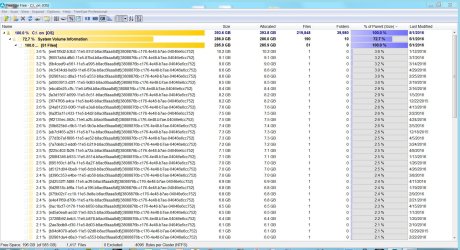
First, System Volume Information is taking up 73% of what is being used, not of your entire HD. You still have over a third of your disk space available (196GB free out 585GB). So with nearly 200GB of free disk space, you are not in any danger of running out of free disk space soon.

But still, your System Volume Information is consuming an abnormal amount of space. I recommend you first try to delete all but the most recent Restore Point, as noted here and see if that helps.

Keep us posted.
 

My Computer My Computer

At a glance

Windows 7 Profession 64-bitIntel Core i7-860 QuadMushkin 4x2Gb PC12800Gigabyte GTX260 896Mb
Computer Manufacturer/Model Number
BrightWorks Systems B4
OS
Windows 7 Profession 64-bit
CPU
Intel Core i7-860 Quad
Motherboard
Gigabyte P55-UD4P
Memory
Mushkin 4x2Gb PC12800
Graphics Card(s)
Gigabyte GTX260 896Mb
Sound Card
Integrated 7.1 HD Dolby
Monitor(s) Displays
2 Samsung 2220wm-HAS 22"
Screen Resolution
1680 x 1050 | 1680 x 1050
Hard Drives
WD HE 1Tb
PSU
Corsair TX-750W
Case
Ultra M998
Cooling
OEM
Keyboard
MS Wireless Comfort 5000
Mouse
MS Wireless 5000
Internet Speed
Cable and pretty darn fast
Run this command in elevated command prompt

vssadmin Delete Shadows /For=C:
 

My Computer My Computer

At a glance

Vista, Windows7, Mint Mate, Zorin, Windows 8from 1.6GHz Duo to i7
Computer Manufacturer/Model Number
HP, Dell, Gateway, Toshiba - 4 laptops and 2 desktops
OS
Vista, Windows7, Mint Mate, Zorin, Windows 8
CPU
from 1.6GHz Duo to i7
Monitor(s) Displays
2x HP w2207
Hard Drives
5x HDD, 7x SSD, 12x Externals
Keyboard
with trackball - no mices
Mouse
Trackball mice
Internet Speed
DSL 6000
FTR, running Disk Cleanup in the manner I linked to above also purges the Shadow copies.
 

My Computer My Computer

At a glance

Windows 7 Profession 64-bitIntel Core i7-860 QuadMushkin 4x2Gb PC12800Gigabyte GTX260 896Mb
Computer Manufacturer/Model Number
BrightWorks Systems B4
OS
Windows 7 Profession 64-bit
CPU
Intel Core i7-860 Quad
Motherboard
Gigabyte P55-UD4P
Memory
Mushkin 4x2Gb PC12800
Graphics Card(s)
Gigabyte GTX260 896Mb
Sound Card
Integrated 7.1 HD Dolby
Monitor(s) Displays
2 Samsung 2220wm-HAS 22"
Screen Resolution
1680 x 1050 | 1680 x 1050
Hard Drives
WD HE 1Tb
PSU
Corsair TX-750W
Case
Ultra M998
Cooling
OEM
Keyboard
MS Wireless Comfort 5000
Mouse
MS Wireless 5000
Internet Speed
Cable and pretty darn fast
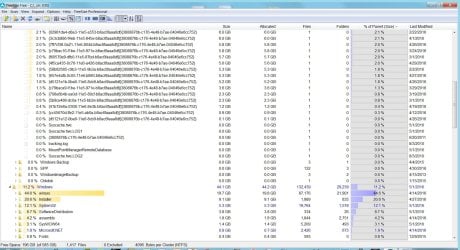
Brilliant Itaregid! In keeping with whs's mantra of KISS (Keep It Simple Stupid) I simply cut my C: back-up allotment from 50% to 5%. (282GB to 30GB) According to TreeSize my largest restore file was 10GB and average was 6GB, so I will still have a minimum of 3 available restore points and probably more like 5. I've never had to go back more than one so I'm good with this. I previously had 51 restore files! Thank you very much. I am much relieved that this was such a simple fix.
 

My Computer My Computer

At a glance

Windows 7 Home Premium 64 bitX6 1035T8GBAMD Video 5770 1G dedicated
Computer type
PC/Desktop
Computer Manufacturer/Model Number
Dell
OS
Windows 7 Home Premium 64 bit
CPU
X6 1035T
Motherboard
Stock for XPS 7100
Memory
8GB
Graphics Card(s)
AMD Video 5770 1G dedicated
Hard Drives
640GB
Antivirus
Avira free
Browser
Chrome
Keep a watch on your (%) and see if it changes.

Their might be a program that you have that might change your (%).
Avast use to do such a thing.

I think the default is 10% which means to me either someone or a program changed the settings to 50%.
 

My Computer My Computer

At a glance

Windows 10 Pro. 64/ version 1709 Windows 7 Pr...Intel i7-6800K @ 4.3Corsair Platinum 16 gig @2400EVGA GTX 1070 OC
Computer type
PC/Desktop
Computer Manufacturer/Model Number
Home made Desktop
OS
Windows 10 Pro. 64/ version 1709 Windows 7 Pro/64
CPU
Intel i7-6800K @ 4.3
Motherboard
ASUS X-99 Deluxe II
Memory
Corsair Platinum 16 gig @2400
Graphics Card(s)
EVGA GTX 1070 OC
Monitor(s) Displays
Asus 27" LED LCD/VE278Q
Screen Resolution
1920-1080 or 1280-720 HDMI
Hard Drives
INTEL SSD 730-240 Gb Sata 3.0/
PSU
EVGA Platium 1200W
Case
Phanteks Luxe Tempered Glass 8 fans/ one radiator
Cooling
XSPC/ Water Cooled CPU
Keyboard
Das 4 Professional
Mouse
Logitech M705/MX Anywhere 2-S
Internet Speed
100 mbits
Antivirus
Microsoft Security Essentials/ Malwarebytes Premium 3.0/ SAS
Browser
I.E. 11 default/Firefox/ ISP Time Warner Cable/Spectrum
Other Info
LG BluRay Burner/
Sound system-KLipsch-THX/
Icy Dock ssd Hot Swap bays.
I also think the default is 10% but also note System Restore is designed to automatically purge points if free disk space become short - to the point SR will even disable itself.
 

My Computer My Computer

At a glance

Windows 7 Profession 64-bitIntel Core i7-860 QuadMushkin 4x2Gb PC12800Gigabyte GTX260 896Mb
Computer Manufacturer/Model Number
BrightWorks Systems B4
OS
Windows 7 Profession 64-bit
CPU
Intel Core i7-860 Quad
Motherboard
Gigabyte P55-UD4P
Memory
Mushkin 4x2Gb PC12800
Graphics Card(s)
Gigabyte GTX260 896Mb
Sound Card
Integrated 7.1 HD Dolby
Monitor(s) Displays
2 Samsung 2220wm-HAS 22"
Screen Resolution
1680 x 1050 | 1680 x 1050
Hard Drives
WD HE 1Tb
PSU
Corsair TX-750W
Case
Ultra M998
Cooling
OEM
Keyboard
MS Wireless Comfort 5000
Mouse
MS Wireless 5000
Internet Speed
Cable and pretty darn fast
Back
Top