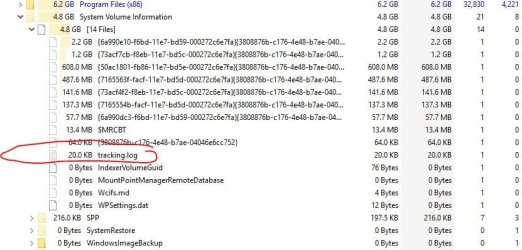
On the machine in question, just a couple weeks ago, I installed two brand-new internal HDDs, both WD, one is a 160-GB that only has the O/S; the other is a 2-TB WD Blue that contains two partitions, approximately 1650-GB partition is Pictures, and the remaining space is All Other Data.
Since installing these HDDs, I have used Synchredible several times to copy the contents of both storage drives to another 2-TB WD HDD; this one is in an external enclosure; I have Synchredible set to duplicate the two drives/partitions onto the external back-up HDD.
I just finished running Synchredible, two separate operations, and got a warning flag on both; "System Volume Information \ Tracking .log could not be copied etc. etc."
I have never seen this before and no such file or whatever it is shows up in Explorer.
I Google-searched, got a gazillion references, and am more confused now than before.
What is this mystery file; why has it all of a sudden showed up in both of my storage drives; and can I hunt it down and delete it ?
Thanks for reading.
On EDIT: I just selected to show hidden files and folders and could not see this mystery file.
I also looked in Disk Management and there was no evidence of anything there either.
Regardless, Synchredible can see whatever it is and refuses to copy it.
Since installing these HDDs, I have used Synchredible several times to copy the contents of both storage drives to another 2-TB WD HDD; this one is in an external enclosure; I have Synchredible set to duplicate the two drives/partitions onto the external back-up HDD.
I just finished running Synchredible, two separate operations, and got a warning flag on both; "System Volume Information \ Tracking .log could not be copied etc. etc."
I have never seen this before and no such file or whatever it is shows up in Explorer.
I Google-searched, got a gazillion references, and am more confused now than before.
What is this mystery file; why has it all of a sudden showed up in both of my storage drives; and can I hunt it down and delete it ?
Thanks for reading.
On EDIT: I just selected to show hidden files and folders and could not see this mystery file.
I also looked in Disk Management and there was no evidence of anything there either.
Regardless, Synchredible can see whatever it is and refuses to copy it.
Last edited:
My Computer
At a glance
Windows 7 Pro x64Intel Core Two Duo E8600 3.33 ghz8GBGigabyte Radeon R7 240
- Computer type
- PC/Desktop
- Computer Manufacturer/Model Number
- Dell Optiplex 780m "mini-tower"
- OS
- Windows 7 Pro x64
- CPU
- Intel Core Two Duo E8600 3.33 ghz
- Motherboard
- Whatever DELL put in it
- Memory
- 8GB
- Graphics Card(s)
- Gigabyte Radeon R7 240
- Monitor(s) Displays
- HP 2159m
- PSU
- 750 Watt Corsair CX750
- Keyboard
- Logitech Wireless
- Mouse
- Logitech Wireless
- Browser
- Chrome, Firefox, IE