System will not run .bat files

Joshrob1410

New member
Local time
5:09 PM
Messages
2
A while ago on my laptop I was messing around with the privilages with cmd. I stupidly deleted and removed it. Don't ask why. So now when I go "Run" and search "cmd" it cannot find it. At the same time this happened I was not able to run .bat files. It comes up with "Windows cannot find (the path). Make sure you typed the name correctly then try again". This happens when I click or search for a .bat file. I'm cluess on the problem of how to fix it and would appreciate some helpful advise. Thank you.
 

My Computer

Computer type
Laptop
Computer Manufacturer/Model Number
Samsung
OS
Windows 7 64 bit
Antivirus
Avast
Browser
Firefox

My Computer

Computer type
Laptop
Computer Manufacturer/Model Number
Employer provided Dell Latitude
OS
W7 Pro SP1 64bit
CPU
i7
Memory
8GB
Graphics Card(s)
Intel HD Graphics
Hard Drives
crappy SSD
Antivirus
Employer mandated Symantec Endpoint Protection
Browser
Pale Moon 64bit, IE11 64bit & Chrome 64bit

My Computer

Computer type
Laptop
Computer Manufacturer/Model Number
ASUS
OS
Microsoft Windows 7 Home Premium 64-bit 7601 Multiprocessor Free Service Pack 1
CPU
AMD C-60 APU with Radeon(tm) HD Graphics
Motherboard
ASUSTeK COMPUTER INC. X501U
Memory
4.00 GB
Graphics Card(s)
AMD Radeon HD 6290 Graphics
Sound Card
(1) AMD High Definition Audio Device (2) Realtek High Defi
Screen Resolution
1366 x 768 x 32 bits (4294967296 colors) @ 60 Hz
Hard Drives
Hitachi HTS545050A7E380 SATA Disk Device
Antivirus
Comodo CIS & FW, SecureAplus App Whitelisting, Threatfire
Browser
Cyberfox 64bit, Opera 64bit, Airfox
Other Info
Spy-The-Spy, HitmanPro.Alert, Norton Connect Safe, MJRegWatcher, BitDefender TrafficLight, Voodoo Shield, Zemana AntiMalware
Someone else had the same problem. See the thread here and also check post #23.

Maybe you have the same issue?

http://www.sevenforums.com/general-discussion/361963-cant-run-bat-files-3.html
Perhaps I'm reading Joshrob1410's original post wrong (quotes below), but I do not think that the cmd.exe file is on his computer. He deleted it. He won't be able to open an elevated command prompt as mentioned in post #23 in the thread that you linked to.

I cannot be positive that the "it" in "removed it" refers to the cmd.exe file or privileges in the preceding sentence. If "it" refers to privileges, then "it" should have been "them". Either the cmd.exe file was removed/deleted from the computer or the privileges were changed in such a way that the user cannot get to the cmd.exe file.
A while ago on my laptop I was messing around with the privilages with cmd. I stupidly deleted and removed it. Don't ask why. So now when I go "Run" and search "cmd" it cannot find it. At the same time this happened I was not able to run .bat files. It comes up with "Windows cannot find (the path). Make sure you typed the name correctly then try again". This happens when I click or search for a .bat file. I'm cluess on the problem of how to fix it and would appreciate some helpful advise. Thank you.

I deleted the cmd.exe file from a virtual machine and then tried to run a BAT file. Windows does indeed throw a misleading error about not being able to find the path to the BAT file. Which is stupid, because Process Monitor shows that Explorer found the BAT file just fine - then passed it to the OS to be opened with the default app. (In this case, the missing cmd.exe file.)

The virtual machine that I was testing in had a restore point. I used that to get the missing cmd.exe file back. There are other ways to put that file back, but a restore point might be the easiest way.
 

My Computer

Computer type
Laptop
Computer Manufacturer/Model Number
Employer provided Dell Latitude
OS
W7 Pro SP1 64bit
CPU
i7
Memory
8GB
Graphics Card(s)
Intel HD Graphics
Hard Drives
crappy SSD
Antivirus
Employer mandated Symantec Endpoint Protection
Browser
Pale Moon 64bit, IE11 64bit & Chrome 64bit
I guess I should have read a little more thoroughly as I seem to have missed the "deleted cmd.exe" part of the original post!

:doh:
 

My Computer

Computer type
Laptop
Computer Manufacturer/Model Number
ASUS
OS
Microsoft Windows 7 Home Premium 64-bit 7601 Multiprocessor Free Service Pack 1
CPU
AMD C-60 APU with Radeon(tm) HD Graphics
Motherboard
ASUSTeK COMPUTER INC. X501U
Memory
4.00 GB
Graphics Card(s)
AMD Radeon HD 6290 Graphics
Sound Card
(1) AMD High Definition Audio Device (2) Realtek High Defi
Screen Resolution
1366 x 768 x 32 bits (4294967296 colors) @ 60 Hz
Hard Drives
Hitachi HTS545050A7E380 SATA Disk Device
Antivirus
Comodo CIS & FW, SecureAplus App Whitelisting, Threatfire
Browser
Cyberfox 64bit, Opera 64bit, Airfox
Other Info
Spy-The-Spy, HitmanPro.Alert, Norton Connect Safe, MJRegWatcher, BitDefender TrafficLight, Voodoo Shield, Zemana AntiMalware
That is nothing. Even after interpreting the original post as saying the cmd.exe was deleted; I started to suggest SFC /SCANNOW

DOH!
 

My Computer

Computer type
Laptop
Computer Manufacturer/Model Number
Employer provided Dell Latitude
OS
W7 Pro SP1 64bit
CPU
i7
Memory
8GB
Graphics Card(s)
Intel HD Graphics
Hard Drives
crappy SSD
Antivirus
Employer mandated Symantec Endpoint Protection
Browser
Pale Moon 64bit, IE11 64bit & Chrome 64bit
I have deleted cmd completely. I removed it from the recycling bin and have looked for ways to get it back but can't seem to do so. I have however sent an email to someone containing an attachment with a .bat file. I saved the file and "run" it. It worked except when I try to run a .bat file from the desktop it still comes up with the error message. I cannot do a system restore as when I try to it always fails.
 

My Computer

Computer type
Laptop
Computer Manufacturer/Model Number
Samsung
OS
Windows 7 64 bit
Antivirus
Avast
Browser
Firefox
You probably did not delete cmd.exe from your hard drive.

You probably only deleted the hard link to CDM.EXE.

The hard link resides in C:\Windows\System32\

cmd-hard-link.png

Let's wait for those smarted than me to help you correctly recreate that hard link - with all of the correct NTFS permissions.
 

My Computer

Computer type
Laptop
Computer Manufacturer/Model Number
Employer provided Dell Latitude
OS
W7 Pro SP1 64bit
CPU
i7
Memory
8GB
Graphics Card(s)
Intel HD Graphics
Hard Drives
crappy SSD
Antivirus
Employer mandated Symantec Endpoint Protection
Browser
Pale Moon 64bit, IE11 64bit & Chrome 64bit
The one in System32 is a hardlink? :)

There is also a 32-bit version under C:\Windows\SysWOW64, maybe you can use it
 

My Computer

Computer type
PC/Desktop
Computer Manufacturer/Model Number
Custom Build
OS
Windows 7 Ultimate x64 SP1
CPU
AMD Phenom 2 1090T
Motherboard
Gigabyte GA-890FXA-UD5
Memory
2x8GB Kingston HyperX Fury Black 1600Mhz Unganged
Graphics Card(s)
MSI GTX 970 Gaming 4G
Sound Card
Realtek On-Board HD 7.1 Audio / Logitech G35
Monitor(s) Displays
3xAcer GD245HQ
Screen Resolution
1920x1080
Hard Drives
Samsung 850 Pro 512GB SSD - OS /
WD Caviar Black SATA 3 - 1 TBx2 - Dynamic RAID 0 /
WD Caviar Green SATA 2 - 640GBx2 - Dynamic RAID 0 /
WD Caviar Green SATA 2 - 640GB - Internal Backup /
Seagate Barracude SATA 3 - 3TB - External Backup/ Sync
PSU
HighPower 1000W
Case
Cooler Master HAF 932
Cooling
Noctua NH-D14
Keyboard
Logitech G19
Mouse
Logitech G500
Internet Speed
100/4 Mbit Cable (100GB quota)
Antivirus
ZoneAlarm Extreme Security / MBAM Pro / MBAE Free / SAS Free
Browser
IE 11 - Firefox - Chrome
Other Info
Logitech F710/ G27/ G940/ Z5500 // TrackIR 5 // Nvidia 3D Surround Vision
The one in System32 is a hardlink? :)...
Yes.

From here:
Don't Trust All Your Eyes Tell You... (hard links in Windows Vista) - if (ms) blog++; - Site Home - TechNet Blogs
When do we use hard links?
Most of the contents of %systemroot%\System32 is actually hard links to files in folders under %systemroot%\winsxs - the "Side-By-Side" component store.

This basically means if you view the properties of the %systemroot% folder, you can pretty much subtract the size of the %systemroot%\System32 folder to get a more accurate total size.

On a side-note, details on the winsxs folder can be found here, along with the reasoning for its size:
What is the WINSXS directory in Windows 2008 and Windows Vista and why is it so large? - Ask the Core Team - Site Home - TechNet Blogs
Typo: "Most of the contents of %systemroot%\System32 are actually hard links..."


There is also a 32-bit version under C:\Windows\SysWOW64, maybe you can use it
It won't run SFC on a 64bit system. Did you have something else in mind?

The long path that I show in the cmd screenshot is the actual 64bit cmd.exe file. It will run SFC on a 64bit system and that will fix the hard link that was deleted. I'm just not sure if SFC is the best way to handle this. Maybe others can chime in.
 

My Computer

Computer type
Laptop
Computer Manufacturer/Model Number
Employer provided Dell Latitude
OS
W7 Pro SP1 64bit
CPU
i7
Memory
8GB
Graphics Card(s)
Intel HD Graphics
Hard Drives
crappy SSD
Antivirus
Employer mandated Symantec Endpoint Protection
Browser
Pale Moon 64bit, IE11 64bit & Chrome 64bit
Ok, why not just copy paste it from the winsxs folder to System32? Or even winsxs is deleted too?

I just copy pasted to desktop and it worked double clicking too (opened as C:\Users\Gokhan\Desktop).

Edit: In case permissions stop you from browsing there, try GiveMePower Download
 

My Computer

Computer type
PC/Desktop
Computer Manufacturer/Model Number
Custom Build
OS
Windows 7 Ultimate x64 SP1
CPU
AMD Phenom 2 1090T
Motherboard
Gigabyte GA-890FXA-UD5
Memory
2x8GB Kingston HyperX Fury Black 1600Mhz Unganged
Graphics Card(s)
MSI GTX 970 Gaming 4G
Sound Card
Realtek On-Board HD 7.1 Audio / Logitech G35
Monitor(s) Displays
3xAcer GD245HQ
Screen Resolution
1920x1080
Hard Drives
Samsung 850 Pro 512GB SSD - OS /
WD Caviar Black SATA 3 - 1 TBx2 - Dynamic RAID 0 /
WD Caviar Green SATA 2 - 640GBx2 - Dynamic RAID 0 /
WD Caviar Green SATA 2 - 640GB - Internal Backup /
Seagate Barracude SATA 3 - 3TB - External Backup/ Sync
PSU
HighPower 1000W
Case
Cooler Master HAF 932
Cooling
Noctua NH-D14
Keyboard
Logitech G19
Mouse
Logitech G500
Internet Speed
100/4 Mbit Cable (100GB quota)
Antivirus
ZoneAlarm Extreme Security / MBAM Pro / MBAE Free / SAS Free
Browser
IE 11 - Firefox - Chrome
Other Info
Logitech F710/ G27/ G940/ Z5500 // TrackIR 5 // Nvidia 3D Surround Vision
Ok, why not just copy paste it from the winsxs folder to System32? Or even winsxs is deleted too?

I just copy pasted to desktop and it worked double clicking too (opened as C:\Users\Gokhan\Desktop).

Edit: In case permissions stop you from browsing there, try GiveMePower Download
If you were able to copy the real cdm.exe file from the protected winsxs area and paste a copy into the System32 folder, then SFC scans would probably indicate an error. I am guessing that a cmd.exe file in the System32 folder is easier to infect. Hard Links seem to be a part of Windows security scheme. See the link inside the quote in my last post.

Our goal should be to return the OP's computer to a state as close to what Microsoft designed as possible. Not just make it functional. For example: turning off the UAC leaves a computer functional :-(
 

My Computer

Computer type
Laptop
Computer Manufacturer/Model Number
Employer provided Dell Latitude
OS
W7 Pro SP1 64bit
CPU
i7
Memory
8GB
Graphics Card(s)
Intel HD Graphics
Hard Drives
crappy SSD
Antivirus
Employer mandated Symantec Endpoint Protection
Browser
Pale Moon 64bit, IE11 64bit & Chrome 64bit
Yes, I understand what you are saying.

Use the cmd in winsxs to create the hardlink and try? I am about to go out for my daily walk, so won't be able to test in a VM until 2 more hours.

But perhaps sfc would work from the winsxs? Another thing to check in VM :)
 

My Computer

Computer type
PC/Desktop
Computer Manufacturer/Model Number
Custom Build
OS
Windows 7 Ultimate x64 SP1
CPU
AMD Phenom 2 1090T
Motherboard
Gigabyte GA-890FXA-UD5
Memory
2x8GB Kingston HyperX Fury Black 1600Mhz Unganged
Graphics Card(s)
MSI GTX 970 Gaming 4G
Sound Card
Realtek On-Board HD 7.1 Audio / Logitech G35
Monitor(s) Displays
3xAcer GD245HQ
Screen Resolution
1920x1080
Hard Drives
Samsung 850 Pro 512GB SSD - OS /
WD Caviar Black SATA 3 - 1 TBx2 - Dynamic RAID 0 /
WD Caviar Green SATA 2 - 640GBx2 - Dynamic RAID 0 /
WD Caviar Green SATA 2 - 640GB - Internal Backup /
Seagate Barracude SATA 3 - 3TB - External Backup/ Sync
PSU
HighPower 1000W
Case
Cooler Master HAF 932
Cooling
Noctua NH-D14
Keyboard
Logitech G19
Mouse
Logitech G500
Internet Speed
100/4 Mbit Cable (100GB quota)
Antivirus
ZoneAlarm Extreme Security / MBAM Pro / MBAE Free / SAS Free
Browser
IE 11 - Firefox - Chrome
Other Info
Logitech F710/ G27/ G940/ Z5500 // TrackIR 5 // Nvidia 3D Surround Vision
~~~
But perhaps sfc would work from the winsxs? Another thing to check in VM :)

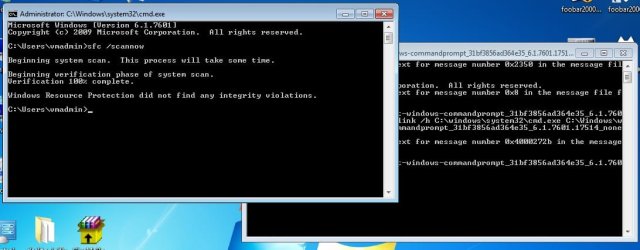
It does work (in my VM). See below. It reports an issue that it cannot fix with the cmd.exe file, but a reboot and another SFC shows no integrity violations. I'm just not willing to suggest it without more opinions/testing. If you get the same results, then I guess we can recommend it to the OP.

From post #10:
~~~
The long path that I show in the cmd screenshot is the actual 64bit cmd.exe file. It will run SFC on a 64bit system and that will fix the hard link that was deleted. I'm just not sure if SFC is the best way to handle this. Maybe others can chime in.
 

My Computer

Computer type
Laptop
Computer Manufacturer/Model Number
Employer provided Dell Latitude
OS
W7 Pro SP1 64bit
CPU
i7
Memory
8GB
Graphics Card(s)
Intel HD Graphics
Hard Drives
crappy SSD
Antivirus
Employer mandated Symantec Endpoint Protection
Browser
Pale Moon 64bit, IE11 64bit & Chrome 64bit
I am starting to test in a VM, will edit this post as I go.

Edit 1: Deleted cmd.exe inside System32 and cmd fails to open "Windows cannot find 'cmd'...."

Edit 2: Sorry it took a while, had trouble either with the mklink command or a permission. The same command worked finally! :) Double click from System32 works, cmd at run box works. Now, running sfc /scannow
 
Last edited:

My Computer

Computer type
PC/Desktop
Computer Manufacturer/Model Number
Custom Build
OS
Windows 7 Ultimate x64 SP1
CPU
AMD Phenom 2 1090T
Motherboard
Gigabyte GA-890FXA-UD5
Memory
2x8GB Kingston HyperX Fury Black 1600Mhz Unganged
Graphics Card(s)
MSI GTX 970 Gaming 4G
Sound Card
Realtek On-Board HD 7.1 Audio / Logitech G35
Monitor(s) Displays
3xAcer GD245HQ
Screen Resolution
1920x1080
Hard Drives
Samsung 850 Pro 512GB SSD - OS /
WD Caviar Black SATA 3 - 1 TBx2 - Dynamic RAID 0 /
WD Caviar Green SATA 2 - 640GBx2 - Dynamic RAID 0 /
WD Caviar Green SATA 2 - 640GB - Internal Backup /
Seagate Barracude SATA 3 - 3TB - External Backup/ Sync
PSU
HighPower 1000W
Case
Cooler Master HAF 932
Cooling
Noctua NH-D14
Keyboard
Logitech G19
Mouse
Logitech G500
Internet Speed
100/4 Mbit Cable (100GB quota)
Antivirus
ZoneAlarm Extreme Security / MBAM Pro / MBAE Free / SAS Free
Browser
IE 11 - Firefox - Chrome
Other Info
Logitech F710/ G27/ G940/ Z5500 // TrackIR 5 // Nvidia 3D Surround Vision
Ok, sfc /scannow finished with no violations.

cmd.exe deleted sfc scannow result.jpg
 

My Computer

Computer type
PC/Desktop
Computer Manufacturer/Model Number
Custom Build
OS
Windows 7 Ultimate x64 SP1
CPU
AMD Phenom 2 1090T
Motherboard
Gigabyte GA-890FXA-UD5
Memory
2x8GB Kingston HyperX Fury Black 1600Mhz Unganged
Graphics Card(s)
MSI GTX 970 Gaming 4G
Sound Card
Realtek On-Board HD 7.1 Audio / Logitech G35
Monitor(s) Displays
3xAcer GD245HQ
Screen Resolution
1920x1080
Hard Drives
Samsung 850 Pro 512GB SSD - OS /
WD Caviar Black SATA 3 - 1 TBx2 - Dynamic RAID 0 /
WD Caviar Green SATA 2 - 640GBx2 - Dynamic RAID 0 /
WD Caviar Green SATA 2 - 640GB - Internal Backup /
Seagate Barracude SATA 3 - 3TB - External Backup/ Sync
PSU
HighPower 1000W
Case
Cooler Master HAF 932
Cooling
Noctua NH-D14
Keyboard
Logitech G19
Mouse
Logitech G500
Internet Speed
100/4 Mbit Cable (100GB quota)
Antivirus
ZoneAlarm Extreme Security / MBAM Pro / MBAE Free / SAS Free
Browser
IE 11 - Firefox - Chrome
Other Info
Logitech F710/ G27/ G940/ Z5500 // TrackIR 5 // Nvidia 3D Surround Vision
Thanks for testing.

Maybe these steps will work for the OP:
1) run SFC from winsxs
2) reboot
3) run SFC from winsxs

Here is the info to run SFC:
click Start
paste this in the search area
Code:
c:\Windows\winsxs\amd64_microsoft-windows-commandprompt_31bf3856ad364e35_6.1.7601.17514_none_e932cc2c30fc13b0\cmd.exe
right click on cmd.exe
run as admin
type in sfc/scannow
(no space needed after sfc)
 

My Computer

Computer type
Laptop
Computer Manufacturer/Model Number
Employer provided Dell Latitude
OS
W7 Pro SP1 64bit
CPU
i7
Memory
8GB
Graphics Card(s)
Intel HD Graphics
Hard Drives
crappy SSD
Antivirus
Employer mandated Symantec Endpoint Protection
Browser
Pale Moon 64bit, IE11 64bit & Chrome 64bit

My Computer

Computer type
PC/Desktop
Computer Manufacturer/Model Number
Home made Desktop
OS
Windows 10 Pro. 64/ version 1709 Windows 7 Pro/64
CPU
Intel i7-6800K @ 4.3
Motherboard
ASUS X-99 Deluxe II
Memory
Corsair Platinum 16 gig @2400
Graphics Card(s)
EVGA GTX 1070 OC
Monitor(s) Displays
Asus 27" LED LCD/VE278Q
Screen Resolution
1920-1080 or 1280-720 HDMI
Hard Drives
INTEL SSD 730-240 Gb Sata 3.0/
PSU
EVGA Platium 1200W
Case
Phanteks Luxe Tempered Glass 8 fans/ one radiator
Cooling
XSPC/ Water Cooled CPU
Keyboard
Das 4 Professional
Mouse
Logitech M705/MX Anywhere 2-S
Internet Speed
100 mbits
Antivirus
Microsoft Security Essentials/ Malwarebytes Premium 3.0/ SAS
Browser
I.E. 11 default/Firefox/ ISP Time Warner Cable/Spectrum
Other Info
LG BluRay Burner/
Sound system-KLipsch-THX/
Icy Dock ssd Hot Swap bays.
:ditto:
As Jack suggests, this could well just be the tip of a large iceberg, and a repair is probably the best option in the longer term.
 

My Computer

Computer type
Laptop
Computer Manufacturer/Model Number
Asus K52F or Lenovo B51-80
OS
Win 7 x64 Home Premium (and x86 VirtualBox VM)/Win10
CPU
i3 370M/i7 6500U
Motherboard
Asus/Lenovo
Memory
8GB - finally :)/8GB
Graphics Card(s)
it's an i3, dude!/dual Intel&nVidia
Sound Card
onboard
Monitor(s) Displays
15.6" built-in
Screen Resolution
1366x768/1920x1080
Hard Drives
750GB Seagate internal
Sundry external drives attached to other computers on the local network
1TB SSD on the Lenovo
PSU
n/a
Internet Speed
as much as I can get - usually on a dongle/phone, so <1MB/s
Antivirus
MSE/Defender
Browser
IE11/12/Edge/Chrome/FF(if I must)
Back
Top