Solved System won't boot from SSD, please help.

Rhirtix

New member
Member
Local time
1:35 AM
Messages
62
Hi,

I just spent hours installing my new Intel 510 250gb SSD along with Windows 7 and the software programs I use. It's connected via SATA III.

I have a Windows 7 install on the previous boot drive, which is a 750gb WD HDD.

When I changed the boot drive priority in BIOS from the HDD to the SSD, upon reboot, the system told me that I need to "Reboot and select proper Boot device or insert Boot media in selected Boot device and press a key".

I completely disabled the HDD in BIOS, but that didn't help.

When the HDD was the primary, I was given the option of selecting the Windows 7 install from which I wanted to boot: HDD or SSD. Now that the HDD is no longer primary, the machine won't boot at all and it no longer gives me an option to choose.

Please help. :confused:

Thanks in advance,
rhit
 

My Computer

OS
Windows 7 x64
CPU
Core i7 950 @ 4Ghz
Motherboard
Asus P6X58D Premium
Memory
Corsair Dominator 12Gb
Graphics Card(s)
EVGA GTX 680 SC
Monitor(s) Displays
Apple 27" LED Cinema Display
Screen Resolution
2560 x 1440
Hard Drives
Intel 510 SSD 256gb + 2 WD Caviar Black drives
PSU
Corsair TX750
Case
Corsair Obsidian 600T
Cooling
Cooler Master Hyper 212 Plus
Keyboard
Logitech G510
Mouse
Logitech M510
Internet Speed
Verizon FIOS
Hello mate.


It seems the "System" boot files may have been placed on the spinner during the install.

Disconnect the spinner and set the SSD as the first boot device, after the CD/DVD drive in the BIOS and boot the Windows install media and in diskpart run detail partition to see if the Windows on the SSD is Active if it's not, make it so and do the 3 separate startup repairs in this tutorial at the link below to (re)create the "System" boot files to the SSD.
 

My Computer

Computer Manufacturer/Model Number
* BFK Customs *
OS
W 7 64-bit Ultimate
CPU
Intel Q9550 Yorkfield
Motherboard
ASUS P5Q Pro
Memory
8GB Dominator 8500C5D
Graphics Card(s)
ATI : XFX 5870
Sound Card
Realtek HD Audio 7-1
Monitor(s) Displays
1x 47" LCD HDMI & 3x 26" LCD HDMI
Screen Resolution
1920x1080P & 1920x1200
Hard Drives
1x 80GB Intel X25-M G2 SSD : 1x 500GB & 1x 640GB WD Caviar Black(s)
PSU
Corsair 620HX
Case
Cooler Master RC-690
Cooling
Tuniq Tower 120, 2x 140mm and 3x 120mm case fans
Keyboard
Microsoft 500
Mouse
Razer Diamondback 3G
Internet Speed
14 Mb/s
Other Info
1x Koutech 3Gb/s SATA HDD Hot Swap Rack
Be sure to post back with any further questions you may have and to keep us informed.
 

My Computer

Computer Manufacturer/Model Number
* BFK Customs *
OS
W 7 64-bit Ultimate
CPU
Intel Q9550 Yorkfield
Motherboard
ASUS P5Q Pro
Memory
8GB Dominator 8500C5D
Graphics Card(s)
ATI : XFX 5870
Sound Card
Realtek HD Audio 7-1
Monitor(s) Displays
1x 47" LCD HDMI & 3x 26" LCD HDMI
Screen Resolution
1920x1080P & 1920x1200
Hard Drives
1x 80GB Intel X25-M G2 SSD : 1x 500GB & 1x 640GB WD Caviar Black(s)
PSU
Corsair 620HX
Case
Cooler Master RC-690
Cooling
Tuniq Tower 120, 2x 140mm and 3x 120mm case fans
Keyboard
Microsoft 500
Mouse
Razer Diamondback 3G
Internet Speed
14 Mb/s
Other Info
1x Koutech 3Gb/s SATA HDD Hot Swap Rack
Once you unplug the HD to mark Active and run Startup Repair 3 times on the SSD set first to boot, then when you plug back in the HD boot it using the Asus F8 one-time BIOS Boot Menu key.

If you installed to the SSD with the HD plugged in, you should get the Dual Boot menu now if HD is set first to boot since Win7 should configure a dual boot during install. So you could run that way if you want, or if you want to make the drives independent to come and go as you please, do the Repairs as specified and use the one-time BIOS Boot Menu key to trigger HD.
 
Thanks for your responses. :)

I followed your instructions.
- I reordered the disk boot priority in BIOS.
- In DISKPART, I made the SSD active and the HDD inactive.
- I ran Startup Repair 2x. It no longer detects any problems.

The SSD is now bootable, but it isn't Disk 0. I'm unable to make it the C: drive.

And, now, even with the 750gb drive still unplugged, I now get at boot up two recovery installs from which to choose.

Please help.

Thanks,
rhit
 

My Computer

OS
Windows 7 x64
CPU
Core i7 950 @ 4Ghz
Motherboard
Asus P6X58D Premium
Memory
Corsair Dominator 12Gb
Graphics Card(s)
EVGA GTX 680 SC
Monitor(s) Displays
Apple 27" LED Cinema Display
Screen Resolution
2560 x 1440
Hard Drives
Intel 510 SSD 256gb + 2 WD Caviar Black drives
PSU
Corsair TX750
Case
Corsair Obsidian 600T
Cooling
Cooler Master Hyper 212 Plus
Keyboard
Logitech G510
Mouse
Logitech M510
Internet Speed
Verizon FIOS
If you don't have the HDD connected and still get the dual boot menu at PC startup, in msconfig, boot tab delete the non-default entry to see if that sorts it; then you could use the method Greg suggests to select which OS to boot ay startup if you desire a dual boot.
 

My Computer

Computer Manufacturer/Model Number
* BFK Customs *
OS
W 7 64-bit Ultimate
CPU
Intel Q9550 Yorkfield
Motherboard
ASUS P5Q Pro
Memory
8GB Dominator 8500C5D
Graphics Card(s)
ATI : XFX 5870
Sound Card
Realtek HD Audio 7-1
Monitor(s) Displays
1x 47" LCD HDMI & 3x 26" LCD HDMI
Screen Resolution
1920x1080P & 1920x1200
Hard Drives
1x 80GB Intel X25-M G2 SSD : 1x 500GB & 1x 640GB WD Caviar Black(s)
PSU
Corsair 620HX
Case
Cooler Master RC-690
Cooling
Tuniq Tower 120, 2x 140mm and 3x 120mm case fans
Keyboard
Microsoft 500
Mouse
Razer Diamondback 3G
Internet Speed
14 Mb/s
Other Info
1x Koutech 3Gb/s SATA HDD Hot Swap Rack
Did you install the SSD from the HD's Win7? If so C was held by the HD and can not be assigned to the SSD for when it is booted as it would have been had it been correctly installed from boot.

Can you get the SSD to boot itself by setting first to boot in BIOS, then trigger the HD using F8 key as needed? If so, then install EasyBCD 2.02 to whichever is giving the Boot menu and delete the ghost listing using Edit Boot Menu.
 
Okay.

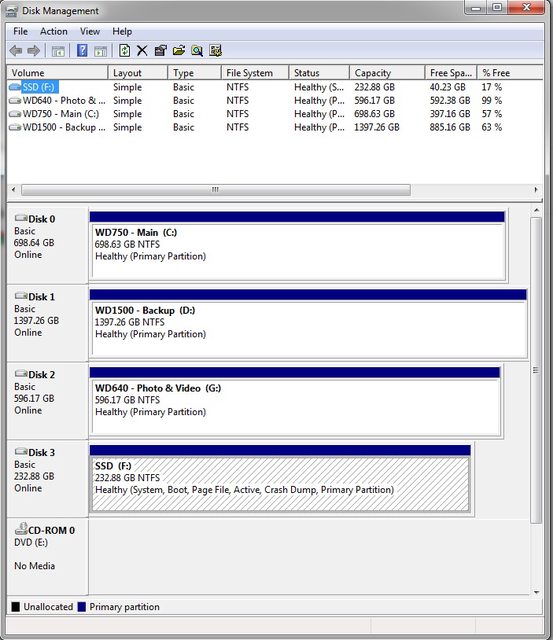
I have the HDD connected and the machine is currently booted off the SSD.

Below are photos of how my diskmgmt and msconfig look.

urxNvl.jpg


4raLT.jpg


In BIOS, the boot priority order mirrors the order in the Volume List at the top of diskmgmt. The disk numbering (i.e., Disk 0, Disk 1, etc.), however, doesn't appear to match that.

Windows 7 was installed onto the SSD via the autorun on the Windows 7 full version retail install disk when inserted. I didn't boot off the disk, if that's what you're asking.

Thanks for your continued help.
 

My Computer

OS
Windows 7 x64
CPU
Core i7 950 @ 4Ghz
Motherboard
Asus P6X58D Premium
Memory
Corsair Dominator 12Gb
Graphics Card(s)
EVGA GTX 680 SC
Monitor(s) Displays
Apple 27" LED Cinema Display
Screen Resolution
2560 x 1440
Hard Drives
Intel 510 SSD 256gb + 2 WD Caviar Black drives
PSU
Corsair TX750
Case
Corsair Obsidian 600T
Cooling
Cooler Master Hyper 212 Plus
Keyboard
Logitech G510
Mouse
Logitech M510
Internet Speed
Verizon FIOS

My Computer

Computer Manufacturer/Model Number
* BFK Customs *
OS
W 7 64-bit Ultimate
CPU
Intel Q9550 Yorkfield
Motherboard
ASUS P5Q Pro
Memory
8GB Dominator 8500C5D
Graphics Card(s)
ATI : XFX 5870
Sound Card
Realtek HD Audio 7-1
Monitor(s) Displays
1x 47" LCD HDMI & 3x 26" LCD HDMI
Screen Resolution
1920x1080P & 1920x1200
Hard Drives
1x 80GB Intel X25-M G2 SSD : 1x 500GB & 1x 640GB WD Caviar Black(s)
PSU
Corsair 620HX
Case
Cooler Master RC-690
Cooling
Tuniq Tower 120, 2x 140mm and 3x 120mm case fans
Keyboard
Microsoft 500
Mouse
Razer Diamondback 3G
Internet Speed
14 Mb/s
Other Info
1x Koutech 3Gb/s SATA HDD Hot Swap Rack
New post with screen shots. Post #9.
 

My Computer

OS
Windows 7 x64
CPU
Core i7 950 @ 4Ghz
Motherboard
Asus P6X58D Premium
Memory
Corsair Dominator 12Gb
Graphics Card(s)
EVGA GTX 680 SC
Monitor(s) Displays
Apple 27" LED Cinema Display
Screen Resolution
2560 x 1440
Hard Drives
Intel 510 SSD 256gb + 2 WD Caviar Black drives
PSU
Corsair TX750
Case
Corsair Obsidian 600T
Cooling
Cooler Master Hyper 212 Plus
Keyboard
Logitech G510
Mouse
Logitech M510
Internet Speed
Verizon FIOS

My Computer

Computer Manufacturer/Model Number
* BFK Customs *
OS
W 7 64-bit Ultimate
CPU
Intel Q9550 Yorkfield
Motherboard
ASUS P5Q Pro
Memory
8GB Dominator 8500C5D
Graphics Card(s)
ATI : XFX 5870
Sound Card
Realtek HD Audio 7-1
Monitor(s) Displays
1x 47" LCD HDMI & 3x 26" LCD HDMI
Screen Resolution
1920x1080P & 1920x1200
Hard Drives
1x 80GB Intel X25-M G2 SSD : 1x 500GB & 1x 640GB WD Caviar Black(s)
PSU
Corsair 620HX
Case
Cooler Master RC-690
Cooling
Tuniq Tower 120, 2x 140mm and 3x 120mm case fans
Keyboard
Microsoft 500
Mouse
Razer Diamondback 3G
Internet Speed
14 Mb/s
Other Info
1x Koutech 3Gb/s SATA HDD Hot Swap Rack
New post with screen shots. Post #9.


Did you see my post #8?

I was hoping your answer might change after seeing the screen shots. Is my only option at this point to completely unplug all other drives and do a clean reinstall on the SSD? Is there not a more user friendly way to sort this out?
 

My Computer

OS
Windows 7 x64
CPU
Core i7 950 @ 4Ghz
Motherboard
Asus P6X58D Premium
Memory
Corsair Dominator 12Gb
Graphics Card(s)
EVGA GTX 680 SC
Monitor(s) Displays
Apple 27" LED Cinema Display
Screen Resolution
2560 x 1440
Hard Drives
Intel 510 SSD 256gb + 2 WD Caviar Black drives
PSU
Corsair TX750
Case
Corsair Obsidian 600T
Cooling
Cooler Master Hyper 212 Plus
Keyboard
Logitech G510
Mouse
Logitech M510
Internet Speed
Verizon FIOS
If you can delete the second Windows 7 (not default) entry at the boot tab of msconfig and you're happy with the way things are, that decision is entirely up to you, if it works (for you) don't fix it.
;)
 

My Computer

Computer Manufacturer/Model Number
* BFK Customs *
OS
W 7 64-bit Ultimate
CPU
Intel Q9550 Yorkfield
Motherboard
ASUS P5Q Pro
Memory
8GB Dominator 8500C5D
Graphics Card(s)
ATI : XFX 5870
Sound Card
Realtek HD Audio 7-1
Monitor(s) Displays
1x 47" LCD HDMI & 3x 26" LCD HDMI
Screen Resolution
1920x1080P & 1920x1200
Hard Drives
1x 80GB Intel X25-M G2 SSD : 1x 500GB & 1x 640GB WD Caviar Black(s)
PSU
Corsair 620HX
Case
Cooler Master RC-690
Cooling
Tuniq Tower 120, 2x 140mm and 3x 120mm case fans
Keyboard
Microsoft 500
Mouse
Razer Diamondback 3G
Internet Speed
14 Mb/s
Other Info
1x Koutech 3Gb/s SATA HDD Hot Swap Rack
If you can delete the second Windows 7 (not default) entry at the boot tab of msconfig and you're happy with the way things are, that decision is entirely up to you, if it works (for you) don't fix it.
;)

Would do so allow me to reorder the drive paths and volume disk number assignments?
 

My Computer

OS
Windows 7 x64
CPU
Core i7 950 @ 4Ghz
Motherboard
Asus P6X58D Premium
Memory
Corsair Dominator 12Gb
Graphics Card(s)
EVGA GTX 680 SC
Monitor(s) Displays
Apple 27" LED Cinema Display
Screen Resolution
2560 x 1440
Hard Drives
Intel 510 SSD 256gb + 2 WD Caviar Black drives
PSU
Corsair TX750
Case
Corsair Obsidian 600T
Cooling
Cooler Master Hyper 212 Plus
Keyboard
Logitech G510
Mouse
Logitech M510
Internet Speed
Verizon FIOS
Would do so allow me to reorder the drive paths and volume disk number assignments?


I'm not going to advise you on changing drive letters as that may break things.
 

My Computer

Computer Manufacturer/Model Number
* BFK Customs *
OS
W 7 64-bit Ultimate
CPU
Intel Q9550 Yorkfield
Motherboard
ASUS P5Q Pro
Memory
8GB Dominator 8500C5D
Graphics Card(s)
ATI : XFX 5870
Sound Card
Realtek HD Audio 7-1
Monitor(s) Displays
1x 47" LCD HDMI & 3x 26" LCD HDMI
Screen Resolution
1920x1080P & 1920x1200
Hard Drives
1x 80GB Intel X25-M G2 SSD : 1x 500GB & 1x 640GB WD Caviar Black(s)
PSU
Corsair 620HX
Case
Cooler Master RC-690
Cooling
Tuniq Tower 120, 2x 140mm and 3x 120mm case fans
Keyboard
Microsoft 500
Mouse
Razer Diamondback 3G
Internet Speed
14 Mb/s
Other Info
1x Koutech 3Gb/s SATA HDD Hot Swap Rack
Shoot. So, at this point, the best way to proceed, in order to have the SSD be Disk 0 / Drive C: is to do a clean install.

Assuming I do that, and the SSD is now the C: drive, what will happen when I plug in the HDD that used to be the C: drive? Will there be a conflict?

And if I delete the boot "profile" in msconfig, I assume I'll no longer be able to boot from the old HDD, right?
 

My Computer

OS
Windows 7 x64
CPU
Core i7 950 @ 4Ghz
Motherboard
Asus P6X58D Premium
Memory
Corsair Dominator 12Gb
Graphics Card(s)
EVGA GTX 680 SC
Monitor(s) Displays
Apple 27" LED Cinema Display
Screen Resolution
2560 x 1440
Hard Drives
Intel 510 SSD 256gb + 2 WD Caviar Black drives
PSU
Corsair TX750
Case
Corsair Obsidian 600T
Cooling
Cooler Master Hyper 212 Plus
Keyboard
Logitech G510
Mouse
Logitech M510
Internet Speed
Verizon FIOS
Shoot. So, at this point, the best way to proceed, in order to have the SSD be Disk 0 / Drive C: is to do a clean install.

Assuming I do that, and the SSD is now the C: drive, what will happen when I plug in the HDD that used to be the C: drive? Will there be a conflict?

And if I delete the boot "profile" in msconfig, I assume I'll no longer be able to boot from the old HDD, right?

1. You would need to make sure the SSD is connected to the #1 SATA port of the motherboard and set as the second boot device in the BIOS after the CD/DVD drive.

2. There will be no conflict as it's not "System Active" where boot files are stored.

3. You could leave it as the only HDD connected and mark it as active and do the 3 separate startup repairs to it so "System" boot files will be (re)created to that Windows 7 and you could use the method Greg posted to select which OS to boot at PC start up once the SSD is reconnected.
 

My Computer

Computer Manufacturer/Model Number
* BFK Customs *
OS
W 7 64-bit Ultimate
CPU
Intel Q9550 Yorkfield
Motherboard
ASUS P5Q Pro
Memory
8GB Dominator 8500C5D
Graphics Card(s)
ATI : XFX 5870
Sound Card
Realtek HD Audio 7-1
Monitor(s) Displays
1x 47" LCD HDMI & 3x 26" LCD HDMI
Screen Resolution
1920x1080P & 1920x1200
Hard Drives
1x 80GB Intel X25-M G2 SSD : 1x 500GB & 1x 640GB WD Caviar Black(s)
PSU
Corsair 620HX
Case
Cooler Master RC-690
Cooling
Tuniq Tower 120, 2x 140mm and 3x 120mm case fans
Keyboard
Microsoft 500
Mouse
Razer Diamondback 3G
Internet Speed
14 Mb/s
Other Info
1x Koutech 3Gb/s SATA HDD Hot Swap Rack
You should have booted the installer to install to the SSD so that Win7 could claim the C drive whenever you are booted into it as intended, whether you're booted into the SSD or HD.

If you can live with the F letter on the SSD, then you can leave it. To remove the Dual Boot menu you're getting when it boots first in BIOS, install EasyBCD 2.02 to Delete the listings on Edit OS Menu tab.

Then to boot the HD via the BIOS, mark it Active, unplug the SSD, boot the Win7 DVD Repair console or Repair CD to run Startup Repair up to 3 separate times with reboots until it writes the System Boot files to the HD Win7 and it starts. Then plug the SSD back in, set it first to boot. To boot HD use F8 Boot Menu key.

If you would rather have a Windows-managed Dual Boot menu, after deleting the listings in EasyBCD, add the HD Win7 by letter and type.
 
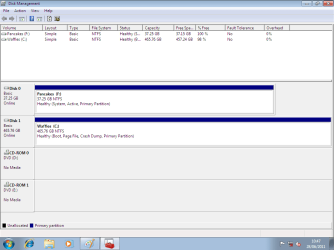
Physically disconnect the old HD.
Make the SSD, disk0 & first HD boot in BIOS.

View attachment 164047

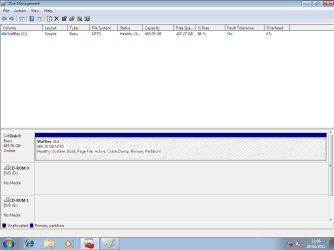
http://www.sevenforums.com/tutorials/681-startup-repair.html?ltr=S
Note: You may need to do startup repair 3 to 4 times.
http://www.sevenforums.com/tutorials/105541-startup-repair-run-3-separate-times.html

View attachment 164048

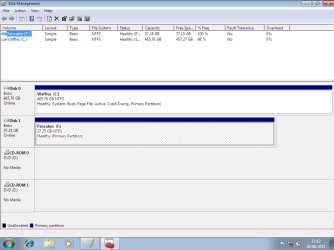
Refit old Hd when Windiws 7 is booting OK.

View attachment 164049

If you can delete the second Windows 7 (not default) entry at the boot tab of msconfig and you're happy with the way things are, that decision is entirely up to you, if it works (for you) don't fix it.
;)

No need to REINSTALL.

Physically disconnect WD750, WD1500, & WD640.
&
delete the second Windows 7.

Also,The HD needs to be pluged in to the first SATA port on MOBO & first HD boot in BIOS.
 

My Computer

OS
ME/XP/Vista/Win7
Back
Top