
Take Ownership Shortcut

Add "Take Ownership" to Context Menu of Files, Folders, and Drives in Windows


   Information
This tutorial will show you how to add Take Ownership to the context menu of all files, folders, and drives for all users in Windows.

This will allow you to be able to instantly take ownership of a file, folder (and all contents), or drive (and all contents) by changing the owner to the current user and grant the Owner_Rights SID (current owner) full access permission.

You must be an administrator to be able to add, remove, and use the "Take Ownership" context menu.

   Note
Application files (ex: EXE, CMD, MSI) will continue to have Run as administrator instead of Take Ownership in their context menu.


When you right click or press and hold on a file, folder, or drive, and click/tap on Take Ownership, you may be prompted by UAC for permission to do so first.

If a user is logged in as an administrator, then the user would just click/tap on Yes to approve and take ownership. The owner of the file, folder, or drive would be changed to the current administrator user account. Permissions would be set to allow the Owner_Rights SID (current owner) full control of the file, folder, or drive.

If a user is logged in as a standard user, then the user would need to enter a selected administrator's password to approve and take ownership. The owner of the file, folder, or drive would be changed to the selected administrator account, and not the standard user. Permissions would be set to allow the Owner_Rights SID (current owner) full control of the file, folder, or drive.


The Take Ownership context menu will not be available when you right click on the C: drive, C:\Program Files folder, C:\Program Files (x86) folder, C:\ProgramData folder, C:\Users folder, and C:\Windows folder. This was done because taking ownership of these system folders can make Windows unstable since it would also take ownership of all the folder's content at the same time.

You will still be able to use the Take Ownership context menu of files inside the folder locations above.

If you would like to have a custom location(s) of your own to not have the context menu, then please feel free to post a request in this tutorial thread. I'll be happy to post back with a custom .reg file for it.

   Warning
This context menu will only work with English Windows installations.

If you have a different language, then please post a reply with what language you have instead. I'll be happy to post back a translated version for you.


EXAMPLE: Take Ownership in Context Menu
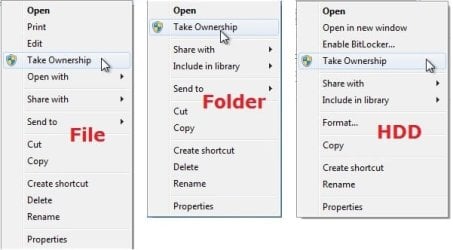
example.jpg


Here's How:

1. Do step 2, 3, or 4 below for what you would like to do.


2. To Add "Take Ownership" to Context Menu

   Note
Application files (ex: EXE, CMD, MSI) will still have Run as administrator instead of Take Ownership in the context menu when you use this step.

A) Click/tap on the Download button below to download the file below, and go to step 5 below.

Add_Take_Ownership_to_context_menu


Download


3. To Add "Take Ownership" with Pause to Context Menu

   Note
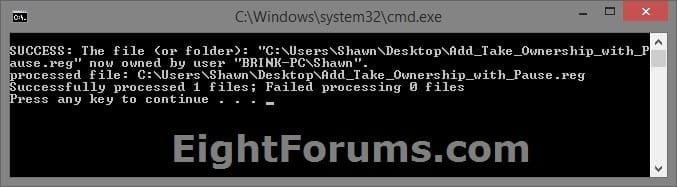
This option pauses the command when you use the "Take Ownership" context menu to be able to see the command results. This can be handy to verify setting ownership and permissions was successful or not.

Application files (ex: EXE, CMD, MSI) will still have Run as administrator instead of Take Ownership in the context menu when you use this step.


Take_Ownership_Pause.jpg


A) Click/tap on the Download button below to download the file below, and go to step 5 below.

Add_Take_Ownership_with_Pause_to_context_menu.reg


Download


4. To Remove "Take Ownership" from Context Menu

   Note
This is the default setting, and will also restore the default Run as administrator for .exe files.


A) Click/tap on the Download button below to download the file below, and go to step 5 below.

Remove_Take_Ownership_from_context_menu.reg


Download


5. Save the .reg file to your Desktop.

6. Double click on the downloaded .reg file to merge it.

7. If prompted, click on Run, Yes (UAC), Yes, and OK to approve the merge.

8. When finished, you can delete the downloaded .reg file if you like.


That's it,
Shawn


Attachments

Last edited:
Thanks SO much for this....:)
 

My Computer My Computer

At a glance

Windows7 Home Premium 64bit
Computer type
PC/Desktop
Computer Manufacturer/Model Number
custom build
OS
Windows7 Home Premium 64bit
You're most welcome Dennis, and welcome to Seven Forums. :)
 

My Computer My Computer

At a glance

64-bit Windows 11 Pro for WorkstationsIntel i7-8700K OC'd to 5 GHz64 GB (4x16GB) G.SKILL TridentZ RGB DDR4 3600...ASUS ROG-STRIX-GTX1080TI-O11G-GAMING
Computer type
PC/Desktop
Computer Manufacturer/Model Number
Self built custom
OS
64-bit Windows 11 Pro for Workstations
CPU
Intel i7-8700K OC'd to 5 GHz
Motherboard
ASUS ROG Maximus XI Formula Z390
Memory
64 GB (4x16GB) G.SKILL TridentZ RGB DDR4 3600 MHz
Graphics Card(s)
ASUS ROG-STRIX-GTX1080TI-O11G-GAMING
Sound Card
Integrated
Monitor(s) Displays
2 x Samsung Odyssey G7 27"
Screen Resolution
2560x1440
Hard Drives
1TB Samsung 990 PRO M.2,
4TB Samsung 990 PRO PRO M.2,
TerraMaster F8 SSD Plus NAS
PSU
Seasonic Prime Titanium 850W
Case
Thermaltake Core P3
Cooling
Corsair Hydro H115i
Keyboard
Logitech wireless K800
Mouse
Logitech MX Master 4
Internet Speed
2 Gb/s Download and 100 Mb/s Upload
Antivirus
Malwarebyte Anti-Malware Premium
Browser
Google Chrome
Other Info
Logitech Z625 speaker system,
Logitech BRIO 4K Pro webcam,
HP Color LaserJet Pro MFP M477fdn,
APC SMART-UPS RT 1000 XL - SURT1000XLI,
Galaxy S23 Plus phone
Take ownership runs when i want to run belarc advisor

Hey,

I applied those registry entries a while ago, and I find them very useful, so thanks for that.
The only thing is, I've got a few lil problems since I use Take Ownership, i.e. when I try to run a program, Take Ownership runs instead. That happens with Belarc Advisor(i want to retrieve my windows key), and it happened with two other programs too, but I can't remember which ones. When I try to run Belarc Advisor, take wonership takes ownership of belarcadvisor.exe, after that, nothing happens.
I cannot think of any cause for this phenomenon. Any experience or advice on this?
Thanks
 

My Computer My Computer

At a glance

Win8.1Proi5-4670G.skill RipjawsX 8GBR9 280
Computer type
PC/Desktop
Computer Manufacturer/Model Number
Custom build
OS
Win8.1Pro
CPU
i5-4670
Motherboard
MSI B85M P33
Memory
G.skill RipjawsX 8GB
Graphics Card(s)
R9 280
Hard Drives
Samsun 850 EVO 250GB
Seagate Baracuda 1TB
Antivirus
Common Sense
Browser
Cr
Hello sum1, and welcome to Seven Forums.

It sounds like it's an issue with the "Run as administrator" for .exe files. The tutorial has been updated since the last time you used it. Please download and merge the newer .reg file in step 2 or 3 (for what you want) to update it, and see how it does now. :)
 

My Computer My Computer

At a glance

64-bit Windows 11 Pro for WorkstationsIntel i7-8700K OC'd to 5 GHz64 GB (4x16GB) G.SKILL TridentZ RGB DDR4 3600...ASUS ROG-STRIX-GTX1080TI-O11G-GAMING
Computer type
PC/Desktop
Computer Manufacturer/Model Number
Self built custom
OS
64-bit Windows 11 Pro for Workstations
CPU
Intel i7-8700K OC'd to 5 GHz
Motherboard
ASUS ROG Maximus XI Formula Z390
Memory
64 GB (4x16GB) G.SKILL TridentZ RGB DDR4 3600 MHz
Graphics Card(s)
ASUS ROG-STRIX-GTX1080TI-O11G-GAMING
Sound Card
Integrated
Monitor(s) Displays
2 x Samsung Odyssey G7 27"
Screen Resolution
2560x1440
Hard Drives
1TB Samsung 990 PRO M.2,
4TB Samsung 990 PRO PRO M.2,
TerraMaster F8 SSD Plus NAS
PSU
Seasonic Prime Titanium 850W
Case
Thermaltake Core P3
Cooling
Corsair Hydro H115i
Keyboard
Logitech wireless K800
Mouse
Logitech MX Master 4
Internet Speed
2 Gb/s Download and 100 Mb/s Upload
Antivirus
Malwarebyte Anti-Malware Premium
Browser
Google Chrome
Other Info
Logitech Z625 speaker system,
Logitech BRIO 4K Pro webcam,
HP Color LaserJet Pro MFP M477fdn,
APC SMART-UPS RT 1000 XL - SURT1000XLI,
Galaxy S23 Plus phone
Hello sum1, and welcome to Seven Forums.

It sounds like it's an issue with the "Run as administrator" for .exe files. The tutorial has been updated since the last time you used it. Please download and merge the newer .reg file in step 2 or 3 (for what you want) to update it, and see how it does now. :)

Excellent, that did the trick. I didn't knew you updated it, belarc advisor works fine now.
Thanks!
 

My Computer My Computer

At a glance

Win8.1Proi5-4670G.skill RipjawsX 8GBR9 280
Computer type
PC/Desktop
Computer Manufacturer/Model Number
Custom build
OS
Win8.1Pro
CPU
i5-4670
Motherboard
MSI B85M P33
Memory
G.skill RipjawsX 8GB
Graphics Card(s)
R9 280
Hard Drives
Samsun 850 EVO 250GB
Seagate Baracuda 1TB
Antivirus
Common Sense
Browser
Cr
You're most welcome. :)
 

My Computer My Computer

At a glance

64-bit Windows 11 Pro for WorkstationsIntel i7-8700K OC'd to 5 GHz64 GB (4x16GB) G.SKILL TridentZ RGB DDR4 3600...ASUS ROG-STRIX-GTX1080TI-O11G-GAMING
Computer type
PC/Desktop
Computer Manufacturer/Model Number
Self built custom
OS
64-bit Windows 11 Pro for Workstations
CPU
Intel i7-8700K OC'd to 5 GHz
Motherboard
ASUS ROG Maximus XI Formula Z390
Memory
64 GB (4x16GB) G.SKILL TridentZ RGB DDR4 3600 MHz
Graphics Card(s)
ASUS ROG-STRIX-GTX1080TI-O11G-GAMING
Sound Card
Integrated
Monitor(s) Displays
2 x Samsung Odyssey G7 27"
Screen Resolution
2560x1440
Hard Drives
1TB Samsung 990 PRO M.2,
4TB Samsung 990 PRO PRO M.2,
TerraMaster F8 SSD Plus NAS
PSU
Seasonic Prime Titanium 850W
Case
Thermaltake Core P3
Cooling
Corsair Hydro H115i
Keyboard
Logitech wireless K800
Mouse
Logitech MX Master 4
Internet Speed
2 Gb/s Download and 100 Mb/s Upload
Antivirus
Malwarebyte Anti-Malware Premium
Browser
Google Chrome
Other Info
Logitech Z625 speaker system,
Logitech BRIO 4K Pro webcam,
HP Color LaserJet Pro MFP M477fdn,
APC SMART-UPS RT 1000 XL - SURT1000XLI,
Galaxy S23 Plus phone
Thank you so so much!
But I don't understand why Microsoft thought that a system administrator on a Windows 7 x64 Ultimate needed special permission to have access and delete files!
I usually need to empty the C drive's temp folder before switching off the computer and had limitations on my own system!
 

My Computer My Computer

At a glance

Windows 7 Ultimate x64Intel i5-6600K 3.50GHzCorsair DDR4 2x8GBMSI GeForce GTX1070 Gaming X
Computer type
PC/Desktop
Computer Manufacturer/Model Number
Custom build
OS
Windows 7 Ultimate x64
CPU
Intel i5-6600K 3.50GHz
Motherboard
Asus Pro Z170 Gaming
Memory
Corsair DDR4 2x8GB
Graphics Card(s)
MSI GeForce GTX1070 Gaming X
Sound Card
On board Realtek
Monitor(s) Displays
Dell SP2309W
Screen Resolution
1920x1080
Hard Drives
OS Samsung 850 EVO 500GB SATA III SSD
2x Hitachi Deskstar 1GB SATA data drives
1x Western Digital Caviar Black 1TB SATA data drive
PSU
Corsair HX650W
Case
CoolerMaster CM 690 III
Cooling
Coolermaster Hyper 212 EVO 1x200mm 1x140mm 2x120mm case fan
Keyboard
Logitech usb keyboard
Mouse
Logitech G500 $27 bargain :)
Internet Speed
ADSL2
Antivirus
Microsoft Security Essential, MalwareBytes
Browser
SRWare Iron, Internet Explorer
Other Info
Very happy with this buid.
I struggled a lot to find all compatible parts since I wanted an Intel 1151 based motherboard so to be able to install Windows 7.
I chose this case because it has amazing air flow, it's sturdy and looks good.
The case included 1x 200mm front and 1x 120mm back fans, I added 1x 200mm on the top and 1x120 bottom fans and modded the panels with black stockings for women s
You're most welcome looked. Windows is protective of it's system files by default to help prevent unwanted access or changes to them. If you did need access or to make changes, then you would usually need to have to take ownership first.

It's basically a safety and security feature.
 

My Computer My Computer

At a glance

64-bit Windows 11 Pro for WorkstationsIntel i7-8700K OC'd to 5 GHz64 GB (4x16GB) G.SKILL TridentZ RGB DDR4 3600...ASUS ROG-STRIX-GTX1080TI-O11G-GAMING
Computer type
PC/Desktop
Computer Manufacturer/Model Number
Self built custom
OS
64-bit Windows 11 Pro for Workstations
CPU
Intel i7-8700K OC'd to 5 GHz
Motherboard
ASUS ROG Maximus XI Formula Z390
Memory
64 GB (4x16GB) G.SKILL TridentZ RGB DDR4 3600 MHz
Graphics Card(s)
ASUS ROG-STRIX-GTX1080TI-O11G-GAMING
Sound Card
Integrated
Monitor(s) Displays
2 x Samsung Odyssey G7 27"
Screen Resolution
2560x1440
Hard Drives
1TB Samsung 990 PRO M.2,
4TB Samsung 990 PRO PRO M.2,
TerraMaster F8 SSD Plus NAS
PSU
Seasonic Prime Titanium 850W
Case
Thermaltake Core P3
Cooling
Corsair Hydro H115i
Keyboard
Logitech wireless K800
Mouse
Logitech MX Master 4
Internet Speed
2 Gb/s Download and 100 Mb/s Upload
Antivirus
Malwarebyte Anti-Malware Premium
Browser
Google Chrome
Other Info
Logitech Z625 speaker system,
Logitech BRIO 4K Pro webcam,
HP Color LaserJet Pro MFP M477fdn,
APC SMART-UPS RT 1000 XL - SURT1000XLI,
Galaxy S23 Plus phone
Was working/ not now:
So having used this magic script for over a year (thank you), suddenly it no longer works.

Acts like it's working:
I appears to work as it always did, Cmd opens, text scrolls past as the operation is applied to all of the files.

Makes no changes:
But the "Read Only" box remains checked so my batch processing programs won't work until I manually remove the Read Only via Windows Properties.

Tried these fixes:
Turned off security programs (yes whilst off line)

Uninstalled/ rebooted/ reinstalled/ rebooted Take Ownership

Downloaded fresh copy of Take Ownership and repeated above.

Still not working at all. Ideas?
 

My Computer My Computer

At a glance

Windows 7 Home Premium 64bit3.30 gigahertz Intel Core i3-2120
Computer type
PC/Desktop
Computer Manufacturer/Model Number
Dell
OS
Windows 7 Home Premium 64bit
CPU
3.30 gigahertz Intel Core i3-2120
Motherboard
Alienware 06G6JW A00

My Computer My Computer

At a glance

64-bit Windows 11 Pro for WorkstationsIntel i7-8700K OC'd to 5 GHz64 GB (4x16GB) G.SKILL TridentZ RGB DDR4 3600...ASUS ROG-STRIX-GTX1080TI-O11G-GAMING
Computer type
PC/Desktop
Computer Manufacturer/Model Number
Self built custom
OS
64-bit Windows 11 Pro for Workstations
CPU
Intel i7-8700K OC'd to 5 GHz
Motherboard
ASUS ROG Maximus XI Formula Z390
Memory
64 GB (4x16GB) G.SKILL TridentZ RGB DDR4 3600 MHz
Graphics Card(s)
ASUS ROG-STRIX-GTX1080TI-O11G-GAMING
Sound Card
Integrated
Monitor(s) Displays
2 x Samsung Odyssey G7 27"
Screen Resolution
2560x1440
Hard Drives
1TB Samsung 990 PRO M.2,
4TB Samsung 990 PRO PRO M.2,
TerraMaster F8 SSD Plus NAS
PSU
Seasonic Prime Titanium 850W
Case
Thermaltake Core P3
Cooling
Corsair Hydro H115i
Keyboard
Logitech wireless K800
Mouse
Logitech MX Master 4
Internet Speed
2 Gb/s Download and 100 Mb/s Upload
Antivirus
Malwarebyte Anti-Malware Premium
Browser
Google Chrome
Other Info
Logitech Z625 speaker system,
Logitech BRIO 4K Pro webcam,
HP Color LaserJet Pro MFP M477fdn,
APC SMART-UPS RT 1000 XL - SURT1000XLI,
Galaxy S23 Plus phone
Thanks Brink
I guess that means that the times I've used this to remove Read Only were times that it was Faux Read Only - where Win 7 has the box solid blue, not checked or blank.
That Default setting has to be the stupidest move yet.

You have a check box,
- checked means Yes,
- unchecked means No
So Windows adds a third option, filled like it's Yes but not technically Ticked so it's actually No :rolleyes:.
That has to be a valid argument for Euthanasia, surely
 

My Computer My Computer

At a glance

Windows 7 Home Premium 64bit3.30 gigahertz Intel Core i3-2120
Computer type
PC/Desktop
Computer Manufacturer/Model Number
Dell
OS
Windows 7 Home Premium 64bit
CPU
3.30 gigahertz Intel Core i3-2120
Motherboard
Alienware 06G6JW A00
Take ownership will not clear read-only.

Were you able to clear read-only for them using the other tutorials I linked, and sort this?
 

My Computer My Computer

At a glance

64-bit Windows 11 Pro for WorkstationsIntel i7-8700K OC'd to 5 GHz64 GB (4x16GB) G.SKILL TridentZ RGB DDR4 3600...ASUS ROG-STRIX-GTX1080TI-O11G-GAMING
Computer type
PC/Desktop
Computer Manufacturer/Model Number
Self built custom
OS
64-bit Windows 11 Pro for Workstations
CPU
Intel i7-8700K OC'd to 5 GHz
Motherboard
ASUS ROG Maximus XI Formula Z390
Memory
64 GB (4x16GB) G.SKILL TridentZ RGB DDR4 3600 MHz
Graphics Card(s)
ASUS ROG-STRIX-GTX1080TI-O11G-GAMING
Sound Card
Integrated
Monitor(s) Displays
2 x Samsung Odyssey G7 27"
Screen Resolution
2560x1440
Hard Drives
1TB Samsung 990 PRO M.2,
4TB Samsung 990 PRO PRO M.2,
TerraMaster F8 SSD Plus NAS
PSU
Seasonic Prime Titanium 850W
Case
Thermaltake Core P3
Cooling
Corsair Hydro H115i
Keyboard
Logitech wireless K800
Mouse
Logitech MX Master 4
Internet Speed
2 Gb/s Download and 100 Mb/s Upload
Antivirus
Malwarebyte Anti-Malware Premium
Browser
Google Chrome
Other Info
Logitech Z625 speaker system,
Logitech BRIO 4K Pro webcam,
HP Color LaserJet Pro MFP M477fdn,
APC SMART-UPS RT 1000 XL - SURT1000XLI,
Galaxy S23 Plus phone
Yep Thanks, that is all working well. .
 

My Computer My Computer

At a glance

Windows 7 Home Premium 64bit3.30 gigahertz Intel Core i3-2120
Computer type
PC/Desktop
Computer Manufacturer/Model Number
Dell
OS
Windows 7 Home Premium 64bit
CPU
3.30 gigahertz Intel Core i3-2120
Motherboard
Alienware 06G6JW A00
Great news. :party:
 

My Computer My Computer

At a glance

64-bit Windows 11 Pro for WorkstationsIntel i7-8700K OC'd to 5 GHz64 GB (4x16GB) G.SKILL TridentZ RGB DDR4 3600...ASUS ROG-STRIX-GTX1080TI-O11G-GAMING
Computer type
PC/Desktop
Computer Manufacturer/Model Number
Self built custom
OS
64-bit Windows 11 Pro for Workstations
CPU
Intel i7-8700K OC'd to 5 GHz
Motherboard
ASUS ROG Maximus XI Formula Z390
Memory
64 GB (4x16GB) G.SKILL TridentZ RGB DDR4 3600 MHz
Graphics Card(s)
ASUS ROG-STRIX-GTX1080TI-O11G-GAMING
Sound Card
Integrated
Monitor(s) Displays
2 x Samsung Odyssey G7 27"
Screen Resolution
2560x1440
Hard Drives
1TB Samsung 990 PRO M.2,
4TB Samsung 990 PRO PRO M.2,
TerraMaster F8 SSD Plus NAS
PSU
Seasonic Prime Titanium 850W
Case
Thermaltake Core P3
Cooling
Corsair Hydro H115i
Keyboard
Logitech wireless K800
Mouse
Logitech MX Master 4
Internet Speed
2 Gb/s Download and 100 Mb/s Upload
Antivirus
Malwarebyte Anti-Malware Premium
Browser
Google Chrome
Other Info
Logitech Z625 speaker system,
Logitech BRIO 4K Pro webcam,
HP Color LaserJet Pro MFP M477fdn,
APC SMART-UPS RT 1000 XL - SURT1000XLI,
Galaxy S23 Plus phone
Thank you Brink-Shawn! You're a life-saver. I was bracing to clear a day for a re-installation from this dent some malware left in my OS. You saved me a whole day of needless work.

Many thanks and be blessed.


:)

Edit: I was being plagued for the last two days by odd little problems out of nowhere that weren't making any sense. It was only when I tried to save an *.ini file that I edit nearly every day that I realized something was seriously wrong even after the malware was eliminated.

It was slowly driving me nuts and I told someone my computer was trying to 'gaslight' me again.

My media hotkeys wouldn't work in the same environment they usually did. My flash player in one of my browsers refused to work. My SysInternal Process Explorer was showing me the User account view. A bunch of little bitty things that were driving me mad with no explanation.

It was the *ini file edit showing 'access denied' that finally drove me to the web for a solution.

You know how that goes: You read 15 different forum threads around the web and get 2 page explanations on 20 things that just lead farther and farther from the problem and end up getting you lost on obscure details about things that you can tell 80% are things you already thought of or know wont help.

So I am happily making this edit to add that your little registry edit fixed all my problems instantly after I rebooted with it (and re-affirmed ownership, of course). I was getting seriously worried and began thinking of allllllll the stuff one has to do to completely reinstall and configure a machine, and dreading it.

Your fixed saved me a ton of time and fixed the issues I didn't even know were related that were driving me bonkers for two days.

I am very grateful. Many, many thanks again. ♥

:)
 
Last edited:

My Computer My Computer

At a glance

Windows 7 Ultimate 32bit SP1AMD Sempron 140 2.7 Ghz2Gig DDR2 DIMM (240-pin) PC2-6400 MB/secGPU NVIDIA GeForce 6150SE nForce 430
Computer type
PC/Desktop
Computer Manufacturer/Model Number
HP Compaq Presario CQ5500Y
OS
Windows 7 Ultimate 32bit SP1
CPU
AMD Sempron 140 2.7 Ghz
Motherboard
M2N68-LA (Narra5)
Memory
2Gig DDR2 DIMM (240-pin) PC2-6400 MB/sec
Graphics Card(s)
GPU NVIDIA GeForce 6150SE nForce 430
Sound Card
Integrated Realtek ALC888S Audio
Monitor(s) Displays
Dell SE178WFP LCD monitor 17"
Screen Resolution
1400 x 900
Hard Drives
ST350041 8AS SCSI - SATA 7200 rpm
Keyboard
Logitech K360 Wireless Keyboard
Mouse
Logitech Anywhere MX Wireless Laser Mouse
Internet Speed
Time Warner Roadrunner 3 mb (Down) 1 mb (Up) [Residential]
Antivirus
Microsoft Security Essentials
If you're the only user on your PC and you keep having problems with Windows locking you to read only on various files and folders even though you are logged in with an account that has administrator rights - I found what looks like an easy to use and permanent fix.

Search for jsware fixnt6.exe I aimed it at the root of each of my hard drives and turned it loose to give all permissions to all users. After it was done, Windows 7 popped up that the recycle bin was corrupted and needed emptied. I agreed to that and all has been fine since. Looks like Windows also adjusts permissions back to what they are supposed to be on system files after running fixnt6.exe

It can be set to work on a single file or on a folder, including or excluding subfolders. I'd tried several Registry edits and other utilities but kept having Windows lock me out of things that should not have been locked.

No more locking me out of files and folders *I* created. No more of that stupid blocking me from creating *new* files in a folder and blocking me from saving changes to files in the same folder but not blocking *save as* to a new file in the same folder.
 

My Computer My Computer

At a glance

Win7 Ultimate 64bitT56004gig
Computer type
Laptop
Computer Manufacturer/Model Number
Dell Inspiron E1505
OS
Win7 Ultimate 64bit
CPU
T5600
Memory
4gig
Hard Drives
500 gig
Hello Fudd456,

I'm happy to hear that it was able to help. :)
 

My Computer My Computer

At a glance

64-bit Windows 11 Pro for WorkstationsIntel i7-8700K OC'd to 5 GHz64 GB (4x16GB) G.SKILL TridentZ RGB DDR4 3600...ASUS ROG-STRIX-GTX1080TI-O11G-GAMING
Computer type
PC/Desktop
Computer Manufacturer/Model Number
Self built custom
OS
64-bit Windows 11 Pro for Workstations
CPU
Intel i7-8700K OC'd to 5 GHz
Motherboard
ASUS ROG Maximus XI Formula Z390
Memory
64 GB (4x16GB) G.SKILL TridentZ RGB DDR4 3600 MHz
Graphics Card(s)
ASUS ROG-STRIX-GTX1080TI-O11G-GAMING
Sound Card
Integrated
Monitor(s) Displays
2 x Samsung Odyssey G7 27"
Screen Resolution
2560x1440
Hard Drives
1TB Samsung 990 PRO M.2,
4TB Samsung 990 PRO PRO M.2,
TerraMaster F8 SSD Plus NAS
PSU
Seasonic Prime Titanium 850W
Case
Thermaltake Core P3
Cooling
Corsair Hydro H115i
Keyboard
Logitech wireless K800
Mouse
Logitech MX Master 4
Internet Speed
2 Gb/s Download and 100 Mb/s Upload
Antivirus
Malwarebyte Anti-Malware Premium
Browser
Google Chrome
Other Info
Logitech Z625 speaker system,
Logitech BRIO 4K Pro webcam,
HP Color LaserJet Pro MFP M477fdn,
APC SMART-UPS RT 1000 XL - SURT1000XLI,
Galaxy S23 Plus phone
Thanks a million

Dude, this is awesome! In seconds, it has helped resolved an issue I've been working on for weeks.
 

My Computer My Computer

At a glance

Windows 7 Pro SP1 64bitintel Core 2 Duo E8500 3.16GHz12GBintegrated intel Q45/Q43 Express chipset
Computer type
PC/Desktop
Computer Manufacturer/Model Number
HP Elite 8000 CMT
OS
Windows 7 Pro SP1 64bit
CPU
intel Core 2 Duo E8500 3.16GHz
Motherboard
hp
Memory
12GB
Graphics Card(s)
integrated intel Q45/Q43 Express chipset
Hard Drives
boot: WD 500GB, 7200RPM
others: two WD 2TB, and two HIT 2TB
Antivirus
McAfee
Browser
IE11 and Chrome
:thumbsup:
 

My Computer My Computer

At a glance

64-bit Windows 11 Pro for WorkstationsIntel i7-8700K OC'd to 5 GHz64 GB (4x16GB) G.SKILL TridentZ RGB DDR4 3600...ASUS ROG-STRIX-GTX1080TI-O11G-GAMING
Computer type
PC/Desktop
Computer Manufacturer/Model Number
Self built custom
OS
64-bit Windows 11 Pro for Workstations
CPU
Intel i7-8700K OC'd to 5 GHz
Motherboard
ASUS ROG Maximus XI Formula Z390
Memory
64 GB (4x16GB) G.SKILL TridentZ RGB DDR4 3600 MHz
Graphics Card(s)
ASUS ROG-STRIX-GTX1080TI-O11G-GAMING
Sound Card
Integrated
Monitor(s) Displays
2 x Samsung Odyssey G7 27"
Screen Resolution
2560x1440
Hard Drives
1TB Samsung 990 PRO M.2,
4TB Samsung 990 PRO PRO M.2,
TerraMaster F8 SSD Plus NAS
PSU
Seasonic Prime Titanium 850W
Case
Thermaltake Core P3
Cooling
Corsair Hydro H115i
Keyboard
Logitech wireless K800
Mouse
Logitech MX Master 4
Internet Speed
2 Gb/s Download and 100 Mb/s Upload
Antivirus
Malwarebyte Anti-Malware Premium
Browser
Google Chrome
Other Info
Logitech Z625 speaker system,
Logitech BRIO 4K Pro webcam,
HP Color LaserJet Pro MFP M477fdn,
APC SMART-UPS RT 1000 XL - SURT1000XLI,
Galaxy S23 Plus phone
Hi, I am admin, installed the right hand Ownership menu line and still can not remove 100ds of Baidu AV files which
1) were left over after deinstallation with Revo free [level max.] (Baidu window confirmed deinstallation). Folder 3.0.0.4605.
2) I am still requested to have admin rights, there is no other user. ACCESS DENIED.
3) The supposedly deinstalled Baidu is still checking files when I mark one, or plug-in a memory stick.
I want to install a different AV, but fear the conflict with the existing "deinstalled" Baidu AV.
I really would like the computer back online, with a crippled AV I hesitate.
Thanks for more sugg's.
 

My Computer My Computer

At a glance

win7 premium, XPh sp3AMD
Computer Manufacturer/Model Number
HP4535s
OS
win7 premium, XPh sp3
CPU
AMD
Hard Drives
1
Case
notebook
Back
Top