
Take Ownership Shortcut

Add "Take Ownership" to Context Menu of Files, Folders, and Drives in Windows


   Information
This tutorial will show you how to add Take Ownership to the context menu of all files, folders, and drives for all users in Windows.

This will allow you to be able to instantly take ownership of a file, folder (and all contents), or drive (and all contents) by changing the owner to the current user and grant the Owner_Rights SID (current owner) full access permission.

You must be an administrator to be able to add, remove, and use the "Take Ownership" context menu.

   Note
Application files (ex: EXE, CMD, MSI) will continue to have Run as administrator instead of Take Ownership in their context menu.


When you right click or press and hold on a file, folder, or drive, and click/tap on Take Ownership, you may be prompted by UAC for permission to do so first.

If a user is logged in as an administrator, then the user would just click/tap on Yes to approve and take ownership. The owner of the file, folder, or drive would be changed to the current administrator user account. Permissions would be set to allow the Owner_Rights SID (current owner) full control of the file, folder, or drive.

If a user is logged in as a standard user, then the user would need to enter a selected administrator's password to approve and take ownership. The owner of the file, folder, or drive would be changed to the selected administrator account, and not the standard user. Permissions would be set to allow the Owner_Rights SID (current owner) full control of the file, folder, or drive.


The Take Ownership context menu will not be available when you right click on the C: drive, C:\Program Files folder, C:\Program Files (x86) folder, C:\ProgramData folder, C:\Users folder, and C:\Windows folder. This was done because taking ownership of these system folders can make Windows unstable since it would also take ownership of all the folder's content at the same time.

You will still be able to use the Take Ownership context menu of files inside the folder locations above.

If you would like to have a custom location(s) of your own to not have the context menu, then please feel free to post a request in this tutorial thread. I'll be happy to post back with a custom .reg file for it.

   Warning
This context menu will only work with English Windows installations.

If you have a different language, then please post a reply with what language you have instead. I'll be happy to post back a translated version for you.


EXAMPLE: Take Ownership in Context Menu
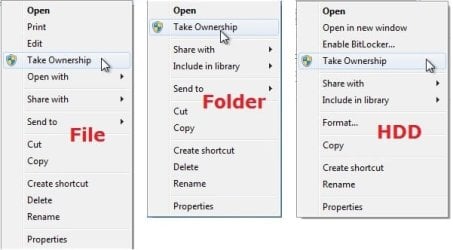
example.jpg


Here's How:

1. Do step 2, 3, or 4 below for what you would like to do.


2. To Add "Take Ownership" to Context Menu

   Note
Application files (ex: EXE, CMD, MSI) will still have Run as administrator instead of Take Ownership in the context menu when you use this step.

A) Click/tap on the Download button below to download the file below, and go to step 5 below.

Add_Take_Ownership_to_context_menu


Download


3. To Add "Take Ownership" with Pause to Context Menu

   Note
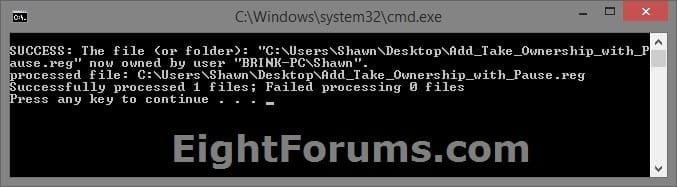
This option pauses the command when you use the "Take Ownership" context menu to be able to see the command results. This can be handy to verify setting ownership and permissions was successful or not.

Application files (ex: EXE, CMD, MSI) will still have Run as administrator instead of Take Ownership in the context menu when you use this step.


Take_Ownership_Pause.jpg


A) Click/tap on the Download button below to download the file below, and go to step 5 below.

Add_Take_Ownership_with_Pause_to_context_menu.reg


Download


4. To Remove "Take Ownership" from Context Menu

   Note
This is the default setting, and will also restore the default Run as administrator for .exe files.


A) Click/tap on the Download button below to download the file below, and go to step 5 below.

Remove_Take_Ownership_from_context_menu.reg


Download


5. Save the .reg file to your Desktop.

6. Double click on the downloaded .reg file to merge it.

7. If prompted, click on Run, Yes (UAC), Yes, and OK to approve the merge.

8. When finished, you can delete the downloaded .reg file if you like.


That's it,
Shawn


Attachments

Last edited:
Yep, it's scary that it doesn't take long to do it. Hopefully, you'll be ok and will not have any issues from doing so.
i restored an w7 image
but i have not an image about xp
:(

is there a way /tool /test to know that everything is ok ?

by the way i'm right Take Ownership change all the permissions to normal user? right?

thanks
you are always very kind


EDIT:
do you know i'm thinking about Ultimate Windows Tweaker

it can show [URL="http://www.sevenforums.com/tutorials/1911-take-ownership-shortcut-post1664679.html#post1664679"]Take Ownership only for files or folder
[/URL]
a new script reg key , for files only or/and folder would be less dangerous;)

thanks
cheers

Sorry, but there's nothing that I'm aware of to test if everything is OK when dealign with ownership and permissions other than you getting a "access denied" message when trying to open or run something, or it just no longer works due to Windows not being able to access it anymore. :(

Take Ownership changes the ownership and permissions to the current user.

I don't much care for those type of all in one tweaker programs. They usually cause more harm than good.

Being able to "Take Ownership" of drives is included in this tutorial's option since many people would like to be able to right click on a HDD to make taking ownership of all of it's contents easier to do. For example, of an external HDD that they lost access permission of somehow.
 

My Computer

Computer type
PC/Desktop
Computer Manufacturer/Model Number
Self built custom
OS
64-bit Windows 11 Pro for Workstations
CPU
Intel i7-8700K OC'd to 5 GHz
Motherboard
ASUS ROG Maximus XI Formula Z390
Memory
64 GB (4x16GB) G.SKILL TridentZ RGB DDR4 3600 MHz
Graphics Card(s)
ASUS ROG-STRIX-GTX1080TI-O11G-GAMING
Sound Card
Integrated
Monitor(s) Displays
2 x Samsung Odyssey G7 27"
Screen Resolution
2560x1440
Hard Drives
1TB Samsung 990 PRO M.2,
4TB Samsung 990 PRO PRO M.2,
TerraMaster F8 SSD Plus NAS
PSU
Seasonic Prime Titanium 850W
Case
Thermaltake Core P3
Cooling
Corsair Hydro H115i
Keyboard
Logitech wireless K800
Mouse
Logitech MX Master 4
Internet Speed
2 Gb/s Download and 100 Mb/s Upload
Antivirus
Malwarebyte Anti-Malware Premium
Browser
Google Chrome
Other Info
Logitech Z625 speaker system,
Logitech BRIO 4K Pro webcam,
HP Color LaserJet Pro MFP M477fdn,
APC SMART-UPS RT 1000 XL - SURT1000XLI,
Galaxy S23 Plus phone
Sorry, but there's nothing that I'm aware of to test if everything is OK when dealign with ownership and permissions other than you getting a "access denied" message when trying to open or run something, or it just no longer works due to Windows not being able to access it anymore. :(

Take Ownership changes the ownership and permissions to the current user.

I don't much care for those type of all in one tweaker programs. They usually cause more harm than good.

Being able to "Take Ownership" of drives is included in this tutorial's option since many people would like to be able to right click on a HDD to make taking ownership of all of it's contents easier to do. For example, of an external HDD that they lost access permission of somehow.

thanks
but could possibile to have a regkey to add "Take Ownership" only for files or folders?

cheers
 
Last edited:

My Computer

Computer type
PC/Desktop
OS
windows 7 ultimate 64bit
Drugo,

Yes, here you go mate. :)
 

Attachments

My Computer

Computer type
PC/Desktop
Computer Manufacturer/Model Number
Self built custom
OS
64-bit Windows 11 Pro for Workstations
CPU
Intel i7-8700K OC'd to 5 GHz
Motherboard
ASUS ROG Maximus XI Formula Z390
Memory
64 GB (4x16GB) G.SKILL TridentZ RGB DDR4 3600 MHz
Graphics Card(s)
ASUS ROG-STRIX-GTX1080TI-O11G-GAMING
Sound Card
Integrated
Monitor(s) Displays
2 x Samsung Odyssey G7 27"
Screen Resolution
2560x1440
Hard Drives
1TB Samsung 990 PRO M.2,
4TB Samsung 990 PRO PRO M.2,
TerraMaster F8 SSD Plus NAS
PSU
Seasonic Prime Titanium 850W
Case
Thermaltake Core P3
Cooling
Corsair Hydro H115i
Keyboard
Logitech wireless K800
Mouse
Logitech MX Master 4
Internet Speed
2 Gb/s Download and 100 Mb/s Upload
Antivirus
Malwarebyte Anti-Malware Premium
Browser
Google Chrome
Other Info
Logitech Z625 speaker system,
Logitech BRIO 4K Pro webcam,
HP Color LaserJet Pro MFP M477fdn,
APC SMART-UPS RT 1000 XL - SURT1000XLI,
Galaxy S23 Plus phone
Take Ownership does not seem to always work. One folder has hunderds of sub directories and I am having to use Take Ownership on each directory separately.

Why in this case is Take Ownership not also giving me ownership of the sub directories?
 

My Computer

Computer Manufacturer/Model Number
ASUS homebrew
OS
Windows 7 Ultimate x64
CPU
Quad Core
Motherboard
Asus
Memory
8GB
Graphics Card(s)
NVidida GT215
Sound Card
built in
Monitor(s) Displays
24inch
Hard Drives
SATA3
Hello Draexo,

What's the path of the folder?
 

My Computer

Computer type
PC/Desktop
Computer Manufacturer/Model Number
Self built custom
OS
64-bit Windows 11 Pro for Workstations
CPU
Intel i7-8700K OC'd to 5 GHz
Motherboard
ASUS ROG Maximus XI Formula Z390
Memory
64 GB (4x16GB) G.SKILL TridentZ RGB DDR4 3600 MHz
Graphics Card(s)
ASUS ROG-STRIX-GTX1080TI-O11G-GAMING
Sound Card
Integrated
Monitor(s) Displays
2 x Samsung Odyssey G7 27"
Screen Resolution
2560x1440
Hard Drives
1TB Samsung 990 PRO M.2,
4TB Samsung 990 PRO PRO M.2,
TerraMaster F8 SSD Plus NAS
PSU
Seasonic Prime Titanium 850W
Case
Thermaltake Core P3
Cooling
Corsair Hydro H115i
Keyboard
Logitech wireless K800
Mouse
Logitech MX Master 4
Internet Speed
2 Gb/s Download and 100 Mb/s Upload
Antivirus
Malwarebyte Anti-Malware Premium
Browser
Google Chrome
Other Info
Logitech Z625 speaker system,
Logitech BRIO 4K Pro webcam,
HP Color LaserJet Pro MFP M477fdn,
APC SMART-UPS RT 1000 XL - SURT1000XLI,
Galaxy S23 Plus phone
You're most welcome. :)
 

My Computer

Computer type
PC/Desktop
Computer Manufacturer/Model Number
Self built custom
OS
64-bit Windows 11 Pro for Workstations
CPU
Intel i7-8700K OC'd to 5 GHz
Motherboard
ASUS ROG Maximus XI Formula Z390
Memory
64 GB (4x16GB) G.SKILL TridentZ RGB DDR4 3600 MHz
Graphics Card(s)
ASUS ROG-STRIX-GTX1080TI-O11G-GAMING
Sound Card
Integrated
Monitor(s) Displays
2 x Samsung Odyssey G7 27"
Screen Resolution
2560x1440
Hard Drives
1TB Samsung 990 PRO M.2,
4TB Samsung 990 PRO PRO M.2,
TerraMaster F8 SSD Plus NAS
PSU
Seasonic Prime Titanium 850W
Case
Thermaltake Core P3
Cooling
Corsair Hydro H115i
Keyboard
Logitech wireless K800
Mouse
Logitech MX Master 4
Internet Speed
2 Gb/s Download and 100 Mb/s Upload
Antivirus
Malwarebyte Anti-Malware Premium
Browser
Google Chrome
Other Info
Logitech Z625 speaker system,
Logitech BRIO 4K Pro webcam,
HP Color LaserJet Pro MFP M477fdn,
APC SMART-UPS RT 1000 XL - SURT1000XLI,
Galaxy S23 Plus phone
Works like a charm

Mark, thanks for your help. I've been going round and round until now trying to open a directory. Solution is simple and works. Very happy.............:))
bob
 

My Computer

Computer Manufacturer/Model Number
Home Built
OS
Windows 7 Pro x64
CPU
I-7 870 @2.93GHz (LGA 1156)
Motherboard
Intel DH55HC
Memory
16 GB Patriot G Series
Graphics Card(s)
ATI Radeon HD 5770
Sound Card
N/A-M/B only
Monitor(s) Displays
Acer H213H
Screen Resolution
1920x1080
Hard Drives
WD Caviar Blue 500GB
Samsung 2TB
Hitachi 1TB
PSU
Cooler Master Silent Pro M 700w
Case
Azza Orion 202
Cooling
Stock Intel
Keyboard
Logitech Illuminated
Mouse
Logitech G9X
Internet Speed
7Mbps
Thanks v. Much

Thanks v. Much!!!!!!!
 

My Computer

Computer type
PC/Desktop
OS
Microsoft Windows 7 Enterprise 64-bit 7601 Multiprocessor Free Service Pack 1
CPU
Intel(R) Core(TM) i7-2600K CPU @ 3.40GHz
Motherboard
ASUSTeK Computer INC. P8Z68-V PRO
Memory
8.00 GB
Graphics Card(s)
Intel(R) HD Graphics 3000
Sound Card
(1) Realtek High Definition Audio (2) Microsoft LifeCam HD
Screen Resolution
1920 x 1080 x 32 bits (4294967296 colors) @ 60 Hz
Hard Drives
(1) INTEL SSDSC2MH120A2 ATA Device (2) WDC WD10EADS-00L5B1 ATA Device (3) WDC WD15EADS-00P8B0 ATA Device (4) WDC WD20EADS-32S2B0 ATA Device (5) WDC WD20EARS-00MVWB0 ATA Device (6) WDC WD20EARX-00PASB0 ATA Device (7) WDC WD20EZRX-00DC0B0 A
Wonderful tools. Thank you.
 

My Computer

Computer Manufacturer/Model Number
My second rig
OS
Windows Professional 7 64bit
CPU
AMD Phenom II X4 965 Black Edition @4.2Ghz
Motherboard
ASUS 970 EVO
Memory
G.Skill DDR3 1600 2X4GB
Graphics Card(s)
AMD HD 6770 GDDR5 1GB Core 920Mhz Memory 1270Mhz
Sound Card
Realteck HD 7.1CH
Monitor(s) Displays
Sony 20.1inch Samsung 3DTV 63C7000
Screen Resolution
1600X1200, 1920X1024
Hard Drives
Corsair Force Series 3 120GB
PSU
Coolermaster Extreme 600W
Case
Thermaltake Gaming V4
Cooling
Coolermaster Hyper 212 Plus
Keyboard
GearHead KB5150W 2.4Ghz RF Wireless Keyboard and mouse
Mouse
GearHead KB5150W 2.4Ghz RF Wireless Keyboard and mouse
Internet Speed
15Mbps/5Mbps
c drive

can i take ownership of the main user folder in the user folder in the c drive because i want to change the name of it because it was the model on display so i want to change the name from the stores name to my name
 

My Computer

OS
windows 7 home premium 64bit

My Computer

Computer Manufacturer/Model Number
acer aspire 5935g
OS
Windows 7 Home Premium x64 SP1
CPU
intel(R)core(TM)2 duo CPU T6600 @ 2.20GHz
Motherboard
intel gm45/gm47 revision 07
Memory
3 gb ddr3
Graphics Card(s)
ati radeon hd4570/512mb
Monitor(s) Displays
lop156wh2-tle1 15.3 flat
Screen Resolution
1366x768
Hard Drives
OCZ-Agility3 60gig ssd
320gig external hdd
500gig external hdd
Mouse
Optical
Internet Speed
30Mbps Down/30Mbps Up
c drive

i dont want to change the folder "users" i want to change one of the folders inside it so it no longer says the name of the store. what i want to know is because it is in the c drive will i screw anything up if i take ownership of the folder inside the users folder to change the name
 

My Computer

OS
windows 7 home premium 64bit
i dont want to change the folder "users" i want to change one of the folders inside it so it no longer says the name of the store. what i want to know is because it is in the c drive will i screw anything up if i take ownership of the folder inside the users folder to change the name

It would depend mostly on what uses that folder and whether it would still be recognised after the name change.My advice would be to back up first.

Danny
 

My Computer

Computer Manufacturer/Model Number
acer aspire 5935g
OS
Windows 7 Home Premium x64 SP1
CPU
intel(R)core(TM)2 duo CPU T6600 @ 2.20GHz
Motherboard
intel gm45/gm47 revision 07
Memory
3 gb ddr3
Graphics Card(s)
ati radeon hd4570/512mb
Monitor(s) Displays
lop156wh2-tle1 15.3 flat
Screen Resolution
1366x768
Hard Drives
OCZ-Agility3 60gig ssd
320gig external hdd
500gig external hdd
Mouse
Optical
Internet Speed
30Mbps Down/30Mbps Up
c drive, take ownership

hi,

I downloaded take ownership to open files in my external HD.

when i opened it it said that the c drive was taken ownership over.

i tried to do system restore, cant open it.

HELP what should i do now?

Thanks
 

My Computer

OS
7 64 bit
Hello TT, and welcome to Seven Forums.

See if you may be able to do a system restore at boot instead using a restore point dated before you did this by mistake.

Hope this helps,
Shawn
 

My Computer

Computer type
PC/Desktop
Computer Manufacturer/Model Number
Self built custom
OS
64-bit Windows 11 Pro for Workstations
CPU
Intel i7-8700K OC'd to 5 GHz
Motherboard
ASUS ROG Maximus XI Formula Z390
Memory
64 GB (4x16GB) G.SKILL TridentZ RGB DDR4 3600 MHz
Graphics Card(s)
ASUS ROG-STRIX-GTX1080TI-O11G-GAMING
Sound Card
Integrated
Monitor(s) Displays
2 x Samsung Odyssey G7 27"
Screen Resolution
2560x1440
Hard Drives
1TB Samsung 990 PRO M.2,
4TB Samsung 990 PRO PRO M.2,
TerraMaster F8 SSD Plus NAS
PSU
Seasonic Prime Titanium 850W
Case
Thermaltake Core P3
Cooling
Corsair Hydro H115i
Keyboard
Logitech wireless K800
Mouse
Logitech MX Master 4
Internet Speed
2 Gb/s Download and 100 Mb/s Upload
Antivirus
Malwarebyte Anti-Malware Premium
Browser
Google Chrome
Other Info
Logitech Z625 speaker system,
Logitech BRIO 4K Pro webcam,
HP Color LaserJet Pro MFP M477fdn,
APC SMART-UPS RT 1000 XL - SURT1000XLI,
Galaxy S23 Plus phone
thanks Shawn

I don't think i got a cd with my laptop.

And i cant open up the system restore, nothing happens.

fyi i have 64 bit thinkpad
 

My Computer

OS
7 64 bit

My Computer

Computer type
PC/Desktop
Computer Manufacturer/Model Number
Self built custom
OS
64-bit Windows 11 Pro for Workstations
CPU
Intel i7-8700K OC'd to 5 GHz
Motherboard
ASUS ROG Maximus XI Formula Z390
Memory
64 GB (4x16GB) G.SKILL TridentZ RGB DDR4 3600 MHz
Graphics Card(s)
ASUS ROG-STRIX-GTX1080TI-O11G-GAMING
Sound Card
Integrated
Monitor(s) Displays
2 x Samsung Odyssey G7 27"
Screen Resolution
2560x1440
Hard Drives
1TB Samsung 990 PRO M.2,
4TB Samsung 990 PRO PRO M.2,
TerraMaster F8 SSD Plus NAS
PSU
Seasonic Prime Titanium 850W
Case
Thermaltake Core P3
Cooling
Corsair Hydro H115i
Keyboard
Logitech wireless K800
Mouse
Logitech MX Master 4
Internet Speed
2 Gb/s Download and 100 Mb/s Upload
Antivirus
Malwarebyte Anti-Malware Premium
Browser
Google Chrome
Other Info
Logitech Z625 speaker system,
Logitech BRIO 4K Pro webcam,
HP Color LaserJet Pro MFP M477fdn,
APC SMART-UPS RT 1000 XL - SURT1000XLI,
Galaxy S23 Plus phone
Clarification Please

I know this is an old thread, but could you tell me what exactly happens re: tutorial, the warning about having to re-install windows. I have used the "take ownership" and now am having trouble with losing my admin privilege. I have been fighting this for awhile now and would like to know if this is the problem.

Hope to hear from you, thanks
 

My Computer

Computer Manufacturer/Model Number
Home Built
OS
Windows 7 Pro x64
CPU
I-7 870 @2.93GHz (LGA 1156)
Motherboard
Intel DH55HC
Memory
16 GB Patriot G Series
Graphics Card(s)
ATI Radeon HD 5770
Sound Card
N/A-M/B only
Monitor(s) Displays
Acer H213H
Screen Resolution
1920x1080
Hard Drives
WD Caviar Blue 500GB
Samsung 2TB
Hitachi 1TB
PSU
Cooler Master Silent Pro M 700w
Case
Azza Orion 202
Cooling
Stock Intel
Keyboard
Logitech Illuminated
Mouse
Logitech G9X
Internet Speed
7Mbps
Back
Top