
Take Ownership Shortcut

Add "Take Ownership" to Context Menu of Files, Folders, and Drives in Windows


   Information
This tutorial will show you how to add Take Ownership to the context menu of all files, folders, and drives for all users in Windows.

This will allow you to be able to instantly take ownership of a file, folder (and all contents), or drive (and all contents) by changing the owner to the current user and grant the Owner_Rights SID (current owner) full access permission.

You must be an administrator to be able to add, remove, and use the "Take Ownership" context menu.

   Note
Application files (ex: EXE, CMD, MSI) will continue to have Run as administrator instead of Take Ownership in their context menu.


When you right click or press and hold on a file, folder, or drive, and click/tap on Take Ownership, you may be prompted by UAC for permission to do so first.

If a user is logged in as an administrator, then the user would just click/tap on Yes to approve and take ownership. The owner of the file, folder, or drive would be changed to the current administrator user account. Permissions would be set to allow the Owner_Rights SID (current owner) full control of the file, folder, or drive.

If a user is logged in as a standard user, then the user would need to enter a selected administrator's password to approve and take ownership. The owner of the file, folder, or drive would be changed to the selected administrator account, and not the standard user. Permissions would be set to allow the Owner_Rights SID (current owner) full control of the file, folder, or drive.


The Take Ownership context menu will not be available when you right click on the C: drive, C:\Program Files folder, C:\Program Files (x86) folder, C:\ProgramData folder, C:\Users folder, and C:\Windows folder. This was done because taking ownership of these system folders can make Windows unstable since it would also take ownership of all the folder's content at the same time.

You will still be able to use the Take Ownership context menu of files inside the folder locations above.

If you would like to have a custom location(s) of your own to not have the context menu, then please feel free to post a request in this tutorial thread. I'll be happy to post back with a custom .reg file for it.

   Warning
This context menu will only work with English Windows installations.

If you have a different language, then please post a reply with what language you have instead. I'll be happy to post back a translated version for you.


EXAMPLE: Take Ownership in Context Menu
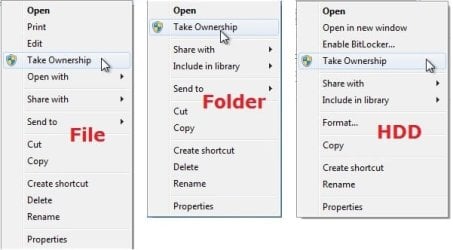
example.jpg


Here's How:

1. Do step 2, 3, or 4 below for what you would like to do.


2. To Add "Take Ownership" to Context Menu

   Note
Application files (ex: EXE, CMD, MSI) will still have Run as administrator instead of Take Ownership in the context menu when you use this step.

A) Click/tap on the Download button below to download the file below, and go to step 5 below.

Add_Take_Ownership_to_context_menu


Download


3. To Add "Take Ownership" with Pause to Context Menu

   Note
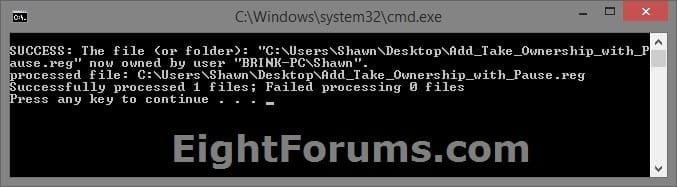
This option pauses the command when you use the "Take Ownership" context menu to be able to see the command results. This can be handy to verify setting ownership and permissions was successful or not.

Application files (ex: EXE, CMD, MSI) will still have Run as administrator instead of Take Ownership in the context menu when you use this step.


Take_Ownership_Pause.jpg


A) Click/tap on the Download button below to download the file below, and go to step 5 below.

Add_Take_Ownership_with_Pause_to_context_menu.reg


Download


4. To Remove "Take Ownership" from Context Menu

   Note
This is the default setting, and will also restore the default Run as administrator for .exe files.


A) Click/tap on the Download button below to download the file below, and go to step 5 below.

Remove_Take_Ownership_from_context_menu.reg


Download


5. Save the .reg file to your Desktop.

6. Double click on the downloaded .reg file to merge it.

7. If prompted, click on Run, Yes (UAC), Yes, and OK to approve the merge.

8. When finished, you can delete the downloaded .reg file if you like.


That's it,
Shawn


Attachments

Last edited:
Error Peculiar to taking ownership of Vista folders?

Gang
have any run into this: I have a Vista drive lashed to my lab mule Windows 7 Ultimate x64, trying to save some, secure-delete other, files/folders off an older Vista drive so I can redeploy it to a recovering laptop.
It seems that no matter what I pick on the drive to deal with the files, when I hit the "Take Ownership" shortcut, it seems to get caught in a loop, acting upon the files over and over ad infinitum. I have yet to run it "till forever"... I usually cancel it after 15 minutes or so [we're talking about a small 80gb drive and way smaller folders - maybe a few hundred files at most on one operation[].
After doing this, its "broken" it seems. If I try to use "Take Ownership" again before restarting the system, it will just bail out [I get a cmd-prompt window that quickly closes... can't read anything]

any help with this would be really valuable
 

My Computer My Computer

At a glance

Windows XP Pro SP3, Windows 7 Pro 32-bit, Win...Pentium 4 3.2GHz, Pentium 4 3.4GHz 64bit, Atom,4GB matched, 1GB, 2.5GB, 4.0 GBGeforce 8400 GS and others
Computer Manufacturer/Model Number
HP DC7600, HP DC7600[2], HP DC7100, Samsung NC10
OS
Windows XP Pro SP3, Windows 7 Pro 32-bit, Windows 7 Ultimate 64bit, Windows XP Home SP3
CPU
Pentium 4 3.2GHz, Pentium 4 3.4GHz 64bit, Atom,
Motherboard
Dunno
Memory
4GB matched, 1GB, 2.5GB, 4.0 GB
Graphics Card(s)
Geforce 8400 GS and others
Sound Card
RealteK ALC260 and others
Monitor(s) Displays
Asus HD
Screen Resolution
1920x1080
Hard Drives
WD Caviar 640gb SATA
Cooling
We Be Cool
Thanks A Load!

Thank You Very Much Dear!
This post is an older one but I believe Thanking anyone who has helped you is never Late! so Thank You! :)
 

My Computer My Computer

At a glance

Windows 7 Ultimate 32bit
OS
Windows 7 Ultimate 32bit
I couldn't just read this without saying a late thank you very much. Awesome tweak!!
 

My Computer My Computer

At a glance

7 ftw.Core 2 Quad Q8200Kingston 2x2gb DDR2 800GeForce 9600gt
OS
7 ftw.
CPU
Core 2 Quad Q8200
Motherboard
Asus P5QL-SE
Memory
Kingston 2x2gb DDR2 800
Graphics Card(s)
GeForce 9600gt
Sound Card
On-Board
Monitor(s) Displays
Flatron F700P
Screen Resolution
1280x1024
Hard Drives
Seagate 500gb SATAII
Seagate 180gb ATA
PSU
Core 2 Quad Q8200
Case
X-Blade
Cooling
Cooler Master
Keyboard
Any ****
Mouse
Razer Diamondback
Internet Speed
6mb
Other Info
that's fun lmao
Great tip, But I would like to add....

The tip worked great on photos that I had loaded from my camera. However when I went to the files that were loaded from my iPhone-this didn't work as planned. Prior to "taking ownership", I couldn't even open in Microsoft Picture Manager to fix the issue, but I was finally able to make changes only in Microsoft Picture Manager. Not a major issue for me since now I can MAKE CHANGES!!! Just flipping the pics the right direction was a huge improvement. I just wanted to be sure to let others know if they were trying to fix iPhone pics, this was the only way I could resolve it.
:thumbsup:
 

My Computer My Computer

At a glance

Windows 7 32bit
OS
Windows 7 32bit
Thanks, I've been struggling all weekend with backup access denied etc. and I eventually found this and it's sorted it in 2 minutes flat :D
 

My Computer My Computer

At a glance

Windows 7 Ultimate x64AMD Athalon II Quad Core 2.81GHz4GB DDR2 800MHzNvidia GeForce 7300GS
Computer Manufacturer/Model Number
Self build work in progress
OS
Windows 7 Ultimate x64
CPU
AMD Athalon II Quad Core 2.81GHz
Motherboard
nVidia GeForce 6100 PM-M2
Memory
4GB DDR2 800MHz
Graphics Card(s)
Nvidia GeForce 7300GS
Sound Card
C-Media Audio Dolby 7.1 Surround
Monitor(s) Displays
17" TFT
Screen Resolution
1024 x 768
Hard Drives
Internal:
200Gb Maxtor
1TB Western Digital Caviar Green (WD10EARS)
1TB Western Digital Caviar Green (WD10EADS)
External:
1TB Western Digital Caviar Green (WD10EADS)
320Gb Seagate Baracuda
PSU
450W
Case
Packard Bell iMedia
Cooling
PSU & CPU Fans
Keyboard
Logitech G110
Mouse
USB Optical
Internet Speed
Rubbish @ 1.2Mbps
Thaaaaaaaaaaaaaaaaanks man
finally i deleted the damn folder
 

My Computer My Computer

At a glance

Windows 7
OS
Windows 7
:geek:

thank you very much it helped and awesome faster :D
 

My Computer My Computer

At a glance

win 8 32 bit
OS
win 8 32 bit
Does this also work in Win8? I used it a lot in Win7!

I ask because it WAS carried over during install, so never got a chance to try it. All of my other-than-Windows programs got removed (by Windows) after a Refresh. :mad:
I'll be heading the Windows Eight forums so as to not go OT. :)
 

My Computer My Computer

At a glance

Windows 7 Pro x64 (Upgrade, Clean Install)
Computer type
Laptop
OS
Windows 7 Pro x64 (Upgrade, Clean Install)

My Computer My Computer

At a glance

64-bit Windows 11 Pro for WorkstationsIntel i7-8700K OC'd to 5 GHz64 GB (4x16GB) G.SKILL TridentZ RGB DDR4 3600...ASUS ROG-STRIX-GTX1080TI-O11G-GAMING
Computer type
PC/Desktop
Computer Manufacturer/Model Number
Self built custom
OS
64-bit Windows 11 Pro for Workstations
CPU
Intel i7-8700K OC'd to 5 GHz
Motherboard
ASUS ROG Maximus XI Formula Z390
Memory
64 GB (4x16GB) G.SKILL TridentZ RGB DDR4 3600 MHz
Graphics Card(s)
ASUS ROG-STRIX-GTX1080TI-O11G-GAMING
Sound Card
Integrated
Monitor(s) Displays
2 x Samsung Odyssey G7 27"
Screen Resolution
2560x1440
Hard Drives
1TB Samsung 990 PRO M.2,
4TB Samsung 990 PRO PRO M.2,
TerraMaster F8 SSD Plus NAS
PSU
Seasonic Prime Titanium 850W
Case
Thermaltake Core P3
Cooling
Corsair Hydro H115i
Keyboard
Logitech wireless K800
Mouse
Logitech MX Master 4
Internet Speed
2 Gb/s Download and 100 Mb/s Upload
Antivirus
Malwarebyte Anti-Malware Premium
Browser
Google Chrome
Other Info
Logitech Z625 speaker system,
Logitech BRIO 4K Pro webcam,
HP Color LaserJet Pro MFP M477fdn,
APC SMART-UPS RT 1000 XL - SURT1000XLI,
Galaxy S23 Plus phone
very handy for editing the host file, thanks :D!
 

My Computer My Computer

At a glance

Windows 7 Ultimate x64, Windows 8.1 Pro x64 (...AMD - A6-3670 Accelerated Processing unit W/R...8.00GBAMD Radeon HD 6530D (APU)
Computer type
PC/Desktop
Computer Manufacturer/Model Number
Desktop - Zoostorm, Laptop - HP
OS
Windows 7 Ultimate x64, Windows 8.1 Pro x64 (on laptop)
CPU
AMD - A6-3670 Accelerated Processing unit W/Radeon HD6530D
Motherboard
MSI
Memory
8.00GB
Graphics Card(s)
AMD Radeon HD 6530D (APU)
Sound Card
Realtek HD
Monitor(s) Displays
single/one
Screen Resolution
1440x900
Hard Drives
1x2tb internal
1x1tb external
PSU
300W
Case
Zoostorm
Cooling
1 rear fan (12cm) 1 GPU cooler fan(8CM) 2 side fans (12cm)
Keyboard
Saitek C.Y.B.O.R.G V5
Mouse
Saitek R.A.T V3
Internet Speed
Download - 17-20 mbps. Upload - 07-1.3 mbps
Antivirus
Eset Smart Security 7.0.302.26
Browser
Google chrome, IE11, Firefox
Other Info
The laptop is a HP Pavillion G6 (AMD A10 APU @ 2.3 (turbo to 3.2) ghz)

My Computer My Computer

At a glance

Windows 7 Pro x64 (Upgrade, Clean Install)
Computer type
Laptop
OS
Windows 7 Pro x64 (Upgrade, Clean Install)

My Computer My Computer

At a glance

64-bit Windows 11 Pro for WorkstationsIntel i7-8700K OC'd to 5 GHz64 GB (4x16GB) G.SKILL TridentZ RGB DDR4 3600...ASUS ROG-STRIX-GTX1080TI-O11G-GAMING
Computer type
PC/Desktop
Computer Manufacturer/Model Number
Self built custom
OS
64-bit Windows 11 Pro for Workstations
CPU
Intel i7-8700K OC'd to 5 GHz
Motherboard
ASUS ROG Maximus XI Formula Z390
Memory
64 GB (4x16GB) G.SKILL TridentZ RGB DDR4 3600 MHz
Graphics Card(s)
ASUS ROG-STRIX-GTX1080TI-O11G-GAMING
Sound Card
Integrated
Monitor(s) Displays
2 x Samsung Odyssey G7 27"
Screen Resolution
2560x1440
Hard Drives
1TB Samsung 990 PRO M.2,
4TB Samsung 990 PRO PRO M.2,
TerraMaster F8 SSD Plus NAS
PSU
Seasonic Prime Titanium 850W
Case
Thermaltake Core P3
Cooling
Corsair Hydro H115i
Keyboard
Logitech wireless K800
Mouse
Logitech MX Master 4
Internet Speed
2 Gb/s Download and 100 Mb/s Upload
Antivirus
Malwarebyte Anti-Malware Premium
Browser
Google Chrome
Other Info
Logitech Z625 speaker system,
Logitech BRIO 4K Pro webcam,
HP Color LaserJet Pro MFP M477fdn,
APC SMART-UPS RT 1000 XL - SURT1000XLI,
Galaxy S23 Plus phone
Works for x64 systems too? Well i just added the .reg then system32 @addOwnership, go to security tab, can't change any permissions, can't add myself, still says access refused just like before i clic on addOwnership... What do i do :sarc:
 

My Computer My Computer

At a glance

Ultimate x86 & x64
OS
Ultimate x86 & x64
Hello goja,

Yep, the "Take Ownership" context menu works in both 32-bit and 64-bit Windows 7.

Using the link in the yellow Tip box at the bottom of the tutorial, double check to make sure you are the "owner", and then try setting permissions for it.

What are you trying to take ownership of?
 

My Computer My Computer

At a glance

64-bit Windows 11 Pro for WorkstationsIntel i7-8700K OC'd to 5 GHz64 GB (4x16GB) G.SKILL TridentZ RGB DDR4 3600...ASUS ROG-STRIX-GTX1080TI-O11G-GAMING
Computer type
PC/Desktop
Computer Manufacturer/Model Number
Self built custom
OS
64-bit Windows 11 Pro for Workstations
CPU
Intel i7-8700K OC'd to 5 GHz
Motherboard
ASUS ROG Maximus XI Formula Z390
Memory
64 GB (4x16GB) G.SKILL TridentZ RGB DDR4 3600 MHz
Graphics Card(s)
ASUS ROG-STRIX-GTX1080TI-O11G-GAMING
Sound Card
Integrated
Monitor(s) Displays
2 x Samsung Odyssey G7 27"
Screen Resolution
2560x1440
Hard Drives
1TB Samsung 990 PRO M.2,
4TB Samsung 990 PRO PRO M.2,
TerraMaster F8 SSD Plus NAS
PSU
Seasonic Prime Titanium 850W
Case
Thermaltake Core P3
Cooling
Corsair Hydro H115i
Keyboard
Logitech wireless K800
Mouse
Logitech MX Master 4
Internet Speed
2 Gb/s Download and 100 Mb/s Upload
Antivirus
Malwarebyte Anti-Malware Premium
Browser
Google Chrome
Other Info
Logitech Z625 speaker system,
Logitech BRIO 4K Pro webcam,
HP Color LaserJet Pro MFP M477fdn,
APC SMART-UPS RT 1000 XL - SURT1000XLI,
Galaxy S23 Plus phone
As i just told you, i've done that, i'm trying it on system32 (as i wanted to overwrite a file in it) and when i add my account and set full control it says i can't, access denied.

Now i'm quite worried about all that so i'll add a question : After we took ownership, can we remove it? I'm not talking about account authorizisations.
 

My Computer My Computer

At a glance

Ultimate x86 & x64
OS
Ultimate x86 & x64
Goja,

I suggested for you to double check that you actually had ownership since you couldn't set permissions. That's usually the cause. ;)

You do not want to take ownership of the System32 folder, so it's a good thing it didn't let you.

Instead, only take ownership and set permissions of the specific file instead.
 

My Computer My Computer

At a glance

64-bit Windows 11 Pro for WorkstationsIntel i7-8700K OC'd to 5 GHz64 GB (4x16GB) G.SKILL TridentZ RGB DDR4 3600...ASUS ROG-STRIX-GTX1080TI-O11G-GAMING
Computer type
PC/Desktop
Computer Manufacturer/Model Number
Self built custom
OS
64-bit Windows 11 Pro for Workstations
CPU
Intel i7-8700K OC'd to 5 GHz
Motherboard
ASUS ROG Maximus XI Formula Z390
Memory
64 GB (4x16GB) G.SKILL TridentZ RGB DDR4 3600 MHz
Graphics Card(s)
ASUS ROG-STRIX-GTX1080TI-O11G-GAMING
Sound Card
Integrated
Monitor(s) Displays
2 x Samsung Odyssey G7 27"
Screen Resolution
2560x1440
Hard Drives
1TB Samsung 990 PRO M.2,
4TB Samsung 990 PRO PRO M.2,
TerraMaster F8 SSD Plus NAS
PSU
Seasonic Prime Titanium 850W
Case
Thermaltake Core P3
Cooling
Corsair Hydro H115i
Keyboard
Logitech wireless K800
Mouse
Logitech MX Master 4
Internet Speed
2 Gb/s Download and 100 Mb/s Upload
Antivirus
Malwarebyte Anti-Malware Premium
Browser
Google Chrome
Other Info
Logitech Z625 speaker system,
Logitech BRIO 4K Pro webcam,
HP Color LaserJet Pro MFP M477fdn,
APC SMART-UPS RT 1000 XL - SURT1000XLI,
Galaxy S23 Plus phone
Double check I had permission, how do I do that? Wanna know. And what shut my other question?
 

My Computer My Computer

At a glance

Ultimate x86 & x64
OS
Ultimate x86 & x64
For single files, it's not hard to restore the default owner. If you take ownership of the System 32 folder, then forget it. There's no going back unless you created a restore point before doing it.

It's highly recommended to not do this with the System32 folder.

You could use OPTION THREE in the tutorial below to manually take ownership and set permissions of the file.

Take Ownership of file
 

My Computer My Computer

At a glance

64-bit Windows 11 Pro for WorkstationsIntel i7-8700K OC'd to 5 GHz64 GB (4x16GB) G.SKILL TridentZ RGB DDR4 3600...ASUS ROG-STRIX-GTX1080TI-O11G-GAMING
Computer type
PC/Desktop
Computer Manufacturer/Model Number
Self built custom
OS
64-bit Windows 11 Pro for Workstations
CPU
Intel i7-8700K OC'd to 5 GHz
Motherboard
ASUS ROG Maximus XI Formula Z390
Memory
64 GB (4x16GB) G.SKILL TridentZ RGB DDR4 3600 MHz
Graphics Card(s)
ASUS ROG-STRIX-GTX1080TI-O11G-GAMING
Sound Card
Integrated
Monitor(s) Displays
2 x Samsung Odyssey G7 27"
Screen Resolution
2560x1440
Hard Drives
1TB Samsung 990 PRO M.2,
4TB Samsung 990 PRO PRO M.2,
TerraMaster F8 SSD Plus NAS
PSU
Seasonic Prime Titanium 850W
Case
Thermaltake Core P3
Cooling
Corsair Hydro H115i
Keyboard
Logitech wireless K800
Mouse
Logitech MX Master 4
Internet Speed
2 Gb/s Download and 100 Mb/s Upload
Antivirus
Malwarebyte Anti-Malware Premium
Browser
Google Chrome
Other Info
Logitech Z625 speaker system,
Logitech BRIO 4K Pro webcam,
HP Color LaserJet Pro MFP M477fdn,
APC SMART-UPS RT 1000 XL - SURT1000XLI,
Galaxy S23 Plus phone
How dko.i.know if i took ownership or not?
 

My Computer My Computer

At a glance

Ultimate x86 & x64
OS
Ultimate x86 & x64
Back
Top