Take Ownership Shortcut

Add "Take Ownership" to Context Menu of Files, Folders, and Drives in Windows


   Information
This tutorial will show you how to add Take Ownership to the context menu of all files, folders, and drives for all users in Windows.

This will allow you to be able to instantly take ownership of a file, folder (and all contents), or drive (and all contents) by changing the owner to the current user and grant the Owner_Rights SID (current owner) full access permission.

You must be an administrator to be able to add, remove, and use the "Take Ownership" context menu.

   Note
Application files (ex: EXE, CMD, MSI) will continue to have Run as administrator instead of Take Ownership in their context menu.


When you right click or press and hold on a file, folder, or drive, and click/tap on Take Ownership, you may be prompted by UAC for permission to do so first.

If a user is logged in as an administrator, then the user would just click/tap on Yes to approve and take ownership. The owner of the file, folder, or drive would be changed to the current administrator user account. Permissions would be set to allow the Owner_Rights SID (current owner) full control of the file, folder, or drive.

If a user is logged in as a standard user, then the user would need to enter a selected administrator's password to approve and take ownership. The owner of the file, folder, or drive would be changed to the selected administrator account, and not the standard user. Permissions would be set to allow the Owner_Rights SID (current owner) full control of the file, folder, or drive.


The Take Ownership context menu will not be available when you right click on the C: drive, C:\Program Files folder, C:\Program Files (x86) folder, C:\ProgramData folder, C:\Users folder, and C:\Windows folder. This was done because taking ownership of these system folders can make Windows unstable since it would also take ownership of all the folder's content at the same time.

You will still be able to use the Take Ownership context menu of files inside the folder locations above.

If you would like to have a custom location(s) of your own to not have the context menu, then please feel free to post a request in this tutorial thread. I'll be happy to post back with a custom .reg file for it.

   Warning
This context menu will only work with English Windows installations.

If you have a different language, then please post a reply with what language you have instead. I'll be happy to post back a translated version for you.


EXAMPLE: Take Ownership in Context Menu
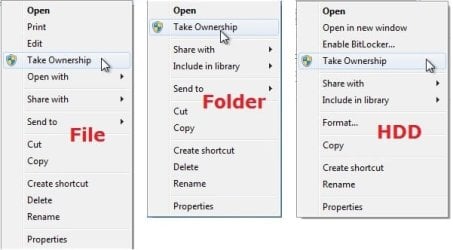
example.jpg


Here's How:

1. Do step 2, 3, or 4 below for what you would like to do.


2. To Add "Take Ownership" to Context Menu

   Note
Application files (ex: EXE, CMD, MSI) will still have Run as administrator instead of Take Ownership in the context menu when you use this step.

A) Click/tap on the Download button below to download the file below, and go to step 5 below.

Add_Take_Ownership_to_context_menu


Download


3. To Add "Take Ownership" with Pause to Context Menu

   Note
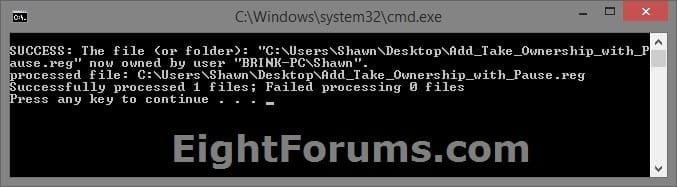
This option pauses the command when you use the "Take Ownership" context menu to be able to see the command results. This can be handy to verify setting ownership and permissions was successful or not.

Application files (ex: EXE, CMD, MSI) will still have Run as administrator instead of Take Ownership in the context menu when you use this step.


Take_Ownership_Pause.jpg


A) Click/tap on the Download button below to download the file below, and go to step 5 below.

Add_Take_Ownership_with_Pause_to_context_menu.reg


Download


4. To Remove "Take Ownership" from Context Menu

   Note
This is the default setting, and will also restore the default Run as administrator for .exe files.


A) Click/tap on the Download button below to download the file below, and go to step 5 below.

Remove_Take_Ownership_from_context_menu.reg


Download


5. Save the .reg file to your Desktop.

6. Double click on the downloaded .reg file to merge it.

7. If prompted, click on Run, Yes (UAC), Yes, and OK to approve the merge.

8. When finished, you can delete the downloaded .reg file if you like.


That's it,
Shawn


Attachments

Last edited:
I installed a fresh copy of Win 7 on my SSD. I left the 2nd HD attached during this process. After the install finished, I was unable to copy any files to the 2nd HD.
I installed the Take Ownership context menu and used it on the Users Folder of the old drive. Now all those folders link to the C drive, which of course have nothing in them yet. Is there a way to undo this? I used the 2nd HD to backup the C drive before the re-install, so I've lost everything....

Thanks,

Art
 

My Computer My Computer

At a glance

Win 7 Ultimate x64
Computer type
Laptop
OS
Win 7 Ultimate x64
I installed a fresh copy of Win 7 on my SSD. I left the 2nd HD attached during this process. After the install finished, I was unable to copy any files to the 2nd HD.
I installed the Take Ownership context menu and used it on the Users Folder of the old drive. Now all those folders link to the C drive, which of course have nothing in them yet. Is there a way to undo this? I used the 2nd HD to backup the C drive before the re-install, so I've lost everything....

Thanks,

Art


Hello Art, and welcome to Seven Forums. :-)

Could you explain more about what you mean by that they are now all linked to the C drive?

The "Take Ownership" context menu will only change the owner of the item to the current user, and grant that user full access in permissions. It has not affect on anything else.
 

My Computer My Computer

At a glance

64-bit Windows 11 Pro for WorkstationsIntel i7-8700K OC'd to 5 GHz64 GB (4x16GB) G.SKILL TridentZ RGB DDR4 3600...ASUS ROG-STRIX-GTX1080TI-O11G-GAMING
Computer type
PC/Desktop
Computer Manufacturer/Model Number
Self built custom
OS
64-bit Windows 11 Pro for Workstations
CPU
Intel i7-8700K OC'd to 5 GHz
Motherboard
ASUS ROG Maximus XI Formula Z390
Memory
64 GB (4x16GB) G.SKILL TridentZ RGB DDR4 3600 MHz
Graphics Card(s)
ASUS ROG-STRIX-GTX1080TI-O11G-GAMING
Sound Card
Integrated
Monitor(s) Displays
2 x Samsung Odyssey G7 27"
Screen Resolution
2560x1440
Hard Drives
1TB Samsung 990 PRO M.2,
4TB Samsung 990 PRO PRO M.2,
TerraMaster F8 SSD Plus NAS
PSU
Seasonic Prime Titanium 850W
Case
Thermaltake Core P3
Cooling
Corsair Hydro H115i
Keyboard
Logitech wireless K800
Mouse
Logitech MX Master 4
Internet Speed
2 Gb/s Download and 100 Mb/s Upload
Antivirus
Malwarebyte Anti-Malware Premium
Browser
Google Chrome
Other Info
Logitech Z625 speaker system,
Logitech BRIO 4K Pro webcam,
HP Color LaserJet Pro MFP M477fdn,
APC SMART-UPS RT 1000 XL - SURT1000XLI,
Galaxy S23 Plus phone
I have an SSD and a 2nd platter drive in my laptop. The 2nd drive was used to be the boot drive years ago, once I got the SSD, I made it the boot drive. I left Win 7 on the 2nd as a backup bootable. It’s run for years with no problems. To save space, I used my profile on the old ‘Documents and Settings’ folder on the 2nd for all my docs, pics, etc. For the fresh install, I used a different user name.
After the install, I was getting permission errors trying to transfer items to the 2nd and installing apps. Did some research and found this tool, installed it and used it on the 2nd drive ‘Documents and Settings‘. In that folder were 3 subfolders - Public, Mine and All Users (mine was the only one with meaningful items).
After a *long* time the cmd window stopped scrolling text and closed.
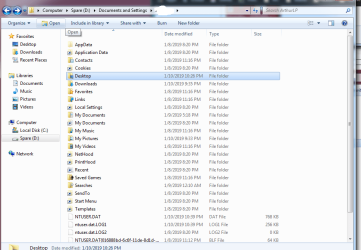
After the script ran the ‘Doc & Settings’ icon is different - where it was a folder with a lock on it, now it’s a small square with an arrow. I open it and see the 3e folders - All Users and Mine have lock icons, Public doesn't. I can open My folder despite the Lock, but most of the icons are arrows - My Docs, My pics, My Music, etc. Double clicking those open the corresponding folder on the fresh Win install on the SSD. There are no docs, pics, or music in them.
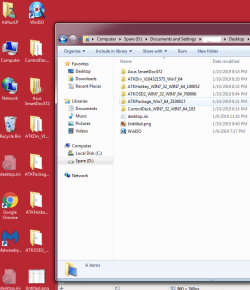
In one of the attachments is shows the Doc & Setting folder as I see it now. The other shows what I see when I double click the Desktop folder - as you can see shows the items that are on the current desktop. The path includes the new username, but on the D drive. It should be the items from that very old user.
In addition to all the Spare drive issues, the Documents & Settings folder on the fresh Win7 on C drive has a lock icon and wont let me open it "Access Denied". So the Spare drive Doc&Settings acts like the boot drive Docs and the boot drive is inaccessible
I just remembered something that may help troubleshooting - in the prior install I had redirected my boot drive user folders (docs, pics, music) to the Spare ‘Docs & Settings’ via dynamic link. So previously - clicking the My Documents icon in the side bar opened the Doc folder on the Spare.
But Change Ownership shouldn’t have replaced the folder, just changed the ownership rights to my new username, right? The Spare folders were not the dynamic folders, they were what the SSD pointed to. I thought that dynamic folders were a one way path, not a back and forth thing.

I'm long-winded, but I hope this gives a better picture of the issue and hopefully a resolution where I can get my stuff back!
 

My Computer My Computer

At a glance

Win 7 Ultimate x64
Computer type
Laptop
OS
Win 7 Ultimate x64
Attachments
Untitled3.png

Untitled2.png
 

My Computer My Computer

At a glance

Win 7 Ultimate x64
Computer type
Laptop
OS
Win 7 Ultimate x64
Ak, ok.

The "Documents and Settings" folder is a protected hidden system folder, and should not be used or messed with as you found out.

You could try using the context menu added by the tutorial below to reset permissions of the folder back to default to see if that may help.

:ar: Add Reset Permissions to Context Menu in Windows | Tutorials
 

My Computer My Computer

At a glance

64-bit Windows 11 Pro for WorkstationsIntel i7-8700K OC'd to 5 GHz64 GB (4x16GB) G.SKILL TridentZ RGB DDR4 3600...ASUS ROG-STRIX-GTX1080TI-O11G-GAMING
Computer type
PC/Desktop
Computer Manufacturer/Model Number
Self built custom
OS
64-bit Windows 11 Pro for Workstations
CPU
Intel i7-8700K OC'd to 5 GHz
Motherboard
ASUS ROG Maximus XI Formula Z390
Memory
64 GB (4x16GB) G.SKILL TridentZ RGB DDR4 3600 MHz
Graphics Card(s)
ASUS ROG-STRIX-GTX1080TI-O11G-GAMING
Sound Card
Integrated
Monitor(s) Displays
2 x Samsung Odyssey G7 27"
Screen Resolution
2560x1440
Hard Drives
1TB Samsung 990 PRO M.2,
4TB Samsung 990 PRO PRO M.2,
TerraMaster F8 SSD Plus NAS
PSU
Seasonic Prime Titanium 850W
Case
Thermaltake Core P3
Cooling
Corsair Hydro H115i
Keyboard
Logitech wireless K800
Mouse
Logitech MX Master 4
Internet Speed
2 Gb/s Download and 100 Mb/s Upload
Antivirus
Malwarebyte Anti-Malware Premium
Browser
Google Chrome
Other Info
Logitech Z625 speaker system,
Logitech BRIO 4K Pro webcam,
HP Color LaserJet Pro MFP M477fdn,
APC SMART-UPS RT 1000 XL - SURT1000XLI,
Galaxy S23 Plus phone
Hello,

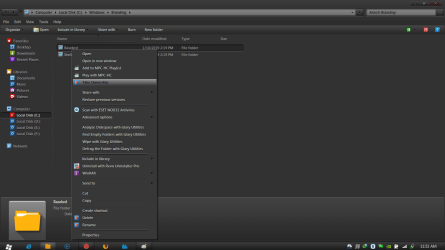
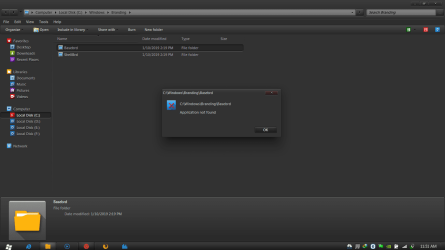
After adding the registry I am getting this message. Also my permission options are grayed out. Please see attachments.

I am looking for solutions for 3 days now. Please help me out.

Thanks in advanced.
Iori
 

Attachments

  • 1.png
    1.png
    38.1 KB · Views: 56
  • 2.png
    2.png
    31.8 KB · Views: 60
  • 3.png
    3.png
    41 KB · Views: 48

My Computer My Computer

At a glance

Windows 7 64 BitCore-i-5 2nd Generation Processor, 2.8 Ghz8 GB TranscendAmd Raideon HD6670
Computer type
PC/Desktop
Computer Manufacturer/Model Number
Intel
OS
Windows 7 64 Bit
CPU
Core-i-5 2nd Generation Processor, 2.8 Ghz
Motherboard
Intel DH61WW
Memory
8 GB Transcend
Graphics Card(s)
Amd Raideon HD6670
Hard Drives
Western Digital 1 TB 7200 RPM Hard Drive
Storejet Transcend 1TB Portable Hard Drive
Antivirus
Eset Antivirus
Browser
Google Chrome
Hello Iori, :-)

If the middle screenshot is what you see after using the "Take Ownership" context menu on the "basebrd.dll" file, then it the .reg file in the tutorial may not have successfully merged.

The "Application not found" message indicates it cannot find the cmd.exe file to run the command from the context menu.

Try merging the .reg file again to see if that may help.
 

My Computer My Computer

At a glance

64-bit Windows 11 Pro for WorkstationsIntel i7-8700K OC'd to 5 GHz64 GB (4x16GB) G.SKILL TridentZ RGB DDR4 3600...ASUS ROG-STRIX-GTX1080TI-O11G-GAMING
Computer type
PC/Desktop
Computer Manufacturer/Model Number
Self built custom
OS
64-bit Windows 11 Pro for Workstations
CPU
Intel i7-8700K OC'd to 5 GHz
Motherboard
ASUS ROG Maximus XI Formula Z390
Memory
64 GB (4x16GB) G.SKILL TridentZ RGB DDR4 3600 MHz
Graphics Card(s)
ASUS ROG-STRIX-GTX1080TI-O11G-GAMING
Sound Card
Integrated
Monitor(s) Displays
2 x Samsung Odyssey G7 27"
Screen Resolution
2560x1440
Hard Drives
1TB Samsung 990 PRO M.2,
4TB Samsung 990 PRO PRO M.2,
TerraMaster F8 SSD Plus NAS
PSU
Seasonic Prime Titanium 850W
Case
Thermaltake Core P3
Cooling
Corsair Hydro H115i
Keyboard
Logitech wireless K800
Mouse
Logitech MX Master 4
Internet Speed
2 Gb/s Download and 100 Mb/s Upload
Antivirus
Malwarebyte Anti-Malware Premium
Browser
Google Chrome
Other Info
Logitech Z625 speaker system,
Logitech BRIO 4K Pro webcam,
HP Color LaserJet Pro MFP M477fdn,
APC SMART-UPS RT 1000 XL - SURT1000XLI,
Galaxy S23 Plus phone
I tried that. I emerged and removed couple of times. But still the problem exists. Please help.
 

My Computer My Computer

At a glance

Windows 7 64 BitCore-i-5 2nd Generation Processor, 2.8 Ghz8 GB TranscendAmd Raideon HD6670
Computer type
PC/Desktop
Computer Manufacturer/Model Number
Intel
OS
Windows 7 64 Bit
CPU
Core-i-5 2nd Generation Processor, 2.8 Ghz
Motherboard
Intel DH61WW
Memory
8 GB Transcend
Graphics Card(s)
Amd Raideon HD6670
Hard Drives
Western Digital 1 TB 7200 RPM Hard Drive
Storejet Transcend 1TB Portable Hard Drive
Antivirus
Eset Antivirus
Browser
Google Chrome
Ok. I was using some other windows version reg file. Downloaded the this thread file and worked fine. Thanks. :)
 

My Computer My Computer

At a glance

Windows 7 64 BitCore-i-5 2nd Generation Processor, 2.8 Ghz8 GB TranscendAmd Raideon HD6670
Computer type
PC/Desktop
Computer Manufacturer/Model Number
Intel
OS
Windows 7 64 Bit
CPU
Core-i-5 2nd Generation Processor, 2.8 Ghz
Motherboard
Intel DH61WW
Memory
8 GB Transcend
Graphics Card(s)
Amd Raideon HD6670
Hard Drives
Western Digital 1 TB 7200 RPM Hard Drive
Storejet Transcend 1TB Portable Hard Drive
Antivirus
Eset Antivirus
Browser
Google Chrome
Great news. :party:
 

My Computer My Computer

At a glance

64-bit Windows 11 Pro for WorkstationsIntel i7-8700K OC'd to 5 GHz64 GB (4x16GB) G.SKILL TridentZ RGB DDR4 3600...ASUS ROG-STRIX-GTX1080TI-O11G-GAMING
Computer type
PC/Desktop
Computer Manufacturer/Model Number
Self built custom
OS
64-bit Windows 11 Pro for Workstations
CPU
Intel i7-8700K OC'd to 5 GHz
Motherboard
ASUS ROG Maximus XI Formula Z390
Memory
64 GB (4x16GB) G.SKILL TridentZ RGB DDR4 3600 MHz
Graphics Card(s)
ASUS ROG-STRIX-GTX1080TI-O11G-GAMING
Sound Card
Integrated
Monitor(s) Displays
2 x Samsung Odyssey G7 27"
Screen Resolution
2560x1440
Hard Drives
1TB Samsung 990 PRO M.2,
4TB Samsung 990 PRO PRO M.2,
TerraMaster F8 SSD Plus NAS
PSU
Seasonic Prime Titanium 850W
Case
Thermaltake Core P3
Cooling
Corsair Hydro H115i
Keyboard
Logitech wireless K800
Mouse
Logitech MX Master 4
Internet Speed
2 Gb/s Download and 100 Mb/s Upload
Antivirus
Malwarebyte Anti-Malware Premium
Browser
Google Chrome
Other Info
Logitech Z625 speaker system,
Logitech BRIO 4K Pro webcam,
HP Color LaserJet Pro MFP M477fdn,
APC SMART-UPS RT 1000 XL - SURT1000XLI,
Galaxy S23 Plus phone
tradução

Por favor conseguiriam traduzir o post para Portugues/Brasil
 

My Computer My Computer

At a glance

windows 10 64 bit
Computer type
Laptop
OS
windows 10 64 bit

My Computer My Computer

At a glance

64-bit Windows 11 Pro for WorkstationsIntel i7-8700K OC'd to 5 GHz64 GB (4x16GB) G.SKILL TridentZ RGB DDR4 3600...ASUS ROG-STRIX-GTX1080TI-O11G-GAMING
Computer type
PC/Desktop
Computer Manufacturer/Model Number
Self built custom
OS
64-bit Windows 11 Pro for Workstations
CPU
Intel i7-8700K OC'd to 5 GHz
Motherboard
ASUS ROG Maximus XI Formula Z390
Memory
64 GB (4x16GB) G.SKILL TridentZ RGB DDR4 3600 MHz
Graphics Card(s)
ASUS ROG-STRIX-GTX1080TI-O11G-GAMING
Sound Card
Integrated
Monitor(s) Displays
2 x Samsung Odyssey G7 27"
Screen Resolution
2560x1440
Hard Drives
1TB Samsung 990 PRO M.2,
4TB Samsung 990 PRO PRO M.2,
TerraMaster F8 SSD Plus NAS
PSU
Seasonic Prime Titanium 850W
Case
Thermaltake Core P3
Cooling
Corsair Hydro H115i
Keyboard
Logitech wireless K800
Mouse
Logitech MX Master 4
Internet Speed
2 Gb/s Download and 100 Mb/s Upload
Antivirus
Malwarebyte Anti-Malware Premium
Browser
Google Chrome
Other Info
Logitech Z625 speaker system,
Logitech BRIO 4K Pro webcam,
HP Color LaserJet Pro MFP M477fdn,
APC SMART-UPS RT 1000 XL - SURT1000XLI,
Galaxy S23 Plus phone
Hello,
thank you for the french version found on 39 page
best regards
 

My Computer My Computer

At a glance

most of allmost of intel and some Amd
Computer type
PC/Desktop
Computer Manufacturer/Model Number
all brant
OS
most of all
CPU
most of intel and some Amd
Motherboard
Asus, Msi etc...
Hard Drives
generaly SSD
Antivirus
comodo and essential from windows
Browser
IE, Edge, Chrome and Firefox my prefered one
Hello,
thank you for the french version found on 39 page
best regards


Welcome to Ten Forums didus69. I'm glad it could help. :-)
 

My Computer My Computer

At a glance

64-bit Windows 11 Pro for WorkstationsIntel i7-8700K OC'd to 5 GHz64 GB (4x16GB) G.SKILL TridentZ RGB DDR4 3600...ASUS ROG-STRIX-GTX1080TI-O11G-GAMING
Computer type
PC/Desktop
Computer Manufacturer/Model Number
Self built custom
OS
64-bit Windows 11 Pro for Workstations
CPU
Intel i7-8700K OC'd to 5 GHz
Motherboard
ASUS ROG Maximus XI Formula Z390
Memory
64 GB (4x16GB) G.SKILL TridentZ RGB DDR4 3600 MHz
Graphics Card(s)
ASUS ROG-STRIX-GTX1080TI-O11G-GAMING
Sound Card
Integrated
Monitor(s) Displays
2 x Samsung Odyssey G7 27"
Screen Resolution
2560x1440
Hard Drives
1TB Samsung 990 PRO M.2,
4TB Samsung 990 PRO PRO M.2,
TerraMaster F8 SSD Plus NAS
PSU
Seasonic Prime Titanium 850W
Case
Thermaltake Core P3
Cooling
Corsair Hydro H115i
Keyboard
Logitech wireless K800
Mouse
Logitech MX Master 4
Internet Speed
2 Gb/s Download and 100 Mb/s Upload
Antivirus
Malwarebyte Anti-Malware Premium
Browser
Google Chrome
Other Info
Logitech Z625 speaker system,
Logitech BRIO 4K Pro webcam,
HP Color LaserJet Pro MFP M477fdn,
APC SMART-UPS RT 1000 XL - SURT1000XLI,
Galaxy S23 Plus phone
Update

Hi Mr. Brink, is there an updated of take ownership for Windows 7 Ultimate 32bits in spanish version?
 

My Computer My Computer

At a glance

Windows 7 Ultimate 32 bits sp1
Computer type
PC/Desktop
Computer Manufacturer/Model Number
HP Compaq DC5100 SFF
OS
Windows 7 Ultimate 32 bits sp1
Antivirus
Panda
Browser
IE 11, Chrome, and Firefox

My Computer My Computer

At a glance

64-bit Windows 11 Pro for WorkstationsIntel i7-8700K OC'd to 5 GHz64 GB (4x16GB) G.SKILL TridentZ RGB DDR4 3600...ASUS ROG-STRIX-GTX1080TI-O11G-GAMING
Computer type
PC/Desktop
Computer Manufacturer/Model Number
Self built custom
OS
64-bit Windows 11 Pro for Workstations
CPU
Intel i7-8700K OC'd to 5 GHz
Motherboard
ASUS ROG Maximus XI Formula Z390
Memory
64 GB (4x16GB) G.SKILL TridentZ RGB DDR4 3600 MHz
Graphics Card(s)
ASUS ROG-STRIX-GTX1080TI-O11G-GAMING
Sound Card
Integrated
Monitor(s) Displays
2 x Samsung Odyssey G7 27"
Screen Resolution
2560x1440
Hard Drives
1TB Samsung 990 PRO M.2,
4TB Samsung 990 PRO PRO M.2,
TerraMaster F8 SSD Plus NAS
PSU
Seasonic Prime Titanium 850W
Case
Thermaltake Core P3
Cooling
Corsair Hydro H115i
Keyboard
Logitech wireless K800
Mouse
Logitech MX Master 4
Internet Speed
2 Gb/s Download and 100 Mb/s Upload
Antivirus
Malwarebyte Anti-Malware Premium
Browser
Google Chrome
Other Info
Logitech Z625 speaker system,
Logitech BRIO 4K Pro webcam,
HP Color LaserJet Pro MFP M477fdn,
APC SMART-UPS RT 1000 XL - SURT1000XLI,
Galaxy S23 Plus phone
Update

Thanks, Mr. brink
 

My Computer My Computer

At a glance

Windows 7 Ultimate 32 bits sp1
Computer type
PC/Desktop
Computer Manufacturer/Model Number
HP Compaq DC5100 SFF
OS
Windows 7 Ultimate 32 bits sp1
Antivirus
Panda
Browser
IE 11, Chrome, and Firefox

My Computer My Computer

At a glance

64-bit Windows 11 Pro for WorkstationsIntel i7-8700K OC'd to 5 GHz64 GB (4x16GB) G.SKILL TridentZ RGB DDR4 3600...ASUS ROG-STRIX-GTX1080TI-O11G-GAMING
Computer type
PC/Desktop
Computer Manufacturer/Model Number
Self built custom
OS
64-bit Windows 11 Pro for Workstations
CPU
Intel i7-8700K OC'd to 5 GHz
Motherboard
ASUS ROG Maximus XI Formula Z390
Memory
64 GB (4x16GB) G.SKILL TridentZ RGB DDR4 3600 MHz
Graphics Card(s)
ASUS ROG-STRIX-GTX1080TI-O11G-GAMING
Sound Card
Integrated
Monitor(s) Displays
2 x Samsung Odyssey G7 27"
Screen Resolution
2560x1440
Hard Drives
1TB Samsung 990 PRO M.2,
4TB Samsung 990 PRO PRO M.2,
TerraMaster F8 SSD Plus NAS
PSU
Seasonic Prime Titanium 850W
Case
Thermaltake Core P3
Cooling
Corsair Hydro H115i
Keyboard
Logitech wireless K800
Mouse
Logitech MX Master 4
Internet Speed
2 Gb/s Download and 100 Mb/s Upload
Antivirus
Malwarebyte Anti-Malware Premium
Browser
Google Chrome
Other Info
Logitech Z625 speaker system,
Logitech BRIO 4K Pro webcam,
HP Color LaserJet Pro MFP M477fdn,
APC SMART-UPS RT 1000 XL - SURT1000XLI,
Galaxy S23 Plus phone
Take ownership for Windows 10 64 bit

Good Morning Mr. Brink, got a new PC with Windows 10 64bits, is there version of take ownership for Windows 10?
 

My Computer My Computer

At a glance

Windows 7 Ultimate 32 bits sp1
Computer type
PC/Desktop
Computer Manufacturer/Model Number
HP Compaq DC5100 SFF
OS
Windows 7 Ultimate 32 bits sp1
Antivirus
Panda
Browser
IE 11, Chrome, and Firefox
Back
Top