
Take Ownership Shortcut

Add "Take Ownership" to Context Menu of Files, Folders, and Drives in Windows


   Information
This tutorial will show you how to add Take Ownership to the context menu of all files, folders, and drives for all users in Windows.

This will allow you to be able to instantly take ownership of a file, folder (and all contents), or drive (and all contents) by changing the owner to the current user and grant the Owner_Rights SID (current owner) full access permission.

You must be an administrator to be able to add, remove, and use the "Take Ownership" context menu.

   Note
Application files (ex: EXE, CMD, MSI) will continue to have Run as administrator instead of Take Ownership in their context menu.


When you right click or press and hold on a file, folder, or drive, and click/tap on Take Ownership, you may be prompted by UAC for permission to do so first.

If a user is logged in as an administrator, then the user would just click/tap on Yes to approve and take ownership. The owner of the file, folder, or drive would be changed to the current administrator user account. Permissions would be set to allow the Owner_Rights SID (current owner) full control of the file, folder, or drive.

If a user is logged in as a standard user, then the user would need to enter a selected administrator's password to approve and take ownership. The owner of the file, folder, or drive would be changed to the selected administrator account, and not the standard user. Permissions would be set to allow the Owner_Rights SID (current owner) full control of the file, folder, or drive.


The Take Ownership context menu will not be available when you right click on the C: drive, C:\Program Files folder, C:\Program Files (x86) folder, C:\ProgramData folder, C:\Users folder, and C:\Windows folder. This was done because taking ownership of these system folders can make Windows unstable since it would also take ownership of all the folder's content at the same time.

You will still be able to use the Take Ownership context menu of files inside the folder locations above.

If you would like to have a custom location(s) of your own to not have the context menu, then please feel free to post a request in this tutorial thread. I'll be happy to post back with a custom .reg file for it.

   Warning
This context menu will only work with English Windows installations.

If you have a different language, then please post a reply with what language you have instead. I'll be happy to post back a translated version for you.


EXAMPLE: Take Ownership in Context Menu
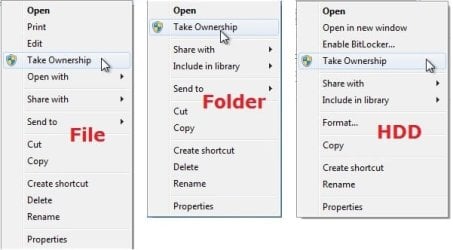
example.jpg


Here's How:

1. Do step 2, 3, or 4 below for what you would like to do.


2. To Add "Take Ownership" to Context Menu

   Note
Application files (ex: EXE, CMD, MSI) will still have Run as administrator instead of Take Ownership in the context menu when you use this step.

A) Click/tap on the Download button below to download the file below, and go to step 5 below.

Add_Take_Ownership_to_context_menu


Download


3. To Add "Take Ownership" with Pause to Context Menu

   Note
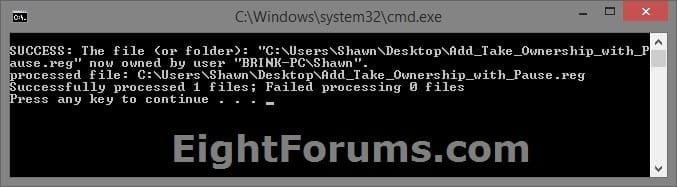
This option pauses the command when you use the "Take Ownership" context menu to be able to see the command results. This can be handy to verify setting ownership and permissions was successful or not.

Application files (ex: EXE, CMD, MSI) will still have Run as administrator instead of Take Ownership in the context menu when you use this step.


Take_Ownership_Pause.jpg


A) Click/tap on the Download button below to download the file below, and go to step 5 below.

Add_Take_Ownership_with_Pause_to_context_menu.reg


Download


4. To Remove "Take Ownership" from Context Menu

   Note
This is the default setting, and will also restore the default Run as administrator for .exe files.


A) Click/tap on the Download button below to download the file below, and go to step 5 below.

Remove_Take_Ownership_from_context_menu.reg


Download


5. Save the .reg file to your Desktop.

6. Double click on the downloaded .reg file to merge it.

7. If prompted, click on Run, Yes (UAC), Yes, and OK to approve the merge.

8. When finished, you can delete the downloaded .reg file if you like.


That's it,
Shawn


Attachments

Last edited:
Hello Solowin,

Welcome to Seven Forums.

Try rt. click on the prog/shortcut and select run as administrator. See if it works then.

Hope this helps.

Gary


edit: could be your av or firewall blocking the ads?
 

My Computer

Computer Manufacturer/Model Number
Dell XPS420
OS
Vista Ult 64 bit Seven Ult RTM x64
CPU
Intel Core2 Quad Q6600 2.40 gigahertz
Memory
Crucial Ballistix 4x2GB PC2 6400
Graphics Card(s)
NVIDIA GeForce 8600 GTS 256 MB
Sound Card
Creative SB X-Fi audio
Monitor(s) Displays
HP w2207 + HPvs15
Screen Resolution
1680x1050 + 1024x768
Hard Drives
2-WD5000AAKS-500 GB
WD5000AAV-500 GB external
Keyboard
Microsoft Comfort Curve
Mouse
MX Revolution
Other Info
Wacom Intuos 2 Graphics Tablet
Experience Index=5.5
I'm not seeing any difference running as or as not administrator. I had tried that yesterday, with the same result.

One thing I'm finding odd, (the more I dig into this program) - within my file structure, I have My Documents/Embroidery and then a number of Folders. Some of these folders have additional folders with a hierarchy of design types, digitizers, etc. but some folders have embroidery files that aren't further filed. These "loose" files are visible within the SEU programs, whereas my files that are further organized aren't visible! I've examined the file properties, security/sharing etc. and can't find one thing different between the higher folders and the ones buried a few layers deeper. All these files are within my "locked" user folder, so maybe the lock has nothing to do with my inability to use these files - I'm totally at a loss here!

Thanks for your suggestion, and if you have any other ideas, I'd be happy to give them a try.
 

My Computer

OS
Win7
Don't know anything about the program. Maybe it is incapable of reading child folders. Have you checked out the site for the software to see if the FAQS say anything or if there is a forum for questions there?
 

My Computer

Computer Manufacturer/Model Number
Dell XPS420
OS
Vista Ult 64 bit Seven Ult RTM x64
CPU
Intel Core2 Quad Q6600 2.40 gigahertz
Memory
Crucial Ballistix 4x2GB PC2 6400
Graphics Card(s)
NVIDIA GeForce 8600 GTS 256 MB
Sound Card
Creative SB X-Fi audio
Monitor(s) Displays
HP w2207 + HPvs15
Screen Resolution
1680x1050 + 1024x768
Hard Drives
2-WD5000AAKS-500 GB
WD5000AAV-500 GB external
Keyboard
Microsoft Comfort Curve
Mouse
MX Revolution
Other Info
Wacom Intuos 2 Graphics Tablet
Experience Index=5.5
Very useful. Thanks much
 

My Computer

Computer Manufacturer/Model Number
Home built
OS
Windows 7 Ultimate 32 bit
CPU
Intel(R) Pentium(R) 4 CPU 3.00GHz
Motherboard
ASUS P4P800-VM Motherboard Chipset: Intel 865G + ICH5
Memory
2.50 GB RAM
Graphics Card(s)
NVIDIA GeForce 7600 GS
Sound Card
SoundMax Integrated Digital Audio (Chip)
Monitor(s) Displays
ViewSonic VX 1962 wm
Screen Resolution
1680 X 1050
Hard Drives
Seagate Barracuda 7200.10 80 GB
ST380215A ATA Device 18.6 GB
Western Digital "My Book" external hard drive 750 GB
Cooling
Fan based
Keyboard
Microsoft Comfort Curve Keyboard 2000 v10 USB
Mouse
Logitec optic USB
Internet Speed
3.01 Mb/s download 0.64 Mb/s upload
HelloBrink,

I have dl and installed, works good -- thanks!

Where in my account is full control?
 

My Computer

OS
Windows7
Hello Katie,

You can take a look at steps 11 to 22 in the tutorial below for more on how to give "Full Control" to your account of a file.

Take Ownership of file - Vista Forums

Hope this helps,
Shawn
 

My Computer

Computer type
PC/Desktop
Computer Manufacturer/Model Number
Self built custom
OS
64-bit Windows 11 Pro for Workstations
CPU
Intel i7-8700K OC'd to 5 GHz
Motherboard
ASUS ROG Maximus XI Formula Z390
Memory
64 GB (4x16GB) G.SKILL TridentZ RGB DDR4 3600 MHz
Graphics Card(s)
ASUS ROG-STRIX-GTX1080TI-O11G-GAMING
Sound Card
Integrated
Monitor(s) Displays
2 x Samsung Odyssey G7 27"
Screen Resolution
2560x1440
Hard Drives
1TB Samsung 990 PRO M.2,
4TB Samsung 990 PRO PRO M.2,
TerraMaster F8 SSD Plus NAS
PSU
Seasonic Prime Titanium 850W
Case
Thermaltake Core P3
Cooling
Corsair Hydro H115i
Keyboard
Logitech wireless K800
Mouse
Logitech MX Master 4
Internet Speed
2 Gb/s Download and 100 Mb/s Upload
Antivirus
Malwarebyte Anti-Malware Premium
Browser
Google Chrome
Other Info
Logitech Z625 speaker system,
Logitech BRIO 4K Pro webcam,
HP Color LaserJet Pro MFP M477fdn,
APC SMART-UPS RT 1000 XL - SURT1000XLI,
Galaxy S23 Plus phone
Great!

Thanks Shawn. I can't tell you how sick I am of this. Take today. I saved a Google image but would it allow...no. I had to change the saveas four times before i managed it.

In Win Xp my favorite lol it was a breeze to save.

Thanks again Shawn!
 

My Computer

OS
Windows7
You're most welcome Katie. :)
 

My Computer

Computer type
PC/Desktop
Computer Manufacturer/Model Number
Self built custom
OS
64-bit Windows 11 Pro for Workstations
CPU
Intel i7-8700K OC'd to 5 GHz
Motherboard
ASUS ROG Maximus XI Formula Z390
Memory
64 GB (4x16GB) G.SKILL TridentZ RGB DDR4 3600 MHz
Graphics Card(s)
ASUS ROG-STRIX-GTX1080TI-O11G-GAMING
Sound Card
Integrated
Monitor(s) Displays
2 x Samsung Odyssey G7 27"
Screen Resolution
2560x1440
Hard Drives
1TB Samsung 990 PRO M.2,
4TB Samsung 990 PRO PRO M.2,
TerraMaster F8 SSD Plus NAS
PSU
Seasonic Prime Titanium 850W
Case
Thermaltake Core P3
Cooling
Corsair Hydro H115i
Keyboard
Logitech wireless K800
Mouse
Logitech MX Master 4
Internet Speed
2 Gb/s Download and 100 Mb/s Upload
Antivirus
Malwarebyte Anti-Malware Premium
Browser
Google Chrome
Other Info
Logitech Z625 speaker system,
Logitech BRIO 4K Pro webcam,
HP Color LaserJet Pro MFP M477fdn,
APC SMART-UPS RT 1000 XL - SURT1000XLI,
Galaxy S23 Plus phone
Can't install the shortcut

Maybe I'm being dense, but...when I right click on the .reg file and select Merge, I get the error message that there's no program associated with it, and I don't know what to associate with it.
 

My Computer

OS
Win 7
Hello Intenseatpon, and welcome to Seven Forums.

It's just that your REG file extension that is not associated properly. Double check in Default Programs to make sure that the REG file extension has it's "Current Default" program set as Registry Editor (C:\Windows\regedit.exe). Afterwards, you should be able to merge the REG download here. :)

Hope this helps,
Shawn
 

My Computer

Computer type
PC/Desktop
Computer Manufacturer/Model Number
Self built custom
OS
64-bit Windows 11 Pro for Workstations
CPU
Intel i7-8700K OC'd to 5 GHz
Motherboard
ASUS ROG Maximus XI Formula Z390
Memory
64 GB (4x16GB) G.SKILL TridentZ RGB DDR4 3600 MHz
Graphics Card(s)
ASUS ROG-STRIX-GTX1080TI-O11G-GAMING
Sound Card
Integrated
Monitor(s) Displays
2 x Samsung Odyssey G7 27"
Screen Resolution
2560x1440
Hard Drives
1TB Samsung 990 PRO M.2,
4TB Samsung 990 PRO PRO M.2,
TerraMaster F8 SSD Plus NAS
PSU
Seasonic Prime Titanium 850W
Case
Thermaltake Core P3
Cooling
Corsair Hydro H115i
Keyboard
Logitech wireless K800
Mouse
Logitech MX Master 4
Internet Speed
2 Gb/s Download and 100 Mb/s Upload
Antivirus
Malwarebyte Anti-Malware Premium
Browser
Google Chrome
Other Info
Logitech Z625 speaker system,
Logitech BRIO 4K Pro webcam,
HP Color LaserJet Pro MFP M477fdn,
APC SMART-UPS RT 1000 XL - SURT1000XLI,
Galaxy S23 Plus phone
Works great, thanks! :)

EDIT. I almost messed up my system! :eek: I don't know if it's because of the .reg file or because of this Restorator (mentioned in Start Button - Change tutorial thread); so for now I'm sticking with my ugly Windows 7 Start Orb until there's a safer method :cry:

PS. I couldn't do a System Restore (didn't even work in Safe Mode); I had to create another Admin Account, go into Safe Mode, then do a System Restore. Worked like a charm but I'll be more careful this time :rolleyes:

EDIT 2. I have finally managed to replace that start button! :party:
I had to combine two tutorials for that. The problem that I had is that Windows wouldn't let me take Full Control of explorer.exe (which is what I was trying to do manually and via Take ownership shortcut), so all I had to do is only tick "Modify" instead of "Full Control" in explorer.exe permissions and voila! :cool:
 
Last edited:

My Computer

OS
Windows 7 Home Premium (64-bit)
Excellent!! I had to Sign up just to express my thanks! I had a problem when I re-id3tagged a folder with thousands of mp3 files in it with a program and it locked all the files from being edited or moved for some reason and used this and fixed it!
 

My Computer

Computer Manufacturer/Model Number
Dell Inspiron 546s
OS
Windows 7 Ultimate x64
CPU
AMD Phenom x3
Memory
8 GB
Graphics Card(s)
integrated
Monitor(s) Displays
24" Full Hd
Hard Drives
650gb Internal 1TB External
Awesome.
this redeems so many posts .....:D
 

My Computer

Computer Manufacturer/Model Number
HP DC7600, HP DC7600[2], HP DC7100, Samsung NC10
OS
Windows XP Pro SP3, Windows 7 Pro 32-bit, Windows 7 Ultimate 64bit, Windows XP Home SP3
CPU
Pentium 4 3.2GHz, Pentium 4 3.4GHz 64bit, Atom,
Motherboard
Dunno
Memory
4GB matched, 1GB, 2.5GB, 4.0 GB
Graphics Card(s)
Geforce 8400 GS and others
Sound Card
RealteK ALC260 and others
Monitor(s) Displays
Asus HD
Screen Resolution
1920x1080
Hard Drives
WD Caviar 640gb SATA
Cooling
We Be Cool
Thanks Bro!!!
 

My Computer

Computer Manufacturer/Model Number
HP
OS
Windows 7 Ultimate X64
CPU
Intel® Core™ i7-720QM processor
Motherboard
Genuine Intel® Core™
Memory
4GB DDR3 System Memory (2 DIMM)
Graphics Card(s)
Nvidia GeForce GT 230M with up to 2815MB
Sound Card
Altec Lansing with SRS Premium Sound
Monitor(s) Displays
15.6" Diagonal High-Definition(8) LED HP Bright View
Screen Resolution
1366*768
Hard Drives
500GB (7200RPM) Hard Drive (SATA)
Keyboard
101-key compatible with full-size keyboard
Mouse
Touch Pad with On/Off button and dedicated vertical scroll
Internet Speed
Virgin Media 20Mbps
Other Info
Everything is Cooollllllll!!!!!!
can't find the zip file I just downloaded to help

I'm sure this is me just being a bit thick. I've just clicked on download and apparently downloaded the zip programme onto my llaptop, only I can't right click on the extrracted reg file as instructed because I can't find it. I've run a search and tried downloading again in case I did something wrong, but apparently it isn't here.....:confused:
 

My Computer

Computer Manufacturer/Model Number
Toshiba Satellite 450L
OS
Windows 7
Memory
3GB
I'm sure this is me just being a bit thick. I've just clicked on download and apparently downloaded the zip programme onto my llaptop, only I can't right click on the extrracted reg file as instructed because I can't find it. I've run a search and tried downloading again in case I did something wrong, but apparently it isn't here.....:confused:

Have you got an anti-malware program that is blocking it quarantining it?
 

My Computer

Computer Manufacturer/Model Number
Home built
OS
Windows 7 Ultimate 32 bit
CPU
Intel(R) Pentium(R) 4 CPU 3.00GHz
Motherboard
ASUS P4P800-VM Motherboard Chipset: Intel 865G + ICH5
Memory
2.50 GB RAM
Graphics Card(s)
NVIDIA GeForce 7600 GS
Sound Card
SoundMax Integrated Digital Audio (Chip)
Monitor(s) Displays
ViewSonic VX 1962 wm
Screen Resolution
1680 X 1050
Hard Drives
Seagate Barracuda 7200.10 80 GB
ST380215A ATA Device 18.6 GB
Western Digital "My Book" external hard drive 750 GB
Cooling
Fan based
Keyboard
Microsoft Comfort Curve Keyboard 2000 v10 USB
Mouse
Logitec optic USB
Internet Speed
3.01 Mb/s download 0.64 Mb/s upload
I just came to this page and a dialogue box told me I had a message but when I tried to view it, it was not allowed and suggestion made was that my pop up blocker could be preventing it. I looked at that, my pop up blocker isn't on ... God, will this never end!
 

My Computer

Computer Manufacturer/Model Number
Toshiba Satellite 450L
OS
Windows 7
Memory
3GB
I've been using this for ages, but i need to get rid of it for a short amount of time. However, when i merge the file that is supposed to get rid of it, the context menu item is still there and functioning fine. I have also had this problem with the copy to.../move to... reg hack.

Any help would be GREAT :)

Thanks in advance,

AClockWorkLemon
 

My Computer

Computer Manufacturer/Model Number
Lenovo Thinkpad R500
OS
Windows 7 64bit
CPU
Intel Dore 2 Duo 2.1GHz
Memory
4GB RAM
Graphics Card(s)
ATI Mobility Radeon 128mb intergrated graphics
Monitor(s) Displays
15.4 WSXGA+
Hard Drives
320GB 5400rpm
Hello AClockWorkLemon,

Double check in Default Programs to make sure that the reg file extension has it's "Current Default" program set as Registry Editor (C:\Windows\regedit.exe). Afterwards, try the REG download again.


If not, then double check the registry locations below to see if you have these takeownership keys to delete.

Code:
Windows Registry Editor Version 5.00
 
[-HKEY_CLASSES_ROOT\*\shell\takeownership]
 
[-HKEY_CLASSES_ROOT\exefile\shell\takeownership]
 
[-HKEY_CLASSES_ROOT\dllfile\shell\takeownership]
 
[-HKEY_CLASSES_ROOT\Directory\shell\takeownership]

Hope this helps,
Shawn
 

My Computer

Computer type
PC/Desktop
Computer Manufacturer/Model Number
Self built custom
OS
64-bit Windows 11 Pro for Workstations
CPU
Intel i7-8700K OC'd to 5 GHz
Motherboard
ASUS ROG Maximus XI Formula Z390
Memory
64 GB (4x16GB) G.SKILL TridentZ RGB DDR4 3600 MHz
Graphics Card(s)
ASUS ROG-STRIX-GTX1080TI-O11G-GAMING
Sound Card
Integrated
Monitor(s) Displays
2 x Samsung Odyssey G7 27"
Screen Resolution
2560x1440
Hard Drives
1TB Samsung 990 PRO M.2,
4TB Samsung 990 PRO PRO M.2,
TerraMaster F8 SSD Plus NAS
PSU
Seasonic Prime Titanium 850W
Case
Thermaltake Core P3
Cooling
Corsair Hydro H115i
Keyboard
Logitech wireless K800
Mouse
Logitech MX Master 4
Internet Speed
2 Gb/s Download and 100 Mb/s Upload
Antivirus
Malwarebyte Anti-Malware Premium
Browser
Google Chrome
Other Info
Logitech Z625 speaker system,
Logitech BRIO 4K Pro webcam,
HP Color LaserJet Pro MFP M477fdn,
APC SMART-UPS RT 1000 XL - SURT1000XLI,
Galaxy S23 Plus phone
Ahh, much appreciated. I think i didn't use the reg from this site, so i also had to delete the "runas" key in each case as well.
 

My Computer

Computer Manufacturer/Model Number
Lenovo Thinkpad R500
OS
Windows 7 64bit
CPU
Intel Dore 2 Duo 2.1GHz
Memory
4GB RAM
Graphics Card(s)
ATI Mobility Radeon 128mb intergrated graphics
Monitor(s) Displays
15.4 WSXGA+
Hard Drives
320GB 5400rpm
Back
Top