
Take Ownership Shortcut

Add "Take Ownership" to Context Menu of Files, Folders, and Drives in Windows


   Information
This tutorial will show you how to add Take Ownership to the context menu of all files, folders, and drives for all users in Windows.

This will allow you to be able to instantly take ownership of a file, folder (and all contents), or drive (and all contents) by changing the owner to the current user and grant the Owner_Rights SID (current owner) full access permission.

You must be an administrator to be able to add, remove, and use the "Take Ownership" context menu.

   Note
Application files (ex: EXE, CMD, MSI) will continue to have Run as administrator instead of Take Ownership in their context menu.


When you right click or press and hold on a file, folder, or drive, and click/tap on Take Ownership, you may be prompted by UAC for permission to do so first.

If a user is logged in as an administrator, then the user would just click/tap on Yes to approve and take ownership. The owner of the file, folder, or drive would be changed to the current administrator user account. Permissions would be set to allow the Owner_Rights SID (current owner) full control of the file, folder, or drive.

If a user is logged in as a standard user, then the user would need to enter a selected administrator's password to approve and take ownership. The owner of the file, folder, or drive would be changed to the selected administrator account, and not the standard user. Permissions would be set to allow the Owner_Rights SID (current owner) full control of the file, folder, or drive.


The Take Ownership context menu will not be available when you right click on the C: drive, C:\Program Files folder, C:\Program Files (x86) folder, C:\ProgramData folder, C:\Users folder, and C:\Windows folder. This was done because taking ownership of these system folders can make Windows unstable since it would also take ownership of all the folder's content at the same time.

You will still be able to use the Take Ownership context menu of files inside the folder locations above.

If you would like to have a custom location(s) of your own to not have the context menu, then please feel free to post a request in this tutorial thread. I'll be happy to post back with a custom .reg file for it.

   Warning
This context menu will only work with English Windows installations.

If you have a different language, then please post a reply with what language you have instead. I'll be happy to post back a translated version for you.


EXAMPLE: Take Ownership in Context Menu
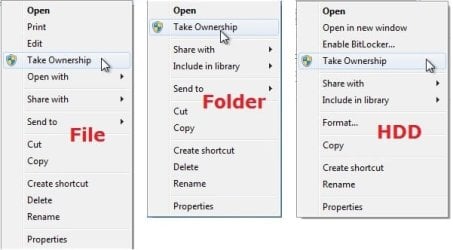
example.jpg


Here's How:

1. Do step 2, 3, or 4 below for what you would like to do.


2. To Add "Take Ownership" to Context Menu

   Note
Application files (ex: EXE, CMD, MSI) will still have Run as administrator instead of Take Ownership in the context menu when you use this step.

A) Click/tap on the Download button below to download the file below, and go to step 5 below.

Add_Take_Ownership_to_context_menu


Download


3. To Add "Take Ownership" with Pause to Context Menu

   Note
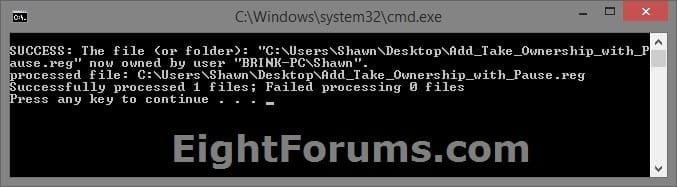
This option pauses the command when you use the "Take Ownership" context menu to be able to see the command results. This can be handy to verify setting ownership and permissions was successful or not.

Application files (ex: EXE, CMD, MSI) will still have Run as administrator instead of Take Ownership in the context menu when you use this step.


Take_Ownership_Pause.jpg


A) Click/tap on the Download button below to download the file below, and go to step 5 below.

Add_Take_Ownership_with_Pause_to_context_menu.reg


Download


4. To Remove "Take Ownership" from Context Menu

   Note
This is the default setting, and will also restore the default Run as administrator for .exe files.


A) Click/tap on the Download button below to download the file below, and go to step 5 below.

Remove_Take_Ownership_from_context_menu.reg


Download


5. Save the .reg file to your Desktop.

6. Double click on the downloaded .reg file to merge it.

7. If prompted, click on Run, Yes (UAC), Yes, and OK to approve the merge.

8. When finished, you can delete the downloaded .reg file if you like.


That's it,
Shawn


Attachments

Last edited:
A kind of thanks. It was very helpful. Now it's not doing the trick! Same old prob has returned. Both the read only status and the difficulty in deleting or even moving the read only files that I've replaced using save as files - the pc declares they can't be moved or deleted because the doc is open - it is not open.
 

My Computer My Computer

At a glance

Windows 73GB
Computer Manufacturer/Model Number
Toshiba Satellite 450L
OS
Windows 7
Memory
3GB
...just read new additions to the thread and maybe it is that my take ownership version needs updating, so reloaded it onto my system from the link on this forum. Fingers crossed....
 

My Computer My Computer

At a glance

Windows 73GB
Computer Manufacturer/Model Number
Toshiba Satellite 450L
OS
Windows 7
Memory
3GB
You sir are a God!!!!!! No more elevator music for me. I have my own music back. Thank you for sharing.
 

My Computer My Computer

At a glance

Windows 7 proi7-860 Processor (8M Cache, 2.80 GHz)G.SKILL Ripjaws Series DDR3 1600MHz (PC3-1280...Ati Radeon HD 5770 Overclock
OS
Windows 7 pro
CPU
i7-860 Processor (8M Cache, 2.80 GHz)
Motherboard
Asus P7H55
Memory
G.SKILL Ripjaws Series DDR3 1600MHz (PC3-12800) 4GB (2x2GB)
Graphics Card(s)
Ati Radeon HD 5770 Overclock
Monitor(s) Displays
Samsung Syncmaster 920nw
PSU
Antec Truepower 750W Continuous Power Supply
Case
Antec p180
Keyboard
Microsft Bluetooth
Mouse
Microsoft Bluetooth
I looked at the permissions and the ones on my account are fine. I checked the full control permissions on all accounts (just in case some illogical step might work!). Still not working. :cry:

:shock: The first time I restarted after fiddling around with other users permissions, my doc still opened as read only. I restarted again for other reasons and when I opened my doc, hey presto, I'm back to [compatability mode]. Have no idea why or if it will last...
 
Last edited by a moderator:

My Computer My Computer

At a glance

Windows 73GB
Computer Manufacturer/Model Number
Toshiba Satellite 450L
OS
Windows 7
Memory
3GB
utterly rocks.
i cannot quantify what value he has!
 

My Computer My Computer

At a glance

Windows XP Pro SP3, Windows 7 Pro 32-bit, Win...Pentium 4 3.2GHz, Pentium 4 3.4GHz 64bit, Atom,4GB matched, 1GB, 2.5GB, 4.0 GBGeforce 8400 GS and others
Computer Manufacturer/Model Number
HP DC7600, HP DC7600[2], HP DC7100, Samsung NC10
OS
Windows XP Pro SP3, Windows 7 Pro 32-bit, Windows 7 Ultimate 64bit, Windows XP Home SP3
CPU
Pentium 4 3.2GHz, Pentium 4 3.4GHz 64bit, Atom,
Motherboard
Dunno
Memory
4GB matched, 1GB, 2.5GB, 4.0 GB
Graphics Card(s)
Geforce 8400 GS and others
Sound Card
RealteK ALC260 and others
Monitor(s) Displays
Asus HD
Screen Resolution
1920x1080
Hard Drives
WD Caviar 640gb SATA
Cooling
We Be Cool
and now back to read only again. Trying to take ownership (maybe microsoft doesn't believe in ownership, maybe them having squillions is all a facade...)
 

My Computer My Computer

At a glance

Windows 73GB
Computer Manufacturer/Model Number
Toshiba Satellite 450L
OS
Windows 7
Memory
3GB
MickyWind

Thanks so much. I must have spent many tens of hours trying to do this. Your fix took me three minutes. Thanks again.
 

My Computer My Computer

At a glance

Windows7
OS
Windows7
If this helps: I copied and pasted my doc onto a new doc (rather than doing 'save as') and it seems to have worked. A week without being reverted to 'read only'. Bloody miracle.
 

My Computer My Computer

At a glance

Windows 73GB
Computer Manufacturer/Model Number
Toshiba Satellite 450L
OS
Windows 7
Memory
3GB
Merging the registry files

I merged the registry files as directed but right clicking on anything isn't giving me the option to take ownership. Even after rebooting.
 

My Computer My Computer

At a glance

windows 7 home premium 64 bitIntel Core two duo E-84004 gig pc2 6400ATI 4670
Computer Manufacturer/Model Number
Gigabyte GA-EP45-DS3L
OS
windows 7 home premium 64 bit
CPU
Intel Core two duo E-8400
Motherboard
Gigabyte GA-EP45-DS3L
Memory
4 gig pc2 6400
Graphics Card(s)
ATI 4670
Other Info
network info:
D-Linl DWL-G520 wireless PCI adapter,
Linksys WRT54G router
Hello Newtech, and welcome to Seven Forums.

Double check that you have merged the "Add_Take_Ownership.reg" file, and not the "remove" one.

Are you logged in as an administrator?

Do you have UAC turned on?
 

My Computer My Computer

At a glance

64-bit Windows 11 Pro for WorkstationsIntel i7-8700K OC'd to 5 GHz64 GB (4x16GB) G.SKILL TridentZ RGB DDR4 3600...ASUS ROG-STRIX-GTX1080TI-O11G-GAMING
Computer type
PC/Desktop
Computer Manufacturer/Model Number
Self built custom
OS
64-bit Windows 11 Pro for Workstations
CPU
Intel i7-8700K OC'd to 5 GHz
Motherboard
ASUS ROG Maximus XI Formula Z390
Memory
64 GB (4x16GB) G.SKILL TridentZ RGB DDR4 3600 MHz
Graphics Card(s)
ASUS ROG-STRIX-GTX1080TI-O11G-GAMING
Sound Card
Integrated
Monitor(s) Displays
2 x Samsung Odyssey G7 27"
Screen Resolution
2560x1440
Hard Drives
1TB Samsung 990 PRO M.2,
4TB Samsung 990 PRO PRO M.2,
TerraMaster F8 SSD Plus NAS
PSU
Seasonic Prime Titanium 850W
Case
Thermaltake Core P3
Cooling
Corsair Hydro H115i
Keyboard
Logitech wireless K800
Mouse
Logitech MX Master 4
Internet Speed
2 Gb/s Download and 100 Mb/s Upload
Antivirus
Malwarebyte Anti-Malware Premium
Browser
Google Chrome
Other Info
Logitech Z625 speaker system,
Logitech BRIO 4K Pro webcam,
HP Color LaserJet Pro MFP M477fdn,
APC SMART-UPS RT 1000 XL - SURT1000XLI,
Galaxy S23 Plus phone
It's working!

Thank you for your tip, yes I ran both files! It appears that I'm finished doing what I set out to do. I'm going to keep this forum in my bookmarks. You made my day :geek:
 

My Computer My Computer

At a glance

windows 7 home premium 64 bitIntel Core two duo E-84004 gig pc2 6400ATI 4670
Computer Manufacturer/Model Number
Gigabyte GA-EP45-DS3L
OS
windows 7 home premium 64 bit
CPU
Intel Core two duo E-8400
Motherboard
Gigabyte GA-EP45-DS3L
Memory
4 gig pc2 6400
Graphics Card(s)
ATI 4670
Other Info
network info:
D-Linl DWL-G520 wireless PCI adapter,
Linksys WRT54G router
That's great news Newtech. I'm happy to hear that you got it sorted. :)
 

My Computer My Computer

At a glance

64-bit Windows 11 Pro for WorkstationsIntel i7-8700K OC'd to 5 GHz64 GB (4x16GB) G.SKILL TridentZ RGB DDR4 3600...ASUS ROG-STRIX-GTX1080TI-O11G-GAMING
Computer type
PC/Desktop
Computer Manufacturer/Model Number
Self built custom
OS
64-bit Windows 11 Pro for Workstations
CPU
Intel i7-8700K OC'd to 5 GHz
Motherboard
ASUS ROG Maximus XI Formula Z390
Memory
64 GB (4x16GB) G.SKILL TridentZ RGB DDR4 3600 MHz
Graphics Card(s)
ASUS ROG-STRIX-GTX1080TI-O11G-GAMING
Sound Card
Integrated
Monitor(s) Displays
2 x Samsung Odyssey G7 27"
Screen Resolution
2560x1440
Hard Drives
1TB Samsung 990 PRO M.2,
4TB Samsung 990 PRO PRO M.2,
TerraMaster F8 SSD Plus NAS
PSU
Seasonic Prime Titanium 850W
Case
Thermaltake Core P3
Cooling
Corsair Hydro H115i
Keyboard
Logitech wireless K800
Mouse
Logitech MX Master 4
Internet Speed
2 Gb/s Download and 100 Mb/s Upload
Antivirus
Malwarebyte Anti-Malware Premium
Browser
Google Chrome
Other Info
Logitech Z625 speaker system,
Logitech BRIO 4K Pro webcam,
HP Color LaserJet Pro MFP M477fdn,
APC SMART-UPS RT 1000 XL - SURT1000XLI,
Galaxy S23 Plus phone
Very cool, well done
 

My Computer My Computer

At a glance

Windows 7 Pro 64 bitIntel(R) Core(TM) i7 CPU 870 @ 2.93GHz4GBNVIDIA GeForce GTX 470
Computer Manufacturer/Model Number
Proline
OS
Windows 7 Pro 64 bit
CPU
Intel(R) Core(TM) i7 CPU 870 @ 2.93GHz
Motherboard
H55-G43(MS-7638)
Memory
4GB
Graphics Card(s)
NVIDIA GeForce GTX 470
Sound Card
Onboard
Monitor(s) Displays
Proline LCD 19 inch
Screen Resolution
1280 x 1024
Hard Drives
2 x SATA 250 Gig 1 x External 2TB
PSU
RX 730 SS
Case
Proline
Cooling
Standard
Keyboard
PS2
Mouse
PS2
Internet Speed
To embarrassed to tell lol
thnks very much. I think the problem was that by taking ownership of the folder i was not able to take the ownership of the subfolders .
 

My Computer My Computer

At a glance

windows 7
OS
windows 7
Super - going where no woman has gone before!!
Avie
 

My Computer My Computer

At a glance

Microsoft Windows 7 Home Premium 64-bit 7601 ...AMD Athlon(tm) 64 X2 Dual Core Processor 4400+4.00 GBNVIDIA GeForce 6150SE nForce 430 (Microsoft C...
Computer Manufacturer/Model Number
HP Pavillon
OS
Microsoft Windows 7 Home Premium 64-bit 7601 Multiprocessor Free Service Pack 1
CPU
AMD Athlon(tm) 64 X2 Dual Core Processor 4400+
Motherboard
ASUSTek Computer INC. NARRA2
Memory
4.00 GB
Graphics Card(s)
NVIDIA GeForce 6150SE nForce 430 (Microsoft Corporation - WD
Sound Card
Realtek High Definition Audio
Monitor(s) Displays
Samsung
Screen Resolution
1280 x 1024 x 32 bits (4294967296 colors) @ 60 Hz
Hard Drives
(1) ST332082 0AS SCSI Disk Device (2) Generic- Compact Flash USB Device (3) Generic- MS/MS-Pro USB Device (4) Generic- SD/MMC USB Device (5) Generic- SM/xD-Picture USB Device
Browser
Firfefox 25
Thank you very much !
 

My Computer My Computer

At a glance

Windows 7 Home Premium x64Intel Celeron 900 @ 2.20 Ghz250 GB - 3 GB RAMIntel GMA 4500MHD Dynamic Video Memory Techno...
Computer Manufacturer/Model Number
Dell Inspiron 1545
OS
Windows 7 Home Premium x64
CPU
Intel Celeron 900 @ 2.20 Ghz
Motherboard
Dell
Memory
250 GB - 3 GB RAM
Graphics Card(s)
Intel GMA 4500MHD Dynamic Video Memory Technology 5.0
Sound Card
High Defnition Audio Device
Monitor(s) Displays
Standard laptop 15.6" and Philips 190CW 19" Monitor
Screen Resolution
1366 x 788 (laptop) and 1440 x 900 (monitor)
Hard Drives
ST9250315AS and WD Elements 320 GB external.
PSU
N/A
Case
Glossy surface with cherry red cover.
Cooling
Fan
Keyboard
Microsoft Wireless Keyboard 6000 V3
Mouse
Microsoft Wireless Laser Mousee 6000 V2
Other Info
Nothing too fancy XD
Will this work on Win Xp Pro Sp3?

Hello guys!

I'm new here and I would like to thank everybody in advance. I just recently re-install my system with Win Xp Pro Sp3 and i have some HD connected... and i was trying now to copy a folder from an eternal HD to and Internal one and I got this following msg:

" Make sure disk is not full or write-protected" and can't copy my folder and i really need to copy that file to the specific HD cuz I did a back up and need bring back the folder.

So I was wondering if having ownership on the folder will help but haven't found anywhere where to get a file like this one you have created here to use for XP.

Thank you for any answer and suppor!

Much appreciate it!!
 

My Computer My Computer

At a glance

Win7 Pro SP1i7 Intel Core 2600 3.40GHz
Computer type
PC/Desktop
OS
Win7 Pro SP1
CPU
i7 Intel Core 2600 3.40GHz
That's twice in a week that these forums have come to my rescue - thanks so much guys :D
 

My Computer My Computer

At a glance

Windows Home Premium 64bit
OS
Windows Home Premium 64bit
Is it possible to change the registry entry for the right click take ownership? If I select multiple files, then each file is "changed" by taking ownership in an individual command prompt window. Yes, the window closes immediately after the command is completed, but I'd like to have all the selected file change ownership in a single command prompt box/window. Is this possible? I guess it will do what I want ONLY if you select an actual folder for taking ownership since all files lie in the same path - so one window to do all the permission changes. But not for individual files ? Even though all the files lie in the same folder path? Can it be done?
 

My Computer My Computer

At a glance

Windows 7 Ultimate 32-Bit
OS
Windows 7 Ultimate 32-Bit
Can I use this to take owner ship of the whole drive C if I want to?
 

My Computer My Computer

At a glance

Windows 7 Ultimate x64AMD Athlon(tm) II X4 630DDR3 2048 MB's/ PC3-10600 (1,333 MHz) (2 Cards)ATI Radeon HD 4200
Computer Manufacturer/Model Number
HP Pavilion p6000 series/Model p6654y
OS
Windows 7 Ultimate x64
CPU
AMD Athlon(tm) II X4 630
Motherboard
Socket AM3 (938)
Memory
DDR3 2048 MB's/ PC3-10600 (1,333 MHz) (2 Cards)
Graphics Card(s)
ATI Radeon HD 4200
Sound Card
Realtek High definition Audio
Monitor(s) Displays
PnP-Monitor (Standard) (I am using my Emerson TV)
Screen Resolution
1024 x 768 pixels at 75 Hz in true colors (32-bit)
Hard Drives
750.05 Gigabytes Usable Hard Drive Capacity
692.61 Gigabytes Hard Drive Free Space

hp DVD-RAM GH60L SATA CdRom Device [Optical drive]
YMAX magicJack USB Device [Optical drive]

Generic- Compact Flash USB Device [Hard drive] -- drive 2
Generic
PSU
250 Watts
Case
HP
Cooling
Fan
Keyboard
Logitech wireless wave combo MK550 (Came with mouse)
Mouse
Logitech wireless wave combo MK550 (Came with keyboard)
Internet Speed
DSL Download speed 15.06-mb/s Upload .49-mb/s ping 45ms
Other Info
HP Wireless 802.11 b/g/n PCIe Card
Back
Top